-
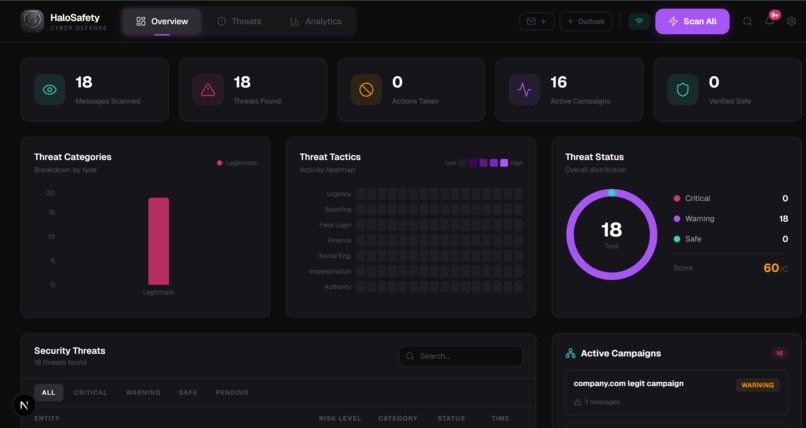
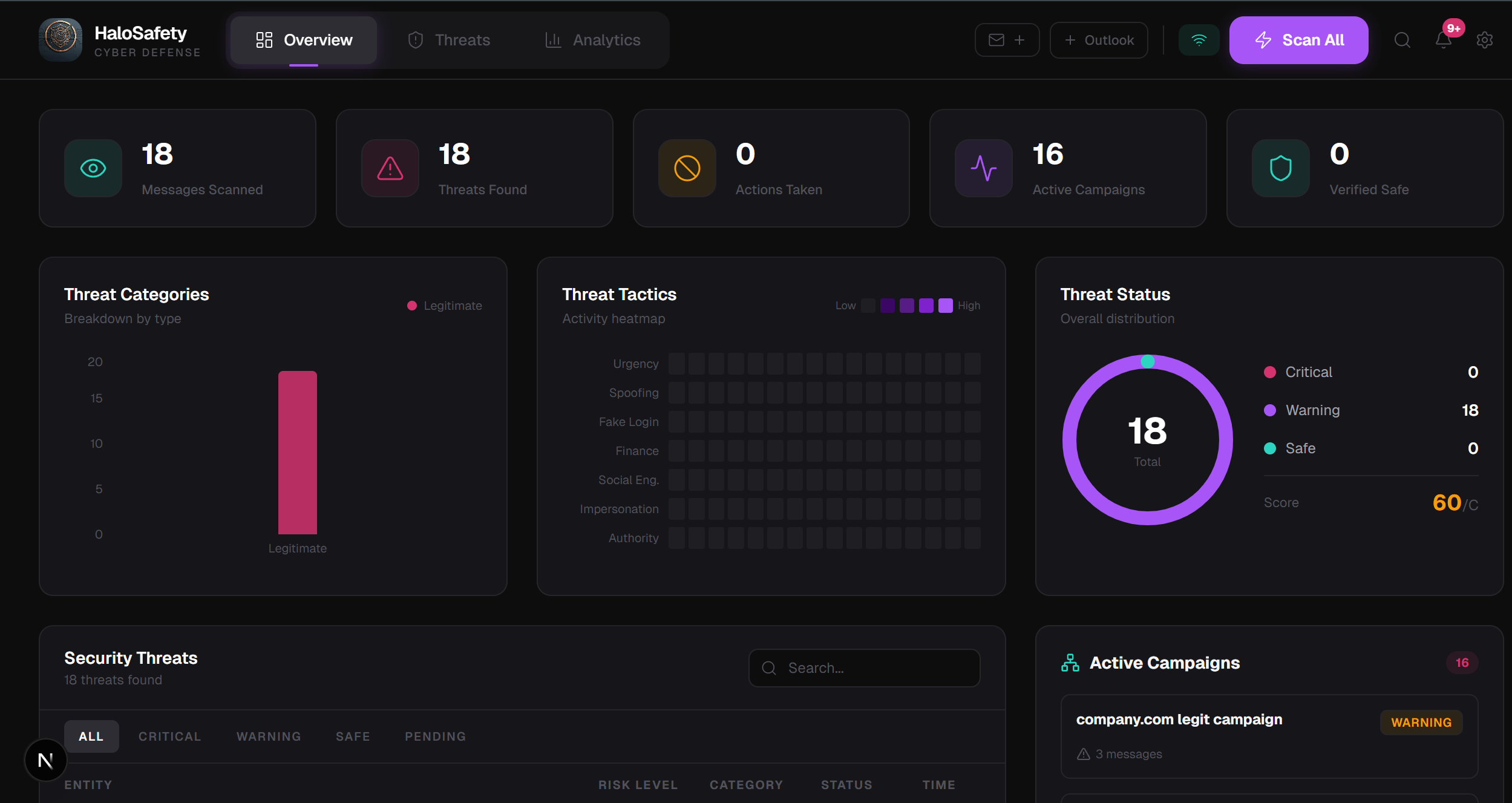
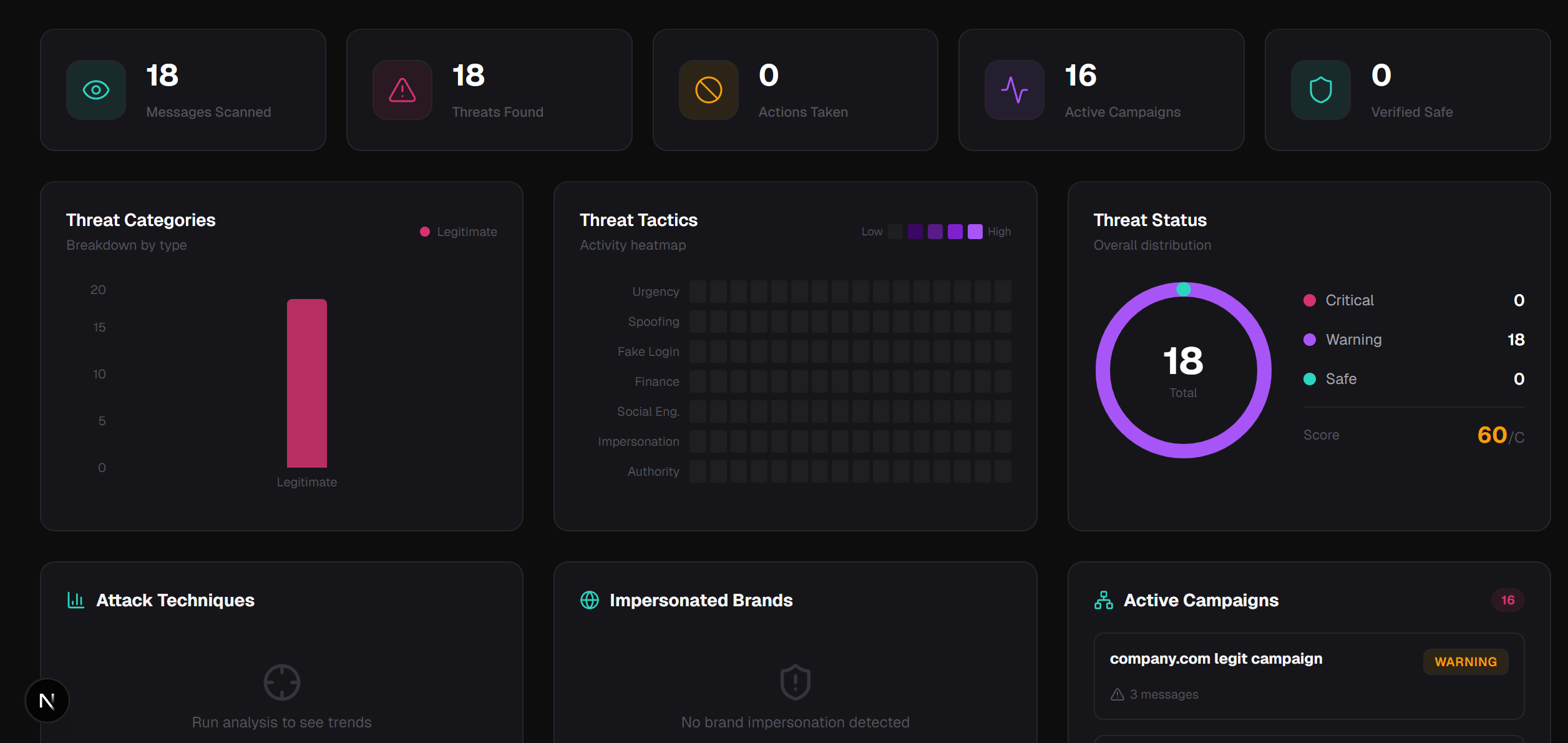
Live dashboard detecting 18 threats in a real Gmail inbox with threat categories, tactics heatmap, campaign tracking, and security score.
-
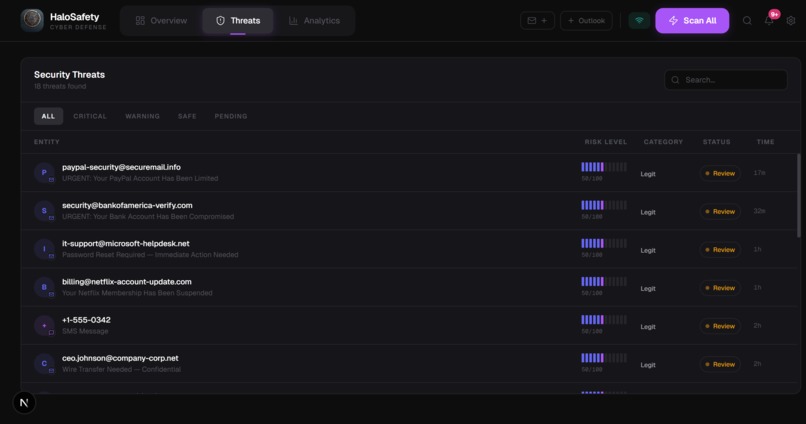
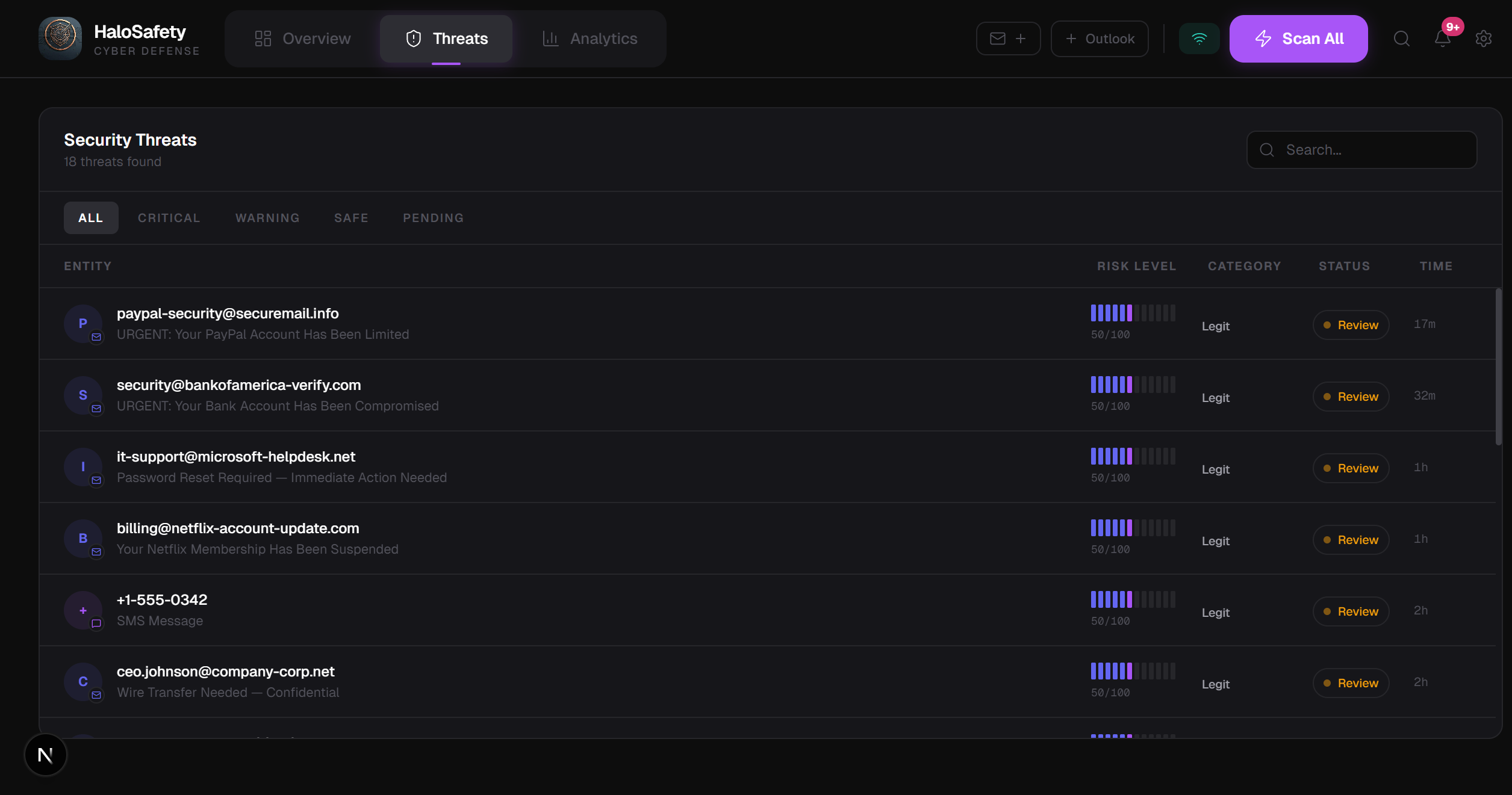
Threats table showing every suspicious email with sender, risk level, category, and status — full forensic inbox view at a glance.
-
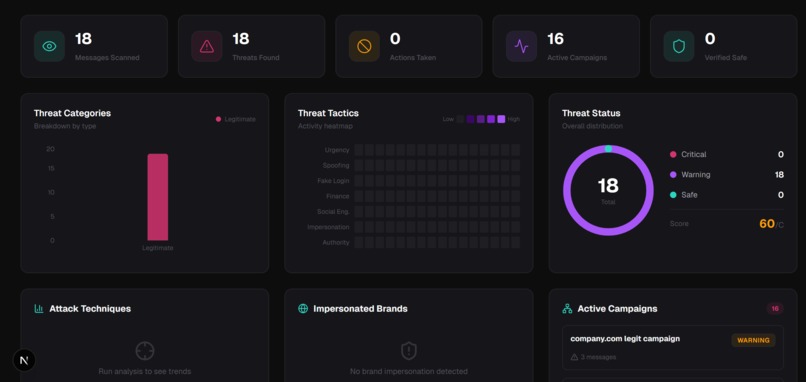
Analytics tab breaking down attack techniques, impersonated brands, and active campaigns — turning emails into threat intelligence.
Inspiration
Every major cyberattack starts with one email. The Change Healthcare ransomware attack that cost $22 million and took down prescription systems across the entire United States — started with a phishing email that passed Gmail's spam filter. The problem is not that people are careless. The problem is that the tools protecting them were built for bulk spam from 2005, not surgical AI-generated attacks from 2025. Gmail catches the obvious stuff. Nobody catches the email that knows your name, your bank, and your employer. We also thought about our grandparents. People who would never know what SPF means but who are exactly the people attackers target. We wanted to build something that protects everyone — not just people who already know what a phishing attack is. That is why we built HaloSafety.
What it does
HaloSafety connects to your real Gmail and Outlook accounts and analyzes every email for threats — phishing, scams, impersonation, and coordinated attacks — before you ever click anything. When you hit Scan All, every message in your inbox gets put through a forensic analysis engine. Within seconds you see a threat dashboard showing exactly which emails are dangerous, what type of attack they are, what red flags were found, and what you should do about it. Click any message and you get the full picture. A five-stage threat analysis pipeline shows how the risk score was built — header authentication, sender domain check, link analysis, content analysis, final verdict. SPF, DKIM, and DMARC badges show whether the email actually came from who it claims. Forensic evidence chips surface every specific red flag — urgency language, identity impersonation, suspicious links, payment requests. The impersonated brand is named. The suspicious URL is shown. A recommended defense action is highlighted. For threats that repeat across multiple messages, HaloSafety automatically detects the campaign — grouping related attacks so you see the coordinated pattern, not just individual emails. And for users who find cybersecurity dashboards overwhelming, Guardian Mode transforms everything into plain English with one toggle. No risk scores, no technical terms — just "This email is trying to steal your PayPal password. Do not click any links. Click Block below." Same protection. Zero jargon. HaloSafety works on your real inbox, right now, with no account creation required.
How we built it
HaloSafety is a multi-layer AI email threat detection platform that connects to your real Gmail and Outlook accounts and analyzes every message with forensic precision. Layer 1 — Deterministic Security Checks Before any AI runs, HaloSafety performs protocol-level checks. It parses SPF, DKIM, and DMARC authentication headers to verify the email actually came from who it claims. It runs lookalike domain detection using fuzzy string matching against 20 trusted brands — catching paypa1.com before a human eye would notice. It extracts every link and flags URL shorteners, raw IP addresses, and fake security keywords like verify-account and secure-login. Layer 2 — Gemini AI Forensic Analysis Gemini 2.0 Flash analyzes message semantics on top of the deterministic findings. It identifies the specific attack type — not just "phishing" but "credential harvesting" or "CEO fraud" or "payroll diversion." It returns forensic evidence chips for every red flag, names the impersonated brand, predicts the attacker's goal, and recommends a defense action. Layer 3 — Campaign Detection HaloSafety automatically groups related threats into coordinated campaigns. Seven FedEx emails with the same attack pattern are not seven separate threats — they are one campaign. The result is a forensic dashboard with a five-stage threat analysis pipeline, SPF/DKIM/DMARC badges, evidence chips, risk scores, attack type classification, and one-click defense actions. And because the most vulnerable people are not security engineers, we built Guardian Mode. One toggle transforms the entire interface into plain English. "This email is trying to steal your PayPal password. Do not click any links." Same analysis underneath. Understandable by anyone on top.
Challenges we ran into
Parsing email authentication headers was harder than expected. The Authentication-Results header is a free-form string with no enforced format — different mail servers write it differently. Building a reliable parser across Gmail, Outlook, and third-party senders took significant trial and error. Making Guardian Mode seamless required rethinking the entire component architecture. We could not just swap text strings — layout, hierarchy, and interactions all needed to change simultaneously. A context provider that every component listens to solved this. Consistent structured JSON from Gemini required careful prompt engineering. Early versions occasionally returned prose instead of clean JSON or omitted fields when confidence was low. Strict output instructions and a fallback parser fixed this. Session isolation without a database was a careful balancing act — every user's data needed to be completely private with no login, while persisting through page refreshes. We combined server-side FastAPI session storage with browser sessionStorage to achieve true isolation with zero friction.
Accomplishments that we're proud of
Guardian Mode is what we are most proud of. One button transforms a forensic cybersecurity dashboard into something a grandmother understands — without hiding any of the underlying analysis. We have not seen another security product that successfully serves both audiences from the same interface. The deterministic layer is our strongest technical accomplishment. Building real SPF/DKIM/DMARC parsing, lookalike domain detection, and link extraction on top of the AI makes HaloSafety a genuine multi-layer system — not a single API call with a dashboard on top. And it works on real inboxes. You can connect your actual Gmail right now and scan your real emails. That end-to-end completeness in under 12 hours is something we did not think was possible when we started.
What we learned
We learned what SPF, DKIM, and DMARC actually are at the protocol level. Three days ago none of us could have explained email authentication. Now we can. We learned that the hardest part of a security product is not detecting threats — it is communicating them. The gap between a risk score of 85 and a person understanding they should not click that link is enormous. Guardian Mode was born from that realization. We learned that deterministic checks and AI are complementary layers, not competing approaches. The SPF check catches what AI might miss technically. The AI catches what rules might miss semantically. The combination is stronger than either alone.
What's next for HaloSafety
Conversation hijack detection — analyzing entire email threads and flagging when a message suddenly introduces a new bank account, new participant, or urgent payment request mid-conversation. One of the most dangerous and least-detected modern attack vectors. Browser extension bringing HaloSafety analysis directly into Gmail and Outlook — risk scores and evidence chips inline, as you read. Multilingual threat detection supporting Spanish, Portuguese, and other languages, making protection accessible to communities that English-first security tools underserve. The vision is simple: every person, regardless of technical knowledge, age, or language, deserves the same email protection that Fortune 500 companies pay enterprise prices for. HaloSafety is how we get there.


Log in or sign up for Devpost to join the conversation.