-
-
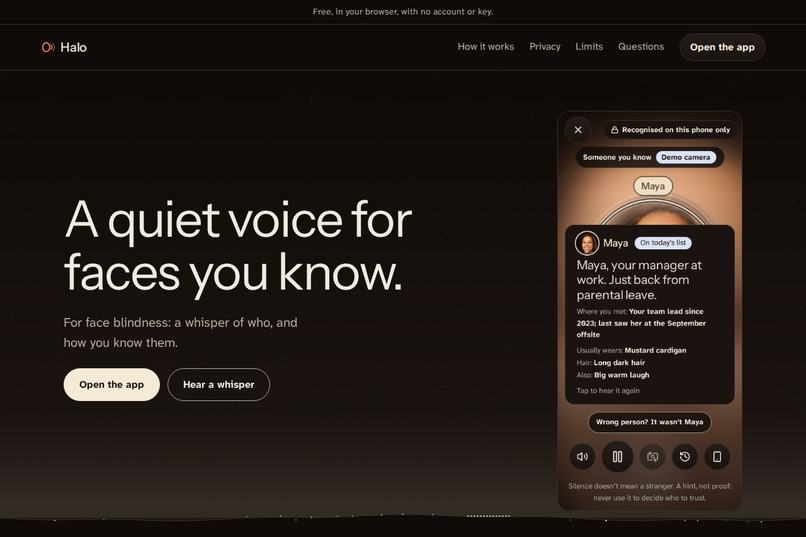
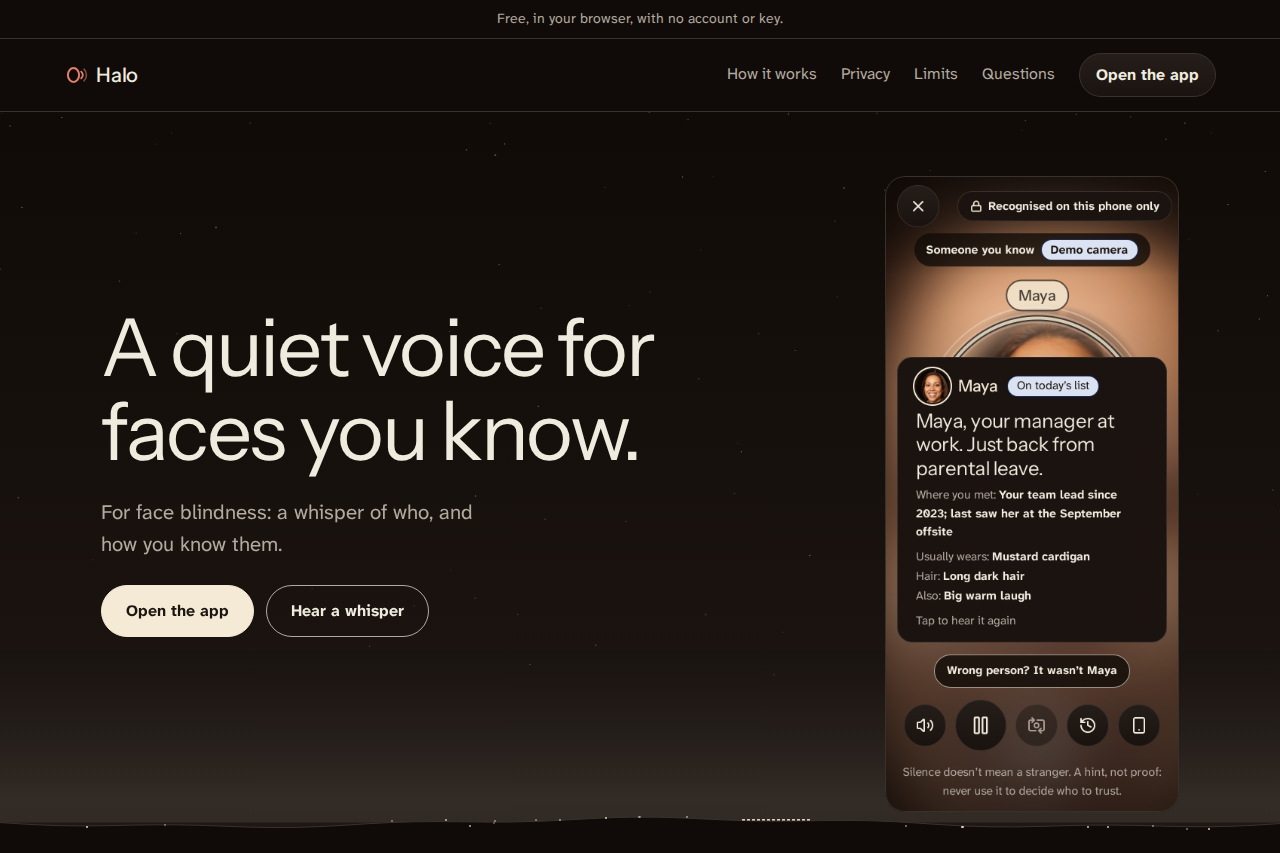
Halo on the web: no account, works offline, faces never leave your phone. Live at halo.dualmindlab.tech.
-
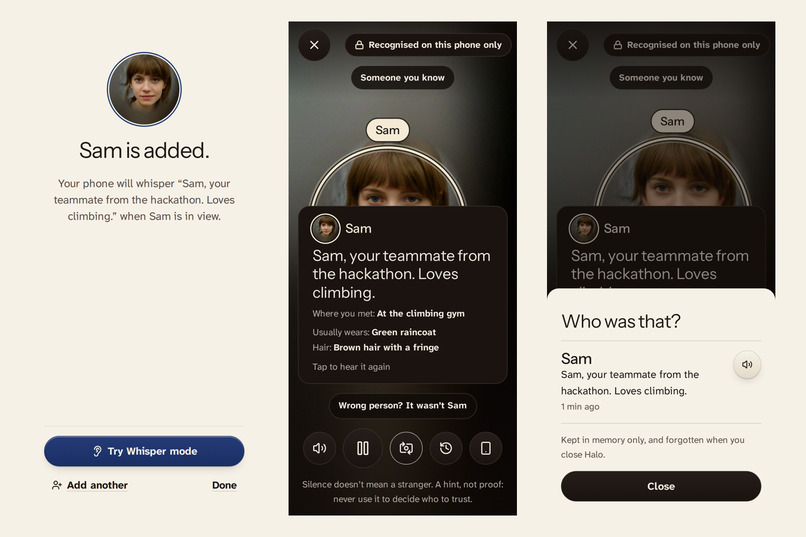
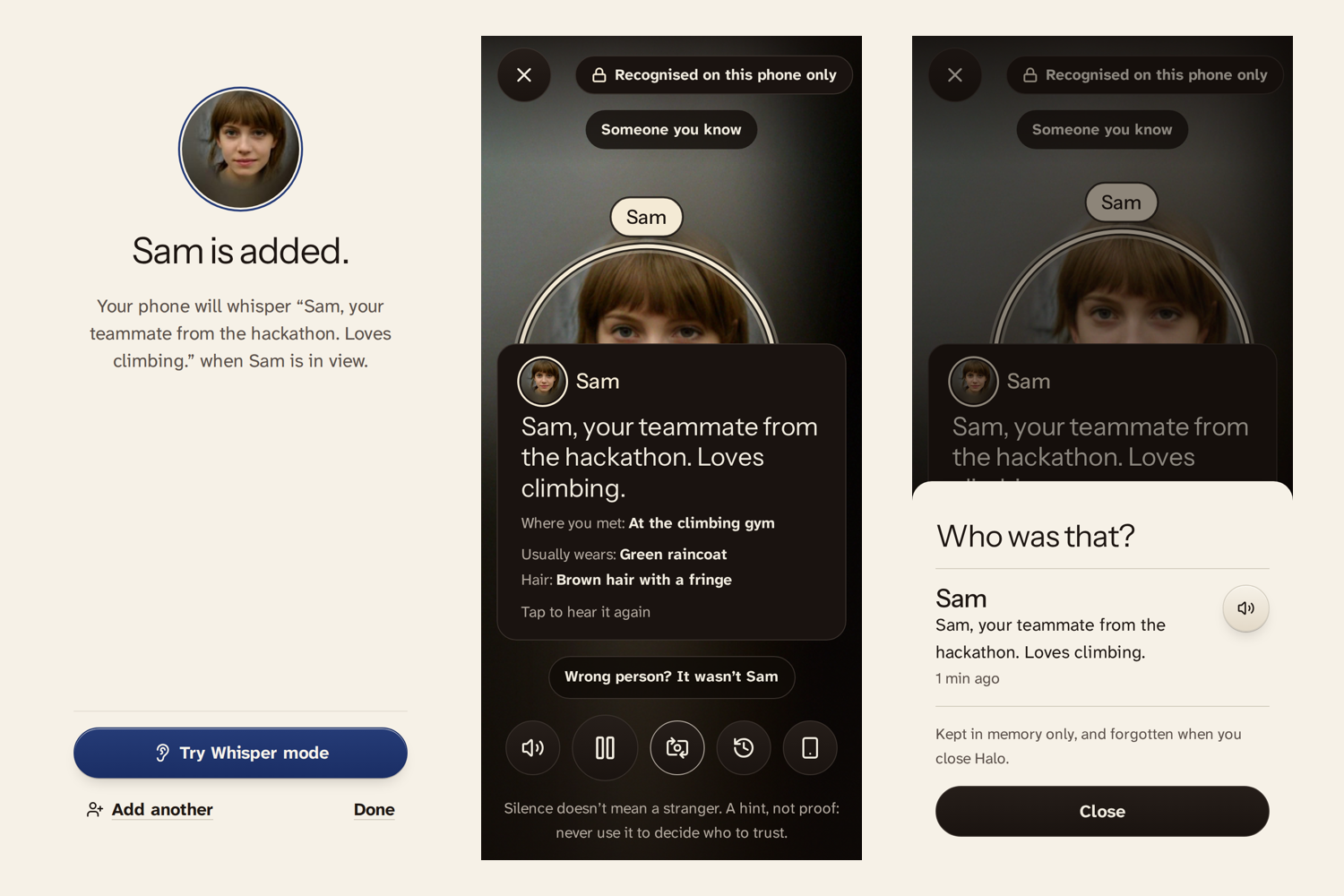
Add a person, hear the whisper line, and check the last five whispers if you missed one.
-
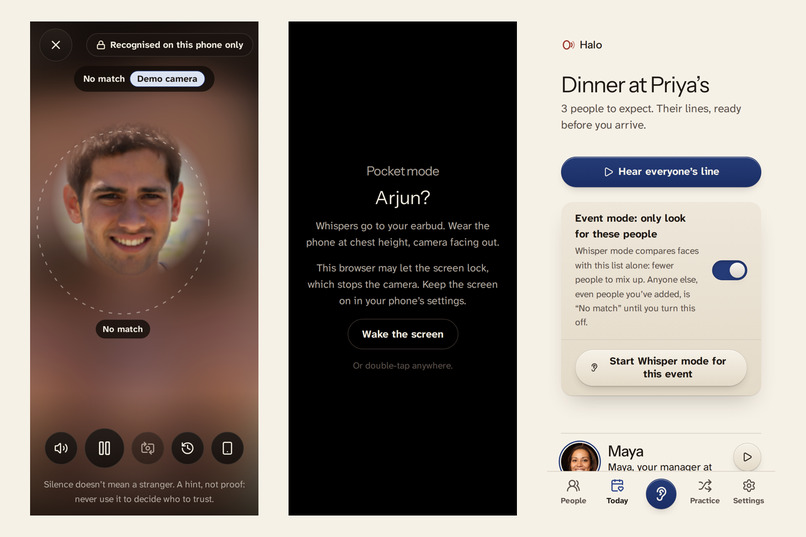
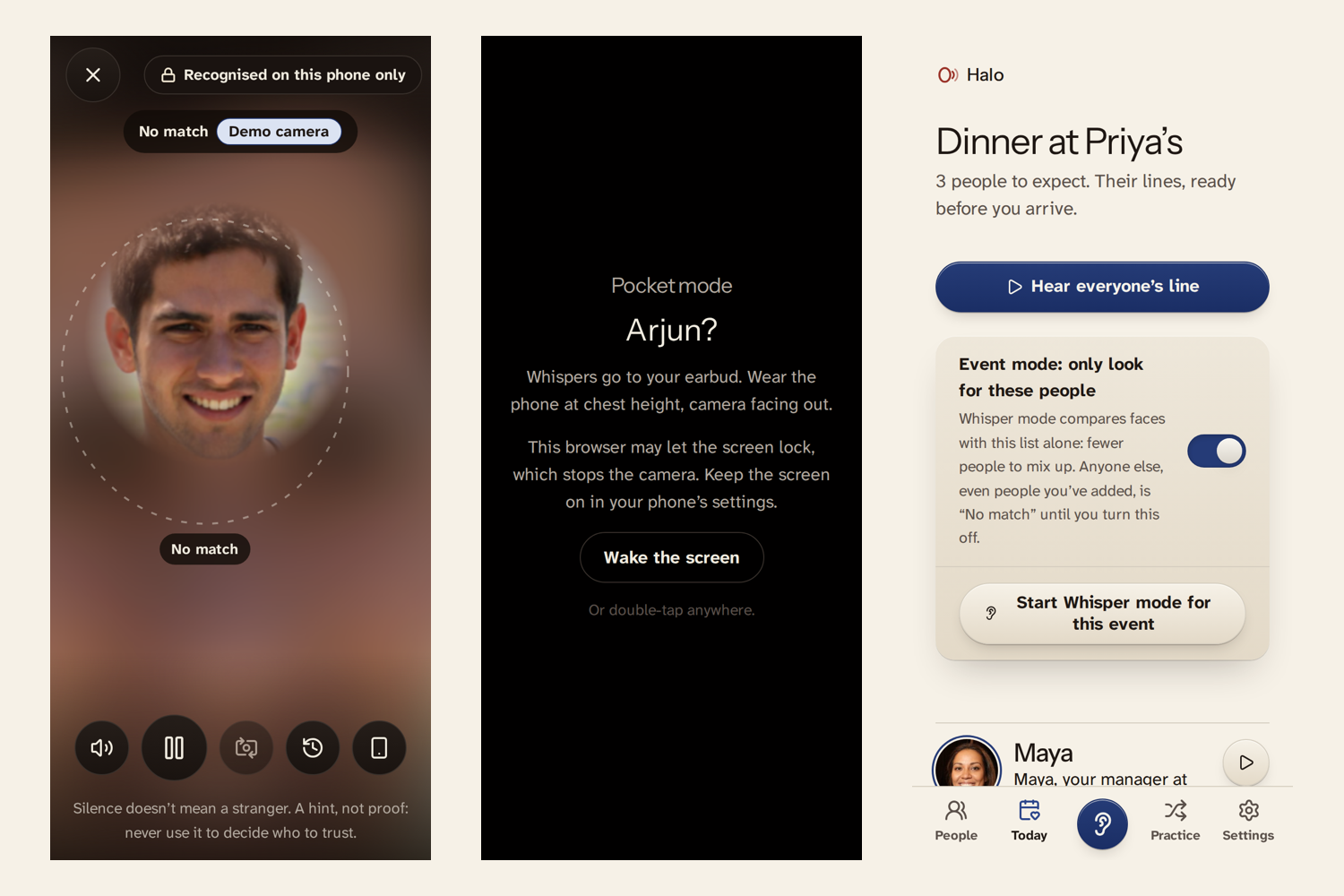
It only speaks when it's sure. A face you never added gets "No match". Pocket mode keeps the screen dark.
-
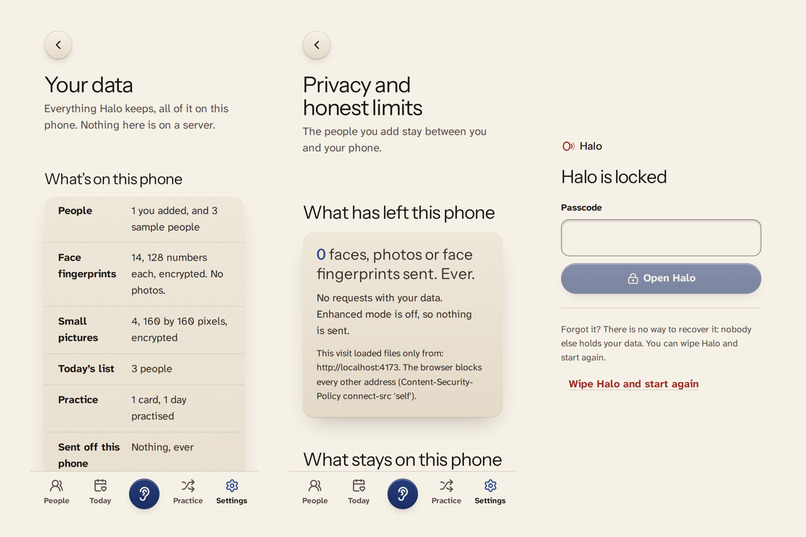
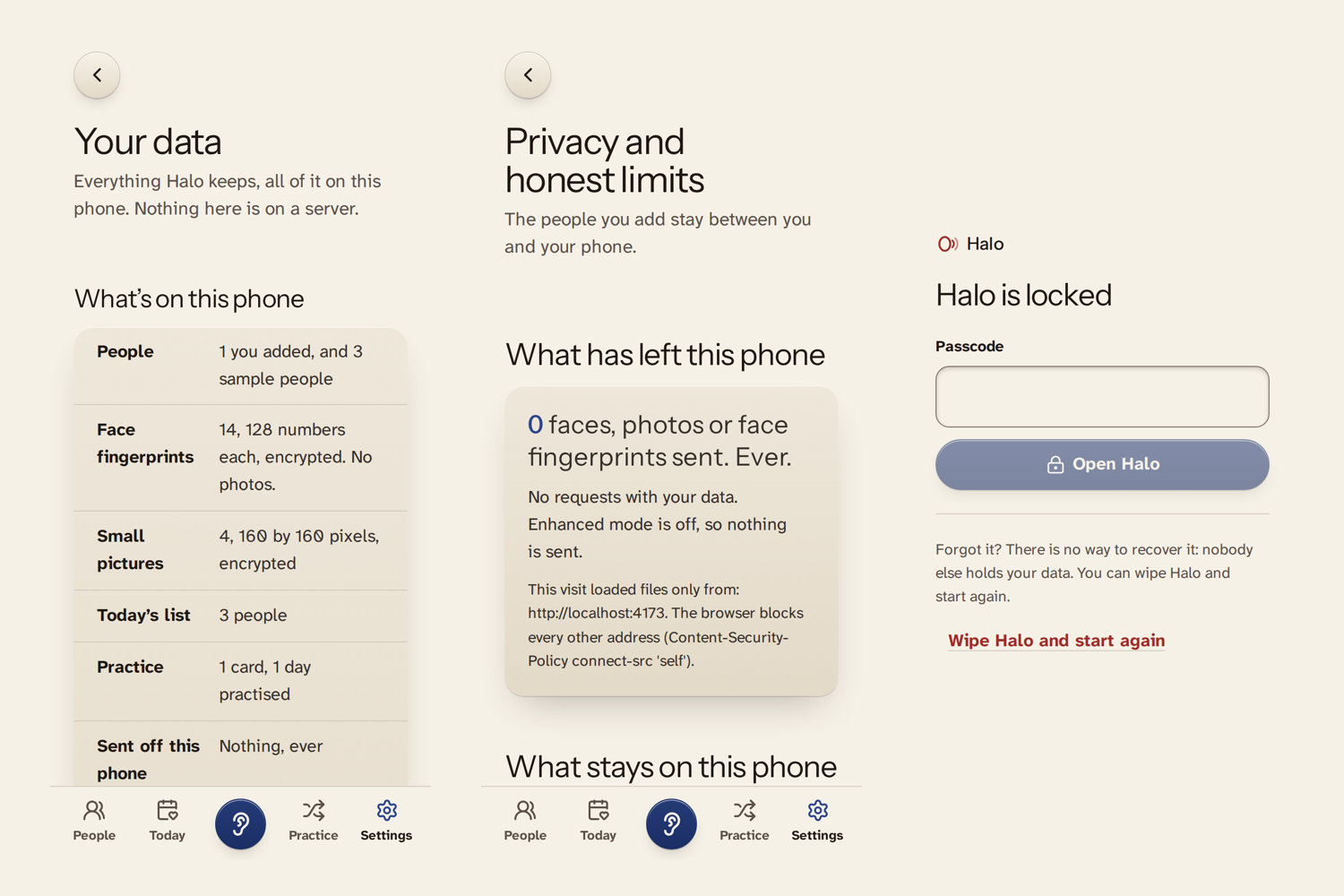
See everything stored, a ledger of what ever leaves the phone, and an optional passcode or fingerprint lock.
Inspiration
About 2 in 100 people have face blindness, also known as prosopagnosia. They can see faces perfectly well but struggle to recognise who someone is, sometimes even when that person is a close friend or family member.
While researching this problem, I found people on r/Prosopagnosia describing a very specific need: someone quietly reminding them who they're looking at. Others wanted something that could recognise and label a person while they were speaking to them.
That stayed with me. People weren't asking for another contact list or a tool to memorise photographs. They wanted a quiet reminder of who someone was, how they knew them, and enough context to feel comfortable in an interaction.
Existing tools such as NameVault, Envision's Teach a Face and OrCam MyEye already address parts of this problem. I wanted to explore a different approach: something that works on an ordinary phone, keeps faces on the device, recognises only people who have agreed to be added, and is honest when it isn't sure.
The central idea behind Halo is simple:
A wrong name can be worse than no name at all.
That principle shaped the recognition system, the consent flow and even the moments when Halo deliberately stays silent.
What it does
Halo is a phone web app designed to help people with face blindness recognise people they know. It requires no account or app-store installation and is designed to work offline after its resources have been cached.
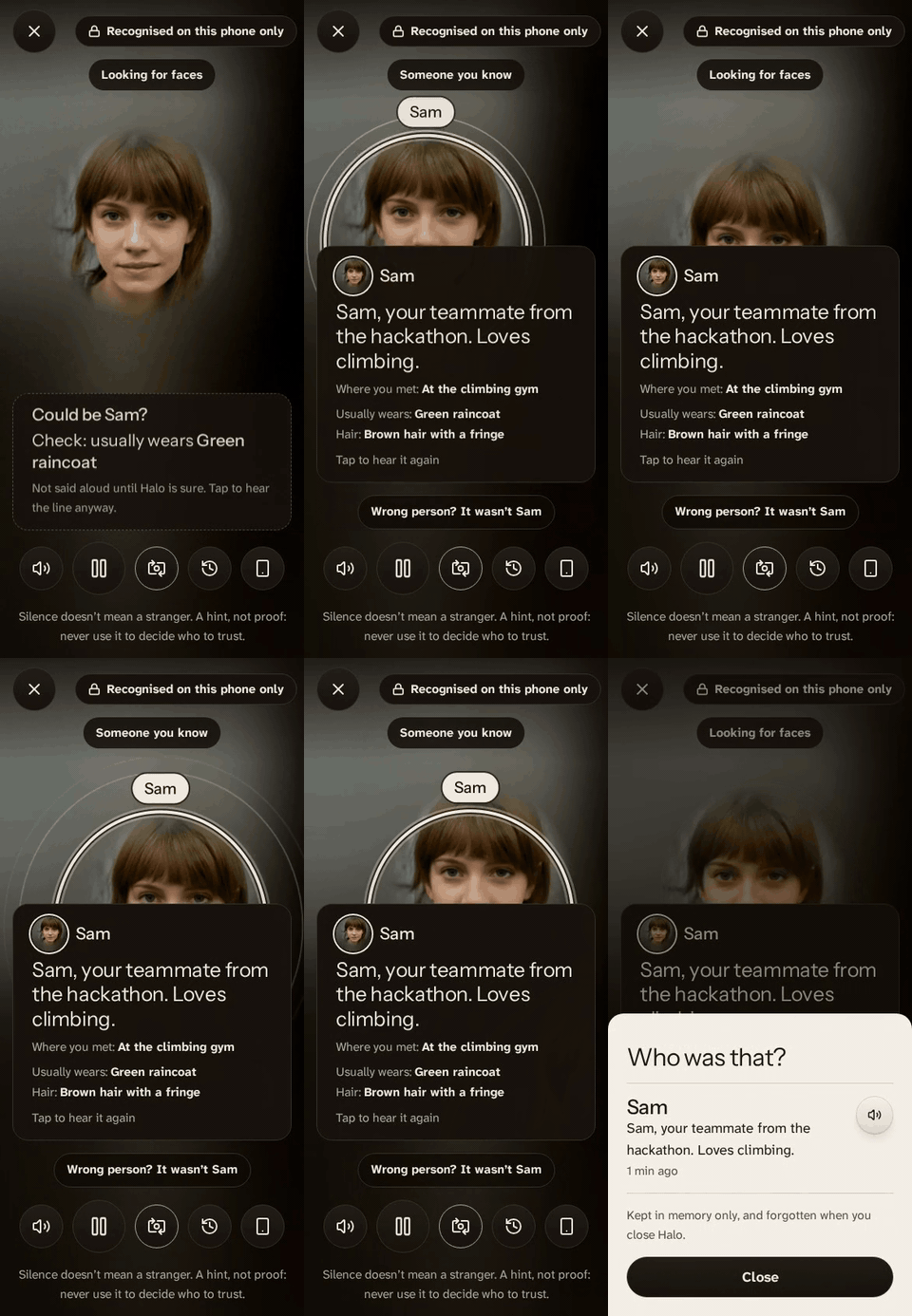
The core experience: a familiar face, a quiet visual cue, and a reminder of who the person is.
Try it live: https://halo.dualmindlab.tech (the "Halo in 60 seconds" path at /app/#/try needs no camera or sign-up).
1. Add someone, with their consent
When adding someone, I enter their name and a personal note, such as where we met or something useful to remember. The person being added reads the exact reminder Halo will say and gives their agreement on the phone.
I then capture three to five photos and add optional cues such as clothing, hair or glasses.
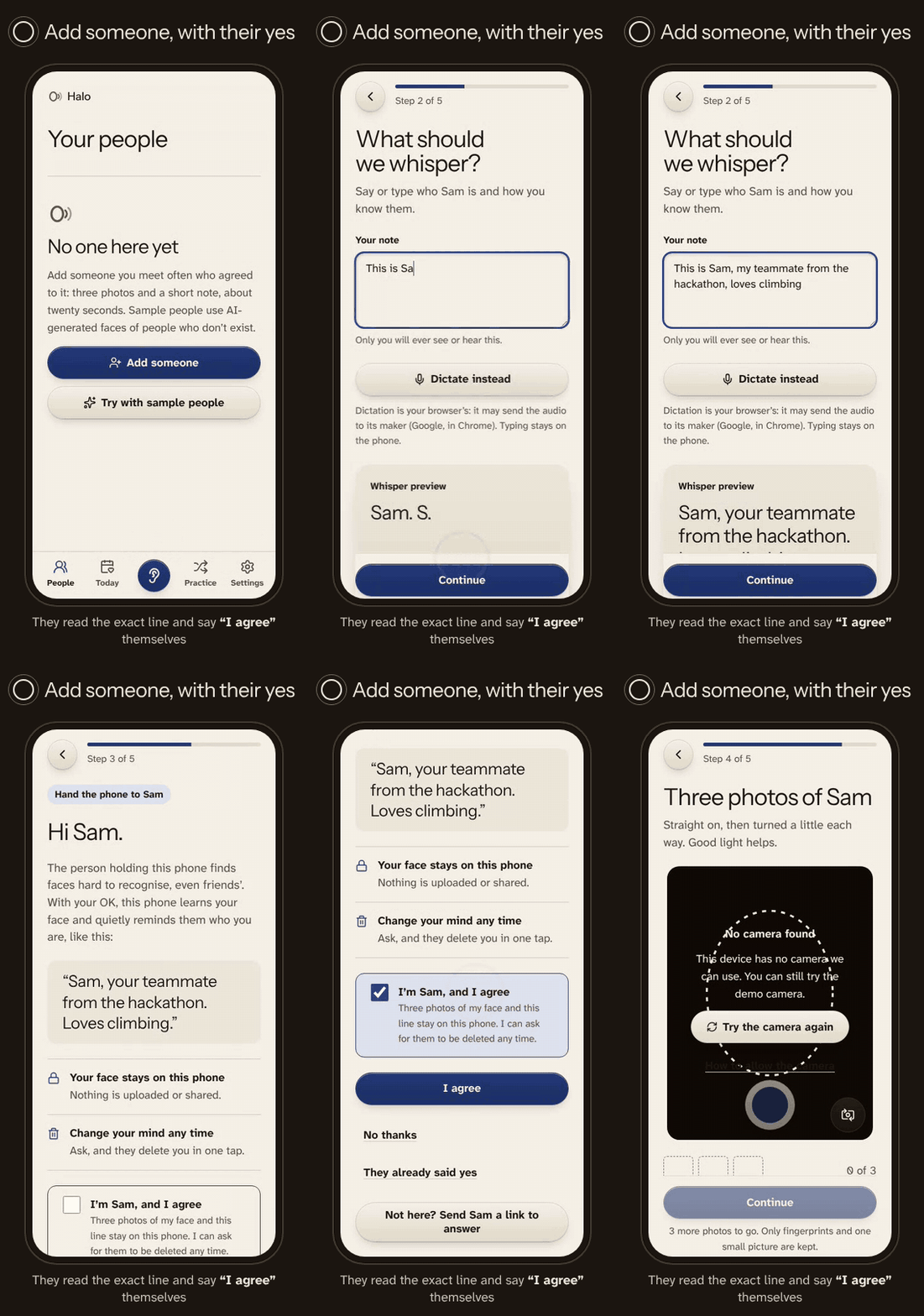
Helper cards can be prepared by a trusted person, but they carry text only. Photos and face fingerprints aren't passed through those links.
2. Whisper mode
When Halo confidently matches someone I've added, it can speak a quiet reminder through an earbud.
For example:
"Sam, your teammate from the hackathon. Loves climbing."
It's more than a name tag. The reminder gives me context about the person and how I know them.
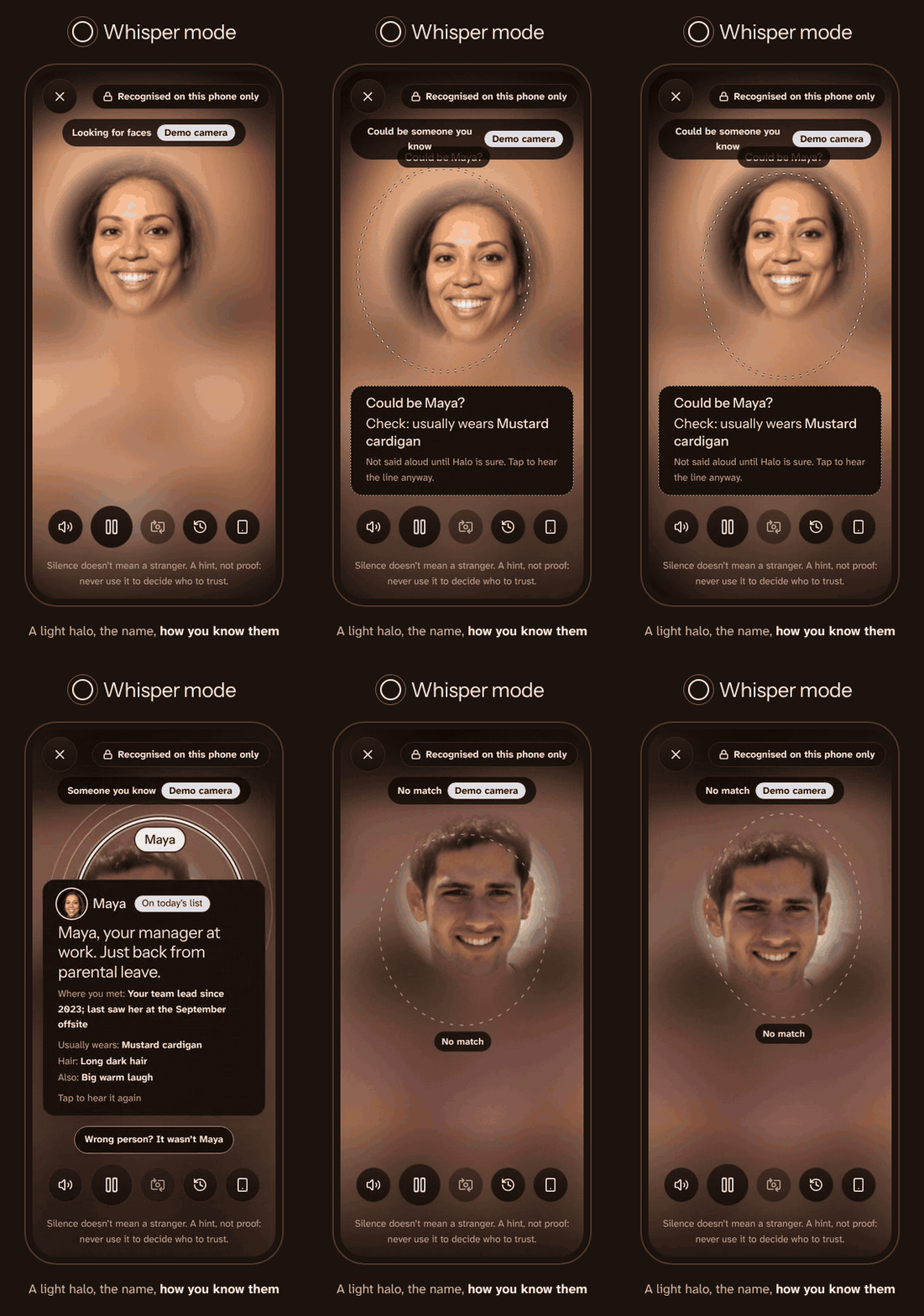
3. Three recognition states
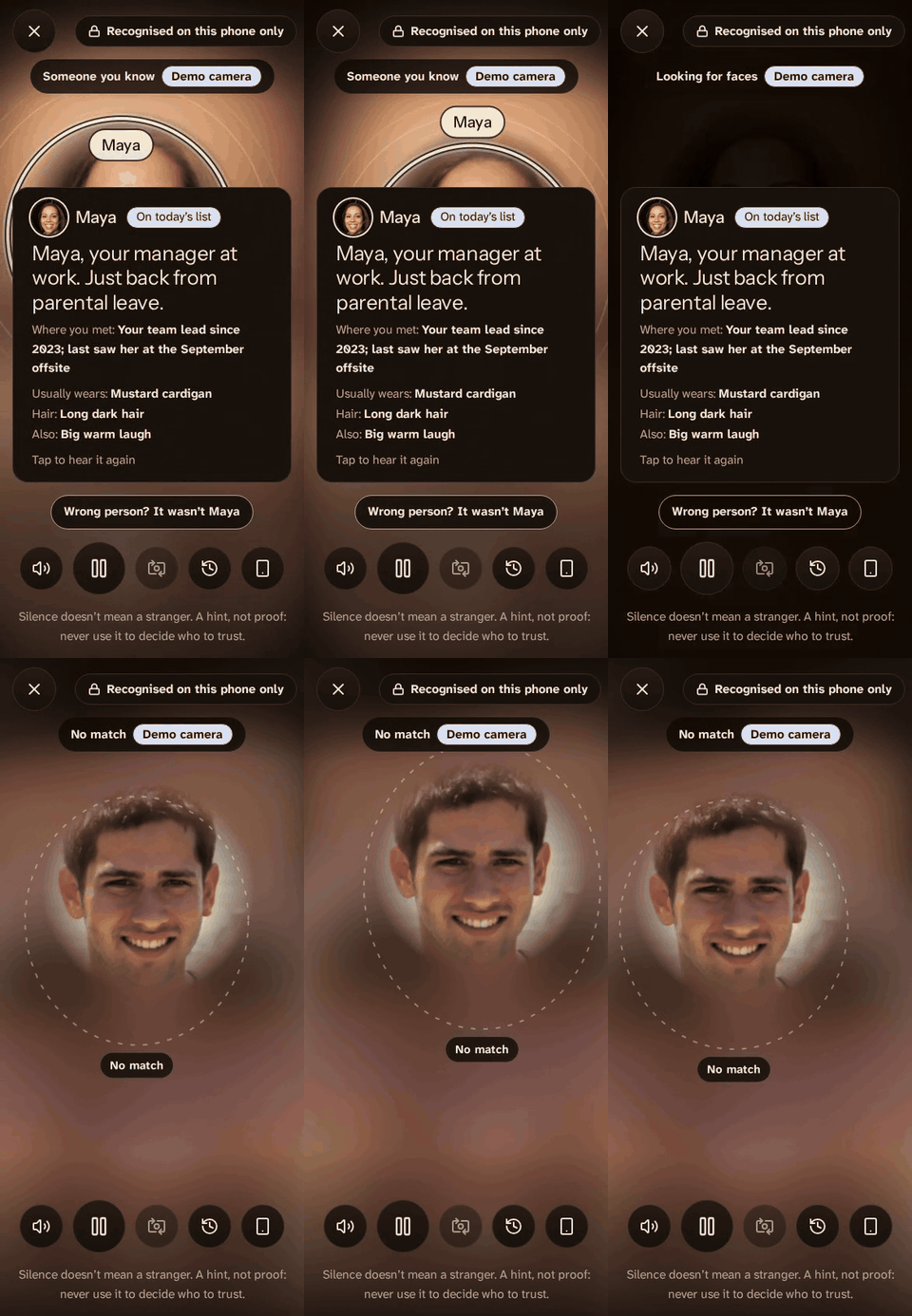
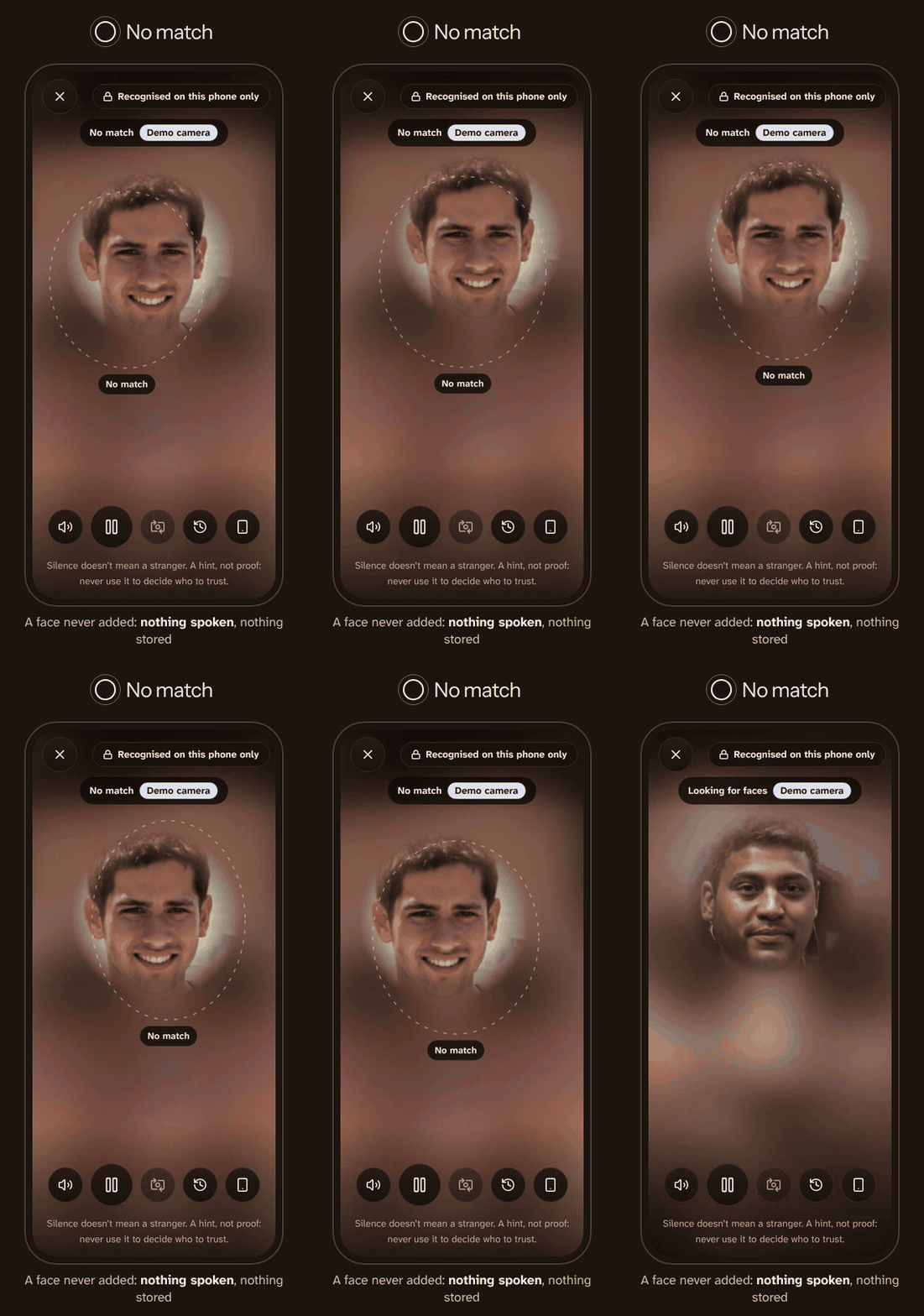
Halo doesn't force every face into a name.
| State | What happens |
|---|---|
| Confident | Displays the recognised person's reminder and can whisper it through a checked earbud. |
| Could be | Shows a possible match and helpful cues, but never speaks the uncertain name. |
| No match | Gives no identity to someone who hasn't been added and doesn't store their face. |
4. Pocket mode
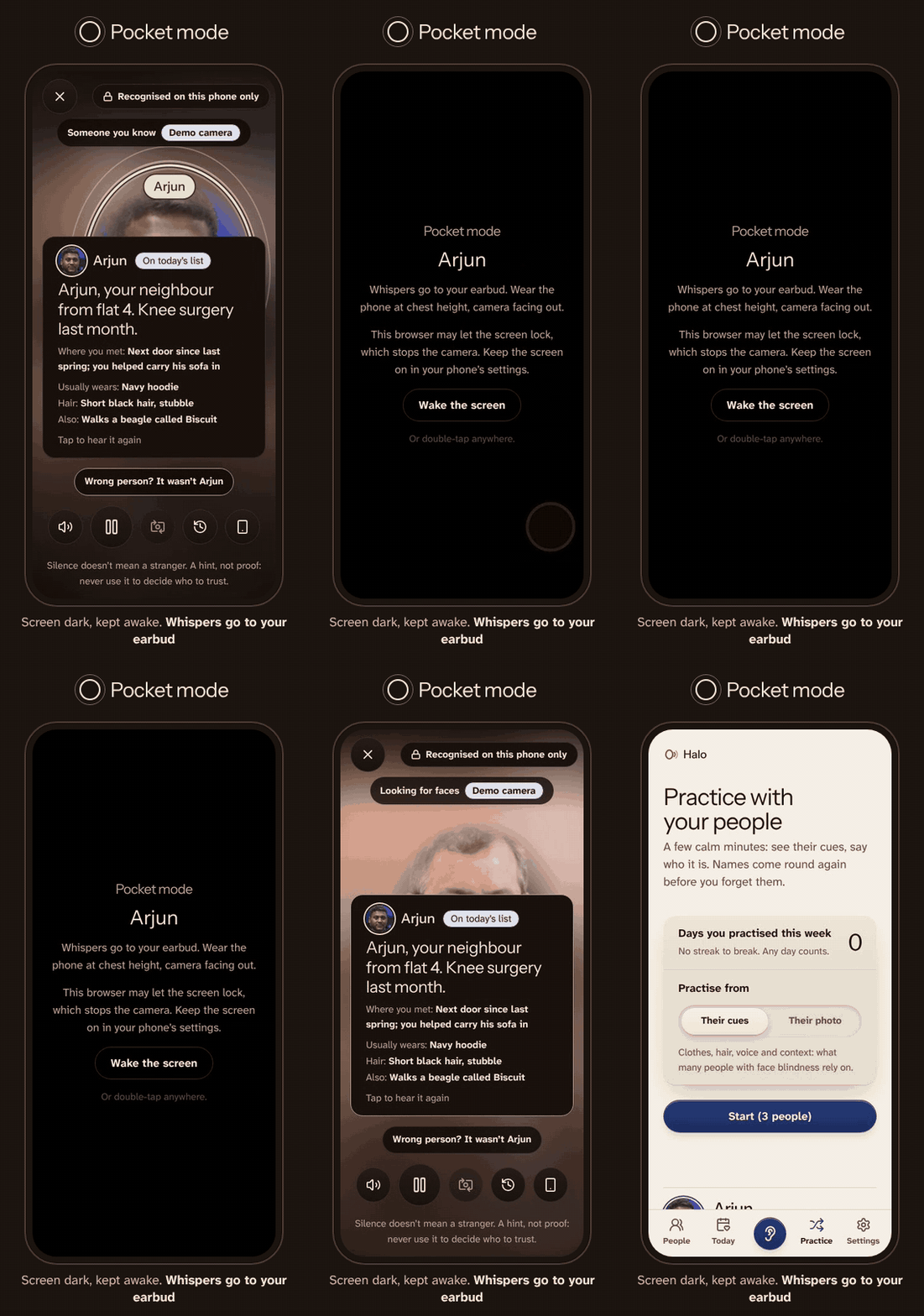
I wanted to address a problem with the obvious solution: constantly pointing a phone at people isn't a natural way to have a conversation.
Pocket mode lets the user wear the phone at chest height with the screen nearly dark. A checked earbud delivers whispers, while vibration codes provide an alternative when spoken output isn't enabled.
5. Today's list and Event mode
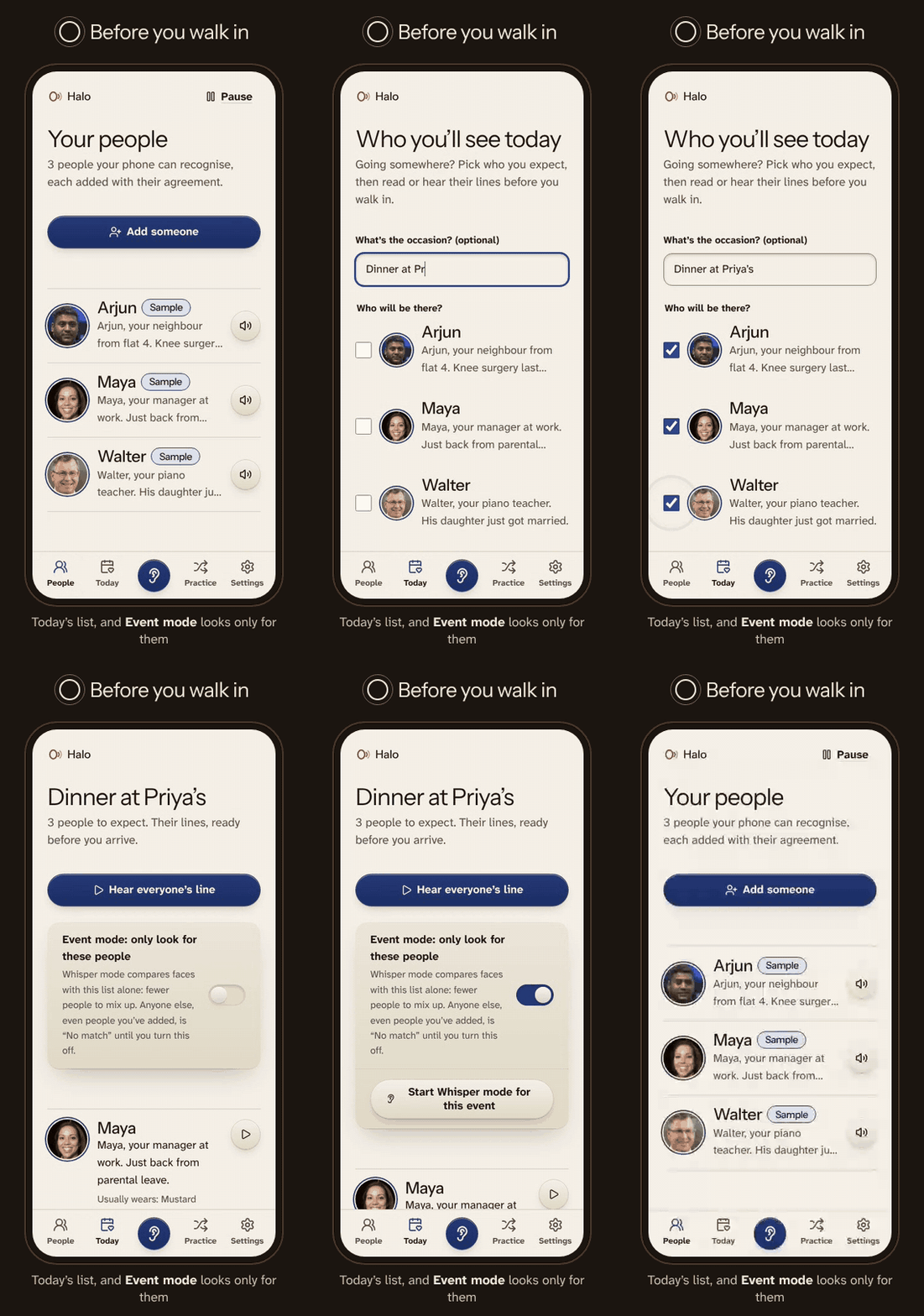
Before a dinner, meeting or gathering, users can review the people they're expecting and hear their reminders in advance.
Event mode narrows matching to that specific list. This reduces the number of possible matches and helps avoid confusing someone with another person in the saved list.
6. Personal data under the user's control
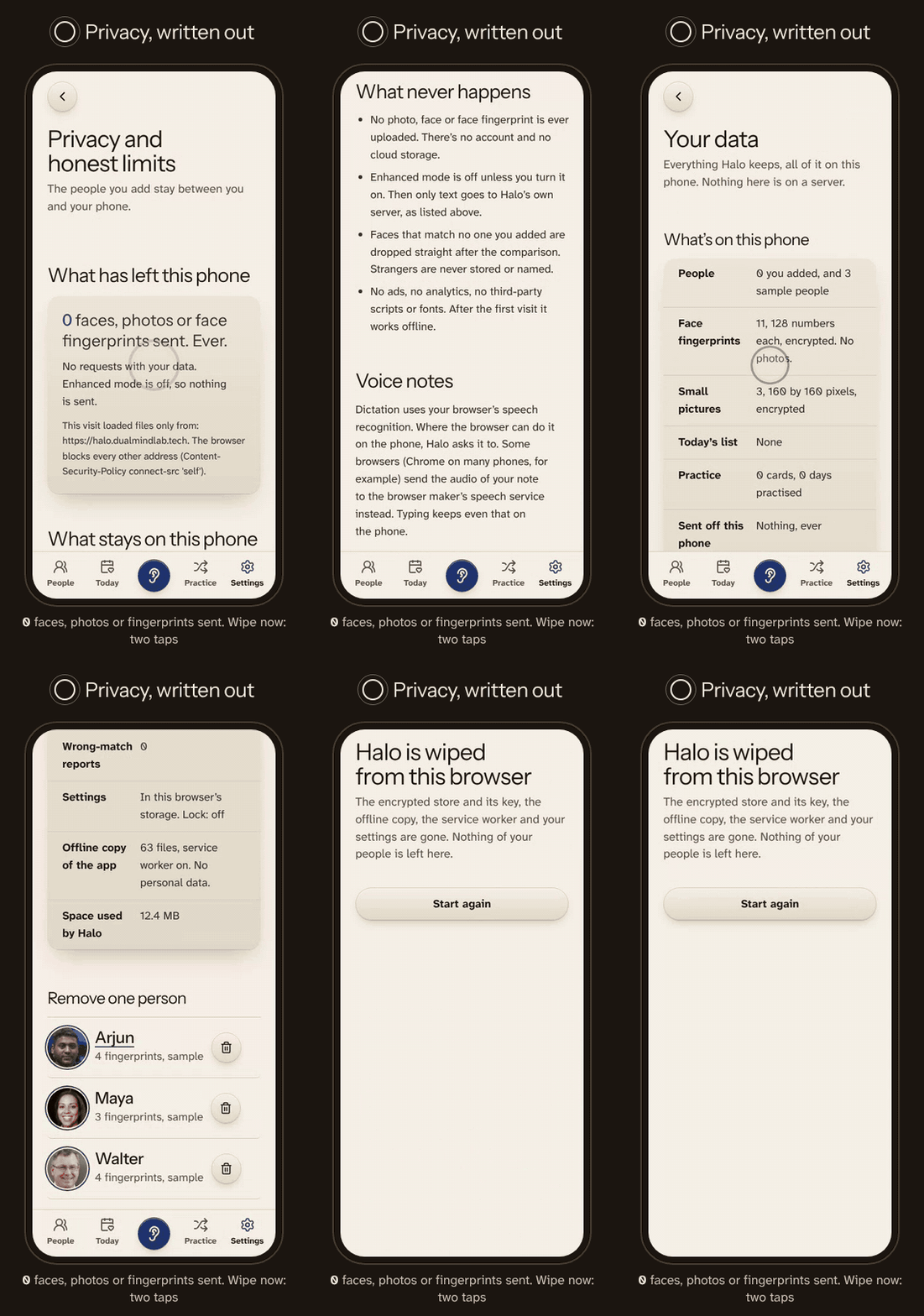
Users can inspect what's stored, remove an individual person, export an encrypted backup and delete everything using Wipe now.
7. Offline-first, with optional Enhanced mode
The default experience performs face detection, matching and local storage on the device. The app can continue working offline after its required resources have been cached.
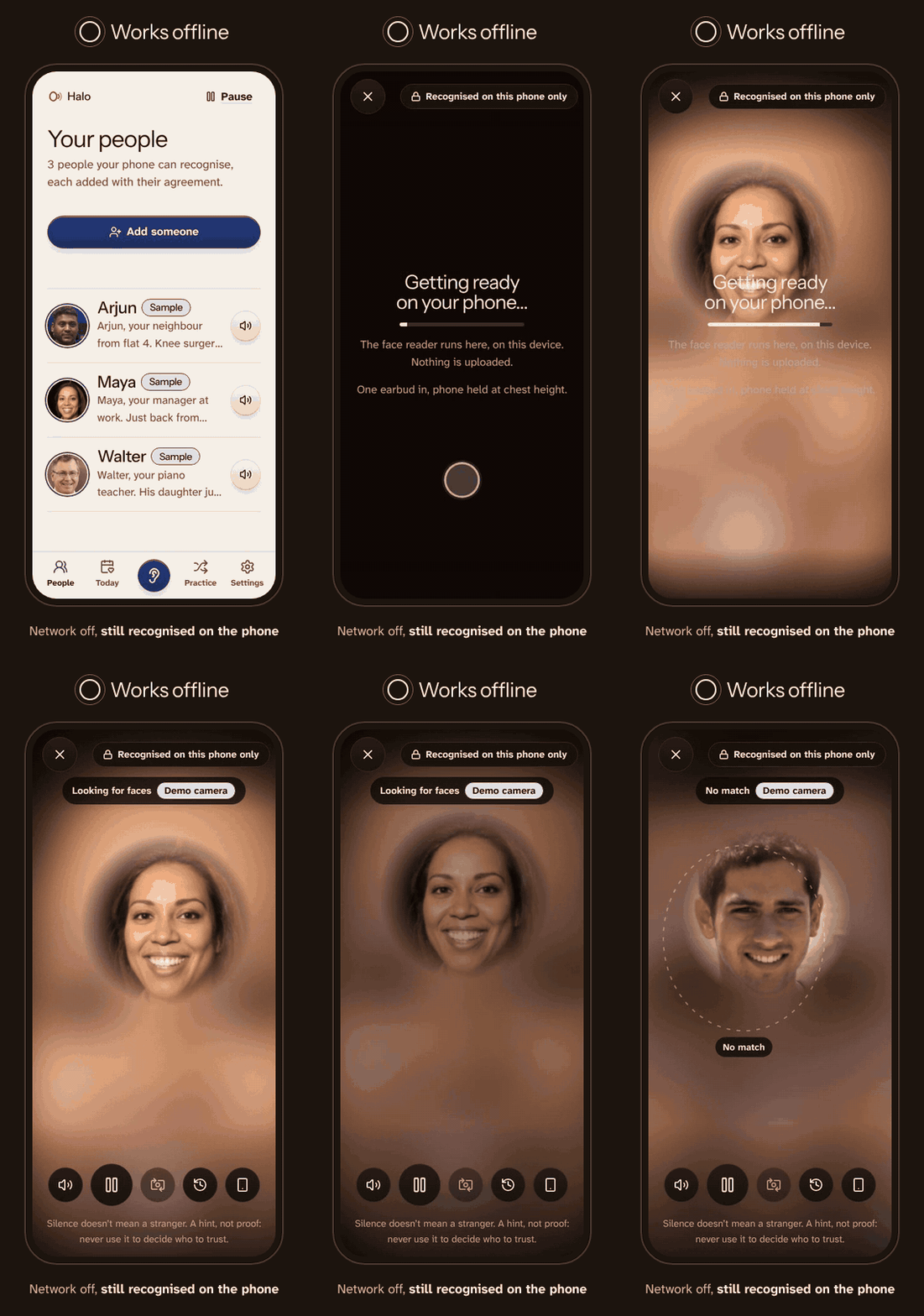
An optional Enhanced mode provides features such as natural voice generation, translation and selected audio-based inputs. Those requests can involve text or short audio, but face photographs and face fingerprints are never sent to the server.
How we built it
I started with the Devpost Learn Skill Pack and its planning-first workflow: scope, product requirements, technical specification and implementation. The repository contains scope.md, prd.md and spec.md.
I used Claude Code as my coding agent and built Halo through nine verified implementation slices. I made the product decisions, reviewed the agent's output and used automated tests to catch problems throughout development. I also used the Hallmark design skill for the design pass, with a palette taken from Ajrakh, the block-printed cotton of Kutch.
Architecture
Halo is a static, multi-page web application, with an optional same-origin server component for Enhanced mode.
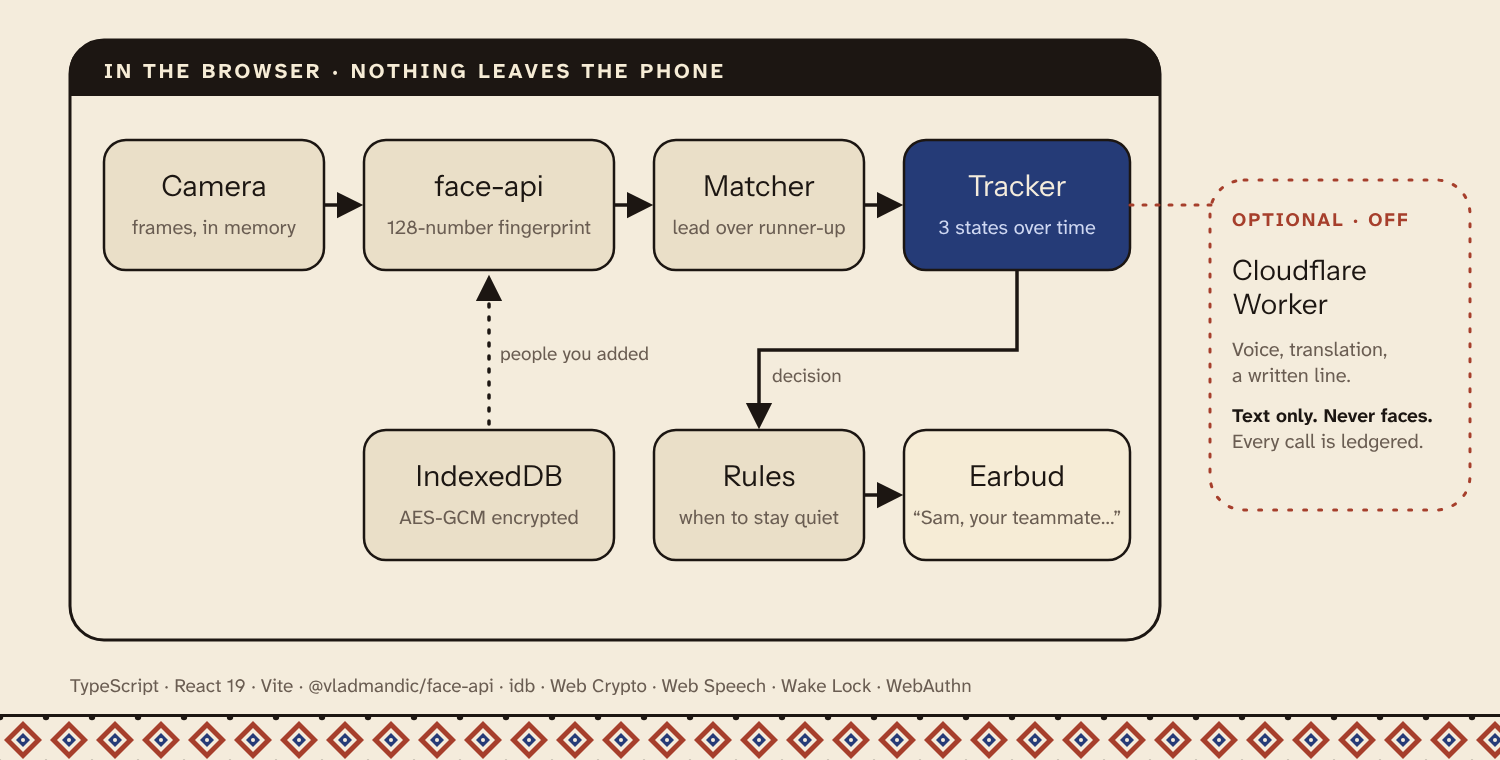
The diagram shows the main components. Face processing and the default recognition path remain on the phone. Enhanced mode is optional and handles supported text or audio requests without receiving face images.
Technology stack
| Component | Technology | Purpose |
|---|---|---|
| Frontend | TypeScript, React 19, Vite 7 | Application and interface |
| Face detection and matching | face-api, TensorFlow.js, WebAssembly | Local face detection and 128-number face fingerprints |
| Local storage | IndexedDB, idb |
Store enrolled people and their records |
| Encryption | Web Crypto, AES-GCM, PBKDF2 | Encrypt personal records and protect optional passcodes |
| Offline support | Service worker | Cache the application and recognition resources |
| Voice and interaction | Web Speech API, Vibration API, Screen Wake Lock API | Spoken reminders, vibration codes and pocket mode |
| Optional AI | Cloudflare Workers, Workers AI | Natural voice, translation and selected text/audio features |
| Testing | Vitest, Playwright, axe | Unit, end-to-end and accessibility testing |
Recognition and decision flow
The most important part of Halo isn't just matching a face. It's deciding what to do with the match.
Camera frame
     |
     v
Detect faces locally
     |
     v
Generate face fingerprint
     |
     v
Compare against enrolled people
(or today's list in Event mode)
     |
     v
Track the face across frames
     |
     v
Check confidence and separation
from the next-best match
     |
     +-----------------------------+
     |              |              |
     v              v              v
  Confident       Could be       No match
     |              |              |
     v              v              v
 Whisper       Show possibility   No name
     |          Stay silent       No storage
     v
Unrecognised faces: keep only
the box and distance
A confident match requires a face to remain stable for at least one second across five frames, including a frontal frame, with a sufficient lead over the next-best candidate. Halo uses a cautious default; the thresholds are safeguards, not guarantees.
Privacy data flow
Privacy isn't an extra feature added after recognition. It determines where the processing happens and which data is allowed to leave the device.
                         PHONE
                           |
                     Camera frame
                           |
                           v
                   Local face engine
                           |
                           v
                  Local face matching
                           |
                           v
                Encrypted IndexedDB vault
                           |
                           v
                   Whisper / output

        No face images or face fingerprints
                  sent to a server


               OPTIONAL ENHANCED MODE
                           |
               User requests a supported
                   text/audio feature
                           |
                           v
                 Same-origin Worker
                           |
                           v
                    Workers AI
                           |
                           v
                  Return text/audio

           Face images: never transmitted
The local vault uses AES-GCM encryption with a browser-generated, non-extractable key. The optional app lock adds a further interface-level barrier; it isn't claimed to be an additional encryption layer.
The app also uses a restrictive content security policy, origin checks for Enhanced mode and tests that check whether the implementation drifts from the documented privacy promises.
Verification and testing
I didn't want the project to stop at a polished interface. The repository includes:
| Verification | Result |
|---|---|
| Unit tests | 91 |
| Playwright end-to-end tests | 25 |
| Automated accessibility checks | Zero violations across tested screens |
| Threat model | 14 risks documented |
| Continuous integration | GitHub Actions on every push |
The tests cover consent, local encryption, recognition states, event filtering, offline operation, Enhanced mode's data flow, deletion, pocket mode, accessibility and other critical journeys.
The evaluation is deliberately separated from these software tests. Passing a test that checks whether the app behaves correctly is not the same as proving that its face-recognition model is accurate for real people.
Challenges we ran into
Getting consent right without compromising privacy
A helper can prepare a card for someone who isn't present, but sending photos through links or messaging apps would undermine the privacy model. I designed helper cards to carry text only, leaving the photos and face fingerprints on the user's phone.
Making uncertainty a real product state
A permissive matcher might recognise more faces, but it could also confidently name the wrong person. I had to design the app around the possibility that it should do nothing.
The result is a three-state interaction rather than a simple match/no-match Boolean: confident, possible and no match. Children and particularly ambiguous cases are handled more cautiously.
Measuring accuracy honestly
I evaluated the matcher using five AI-generated sample faces and altered copies under different conditions.
In the recorded synthetic evaluation:
- Same-person comparisons had distances from 0.05 to 0.21, with a median of 0.13.
- Different-person comparisons had distances of 0.70 or higher in that dataset.
- Four of the 50 altered probes did not produce a detected face.
These results were encouraging for the test set, but they don't establish real-world accuracy. Altered copies of generated faces aren't equivalent to real people photographed on different days, in different lighting, with different expressions or appearances.
Fixing a deletion race condition
An end-to-end test found that a service worker still being installed could recreate its cache after the first deletion sweep. I changed the wipe procedure to keep sweeping briefly and added a test to protect against the regression.
Fixing accessibility bugs
Automated accessibility checks found that focus wasn't moving correctly between tour steps and that the footer overflowed on a narrow screen. Both were real usability issues that weren't obvious from looking at screenshots. I fixed them and kept the accessibility checks in the testing process.
Working with an archived face library
The face-api library used in this prototype was archived in February 2025. It still works in the current implementation, but moving to a maintained alternative is an important next step.
Accomplishments that we're proud of
- A working end-to-end product. Halo includes consent-based enrolment, local recognition, personal reminders, three recognition states, event filtering, pocket mode and personal-data controls.
- Privacy built into the architecture. Face images and face fingerprints remain on-device instead of being sent to a recognition server.
- An explicit response to uncertainty. The system can show "Could be" or "No match" rather than pretending every identification is reliable.
- A complete application, not just a recognition demo. It includes onboarding, a landing page, help, safety and privacy information, a lock screen, backups, language support and offline functionality.
- Testing beyond screenshots. Unit tests, browser-based end-to-end tests and automated accessibility checks have caught actual bugs during development.
- A documented technical foundation. The codebase includes planning documents, test evidence, an accuracy report, a threat model and a changelog.
- A design rooted in place. The visual identity draws from Ajrakh's undyed cotton, iron black, indigo and madder palette, with accessible typography and distinct recognition states.
- A clear roadmap. I haven't hidden the unproven parts behind a polished demo. The next phase is about testing the system with real participants and improving it based on evidence.
What we learned
Building Halo changed how I think about AI-assisted development. An AI agent can write code quickly, but it can't make every product decision for me. Writing the scope, PRD and technical spec first gave me a way to challenge its suggestions, make deliberate trade-offs and keep nine build slices moving in the same direction instead of ending up with a pile of features.
The biggest lesson was that privacy has to shape the architecture, not just the privacy policy. Keeping faces on the phone meant giving up some convenient approaches and designing consent, storage and deletion around that decision from the start.
I also learned that, for face recognition, uncertainty is a feature. A wrong name could do more harm than no name at all, so "Could be" and "No match" need to be treated as valid outcomes, not failures to hide.
Testing taught me another important lesson: passing tests doesn't automatically mean a product is safe or ready for real people. My 91 unit tests, 25 end-to-end tests and accessibility checks caught bugs that looking at screenshots never would have. But my recognition evaluation uses only five AI-generated faces and altered copies. It doesn't prove how Halo will perform across real people, different lighting conditions or the people it was designed to help. That's something I still need to validate with consenting participants.
My biggest takeaway is that an AI-built prototype can look finished long before its most important claims are proven. My job isn't just to make something work. It's to understand the trade-offs, test what matters, be honest about the limits and know what evidence I still need before asking someone to trust it.
What's next for Halo
1. Test with real people
Run structured evaluation sessions with consenting adults across different skin tones, ages, appearances, glasses and lighting conditions. Measure correct confident matches, incorrect confident matches, uncertain matches and missed recognitions separately.
2. Validate with people who have face blindness
The real measure of Halo isn't whether a synthetic demo recognises five faces. It's whether people with prosopagnosia find the experience useful, comfortable and reliable enough in everyday interactions. Their feedback needs to guide the next iteration.
3. Replace the archived face engine
Evaluate a maintained recognition engine while preserving local processing and the existing privacy model.
4. Improve recognition for look-alikes
Explore per-person thresholds and more conservative handling of people who are difficult to distinguish. Better recognition should not come at the cost of hiding uncertainty.
5. Improve language quality
Have native speakers review Hindi, Gujarati and other supported languages. The main flow already has Hindi and Gujarati support, but machine-translated content needs human review before being treated as polished.
6. Explore smart glasses
A phone worn at chest height is a practical prototype, not necessarily the ideal long-term interaction. Smart glasses could offer a more natural way to receive reminders without holding or wearing a phone in a particular position.
The next milestone is evidence, not more features. I want to understand how Halo behaves with real people, publish what works and what fails, and make the system safer and more useful based on those results.
Try it: https://halo.dualmindlab.tech · Code (MIT): https://github.com/harshbhx/halo · Built by Harsh Bhanushali
Built With
- axe-core
- claude-code
- cloudflare-workers
- cloudflare-workers-ai
- elevenlabs
- face-api
- github-actions
- indexeddb
- mermaid
- playwright
- pwa
- react
- remotion
- service-worker
- tensorflow-js
- typescript
- vite
- vitest
- web-crypto
- web-speech-api
- webassembly

Log in or sign up for Devpost to join the conversation.