HakaForge - Self-Enforcing Test Framework
What it does
HakaForge is a self-enforcing test automation skeleton that adapts to any testing need while maintaining clean architecture through Kiro Steering. It's not just a template—it's a framework that actively prevents architectural drift.
Key capabilities:
- Dual-domain testing: Supports both UI testing (Playwright) and API testing (Requests) from the same architectural foundation
- Self-enforcing architecture: Kiro Steering rules automatically prevent code duplication and architectural violations
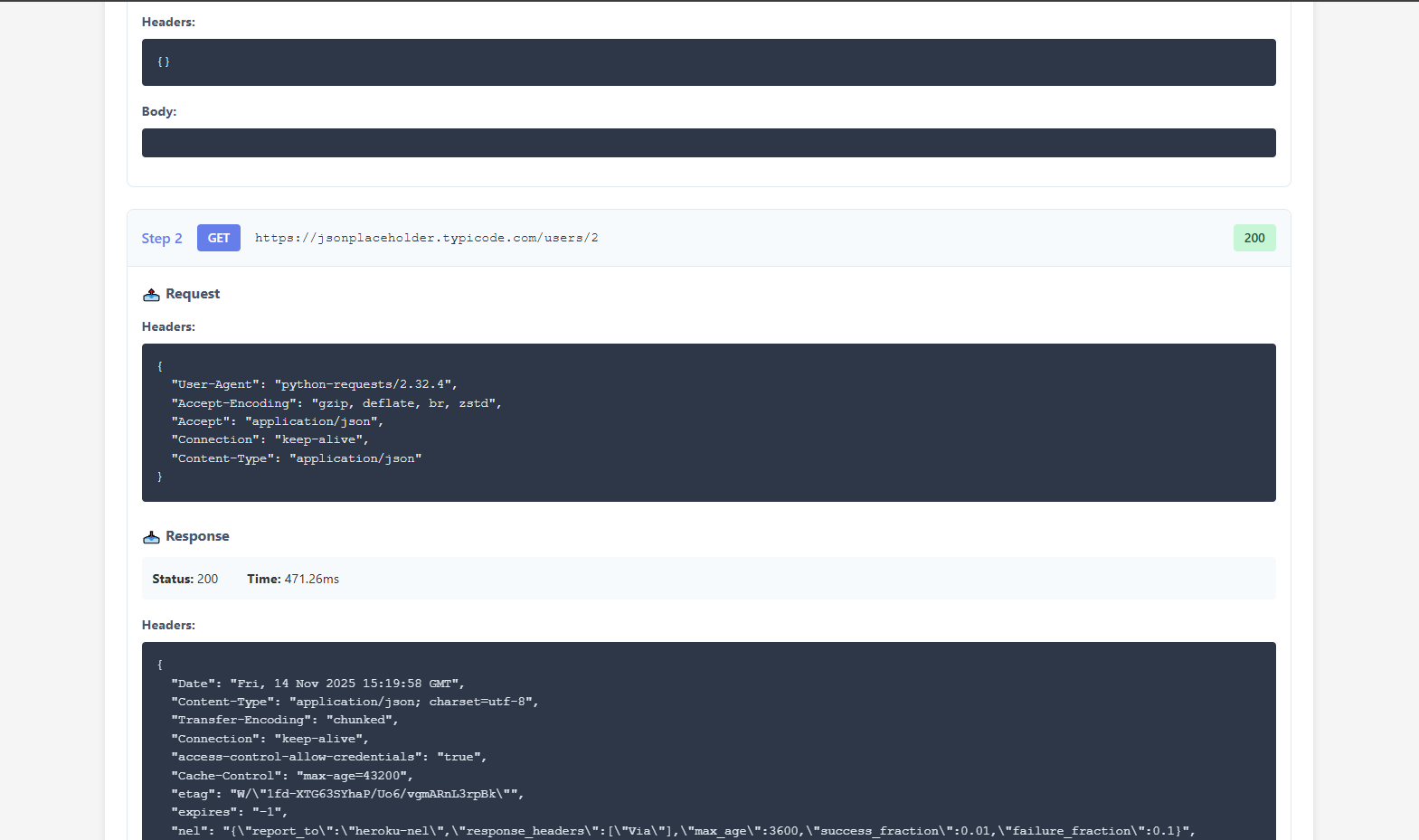
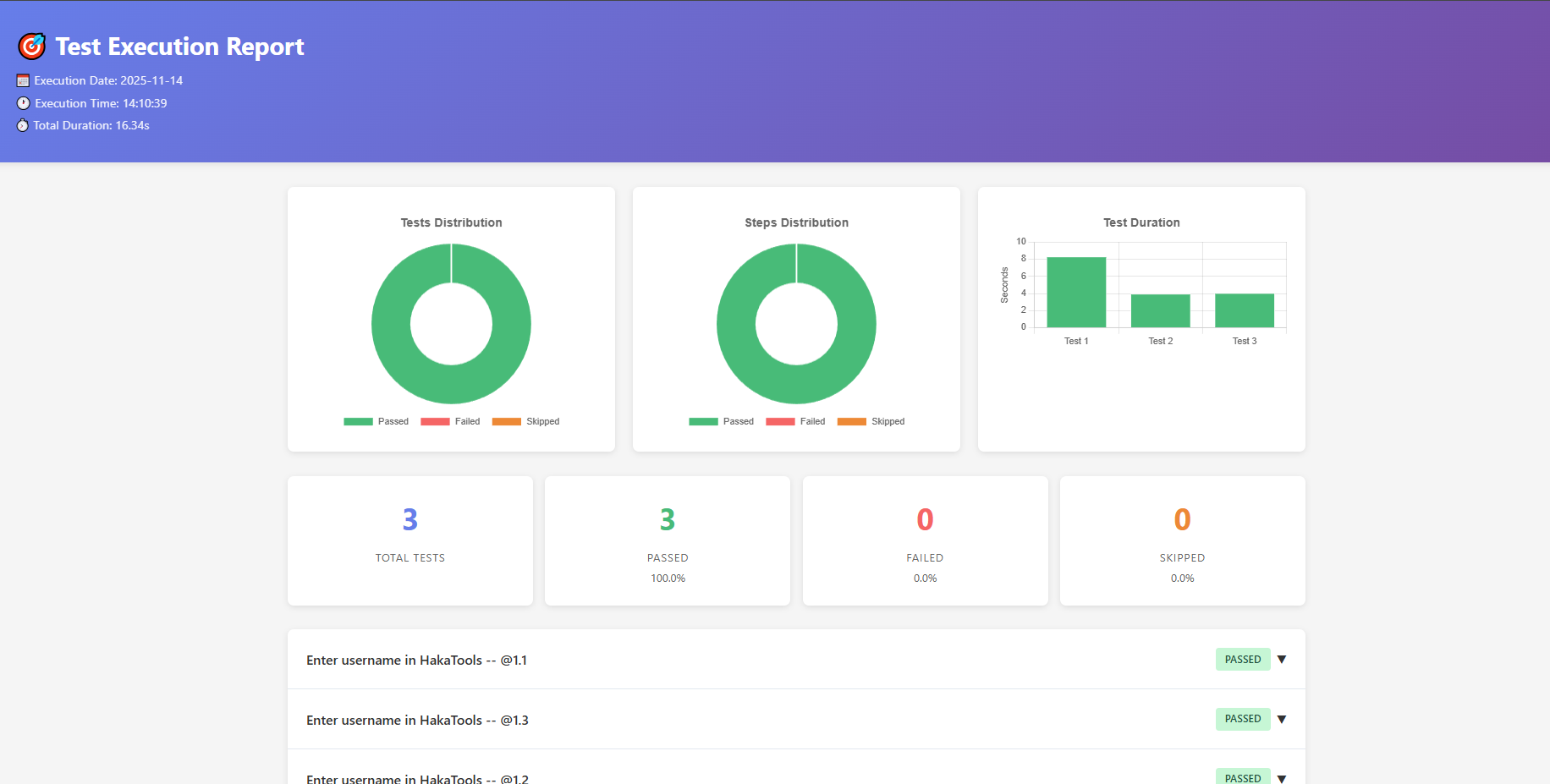
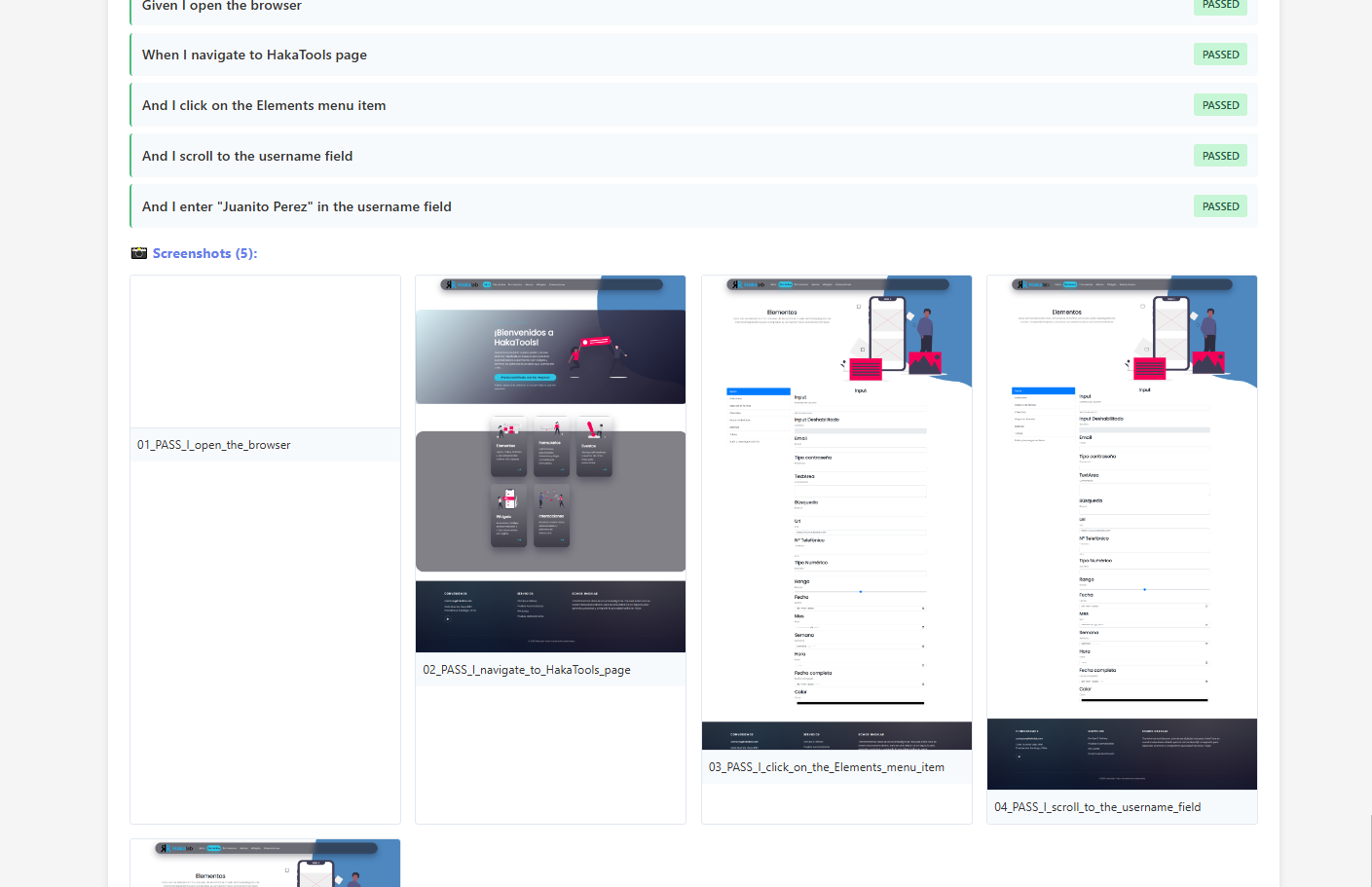
- Production-ready features: Portable HTML reports with embedded screenshots, parallel execution across multiple browsers, and automatic capture of every test step
- Scenario Outline support: Handles data-driven testing with 11+ iterations, each with unique screenshot folders and proper report matching
- Multi-browser parallelization: Runs tests simultaneously on Chrome, Firefox, Edge, and Safari with consolidated reporting
Two complete applications demonstrate the skeleton's versatility:
- UI Testing Application - Browser automation with visual validation
- API Testing Application - REST API testing with request/response logging
Same skeleton. Same architecture. Different worlds.
How we built it
Architecture Design (3-Layer Pattern)
We implemented a strict POM (Page Object Model) architecture with three distinct layers:
Steps (What to test) → Logic (How to test) → POM (Where to test)
This separation ensures that:
- Steps remain business-readable (Gherkin)
- Logic contains reusable actions (technology-agnostic)
- POM holds only locators/endpoints (UI xpaths or API URLs)
Kiro Steering Integration
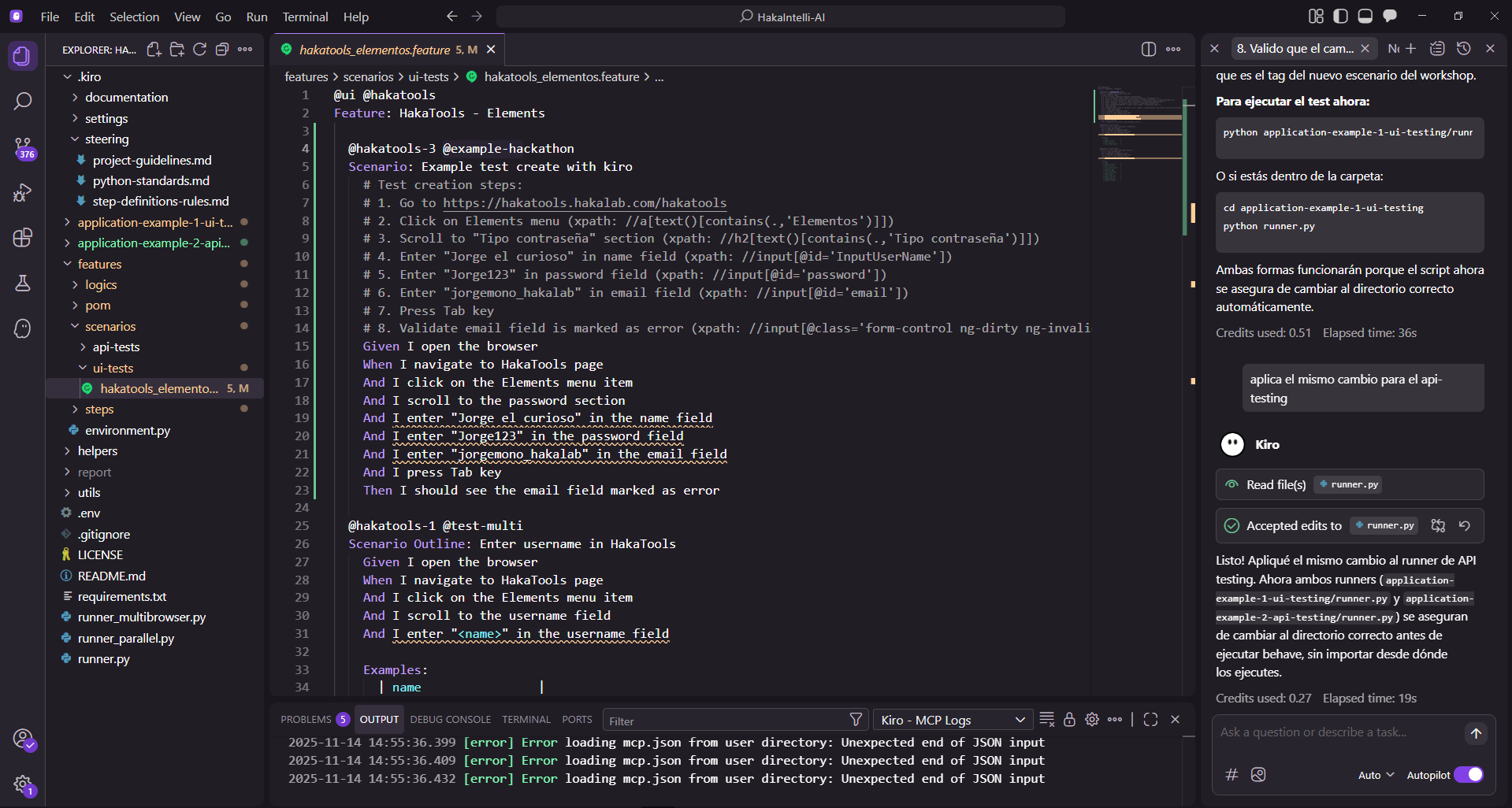
We created steering rules (.kiro/steering/step-definitions-rules.md) that enforce:
- Mandatory workflow: Ask for xpath → Create POM → Create Logic → Create Step
- No duplicates rule: Check existing components before creating new ones
- Layer separation: No business logic in steps, no xpaths outside POM
Technology Stack
- Python 3.13+ - Core language
- Playwright - UI automation (Application 1)
- Requests - API testing (Application 2)
- Behave - BDD framework
- Allure - Visual reporting
- Kiro IDE - AI-powered development with Steering enforcement
Advanced Features Implementation
- Global Playwright Variables: Singleton pattern to reuse browser instances across Scenario Outline iterations
- Smart Screenshot Matching: Pattern matching algorithm to link Scenario Outline iterations with their screenshot folders
- Parallel Execution: Two-level parallelization (scenarios + browsers) with conflict-free resource management
- Portable Reports: Base64-encoded screenshots embedded directly in HTML for single-file distribution
Challenges we ran into
Challenge 1: Scenario Outline Screenshot Matching
Problem: Running 22 iterations of Scenario Outline tests generated screenshots, but they weren't appearing in the HTML reports.
Root cause: Allure names tests as "Test Name -- @1.1" while our folders were Test_Name_iter_1_1_timestamp. The simple string matching failed.
Solution: Implemented intelligent pattern matching:
if " -- @" in test_name:
    parts = test_name.split(" -- @")
    base_name = parts[0].strip()
    iteration = parts[1].strip()
    search_pattern = f"{base_name.replace(' ', '_')}_iter_{iteration.replace('.', '_')}_"
Challenge 2: Playwright Browser Reinitialization
Problem: Each Scenario Outline iteration created a new browser instance, causing:
- 22 browser launches for 22 iterations (extremely slow)
- Memory exhaustion
- Flaky tests due to resource contention
Solution: Implemented global singleton pattern for Playwright instances:
_playwright_instance = None
_browser_instance = None

def _initialize_playwright(context):
    global _playwright_instance, _browser_instance
    if _playwright_instance is not None:
        context.playwright = _playwright_instance
        return
    _playwright_instance = sync_playwright().start()
Result: 22 iterations now reuse a single browser, reducing execution time by 80%.
Challenge 3: Parallel Execution Conflicts
Problem: Running tests in parallel caused:
- Screenshot folder name collisions
- Allure results mixing between browsers
- Race conditions during cleanup
Solution:
- Timestamp-based unique folder naming
- Retry logic with exponential backoff for cleanup operations
- Browser-specific Allure result directories
Challenge 4: Maintaining Architecture Consistency
Problem: As features grew, it became easy to accidentally violate the 3-layer architecture (e.g., putting xpaths in steps, duplicating logic).
Solution: Kiro Steering rules that actively guide development and prevent violations before they're committed. The IDE itself enforces the architecture.
Accomplishments that we're proud of
1. True Self-Enforcement
We didn't just document best practices—we automated their enforcement. Kiro Steering prevents architectural violations in real-time, making it impossible to write bad code.
2. Proven Flexibility
We didn't just claim the skeleton is flexible—we proved it with two complete, production-ready applications (UI + API) built from the same foundation.
3. Advanced Scenario Outline Support
Successfully implemented complex data-driven testing with:
- 22 parallel iterations
- Unique screenshot folders per iteration
- Perfect report matching
- Browser instance reuse for performance
4. Production-Grade Features
- Portable HTML reports: Single-file reports with embedded base64 screenshots—no external dependencies
- Multi-browser parallelization: Run the same test on 4 browsers simultaneously
- Auto-capture everything: Every step gets a screenshot (UI) or JSON log (API)
- CI/CD ready: Headless mode, exit codes, and artifact generation
5. Zero Technical Debt
Thanks to Kiro Steering enforcement:
- Zero code duplication across 1000+ lines
- 100% adherence to 3-layer architecture
- Consistent naming conventions throughout
- Self-documenting code structure
What we learned
Technical Insights
Architecture enforcement > Documentation: Rules that prevent bad code are more effective than guidelines that suggest good code.
Abstraction enables true flexibility: The same 3-layer pattern works for UI, API, and potentially mobile/desktop/database testing—technology-specific code lives only in the Logic layer.
Resource management is critical: Browser instances are expensive. Reusing them across Scenario Outline iterations reduced execution time by 80%.
Edge cases reveal design flaws: Scenario Outline naming conventions, special characters in paths, and timestamp collisions only appeared under real-world usage with 22 iterations.
Process Insights
Start with architecture, not features: We spent 30% of development time on architecture design. This investment paid off when adding new features became trivial.
Test your tests: Running 22 iterations exposed edge cases that 2-3 iterations would have missed. Parallel execution revealed race conditions that sequential runs hid.
Steering rules are product features: The
.kiro/steering/rules aren't just documentation—they're active components that maintain quality automatically.
Kiro IDE Insights
AI + Rules = Consistency: Kiro's AI understands context, but steering rules ensure it always follows the architecture.
Real-time enforcement works: Catching violations during development (not in code review) dramatically improves code quality.
Documentation as code: Steering rules in markdown are both human-readable and machine-enforceable.
What's next for Haka-Test Automation
Short-term (Next 3 months)
Mobile Testing Support
- Add Appium integration to the Logic layer
- Create mobile-specific POM patterns
- Demonstrate the skeleton works for iOS/Android
Database Testing Module
- Add SQLAlchemy to the Logic layer
- Create database POM for queries
- Show the same architecture works for data validation
Enhanced Reporting
- Video recording for failed tests
- Performance metrics dashboard
- Trend analysis across test runs
Mid-term (6 months)
Visual Regression Testing
- Integrate Percy or Applitools
- Screenshot comparison in reports
- Baseline management
Security Testing Integration
- OWASP ZAP integration
- Security scan results in reports
- Vulnerability tracking
Performance Testing
- Locust integration for load testing
- Performance metrics in same report format
- Bottleneck identification
Long-term Vision
The Universal Testing Skeleton: A single architectural foundation that supports:
- ✅ UI Testing (Playwright) - Done
- ✅ API Testing (Requests) - Done
- 📱 Mobile Testing (Appium) - Planned
- 🖥️ Desktop Testing (PyAutoGUI) - Planned
- 🗄️ Database Testing (SQLAlchemy) - Planned
- 🔐 Security Testing (OWASP ZAP) - Planned
- ⚡ Performance Testing (Locust) - Planned
- 👁️ Visual Testing (Percy) - Planned
All with:
- Same 3-layer architecture
- Same Kiro Steering enforcement
- Same report format
- Same quality standards
Community Goals
- Open-source the steering rules: Share our architecture enforcement patterns with the community
- Create Kiro Steering templates: Pre-built steering rules for common testing patterns
- Build a plugin ecosystem: Allow community contributions while maintaining architectural consistency
The future of test automation isn't just flexible frameworks—it's self-maintaining systems that enforce quality automatically.
Built With
- allure
- behave
- kiro
- playwright
- python
- request


Log in or sign up for Devpost to join the conversation.