-
-
Architecture
Inspiration
As developers, we've all been there. It's 3 AM, the hackathon deadline is looming, our project finally works, but now we have to write the submission text. We're exhausted, our brains are fried, and we can't string two compelling sentences together. This "last-mile problem" is where great projects often fail to impress judges.
We built HackPitch AI to solve our own problem: to be the AI co-pilot that turns a great idea into a winning pitch, letting us focus on what we do best—building.
What it Does
HackPitch AI is a serverless web app that generates a complete, professional, and compelling hackathon submission text from three simple inputs: your Project Name, a One-Line Summary, and your Tech Stack.
The AI analyzes your inputs and generates all the critical sections judges look for: a powerful Inspiration story, a clear What it Does explanation, a How We Built It technical breakdown, realistic Challenges We Ran Into, and exciting What's Next ideas for the project.
How We Built It
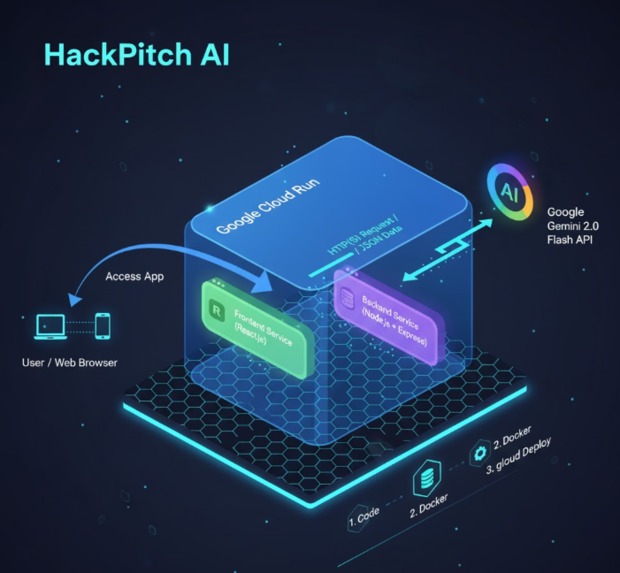
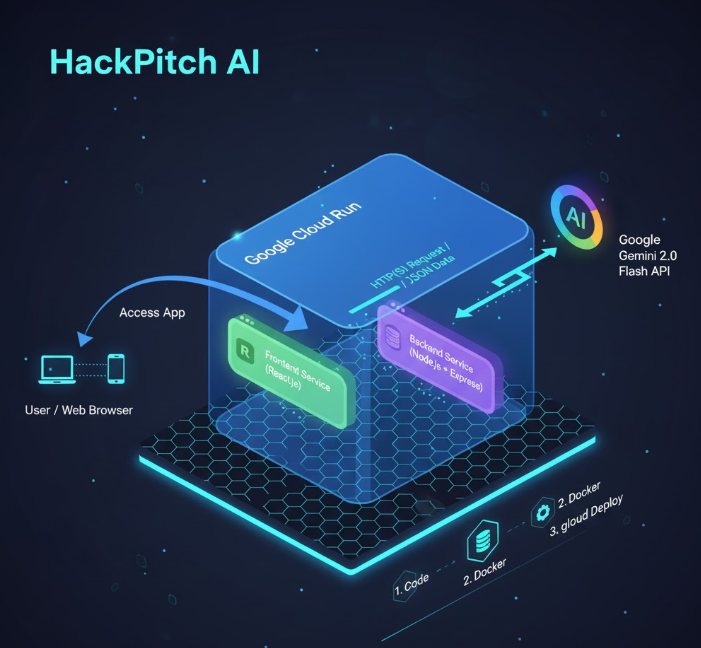
We built this project using a modern, serverless-first architecture, designed perfectly for Google Cloud Run.
Frontend: A fast, responsive React + Vite application. It provides a clean UI for user input and displays the final generated text.
Backend: A Node.js + Express API. This is the "brain" that securely handles requests, communicates with the Gemini API, and returns the pitch.
AI: We used Google AI Studio to "vibe-code" our initial prompt, iterating until the AI's persona—an "expert hackathon judge"—was perfect. The backend securely calls the Gemini 2.0 Flash model to generate the content.
Deployment (Architecture): The entire application is containerized using Docker. Our architecture features two distinct services designed for Google Cloud Run: a service for the React frontend and a separate, auto-scaling service for the Node.js backend. This microservice design is robust, secure, and infinitely scalable.
Challenges We Ran Into
Our biggest challenge was prompt engineering. Getting the Gemini AI to consistently produce text that was not just accurate but also inspiring and human-sounding required dozens of iterations.
We also ran into classic (and frustrating!) Node.js bugs. We spent significant time debugging an issue where our req.body was empty, only to find our app.use(express.json()) middleware was in the wrong order. It was a great reminder that in Express, order matters!
Finally, as students, we hit the hard blocker of needing a credit card to activate the Google Cloud free trial for deployment. We pivoted by building the entire application 100% locally, proving its functionality in our demo video, with the full Cloud Run-ready architecture in our code repo.
What We Learned
We learned how to design, build, and containerize a full-stack, AI-powered application from scratch. We gained deep experience in prompt engineering, debugging Node.js networking, and designing a scalable microservice architecture for a serverless platform like Cloud Run.


Log in or sign up for Devpost to join the conversation.