-
-
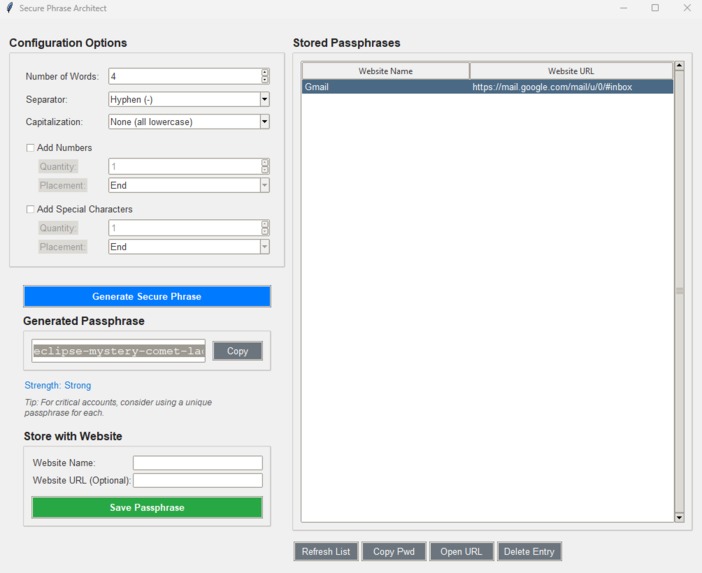
Secure Phrase Architect
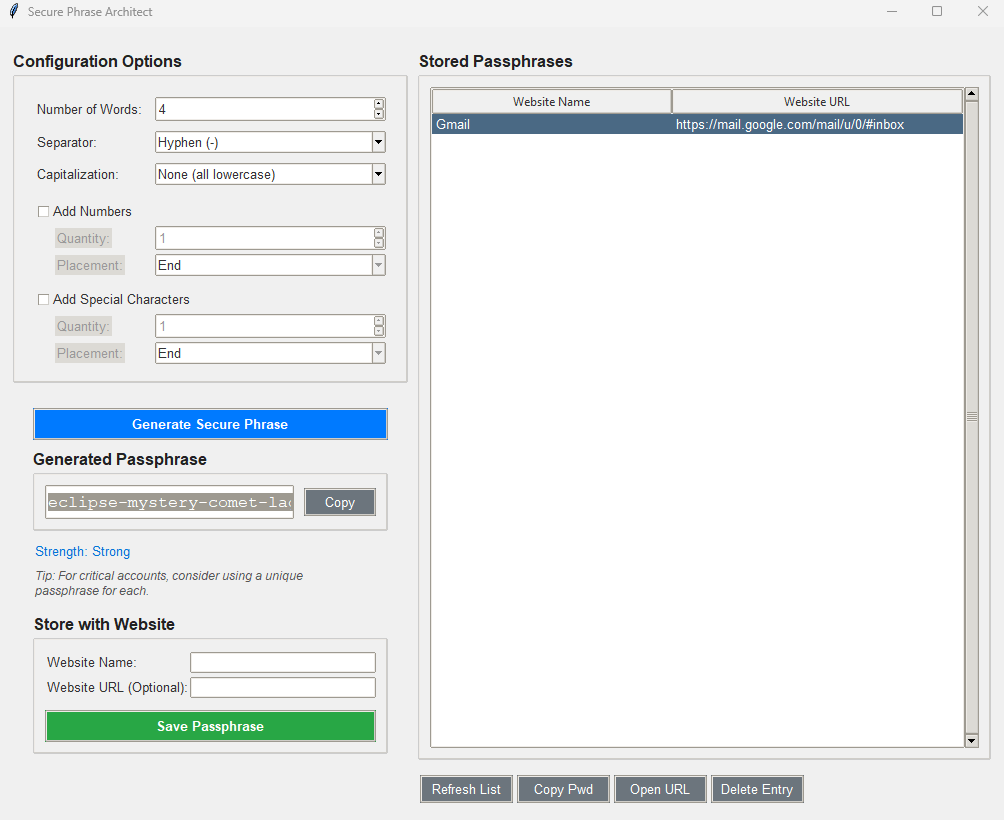
Secure Phrase Architect: My AmpliCode Hackathon 2025 Journey
About the Project
Secure Phrase Architect is a desktop application designed to help users create, manage, and use strong, memorable passphrases. In an era where digital security is paramount, many people struggle with the dichotomy of needing complex passwords for security versus the human need for something rememberable. This project tackles that by leveraging the power of passphrases – sequences of words that are significantly harder for machines to crack than traditional "complex" passwords, yet often easier for humans to recall.
The application allows users to:
- Generate customizable passphrases (varying word count, separators, capitalization, and optional numbers/special characters).
- Instantly see an estimated strength of the generated passphrase.
- Store generated passphrases associated with a website name and URL.
- View, copy, and delete stored entries.
- Directly open the stored website URL from the application.
It's built with Python and Tkinter, aiming for a user-friendly interface that makes robust security practices more accessible.
What Inspired Me
My inspiration for "Secure Phrase Architect" stemmed from a few key observations and the "Security & Online Safety" theme of the AmpliCode Hackathon 2025:
- Password Fatigue is Real: Like many, I've felt the frustration of juggling countless complex passwords, often resorting to patterns that, while seeming secure, are vulnerable. The mental overhead is significant.
- The Power of Passphrases: I've always been a fan of the XKCD comic that beautifully illustrates how a passphrase of common words can be vastly more secure and easier to remember than a jumble of special characters. I wanted to build a tool that champions this approach.
- Accessibility of Security Tools: While sophisticated password managers exist, I wanted to create something relatively simple that could serve as an educational tool as well – demonstrating good passphrase construction and providing immediate feedback on strength.
- The Hackathon Challenge: The "Security & Online Safety" track was a direct call to action. I saw an opportunity to build something tangible that addresses a common, everyday security concern.
The idea was to create more than just a generator; I envisioned a mini-manager that bridges the gap between generating a strong credential and actually using it for a specific service.
What I Learned
This hackathon was a fantastic learning experience. Here are some key takeaways:
- Deepening Python & Tkinter Skills: While I had some Python experience, building a GUI application with Tkinter from scratch was a significant learning curve. I learned a lot about:
- Layout management (
grid,pack). - Event handling and callbacks.
- Using
ttkfor themed widgets and custom styling. - Managing application state through Tkinter variables.
- Layout management (
- Modular Design: As the project grew, the need for separating concerns became evident. Breaking the code into
config.py,logic.py,storage.py, andui.pymade development much more manageable and the codebase cleaner. - File I/O with JSON: Implementing the storage feature using JSON for data persistence was a practical exercise in serialization and deserialization, along with basic file handling.
- UI/UX Considerations (even for simple apps): Thinking about how the user would interact with the application – what's intuitive, what's confusing, how to provide feedback – was crucial. Even small things like disabling buttons when not applicable or providing visual feedback for actions (like "Copied!") enhance the user experience.
- Security Principles in Practice: While the passphrase generation logic is the core, thinking about aspects like the strength meter and the (very important) warning about plaintext storage reinforced practical security awareness.
- Rapid Prototyping: The hackathon environment forces you to make quick decisions and build iteratively. I started with the core generation and gradually added layers of functionality.
How I Built My Project
The development of "Secure Phrase Architect" followed an iterative process:
- Core Logic First (Python Console): I began by writing the fundamental passphrase generation logic in Python, testing it in the console. This included word selection, separators, and initial customization options.
- Basic Tkinter Shell: Next, I created the initial Tkinter window and started porting the generation logic to be triggered by a button, displaying the result in a label or entry field.
- Adding Customization UI: I then built out the UI elements for all the customization options (number of words, separators, capitalization, numbers, special characters) using
ttk.Spinbox,ttk.Combobox, andttk.Checkbutton. - Strength Meter: The strength estimation logic was developed and integrated, with a label updating dynamically.
- Modularity Refactor: At this point, the UI code was getting long, so I refactored by separating constants into
config.pyand core functions intologic.py. - Styling and UI Polish: I dedicated time to improving the visual appeal using
ttk.Style, custom fonts, and better layout spacing to make it more user-friendly. - Storage Feature - Backend (
storage.py): I createdstorage.pyto handle saving and loading passphrase entries to/from a JSON file. This involved functions for adding, deleting, and retrieving data. - Storage Feature - Frontend (UI):
- Added input fields for website name and URL.
- Implemented the "Save" button and its logic, including the crucial plaintext storage warning.
- Integrated a
ttk.Treeviewto display stored entries. - Added action buttons (Refresh, Copy Pwd, Open URL, Delete) for interacting with the stored data.
- Connecting UI Actions to Storage: Wired up the action buttons to call the appropriate functions in
storage.pyand update the Treeview. - Final Testing and Refinements: Thoroughly tested all functionalities, fixed bugs, and made minor UI tweaks.
Throughout the process, I frequently referred to Tkinter documentation and online examples to overcome specific UI challenges.
Challenges I Faced
Building "Secure Phrase Architect" within the hackathon timeframe came with its set of challenges:
- Tkinter Layout Nuances: Getting the Tkinter layout to look clean and behave responsively (especially with nested frames and dynamic enabling/disabling of widgets) required a fair bit of trial and error.
gridandpackcan be powerful but sometimes counterintuitive. - State Management in UI: Keeping all the UI elements (like buttons and option sub-sections) correctly enabled or disabled based on user selections and application state was tricky to manage initially.
- Data Persistence & Security Trade-offs: Implementing the storage feature brought up the challenge of how to store the data. For a hackathon project, using plaintext JSON was a pragmatic choice for speed of development. However, I recognized this is not secure for real-world use. Communicating this limitation via a warning message was an important, albeit challenging, part of the process – balancing functionality with responsible disclosure. A more secure solution (like OS keychain integration or encrypted files) would be a next step but was beyond the scope of a rapid hackathon build.
- Feature Creep vs. Time: It's easy to get carried away with adding more features. Deciding what was essential for a Minimum Viable Product (MVP) for the hackathon and what could be a "future improvement" was a constant balancing act.
- Integrating Treeview with Data: Populating the
ttk.Treeviewand handling selections to trigger actions (like copying the actual passphrase which wasn't directly displayed in a column) required careful handling of item IDs and associated data (using tags).
Despite these challenges, the process was incredibly rewarding, and I'm proud of the functional and (hopefully!) useful tool that emerged. "Secure Phrase Architect" is my contribution to making online security a little bit easier and more intuitive for everyone.

Log in or sign up for Devpost to join the conversation.