-
-
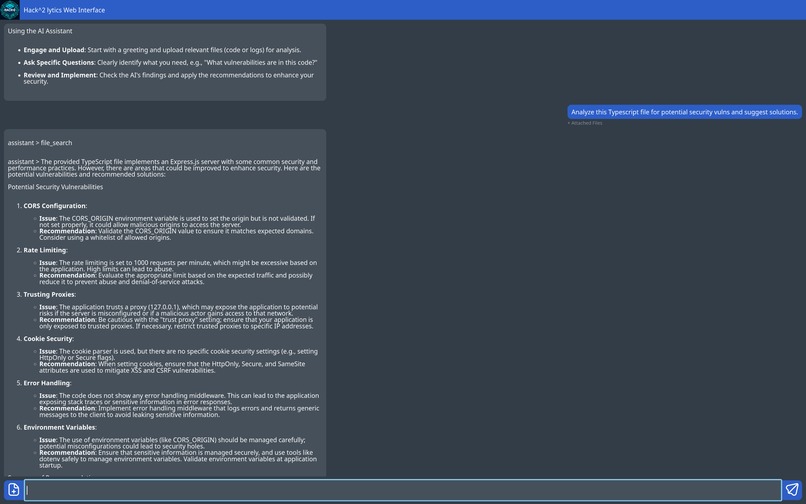
Screenshot of our assistant in action
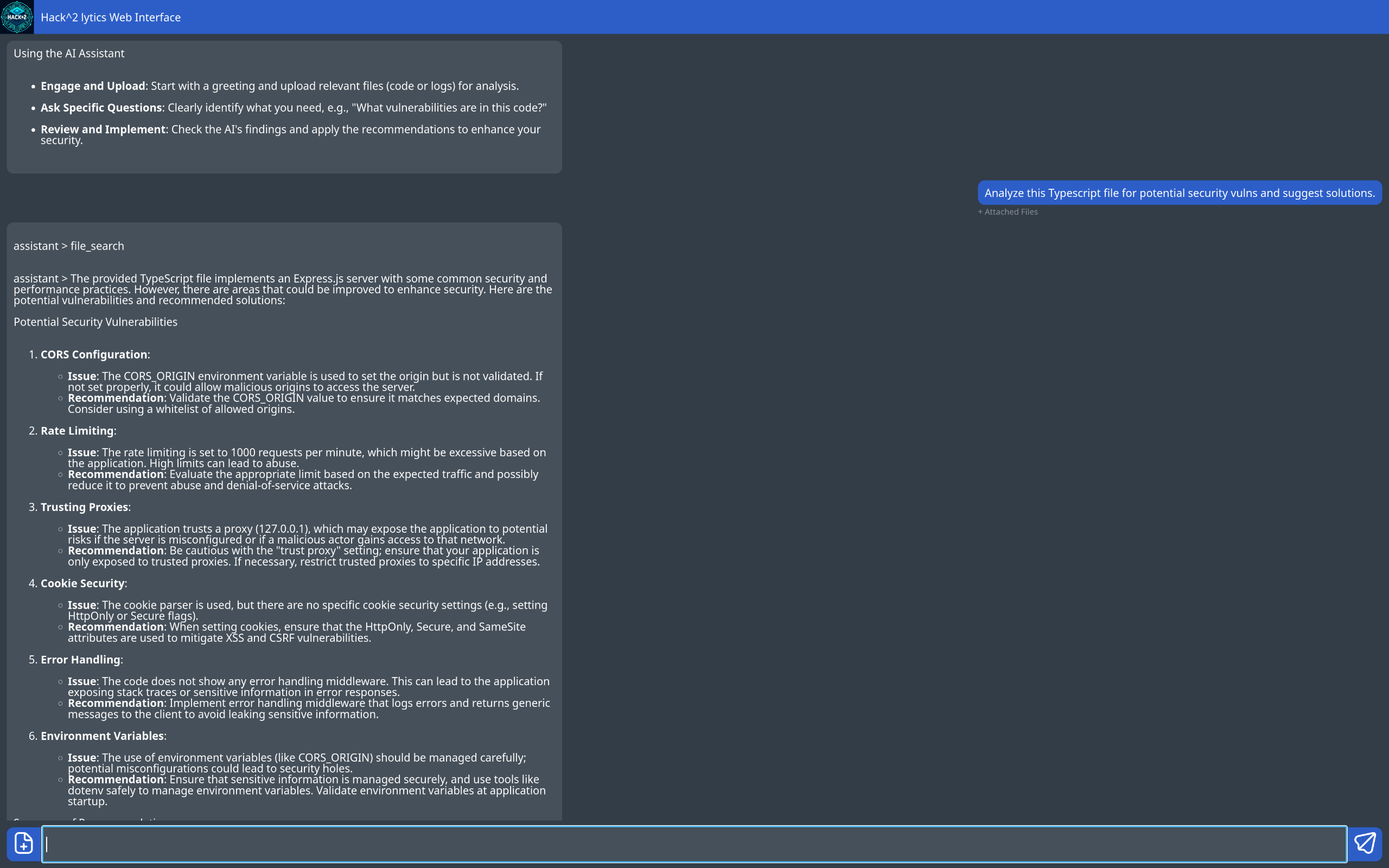

LLM-Powered Cybersecurity Assistant
🔥 Inspiration
This project stemmed from our concern about the learning curve for cybersecurity. For aspiring web developers, this process can be particularly difficult due to the broad scope of cybersecurity—let alone the knowledge required for web development.
To dig deeper into this issue, we explored accessible tools for evaluating website security. While collecting test data, our team discovered a major vulnerability on a particular site. This unnamed website had been operating for three years and had handled thousands of users. The vulnerability was easily exploitable, putting sensitive personal information at risk.
While this discovery prompted urgent discussions with the website owners and a vulnerability report, it also reinforced the importance of cybersecurity in our web-centric society. This motivation propelled our Hacklytics project into its final form:
Hack^2lytics: A beginner-friendly, LLM-powered assistant for detecting website vulnerabilities and providing cybersecurity insights.
💡 What It Does
Our LLM-powered tool is an interactive chat application designed to analyze source files and network requests, identifying potential vulnerabilities while providing educational insights.
Beyond detection, it suggests possible fixes and allows users to engage in a dynamic conversation with the LLM, deepening their understanding of cybersecurity. By exploring security issues through an intuitive chat interface, developers can refine their skills and build more secure software.
🛠️ How We Built It
⚡ LLM API-Powered Backend
Since we had no prior experience deploying an LLM via an API, building this backend taught us a great deal about the intricacies of using the OpenAI API. Our API of choice was GPT-4o-mini, selected for its speed, affordability, and ability to fit within OpenAI's free-tier credits.
To ensure consistent detection of website vulnerabilities and insights tailored to our project’s needs, we experimented with:
- Different API calls (Chat Completion vs. Assistant)
- Prompt engineering for more accurate responses
- LLM functionalities like file search, incorporating user-provided documents in inference
Python scripts were integrated as part of the web server to streamline the process.
🌍 Web Server
We utilized two separate backend servers:
- Frontend communication server
- LLM output generation server
This approach enhances scalability by abstracting code analysis from backend tasks and allows us to eventually transition to self-hosted models like DeepSeek.
This application structure proved successful, allowing our ML developers to work independently from our full-stack developers.
🎨 Website Design
We used Figma to design the base frame for our website, including:
- A header for the interface title
- A text box for user input
- Buttons for file uploads and sending messages
Since none of us had prior experience with Figma, we learned through online tutorials and applied our existing web development knowledge to create an intuitive design.
🚧 Challenges We Ran Into
🖥️ Hosting an LLM Locally
We initially attempted to use Georgia Tech AI Makerspace and Hugging Face to host an LLM locally. However, we encountered:
- Inefficient Hugging Face model deployment
- Slow LLM inference speeds
- Disk quota limitations on our cluster node
These issues were time-consuming to debug and limited our final product’s quality. Given our project's time constraints, we pivoted to an API-based approach for model deployment.
🔗 Server Communication
As our project evolved, defining a clear interface between our servers became a challenge. Changing requirements required constant communication between our two subteams to ensure seamless integration.
🎨 Web Design Learning Curve
Since none of us had used Figma before, we had to quickly learn it while designing the website. We relied on online tutorials and collaborative problem-solving to overcome this challenge.
🏆 Accomplishments That We're Proud Of
- We got this working! 🎉
- Successfully integrated LLM-powered vulnerability detection
- Overcame technical hurdles with model hosting and server architecture
- Designed a functional, intuitive web interface with no prior Figma experience
📚 What We Learned
- Trade-offs in LLM hosting → Computing cost vs. speed vs. capability
- Rapid web development → Leveraging ChatGPT to learn new tools on the fly
- Effective teamwork & task distribution → Abstracting different parts of the problem so each subteam could work independently
🚀 What's Next for Hack^2lytics
🔍 LLM API-Powered Backend
- Fine-tune prompt engineering to detect more subtle vulnerabilities and increase efficiency
- Experiment with self-hosted models to reduce reliance on APIs
- Expand RAG capabilities
🌐 Web Server
- Improve server efficiency and API call optimization
🎨 Website Design
- Refine user experience (UX) with more interactive elements
Thanks for reading! 🚀
Built With
- .tech
- cloudflare
- contabo
- mongodb
- nunjucks
- openai
- postman
- python
- scss
- typescript


Log in or sign up for Devpost to join the conversation.