HabiWatch
HabiWatch helps habitat scientists decide where to inspect by gathering public evidence, checking it, and monitoring the same area over time.
Category: Taskmaster
Built for: All Things Agentic Hackathon
Source: github.com/Husky-AI9/HabiWatch
Required Google stack: Gemini 3.5 Flash through the Gemini API · Google ADK and Google GenAI SDK · Cloud Run, Firestore, Pub/Sub, and Cloud Storage
Inspiration
The idea started when I tried to answer a habitat question with public data. The data existed, but it was spread across satellite archives, climate portals, species databases, fire maps, and wetland records. Putting one map together was only the start. I still had to reconcile dates, notice missing evidence, decide where a field visit would matter, save the reasoning, and remember to repeat the work later.
A habitat scientist faces the same problem at a larger scale. A small field team may be responsible for a large area. They cannot inspect every place every month. They need to know what changed, how strong the evidence is, and where to look first.
HabiWatch is the workflow I wanted for that problem. It handles the slow, repeatable work around the decision. It does not replace a scientist or prove environmental damage. It helps a scientist use limited field time on the places with the strongest evidence.
Real use case: Bobcat Lakes
A government conservation scientist sees possible vegetation stress around Bobcat Lakes in Montana. The field team cannot inspect the whole habitat, so they need to know whether conditions changed and where to look first.
The scientist searches for Bobcat Lakes, draws an area below 150 square miles, and asks:
How has this habitat changed from 2005–2024? Assess climate pressure, documented biodiversity, vegetation stress, and current wildfire exposure, then identify where a field team should inspect first.
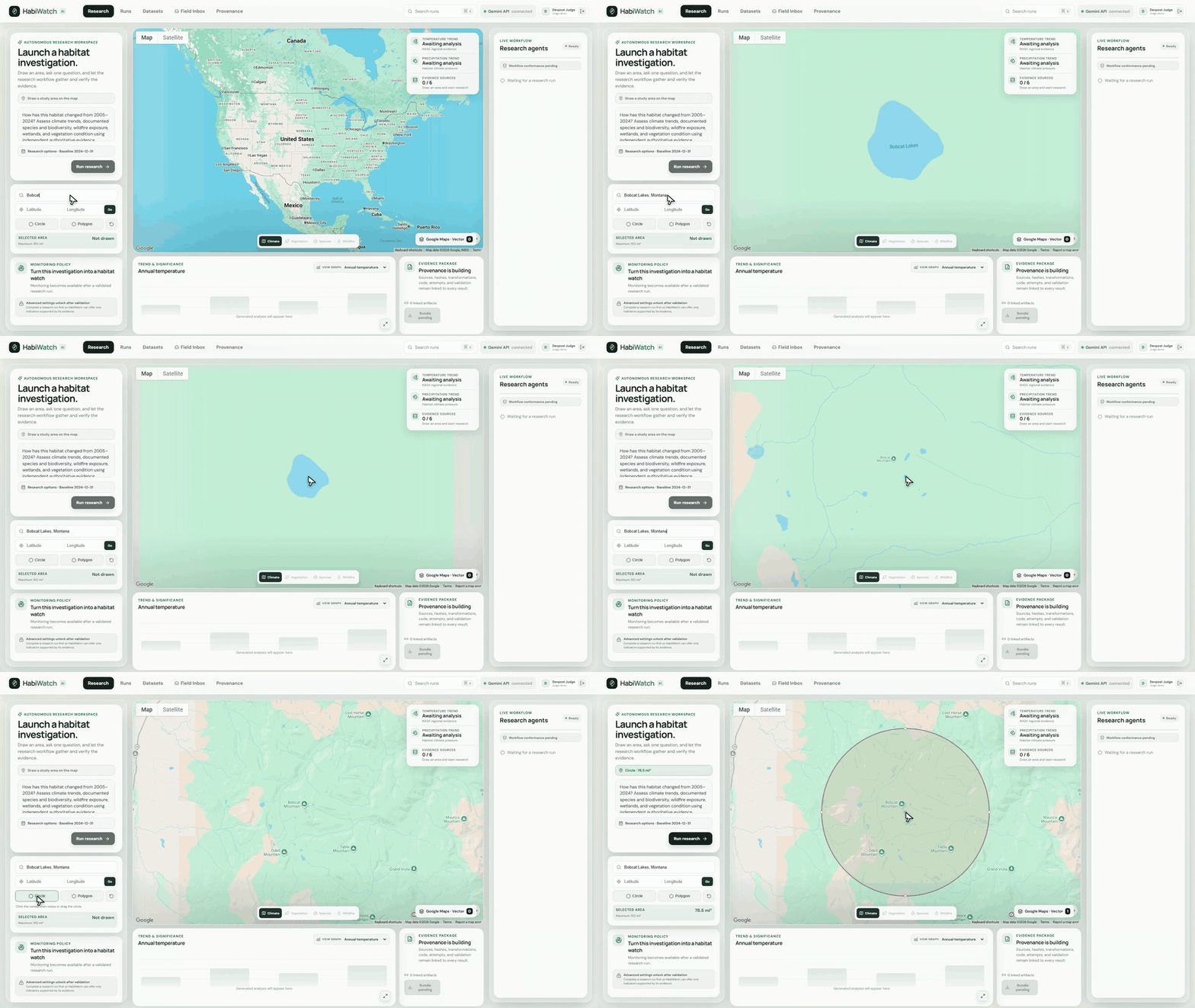
The study shape becomes the boundary for every source query and calculation.
- Finds climate, species, wildfire, wetland, hydrology, and Sentinel-2 evidence.
- Calculates vegetation greenness and moisture from real multispectral bands.
- Compares recent conditions with the same season in the previous five years.
- Shows missing data, source disagreements, and confidence limits.
- Creates an evidence package and a suggested field task.
- Lets the scientist monitor the same area on a schedule.
For example, the scientist can check monthly for falling NDVI, falling NDMI, or growing stressed area. If a value crosses the chosen threshold, HabiWatch checks the finding again and creates an incident.
The work continues after the first chart appears. That is the main reason I built it.
What it does
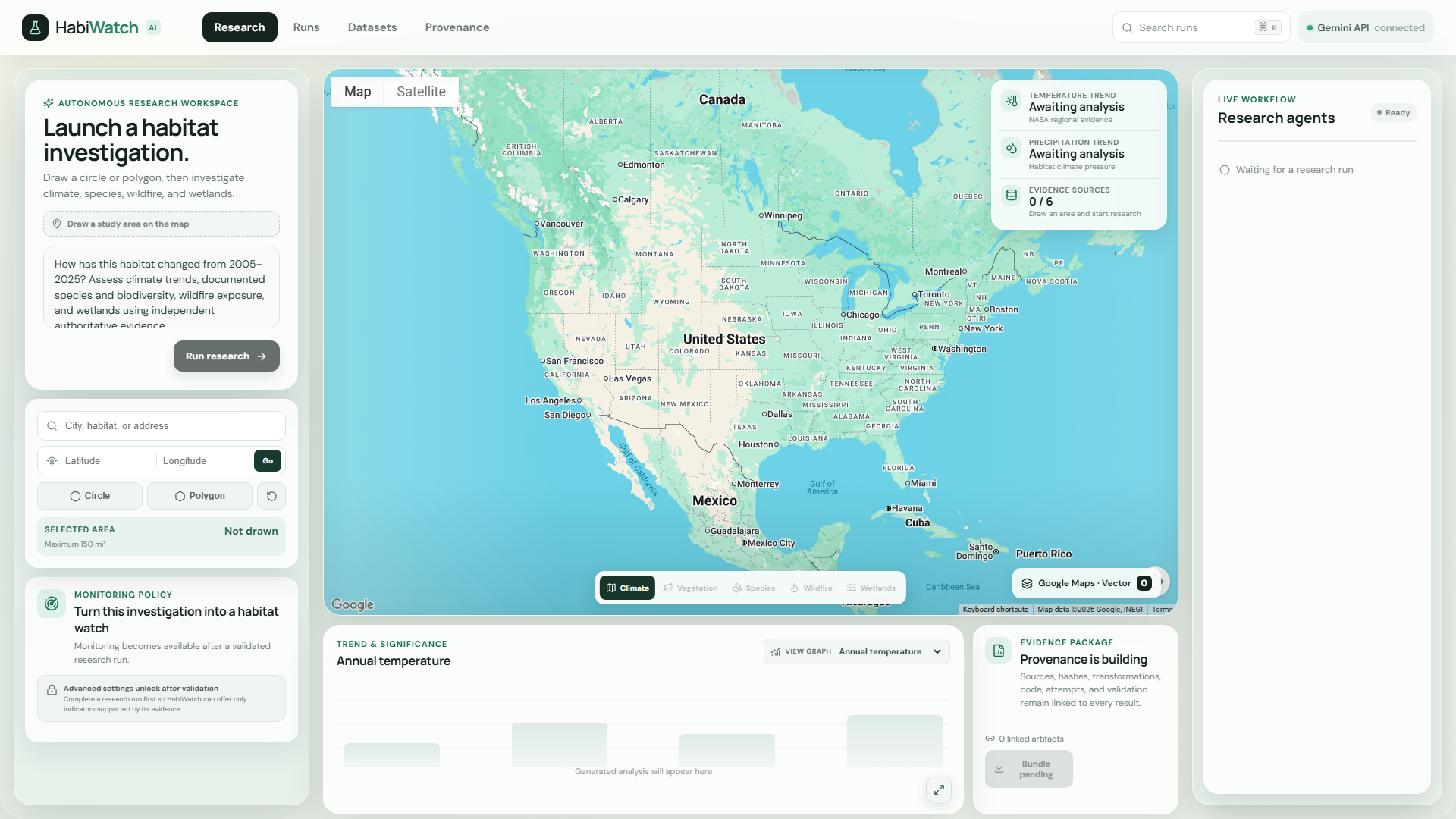
The selected map shape controls the data search, satellite processing, charts, monitoring policy, and field task.
- Search by habitat or coordinates, then draw a circle or polygon.
- Explore Climate, Vegetation, Species, and Wildfire views.
- Inspect overlays and charts while the Live Workflow shows each step.
- Open sources, warnings, checksums, and model records.
- Save runs and return after a refresh.
- Create, edit, pause, resume, or run a monitoring policy.
- Review incidents and field tasks.
Agent workflow
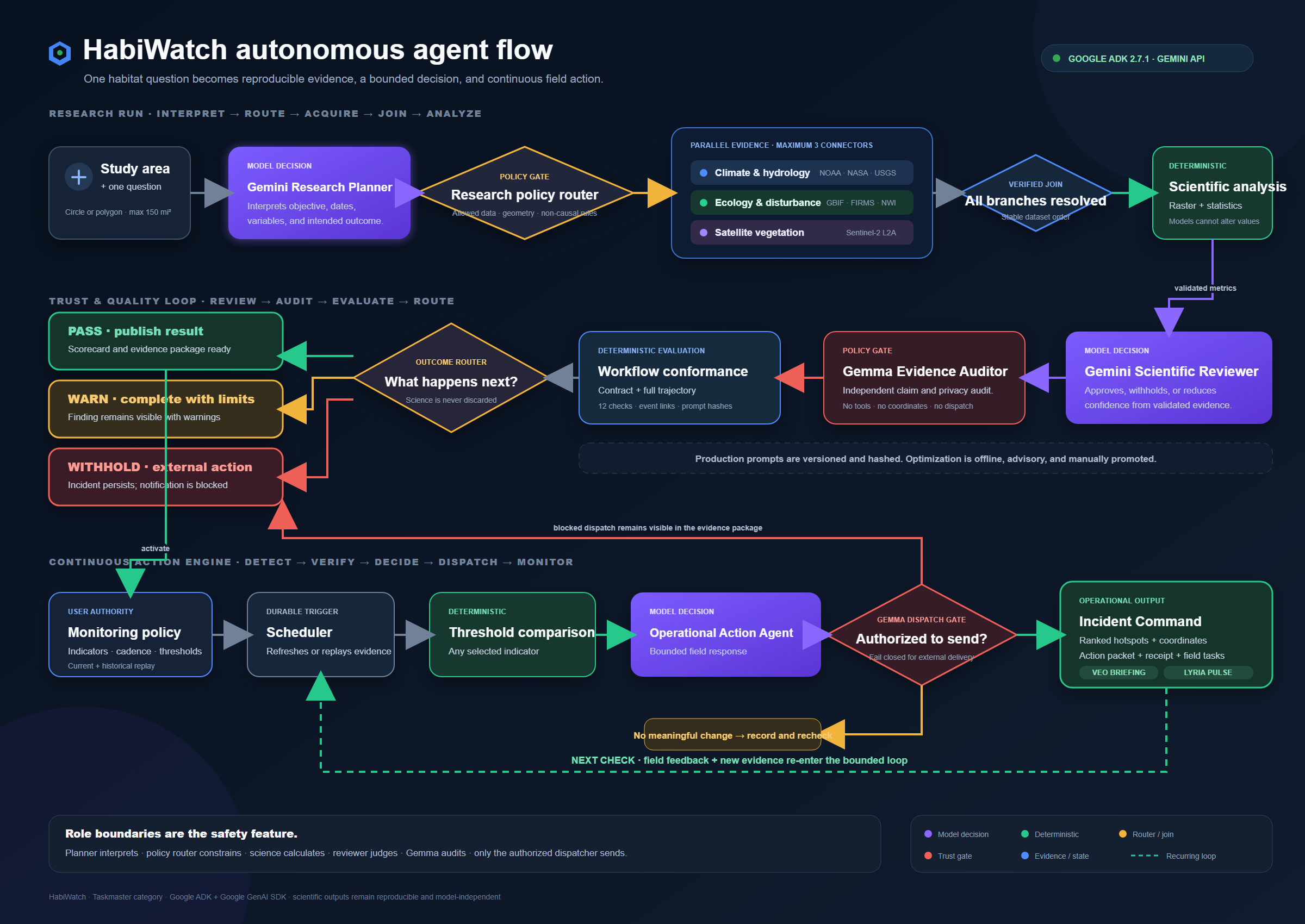
One question starts the full background workflow:
Plan → Apply rules → Gather evidence in parallel → Join results
→ Calculate → Review → Audit → Build evidence → Monitor
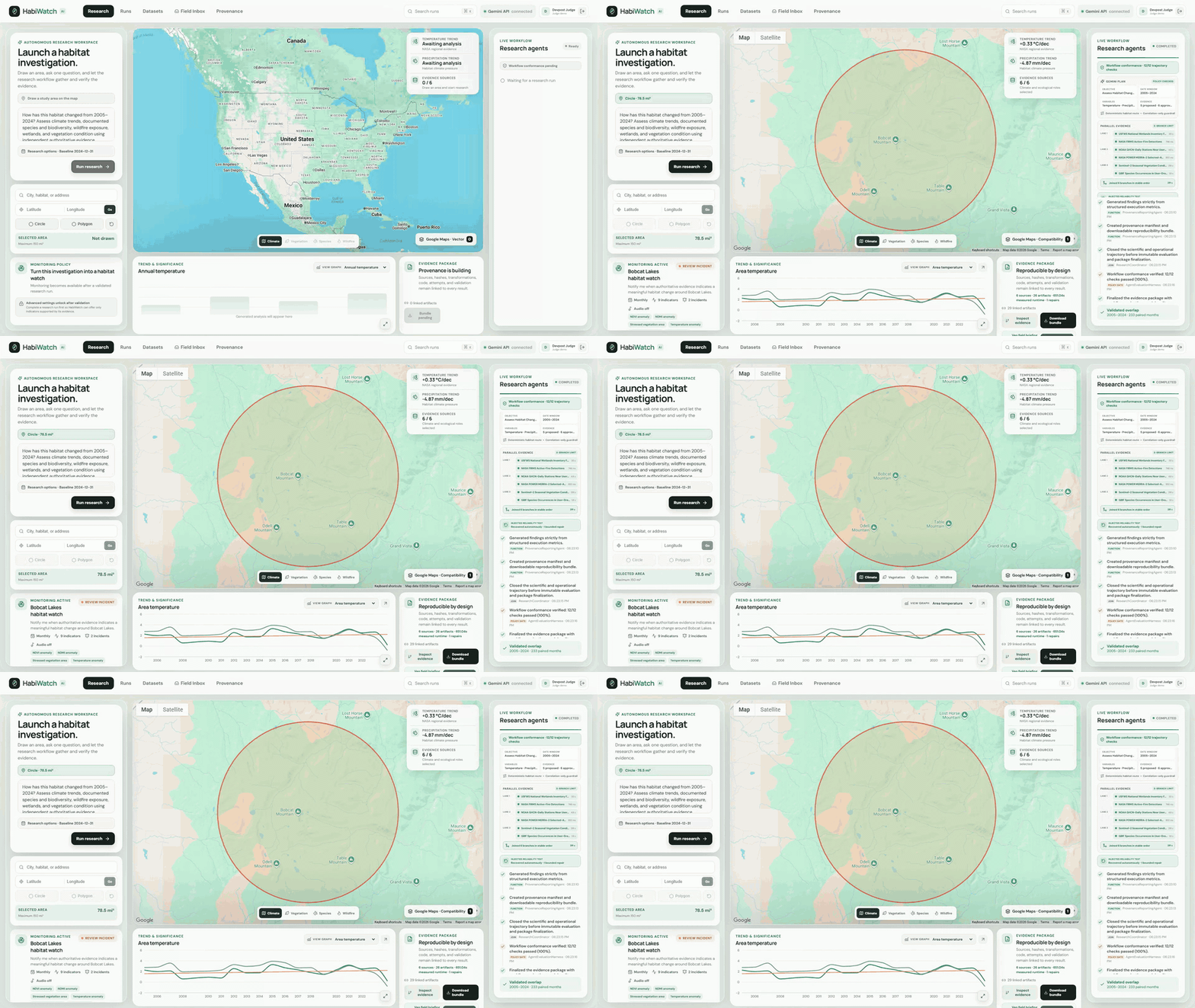
The right sidebar shows model decisions, deterministic functions, parallel branches, recovery, and the join point while the run is active.
- Research Planner: Gemini 3.5 Flash identifies the dates, variables, and goal.
- Policy router: Server code limits datasets, geometry, analysis, and claims.
- Evidence branches: Up to three connectors run at once, then save in a fixed order.
- Scientific analysis: Code calculates trends, NDVI, NDMI, coverage, and thresholds.
- Scientific Reviewer: Gemini 3.6 Flash reviews results, gaps, and disagreements.
- Gemma audit: Gemma checks findings and messages without tools or notification access.
- Operational Action Agent: It prepares a field task after a meaningful monitored change.
Every completed run also gets a 12-check report. It checks the response, workflow order, source grounding, reproducibility, and safety rules. The report links each check to real timeline events.
Why this helps a scientist or agency
HabiWatch is useful when a team manages more habitat than it can inspect often.
It can help with wetland condition checks, restoration follow-up, drought stress, wildfire recovery, and species observation gaps.
- Spend less time repeating the same source search.
- Use limited field crews where the evidence shows the strongest change.
- Keep one record of the sources, dates, warnings, and decisions.
- Continue checking after the first report.
- Explain later why a location was chosen for inspection.
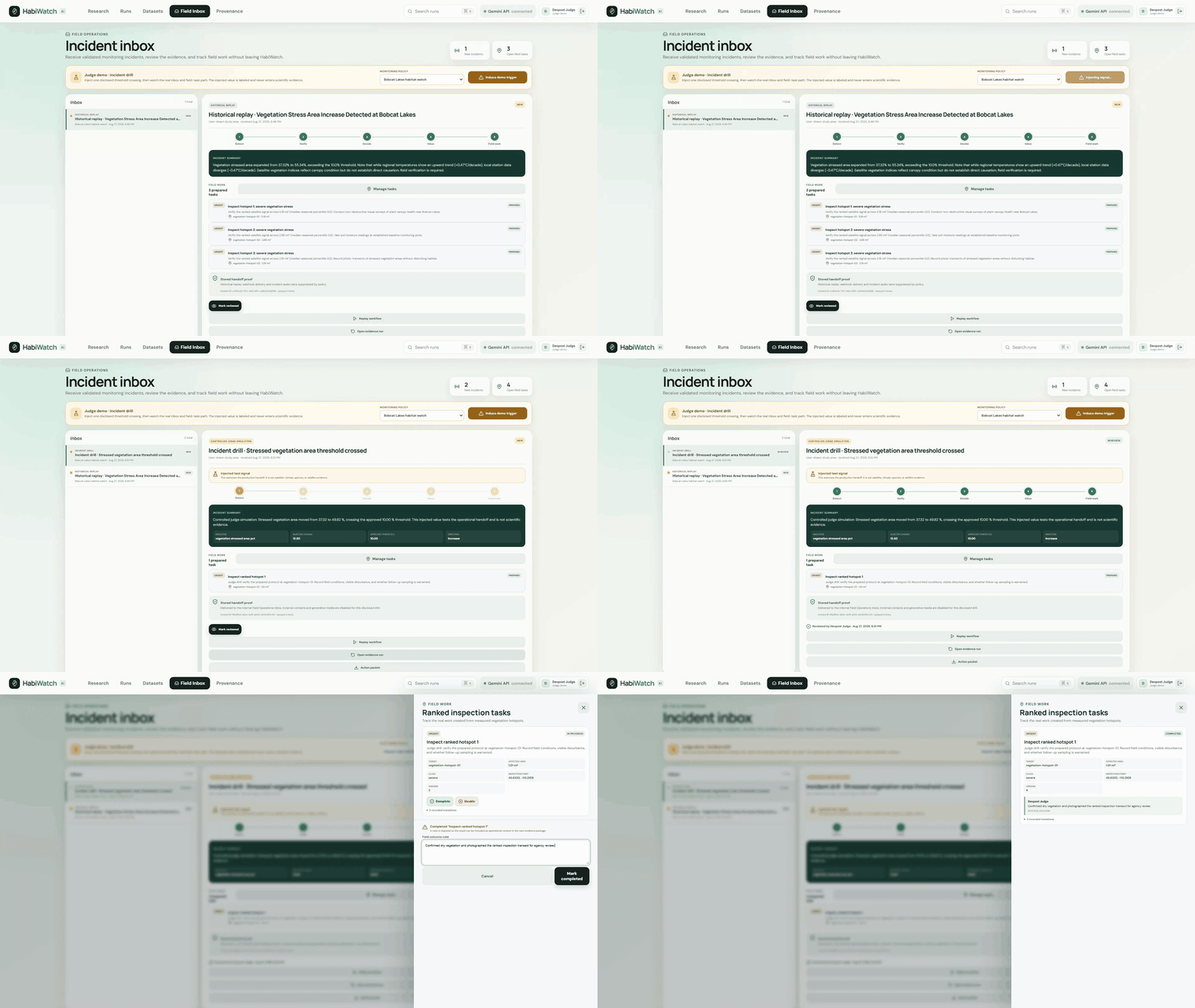
A disclosed demo trigger shows the same incident path without pretending it is live scientific evidence.
Why each Google model has one job
HabiWatch calls Google AI from the backend with a server-side API key through the Gemini API. It does not use Vertex AI.
Gemini 3.5 Flash is part of every research run, not a model that is only listed in configuration. A real invocation starts each investigation and its typed result is saved with the run.
| Model | Its job | Why I use it here |
|---|---|---|
Gemini 3.5 Flash (gemini-3.5-flash) |
Research planning | It quickly turns a scientist's question into a typed objective, date range, variables, evidence roles, and proposed operations. Server policy checks the plan before anything runs. |
Gemini 3.6 Flash (gemini-3.6-flash) |
Scientific review and operational decisions | This is the later judgment step. It compares sources, calls out limits, and decides whether a validated change warrants action. It receives calculated results but cannot change them. |
Gemma 4 (gemma-4-26b-a4b-it) |
Independent evidence and dispatch audit | A separate model checks unsupported claims and privacy risk. It has no tools, coordinates, or notification access. A failed dispatch audit withholds the external message. |
Veo 3.1 (veo-3.1-generate-preview) |
Optional visual field briefing | It turns an approved finding into a short visual briefing for a field crew. The output is labeled illustrative and never treated as a measurement. |
Lyria 3 Clip (lyria-3-clip-preview) |
Optional incident audio | It creates an instrumental Habitat Pulse for an approved attention incident. It is an alert cue, not scientific evidence. |
Google ADK 2.7.1 defines the planner, scientific reviewer, and operational action agents with separate instructions and Pydantic output contracts. The Google GenAI SDK provides the Gemini API client, model checks, Gemma function call, Veo generation, and Lyria interaction. Deterministic code still owns raster math, statistics, geometry, thresholds, retries, and source provenance.
The Evidence Package records the exact model ID, role, invocation status, timestamp, prompt hash, output hash, and artifact ID. This makes the model split visible as an engineering choice instead of a claim in the write-up.
Where the agent and model calls are implemented
The ADK agents live in backend/src/terraforge/adk/runtime.py. This shortened excerpt shows the required Gemini 3.5 model attached to a typed ADK planner:
from google.adk.agents import LlmAgent

return LlmAgent(
    name="terraforge_research_coordinator",
    model=self.settings.gemini_planner_model,  # gemini-3.5-flash
    output_schema=AdkResearchDecision,
    output_key="research_decision",
    instruction=(...),
)
The runtime uses ADK's InMemoryRunner with an isolated session for each run. The response must pass Pydantic validation before the coordinator can use it:
os.environ["GOOGLE_API_KEY"] = self.settings.google_api_key.get_secret_value()
runner = InMemoryRunner(agent=agent, app_name=app_name)
async for event in runner.run_async(
    user_id="research-user", session_id=session.id, new_message=message
):
    responses.extend(part.text for part in event.content.parts if part.text)
return output_model.model_validate_json(responses[-1])
The direct Gemini API integrations use the server-side Google GenAI SDK client. Gemma is implemented in audit/gemma.py, while Veo and Lyria use durable jobs in media/jobs.py:
from google import genai

client = genai.Client(api_key=self.settings.google_api_key.get_secret_value())
audit = client.models.generate_content(model=self.settings.gemma_model, contents=prompt)
video = client.models.generate_videos(model=job.model, prompt=job.prompt)
audio = client.interactions.create(model=job.model, input=job.prompt)
The coordinator that places those calls inside the research and monitoring workflow is in orchestration/coordinator.py. Models interpret and review. Server code still owns measurements, geometry, thresholds, source selection policy, retries, and external-action limits.
Architecture
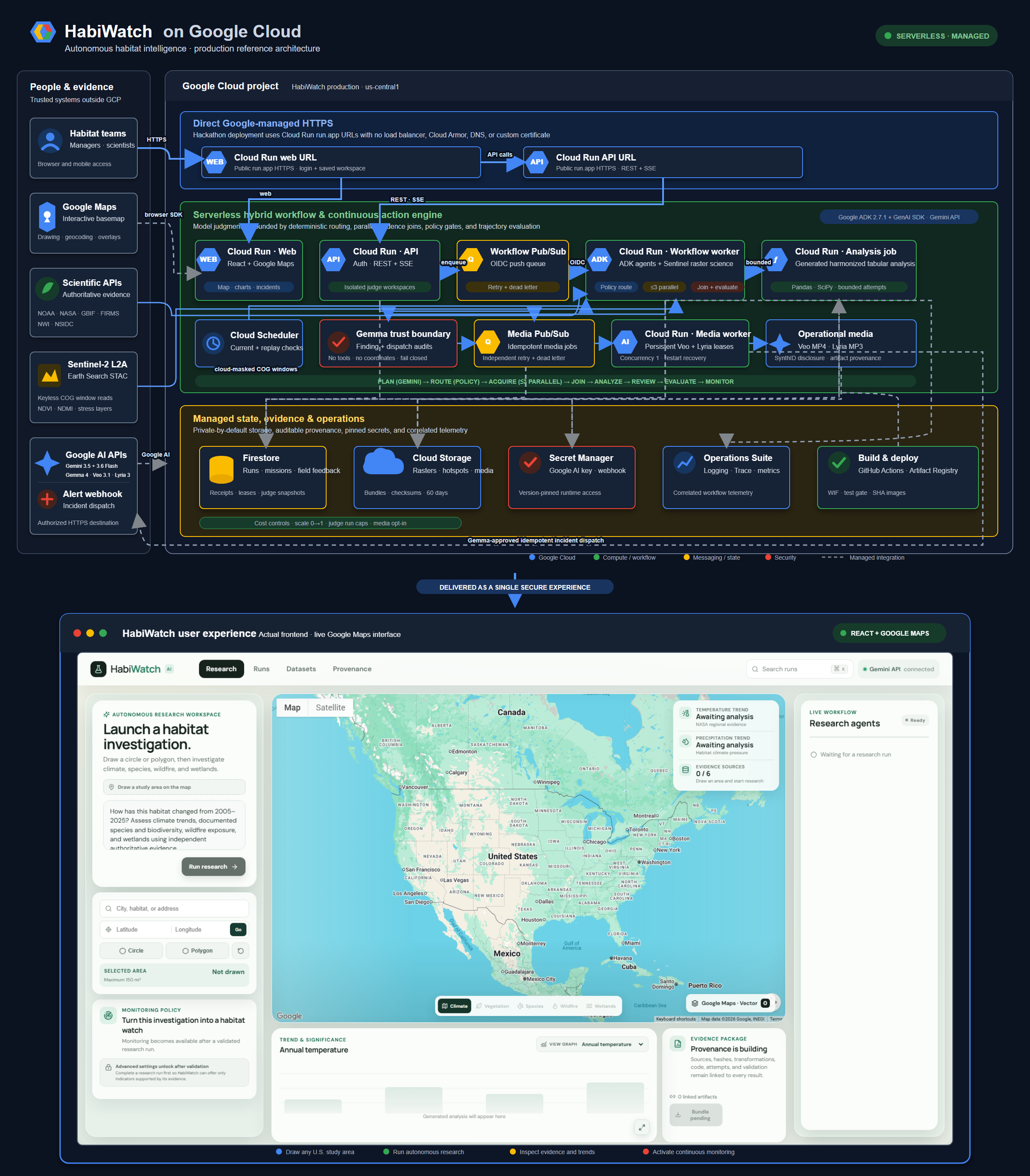
The frontend uses React, TypeScript, Google Maps, and Recharts. The backend uses FastAPI, Pydantic, Rasterio, NumPy, Pandas, and SciPy. The live demo is deployed in the Google Cloud project habiwatch.
- Cloud Run hosts the web app, API, workflow worker, media worker, and restricted analysis job.
- Firestore keeps accounts, research runs, agent events, monitoring policies, incidents, and field-task state after refresh.
- Pub/Sub carries durable workflow and media jobs with retries and dead-letter handling.
- Cloud Storage keeps checksummed evidence bundles, raster layers, videos, and audio.
- Secret Manager keeps the Gemini API key and other backend credentials out of the browser and images.
The services scale to zero. I kept the hosting small because the judge demo does not need a load balancer or a large database.
How I built it
I used Google Antigravity as the development workspace. The deployed backend runs Google ADK and the Google GenAI SDK against the Gemini API. The final demo also shows the live Cloud Run services before opening the hosted application from the Cloud console.
I built each feature across the full stack. For example, a drawn map shape passes through the frontend, API validation, data connectors, satellite crop, saved run, and monitoring policy. The backend recalculates its area instead of trusting the browser.
Backend tests, frontend tests, and Playwright browser tests cover the full Bobcat Lakes path. This includes drawing an area, running research, showing agent events, opening evidence, creating monitoring, handling incidents, and keeping state after reload.
Challenges and lessons
The hardest part was keeping model judgment separate from scientific measurement. Models help read questions and review results. Regular code handles raster values, statistics, limits, and thresholds.
Missing data also had to remain visible. HabiWatch requires at least two recent satellite scenes, six baseline scenes, and 60% valid coverage before reporting vegetation stress. Otherwise, it reports that the satellite evidence is not strong enough.
I also learned that a good final answer does not prove a good workflow. That is why HabiWatch records every stage and grades the full path.
What comes next
- Add an offline mobile field view for inspection notes, photos, and task updates.
- Add more habitat-specific indicators and shared workspaces for agency teams.
- Connect incidents to email and case-management systems while keeping policy changes under scientist control.
Known limits
- Vegetation indices show possible stress. They do not prove damage or its cause.
- Satellite results depend on recent clear images.
- Species records show reported observations, not every species present.
- Some wildfire data needs a separate NASA FIRMS key.
- Outside notification needs an approved HTTPS webhook.
- Veo and Lyria are optional and cost money when used.
- A larger public release would need more account and abuse protection.
Submission links
- Source repository: github.com/Husky-AI9/HabiWatch
- Public demo video: youtube.com/watch?v=1jhE50XkExQ
Built With
- gemini
- gemma
- google-cloud
- lyra
- veo


Log in or sign up for Devpost to join the conversation.