-
-
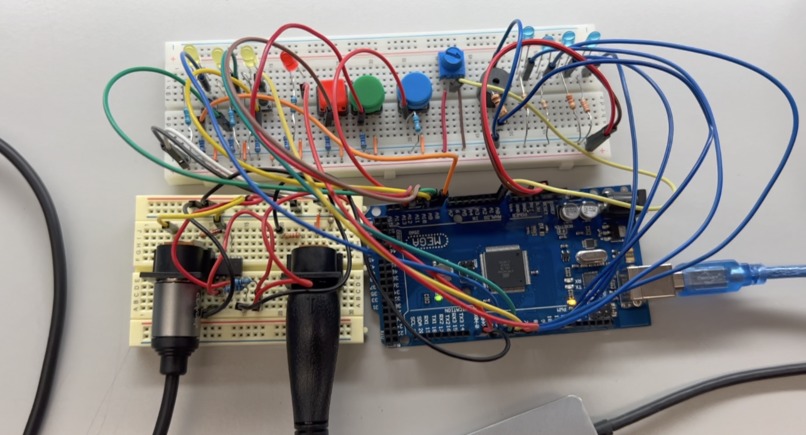
Hardware

Abstract
This project was focused on creating a user friendly MIDI looper from scratch. Our approach was to create a UART library and associated functions like process_midi_message() and process_midi_data() to accurately receive, store, and transmit MIDI notes that were inputted from a keyboard. From this, we successfully created a device with an intuitive recording interface, implemented a metronome, and allowed for recording multiple tracks that can be played back at the same time.
Features
- Record the input MIDI and play it back in a loop
- Change channels to record to by pressing the button corresponding to the channel
- Clear and reset the looper after pressing the red panic button
- Start and stop playback by pressing the green button
- Change the tempo via a potentiometer and view the BPM with flashing LEDs
- Toggle the metronome sound on and off
Design
We wrote our own UART library and associated functions in main.c to handle receiving, storing, and transmitting MIDI information from the MIDI keyboard to the digital audio work station. In our code, we have three 2D arrays that represent our tracks. Within these tracks, we store MIDI note on and note off messages. To change tracks, we implemented button input with pin change interrupts, which also triggers LEDs. Since we had to be able to change the speed of the clock, we set the timer to be in CTC mode. We used ADC to read in the value of the potentiometer, then mapped it to a value which would be used to make the sampling rate faster or slower. We then implemented a buzzer that can be toggled on and off which will beep according to the tempo. For additional buttons, we have a reset panic button to clear all tracks and a pause and play button.

Log in or sign up for Devpost to join the conversation.