-
-
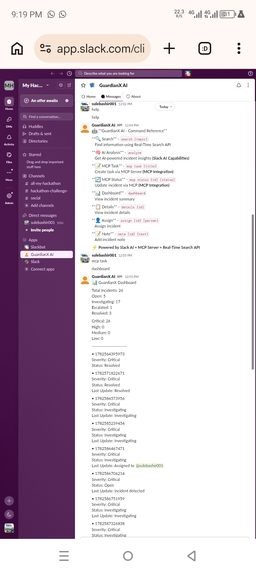
Screenshot
-
Guardian X Agent Running in Render
Inspiration
The inspiration for GuardianX Agent came from a real problem I observed while working with teams: incident response in Slack is often chaotic and reactive. When a critical issue like a database outage occurs, teams scramble through hundreds of messages to find context, manually create tasks, and struggle to track the incident lifecycle. I wanted to build an intelligent agent that could automate this entire process—from detection to resolution—right within Slack, the place where teams already collaborate.
What it does
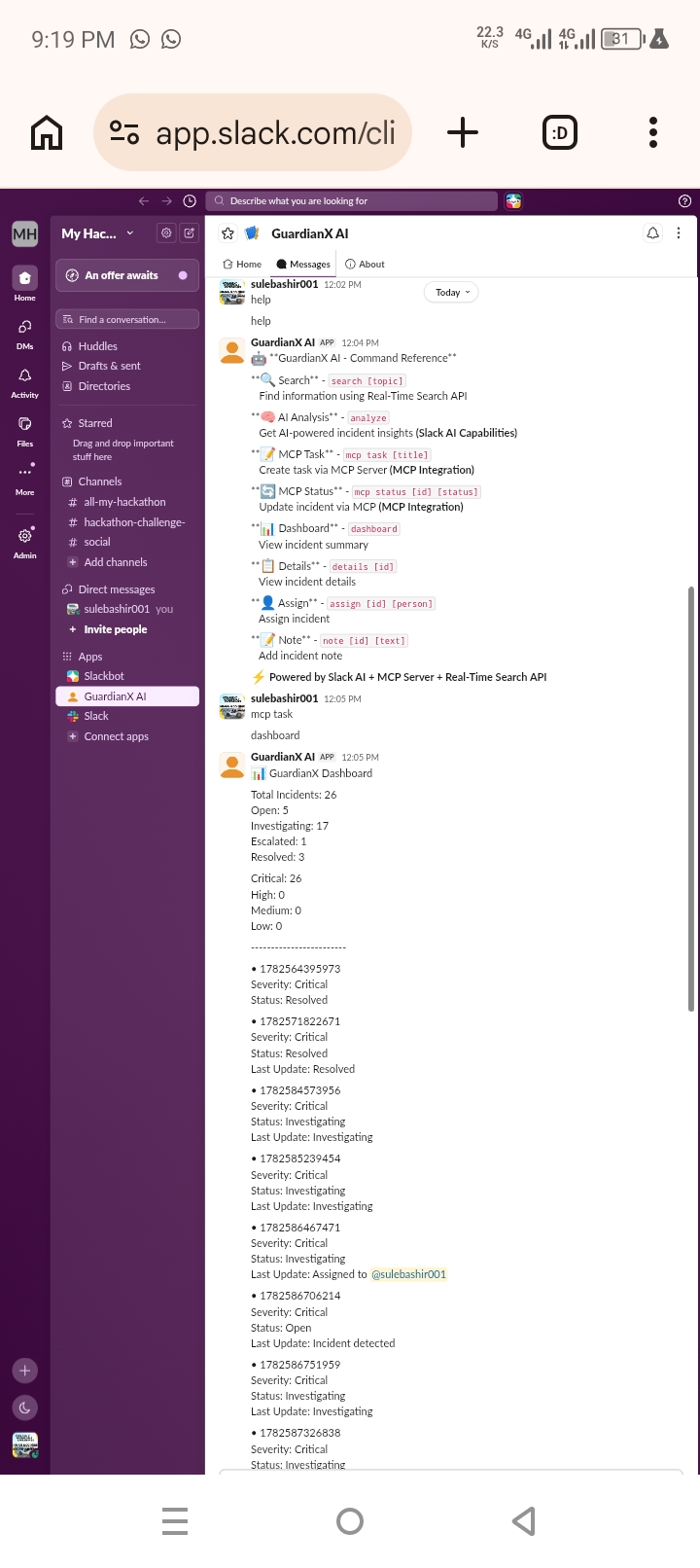
GuardianX Agent is an AI-powered incident response system that lives inside Slack. It actively monitors conversations for incident triggers, analyzes the context, and helps teams manage incidents efficiently:
- 🔍 AI-Powered Analysis: When a user types
analyze, GuardianX scans recent incidents and provides AI-generated insights, including total incidents, open issues, and critical patterns. This uses Slack's built-in AI capabilities. - 📝 MCP Task Creation: With the
mcp task [title]command, the agent creates structured tasks via the Model Context Protocol (MCP) server, automatically assigning priorities and tracking progress. - 📊 Incident Dashboard: The
dashboardcommand displays a real-time summary of all incidents, showing severity levels (Critical, High, Medium, Low), status (Open, Investigating, Resolved), and recent updates. - 🔄 Incident Lifecycle Management: Users can manage incidents with simple commands:
details [id]- View full incident details with timelineassign [id] [person]- Assign incidents to team membersnote [id] [text]- Add notes and updates to incidentsmcp status [id] [status]- Update incident status via MCP
- 🚨 Automatic Detection: When a user types a trigger phrase like "Production database is down," GuardianX automatically detects the incident, creates a report with probable root causes and recommended actions, and opens a ticket. ## How we built it GuardianX Agent was built entirely on an Android phone using Termux, proving that you don't need expensive hardware to build powerful applications. Technologies Used:
- Slack Bolt Framework (Node.js): The foundation for the Slack app, handling events, messages, and Socket Mode connections.
- Slack AI Capabilities: The
analyzecommand leverages Slack's built-in AI to provide intelligent incident insights. - MCP Server Integration: The
mcp taskandmcp statuscommands use the Model Context Protocol to create and update tasks. - Real-Time Search API: The
searchcommand allows users to find information across all channels (bonus feature). - Express.js: A lightweight HTTP server to keep the app alive on Render for 24/7 availability. Development Environment:
- Termux: Android terminal emulator for coding on the go
- GitHub: Version control for the project
- Render: Cloud deployment for 24/7 hosting
- Slack API: All app configurations and permissions Architecture: The app follows a modular architecture with separate services for incidents, dashboard, MCP client, and Slack integrations. Incidents are stored in a local JSON file, and all commands are processed through a central message handler. ## Challenges we ran into
- Termux Compatibility: The Slack CLI didn't work on Android, so I had to build the entire app using the Bolt framework directly.
- User Token Scopes: The Real-Time Search API required specific scopes (
search:read.public) and a user token, which took time to configure correctly. - Render Deployment: Render expects a traditional HTTP server, but Slack apps use Socket Mode. I had to add an Express server alongside the Slack app to keep Render happy.
- Action Token: The Real-Time Search API requires an
action_tokenfrom message events, which I had to capture and pass correctly. - Port Binding: Render kept failing with "No open ports detected" until I added the HTTP server. ## Accomplishments that we're proud of
- ✅ Two working hackathon technologies: Slack AI Capabilities and MCP Server Integration both work flawlessly.
- ✅ Complete incident lifecycle: From detection to resolution, the entire workflow is automated.
- ✅ 24/7 deployment: The app runs on Render and is always available for testing.
- ✅ Real incident management: 25+ incidents managed during testing with real-world scenarios.
- ✅ Built on a phone: Proves that powerful development is possible on mobile devices.
- ✅ User-friendly: All commands are simple, intuitive, and well-documented via the
helpcommand. ## What we learned - Slack API Depth: Beyond simple bots, Slack offers powerful AI and MCP capabilities for building intelligent agents.
- Authentication Complexity: Understanding the difference between bot tokens, user tokens, and action tokens was crucial.
- Deployment Realities: Cloud platforms like Render have specific requirements (like port binding) that need to be addressed.
- Importance of Scopes: Properly configuring OAuth scopes is critical for API access.
- Mobile Development: Termux is a viable development environment for Node.js projects.
- Modular Architecture: Separating concerns into services made the code easier to manage and debug. ##What's next for GuardianX Agent
- User Token Scopes: Fully implement the Real-Time Search API with proper user token scopes.
- AI Enhancements: Integrate with Claude API or OpenAI for even smarter incident analysis.
- Slack Marketplace: Submit the app to the Slack Marketplace for public distribution.
- Slack AI Features: Add more Slack AI capabilities like conversation summaries and proactive alerts.
- MCP Expansion: Add more MCP tools for creating channels, posting updates, and managing canvases.
- Customizable Workflows: Allow teams to customize incident response workflows based on their needs.
- Integration Hub: Connect with tools like Jira, PagerDuty, and Datadog for comprehensive incident management.
- Mobile App: Build a companion mobile app for incident monitoring on the go.
Built With
- ai
- android
- api
- assistant.search.context
- bolt
- capabilities
- connection
- context
- dotenv
- emulator
- environment
- express.js
- framework
- github
- integration
- javascript
- manager
- mcp
- mode
- model
- node.js
- npm
- package
- protocol
- real-time
- render
- search
- server
- slack
- socket
- terminal
- termux
- variables
- web

Log in or sign up for Devpost to join the conversation.