-
-
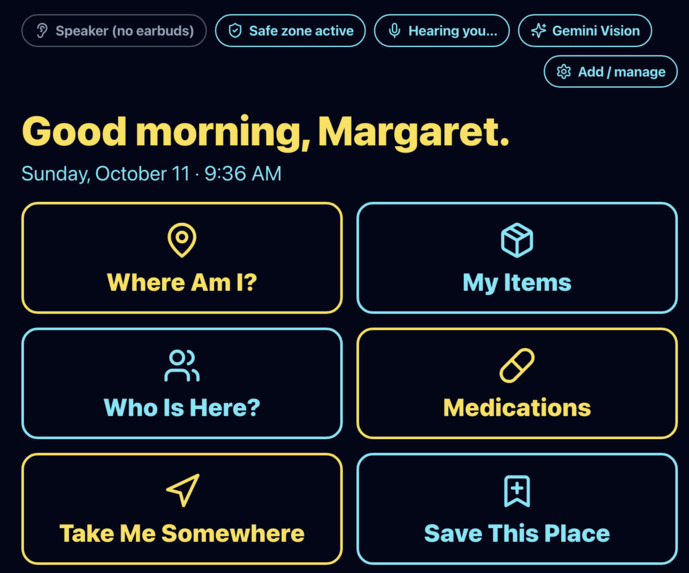
homepage. voice commands. say "Where am i?" "medications" "take me somewhere" etc.
-
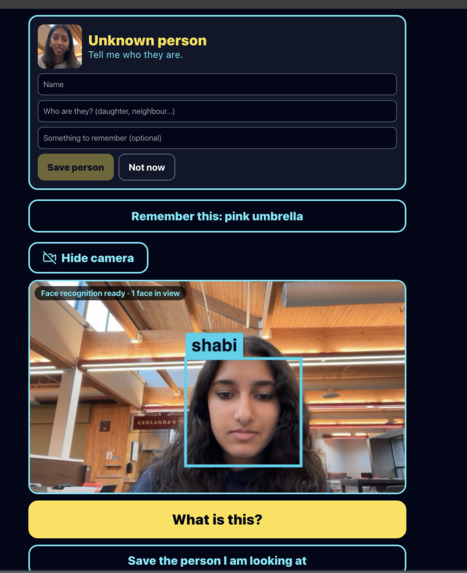
facial recognition. recognizes saved person when in frame. recognizes unknown person and prompts to save them.
Inspiration
More than 57 million people live with dementia worldwide. The hardest moments are small and constant: not recognizing your own daughter, not knowing what an object is, not knowing where you are. Caregivers can't be in the room every minute, and answering the same questions all day is exhausting for everyone. We wanted to build a calm voice that answers those questions privately, without any special hardware.
What it does
GuardianAngel is an ambient AI caregiver that runs in a web browser with a webcam, a microphone, and ordinary Bluetooth earbuds.
- Who is here? It recognizes saved people on camera and whispers their name and a memory ("That's your daughter Sarah. She brought you peach cobbler today."). If it sees someone new, it labels them "Unknown person" and offers to save them.
- What is this? Hold up any object and ask. The AI names it and says where it belongs, and you can save new items from a photo.
- Where am I? It reads your GPS location and says your street address in plain words. You can say "save this place", name it, and later say "take me somewhere" to get walking directions.
- What's next? It speaks medication and appointment reminders on time.
- Panic help. If it hears "I want to go home", "Who are you?" or "Help", it opens a full-screen Anchor Card with a calming voice, the time, the address, and a one-tap emergency button, and it sends a caregiver alert (simulated in the demo).
How we built it
- Frontend: Next.js, TypeScript, Tailwind CSS, Framer Motion, and Zustand with local storage. The design uses huge text and high contrast for elderly users.
- Faces: face-api creates a 128-number signature for each face on the device. We follow each face from frame to frame, so the slow identity step runs only once per person.
- Objects: Gemini Vision names whatever is held up. Without a key, on-device models take over.
- Voice: The Web Speech API handles listening and speaking, with optional ElevenLabs voices.
- Location: The browser Geolocation API plus OpenStreetMap turn coordinates into a street address.
- Offline-friendly: With no API keys, the app still runs using browser voices and on-device models.
Challenges we ran into
- Slow, glitchy face recognition. Running the heavy recognition step on every frame froze the page. Tracking faces and recognizing each person once made it much faster.
- Conflicting AI libraries. Two copies of TensorFlow.js were loaded and broke face detection. We moved everything onto a single copy.
- Trustworthy location. Laptop GPS can be off by hundreds of meters, so we reject low-accuracy fixes and read the address instead of guessing a saved place.
- Changing AI model names. Gemini models get renamed and retired, so the app now asks Google which models are available.
- The app hearing itself. We had to pause listening while it speaks so it doesn't react to its own voice.
Accomplishments that we're proud of
- A complete, voice-first assistant that needs only a laptop or phone and earbuds
- Recognizing and remembering multiple people on the device, with no cloud face database
- A calming panic flow designed around how a frightened person actually behaves
- An app that works end to end even with no API keys, so the demo never breaks
What we learned
- Speed matters as much as accuracy for someone who is confused and waiting for an answer.
- Real-world sensors like GPS, microphones and cameras are messy, so the app has to say plainly when it isn't sure.
- Designing for dementia means huge text, few choices, and a calm tone.
What's next for GuardianAngel
- Real caregiver alerts by SMS and push, instead of the simulated alert
- Smart glasses and a wearable camera for fully hands-free use
- More languages for voice and recognition
- Safe-zone alerts when someone leaves a saved place
- Testing with caregivers and clinicians to refine the experience
Built With
- claude
- gemini
- typescript

Log in or sign up for Devpost to join the conversation.