Inspiration
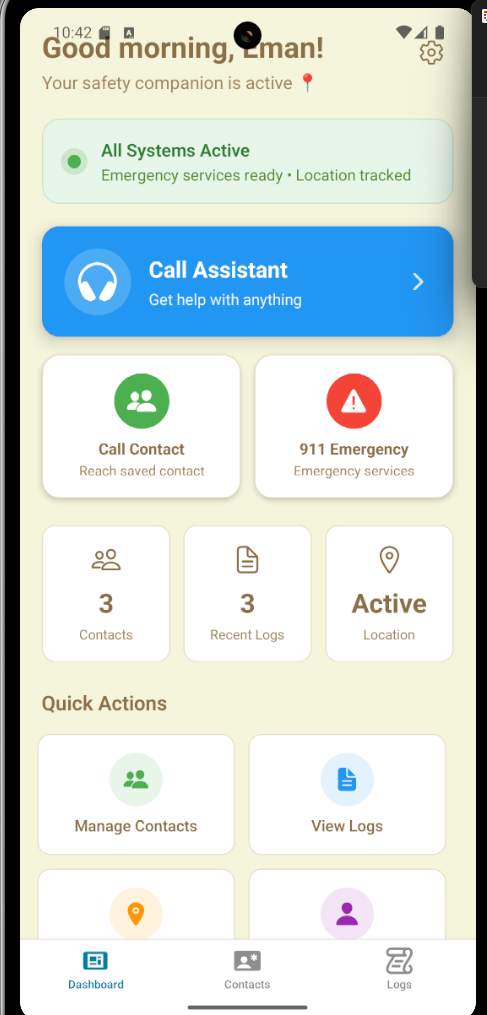
Our inspiration for Guardian draws from a blend of security-focused tools, empathetic voice experiences, and minimalist design principles. Visually, we looked to modern safety apps like Citizen and Apple’s Emergency SOS, which use clean interfaces and assertive iconography to build user trust in urgent moments. We also studied voice-based platforms like Google Assistant and Alexa, where calm, conversational tone pairs with structured guidance to support users effectively. Aesthetically, the beige and white color palette is inspired by wellness and journaling apps, evoking a sense of calm while maintaining clarity and purpose. Together, these references shaped our goal: a voice-powered guardian that feels reassuring, intuitive, and always ready to act when safety matters most.
What it does
Guardian is a voice-activated safety companion designed to help users feel secure in uncertain or potentially dangerous situations. By simply speaking to the app, users can describe their location, surroundings, or concerns, and Guardian will intelligently interpret the conversation to take action such as identifying their location using Google Maps, analyzing risk levels, and offering advice or support. It can also generate a structured report of the interaction, send transcripts via SMS to a trusted contact, or escalate to emergency services if needed. Built for real-time voice interaction, Guardian empowers users with calm, immediate assistance when it matters most.
How we built it
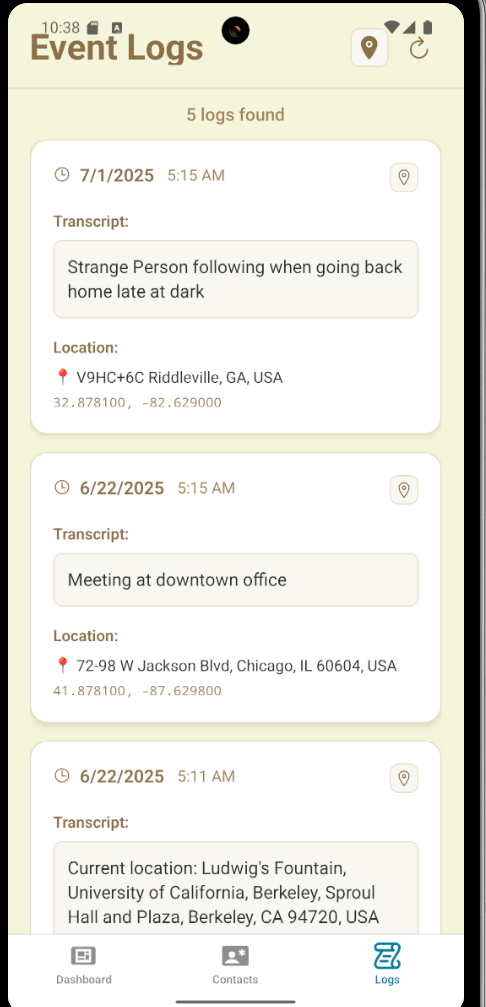
We leveraged Vapi to power real-time, two-way voice interaction, enabling users to speak naturally with our Guardian bot while it discreetly keeps them safe. During every call, the bot transcribes the conversation, stores time-stamped notes, and taps Google’s Geocoding API to continually update the user’s location. Custom prompts let the assistant sense distress, recognize when the caller can’t speak freely, and even pivot to low-profile cues like “ordering a pizza” to avoid raising suspicion. The frontend is built in React Native for a seamless mobile experience, while a Node.js/Express backend orchestrates Vapi events and persists data in MongoDB. Together, this stack delivers a calm, always-on safety companion that’s both intuitive and technically robust.
Challenges we ran into
Getting Vapi to respond correctly: As first-time users, understanding how to configure prompts, voice settings, and handle events was a major learning curve.
Implementing SMS messaging: We had to figure out how to send transcripts or alerts to phone numbers using APIs.
Adding sentiment analysis: Detecting distress, silence, or uncertainty in a user's voice required us to carefully craft prompts and test edge cases.
Location tracking with Google Geocoding: Translating spoken addresses into coordinates and updating location data in real time was entirely new to us.
Summarizing and logging transcriptions: Structuring raw voice data into readable summaries and saving it reliably challenged our backend design.
Connecting React Native without Expo: Without Expo, we had to manually configure native modules, handle API requests, and manage permissions ourselves.
Securing API access with authorization: Setting up protected routes and environment-based access controls pushed us to think about real-world data security.
Accomplishments that we're proud of
We’re proud to have built a fully functional full-stack application that brings together both frontend and backend components into a seamless experience. Despite being beginners, we successfully integrated technologies like Vapi, React Native, Node.js, MongoDB, and Google’s Geocoding API to create a working safety assistant. The app can place real-time voice calls, record full transcripts, and log each interaction with time-stamped summaries. More importantly, we created an app designed to help people feel safer when walking alone or navigating uncertain environments, offering peace of mind and discreet support in moments when they may feel vulnerable. Seeing all of these systems work together to serve a meaningful purpose was a huge milestone for our team and a reflection of how much we’ve learned throughout the process.
What we learned
We learned a lot. As a team of beginners, this project challenged us to step far outside our comfort zones. We gained hands-on experience with full-stack development, learned how to integrate real-time voice AI using Vapi, and figured out how to implement features like SMS messaging, location tracking, and sentiment analysis. We also discovered the importance of API security, backend logging, and debugging across multiple layers of an app. Most importantly, we learned how to collaborate, problem-solve, and build something meaningful from the ground up, even when we didn’t always know where to start.
What's next for Guardian
SMS Alerts on Activation Automatically notifies a designated emergency contact via text when the app is activated, including a live update and the conversation transcript.
Threat Level Detection (1–5) Rates the severity of the situation based on speech analysis. If the risk level reaches 5, the app will escalate appropriately such as contacting emergency services.
Dynamic Threat Mapping Visualizes historical data to generate a color-coded map of surrounding danger zones, helping users navigate safer areas in real time.
Crime Rate API Integration Incorporate real-world crime statistics to improve threat assessments and add context to dynamic safety maps.
AI-Initiated Emergency Response Train the assistant to independently recognize when a user is in danger even if unspoken and determine the best moment to act, including initiating emergency contact without user command.


Log in or sign up for Devpost to join the conversation.