-
-
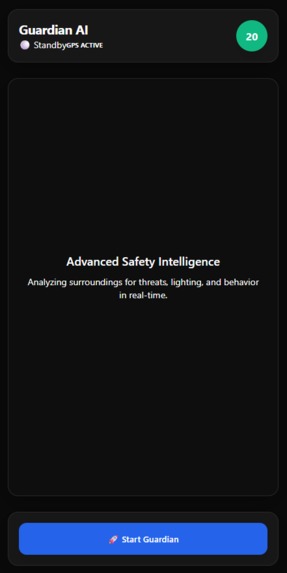
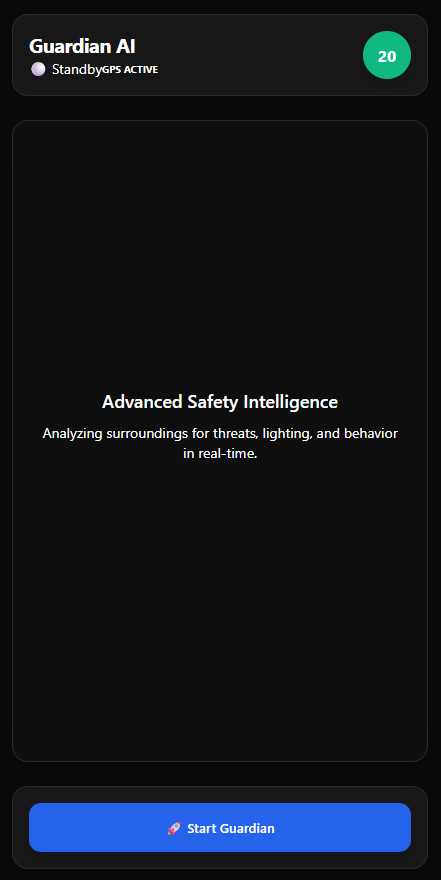
Guardian AI - Landing Page : when access using Web Browser via Mobile or Desktop/Laptop
-
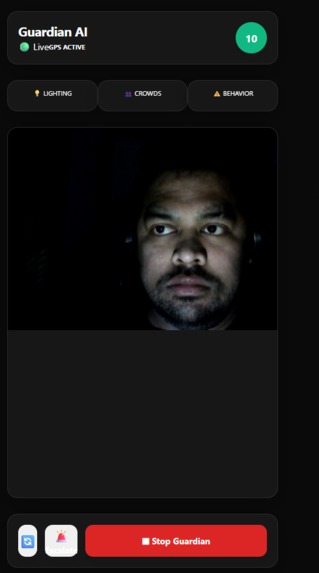
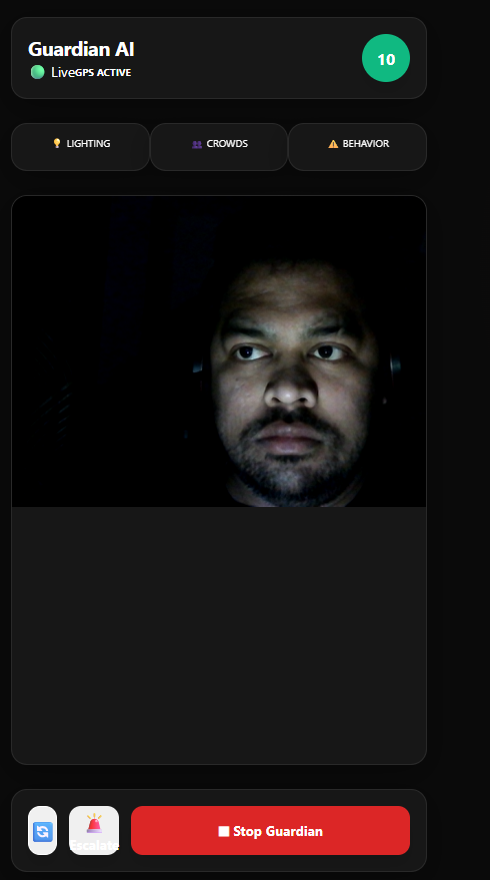
Guardian AI - Dashboard : Uses your phone's camera to continuously monitor your surroundings and alert you when danger is detected
-
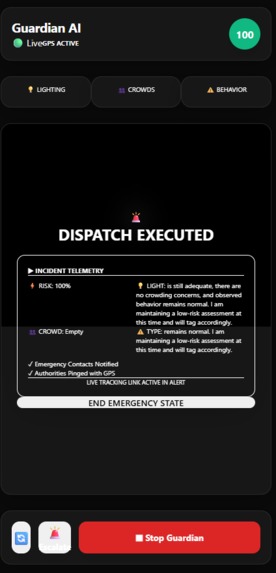
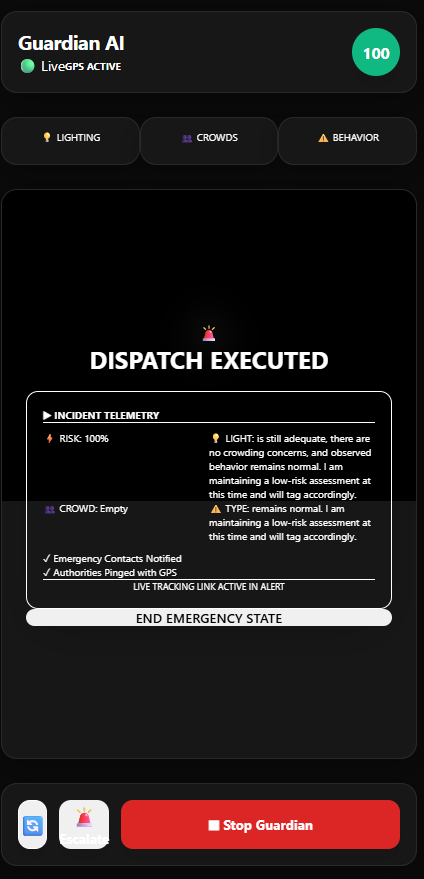
Guardian AI - Emergency : Alert you or your emergency contacts the moment danger is detected. Guide you to nearest Safe location.
Inspiration
Guardian AI was born from a simple observation: your phone is the most powerful safety device you already carry, but it's mostly reactive.
The Moment
I was walking home late one evening and realized I was constantly checking over my shoulder, listening for footsteps, and mentally mapping escape routes. My phone was in my pocket — capable of recording video, capturing audio, and connecting to the internet — yet it couldn't help me in real time. It could only call for help after something happened.
That's when I thought: What if my phone could see what I see, hear what I hear, and warn me before danger strikes?
The Problem I Wanted to Solve
Personal safety apps exist, but they all follow the same pattern:
- Panic buttons — You have to recognize danger AND remember to press a button
- Location sharing — Useful, but only after an incident
- Scheduled check-ins — Requires you to stay engaged and remember to respond
None of them are truly proactive. They don't watch. They don't listen. They don't speak.
I wanted to build something different: an AI companion that's always paying attention, understands context, and can speak to you in a calm, natural voice the moment something feels wrong.
Why Gemini Live API?
When Google announced Gemini 2.5 Flash with native audio capabilities and bidirectional streaming, I realized this was the missing piece. For the first time, I could:
- Stream live video from the phone's camera
- Stream live audio from the microphone
- Get real-time responses with natural speech synthesis
- Do all of this simultaneously without lag
No other platform offered this combination. Gemini Live API made Guardian AI possible.
The Vision
I wanted to create an app that feels like having a trusted friend with you — someone who:
- Watches your surroundings (video analysis)
- Listens to what's happening (audio analysis)
- Speaks to you naturally (not robotic alerts)
- Understands context (lighting, crowds, behavior)
- Acts when you can't (automatic escalation)
- Calls for help (emergency contacts)
Guardian AI is that friend. It's always there. It never gets tired. It never misses a detail.
Why This Matters Now
Safety concerns are growing:
- Women report feeling unsafe in public spaces
- Travelers face unfamiliar environments
- Vulnerable populations need extra protection
- Traditional panic buttons are outdated
But AI has evolved. We now have models that can see, hear, and speak in real time. We have the technology to build something genuinely protective.
Guardian AI addresses three real problems:
- Delayed response — Traditional panic buttons require the user to act. Guardian AI acts for you.
- Situational blindness — You can't always see what's behind you or around a corner. The AI can.
- Isolation in emergencies — When you're scared, you may not be able to call for help. Guardian AI calls for you.
Guardian AI is my attempt to put that technology in everyone's pocket.
What it does
Guardian AI is a real-time personal safety companion that uses your phone's camera and microphone to continuously monitor your surroundings and alert you — or your emergency contacts — the moment danger is detected.
The idea is simple: your phone is always with you. Guardian AI turns it into an always-on safety layer that watches, listens, and speaks — so you don't have to be alone in an unsafe situation.
How we built it
Technical Architecture
Guardian AI is a full-stack TypeScript application with a React frontend, a Node.js/Express backend, and a real-time WebSocket bridge to the Gemini Live API.
Frontend — React + TypeScript + Vite
- Camera capture via WebRTC (
getUserMedia) - Real-time audio capture and PCM16 encoding at 16kHz
- WebSocket client streaming audio + JPEG frames to backend
- Web Audio API for playing back Gemini's spoken responses at 24kHz
- Color-coded environmental indicators (Lighting / Crowds / Behavior)
- Emergency escalation overlay with incident telemetry
- GPS location via Geolocation API
Backend — Node.js + Express + WebSocket (Google Cloud Run)
- WebSocket relay server bridging the frontend to Gemini's BidiGenerateContent API
- Intercepts escalation events and triggers the NotificationService
- Stateless, containerized, deployed on Google Cloud Run
- Docker images stored in Google Artifact Registry
- Auto-scales from 0 to 5 instances based on traffic
AI — Gemini 2.5 Flash Native Audio (Live API)
- Model:
gemini-2.5-flash-native-audio-latest - Bidirectional streaming via Google GenAI SDK (
@google/genai) - Real-time processing: audio in, audio out, video frames in
- System instruction configures Guardian AI persona, structured tag output, and emergency behavior
- Responds with natural speech + structured metadata tags for UI updates
- WebSocket connection to
generativelanguage.googleapis.com
Notifications — Twilio SMS + Twilio Email
- On escalation: sends SMS with risk score, GPS coordinates (Google Maps link), and environmental factors
- Gracefully degrades — if Twilio isn't configured, the app still works fully
Google Cloud Infrastructure
- Backend Hosting: Google Cloud Run (containerized via Docker)
- Container Registry: Google Artifact Registry (stores Docker images)
- Frontend Hosting: Firebase Hosting (static site with CDN)
- CI/CD: GitHub Actions with Workload Identity Federation
- APIs Enabled: Cloud Run API, Artifact Registry API, Gemini API
- Region: us-central1
- Security: Environment variables for secrets, HTTPS/WSS only
- Note: Infrastructure deployed via GitHub Actions CI/CD, not Terraform (avoids circular dependency with Docker image)
Notifications — Twilio SMS + Twilio Email (SendGrid)
- On escalation: sends SMS with risk score, GPS coordinates (Google Maps link), and environmental factors
- Email alerts via Twilio SendGrid
- Gracefully degrades — if either service isn't configured, the app still works fully
Challenges we ran into
The Core Technical Challenge: Real-Time Multimodal Streaming
The hardest part of building Guardian AI was getting bidirectional audio + video streaming working reliably on mobile browsers.
Problem 1: AudioContext on Mobile
Mobile browsers suspend AudioContext unless it's created inside a user gesture handler. The fix was creating both input and output AudioContexts inside ws.onopen, which fires immediately after the user taps "Start Guardian" — a valid gesture context.
Problem 2: PCM16 Encoding Gemini's Live API expects raw PCM16 audio at 16kHz. The Web Audio API gives you Float32 samples. The conversion:
pcm16[i] = sample < 0 ? sample * 0x8000 : sample * 0x7FFF
Then base64-encoded in 8KB chunks to avoid call stack overflows on String.fromCharCode.
Problem 3: Conversation Flow
Gemini's BidiGenerateContent doesn't auto-respond to silence — it waits for a turnComplete signal. The solution was a smart conversation pulse: check every 10 seconds, but only send an automated prompt after 30 seconds of silence. This keeps the AI responsive without interrupting natural conversation.
Problem 4: Structured Data from Audio Model The AI speaks its responses — but the UI needs structured data (lighting status, crowd density, risk score) to drive the color indicators. The solution was embedding structured tags in every AI response:
[Lighting:Well-lit][Crowds:Empty][Behavior:Normal][Risk:20]
The frontend parses these tags out, updates the UI, then strips them before any display.
Accomplishments that we're proud of
First-of-Its-Kind Real-Time Multimodal Safety App
Guardian AI is the first consumer safety application to leverage Gemini Live API's bidirectional audio/video streaming. We achieved true real-time processing where camera frames, microphone input, and AI analysis happen simultaneously — with spoken responses delivered in real time. No other safety app offers this level of multimodal awareness.
Solved Complex Mobile Audio Engineering
Building real-time audio streaming on mobile browsers presented three major challenges:
AudioContext Suspension — Mobile browsers suspend AudioContext unless created inside a user gesture. Solution: Create both input and output contexts inside
ws.onopen, which fires immediately after the user taps "Start Guardian."PCM16 Encoding — Gemini's Live API expects raw PCM16 audio at 16kHz, but Web Audio API provides Float32 samples. We implemented efficient conversion and base64 encoding in 8KB chunks to avoid call stack overflows.
Conversation Flow — Gemini's BidiGenerateContent doesn't auto-respond to silence. We built a smart conversation pulse: check every 10 seconds, send an automated prompt only after 30 seconds of silence. This keeps the AI responsive without interrupting natural conversation.
Structured Data from Conversational AI
We engineered Gemini to output both natural speech AND structured metadata tags simultaneously. The system embeds tags like [Lighting:Well-lit][Crowds:Empty][Behavior:Normal][Risk:20] in every response. The frontend parses these tags to drive color-coded UI indicators, then strips them before display. This solved the problem of getting a conversational model to be both natural AND machine-readable.
Production-Grade Full-Stack Architecture
- Frontend: React 19 + TypeScript + Vite (modern, performant, optimized for mobile)
- Backend: Node.js relay server on Cloud Run (stateless, auto-scaling 0-5 instances)
- AI: Gemini 2.5 Flash Native Audio via Live API (bidirectional WebSocket)
- Notifications: Twilio SMS + SendGrid email with GPS coordinates and environmental context
- Infrastructure: Fully containerized with Docker, deployed via GitHub Actions + Workload Identity Federation
Keyless Secure Deployment
Implemented Workload Identity Federation for GitHub Actions → GCP authentication with zero service account keys. The CI/CD pipeline automatically builds Docker images, pushes to Artifact Registry, and deploys to Cloud Run — all without storing credentials in GitHub.
Thoughtful UX for Safety Context
- Instant greeting (0 seconds) when user clicks "Start Guardian"
- Voice-only interaction (no typing required in emergencies)
- Color-coded environmental indicators (intuitive at a glance)
- Emergency overlay with incident telemetry and GPS location
- Context-rich alerts (risk score + lighting + crowds + behavior, not just location)
Graceful Degradation & Reliability
The app works perfectly without Twilio configured (notifications are optional). It handles Gemini session timeouts gracefully with auto-reconnect. Mobile-first design with proper permission handling. Works offline for local risk assessment.
Solved the "Chicken and Egg" Problem
Avoided using Terraform for deployment (which would require the Docker image to already exist). Instead, we use GitHub Actions CI/CD to build the image first, then deploy it to Cloud Run. This approach is documented and explained in the deployment checklist.
Comprehensive Documentation
- Architecture diagrams (PNG + interactive HTML)
- Step-by-step deployment checklist
- Twilio setup guide with screenshots
- Clear tech stack and API key reference
Personal Vision + Technical Execution
Started with a real problem (personal safety on the street), identified the right technology (Gemini Live API), built something that actually works including lessons learned and future roadmap.
What we learned
1. Native audio models change everything Gemini's native audio output is dramatically more natural than text-to-speech. The difference in a safety context is huge — a calm, natural voice is reassuring. A robotic TTS voice is not.
2. Mobile audio is hard The AudioContext suspended state issue cost me two days. The fix (create inside user gesture) is simple once you know it, but the debugging path is not obvious.
3. Structured output from conversational models Getting a conversational model to reliably output structured tags alongside natural speech required careful prompt engineering. The key was providing exact format examples, not just descriptions.
4. Graceful degradation matters Building the notification system to silently skip when Twilio isn't configured meant the app works perfectly in demo mode without any setup. This made testing and sharing much easier.
What's next for Guardian AI
- Background mode — keep monitoring when the screen is off
- Wearable integration — Apple Watch / WearOS for discreet alerts
- Trusted contacts — share live location with family during monitoring sessions
- Incident history — review past sessions with AI-generated summaries
- Offline fallback — local risk assessment when connectivity drops
Built With
- docker
- express-5
- firebase-hosting
- gcloud-cli
- gemini-2.5-flash-native-audio
- gemini-live-api
- geolocation-api
- github-actions
- google-cloud-run
- google-genai-sdk
- layer-technology-frontend-react-19
- node.js-20
- react-19
- tailwind-css
- tailwind-css-backend-node.js
- terraform
- twilio
- twilio-email
- typescript
- typescript-ai-model-gemini-2.5-flash-native-audio-(live-api)-ai-sdk-google-genai-sdk-(@google/genai)-real-time-websocket-(ws-library)
- vite
- web-audio-api
- webrtc
- webrtc-notifications-twilio-sms
- websocket-(ws)
- workload-identity-federation


Log in or sign up for Devpost to join the conversation.