-
-
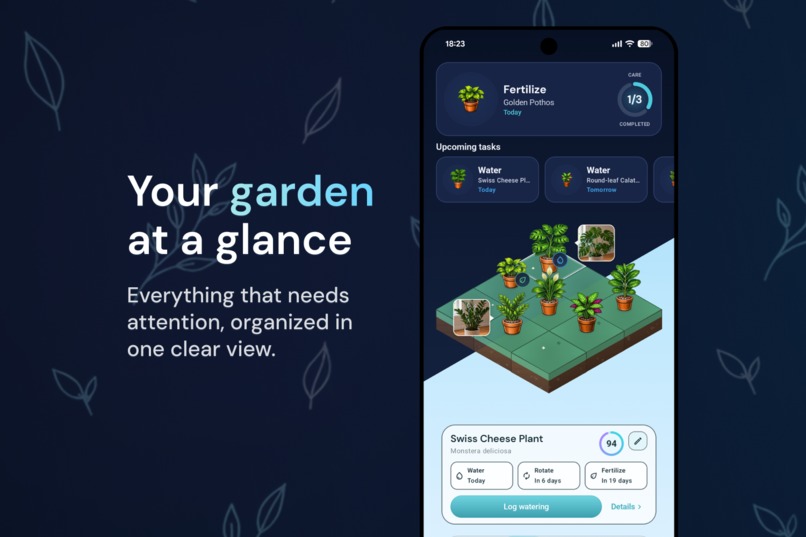
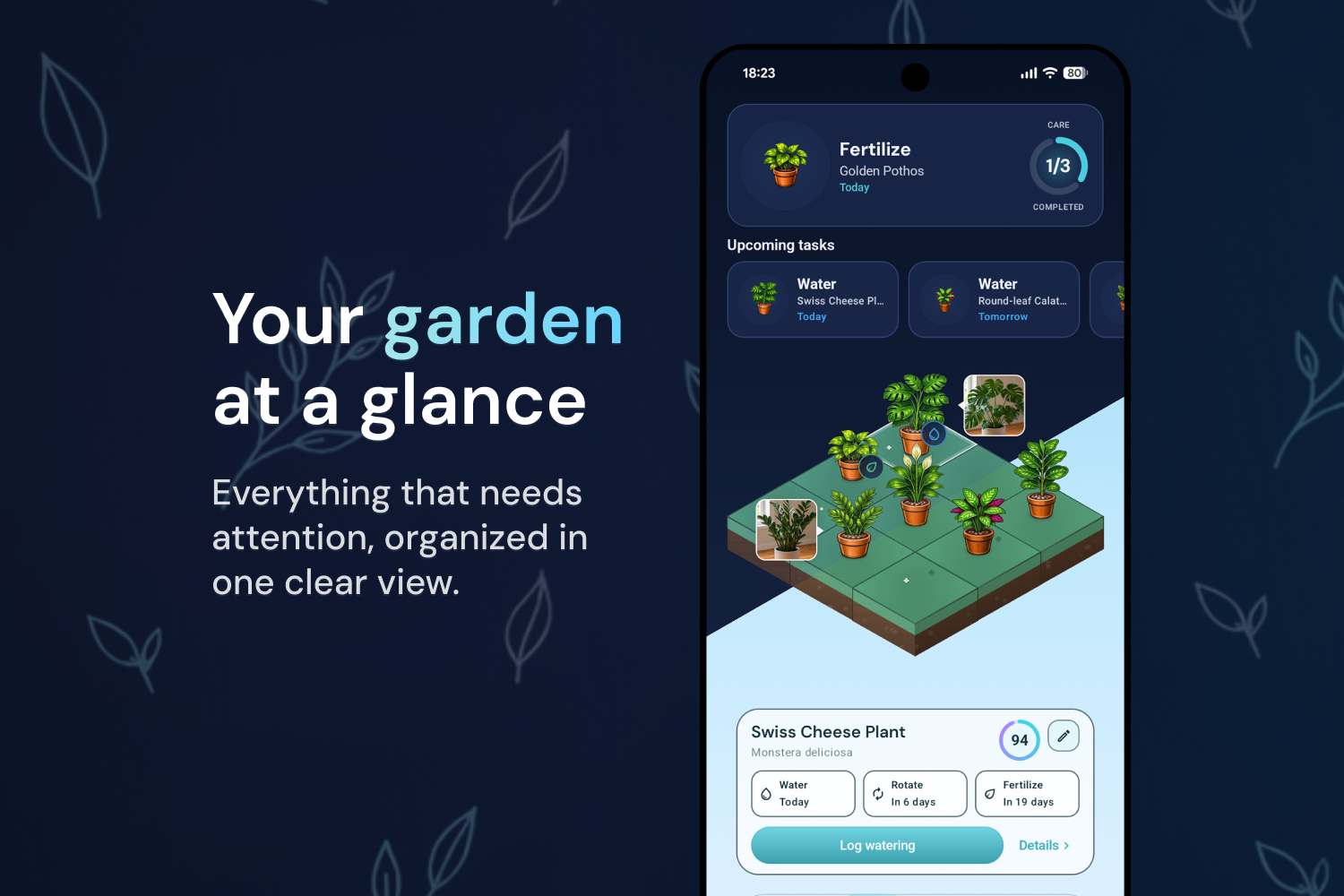
Visual garden with upcoming care tasks, plant status and quick actions in one place.
-
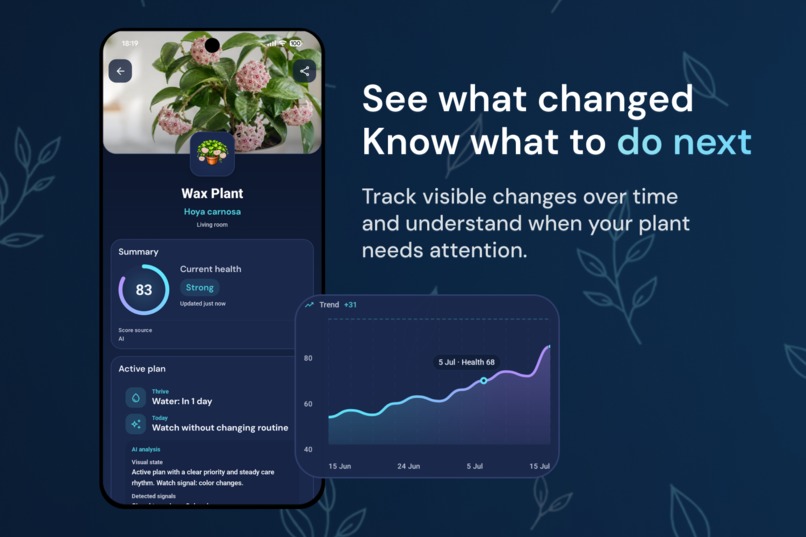
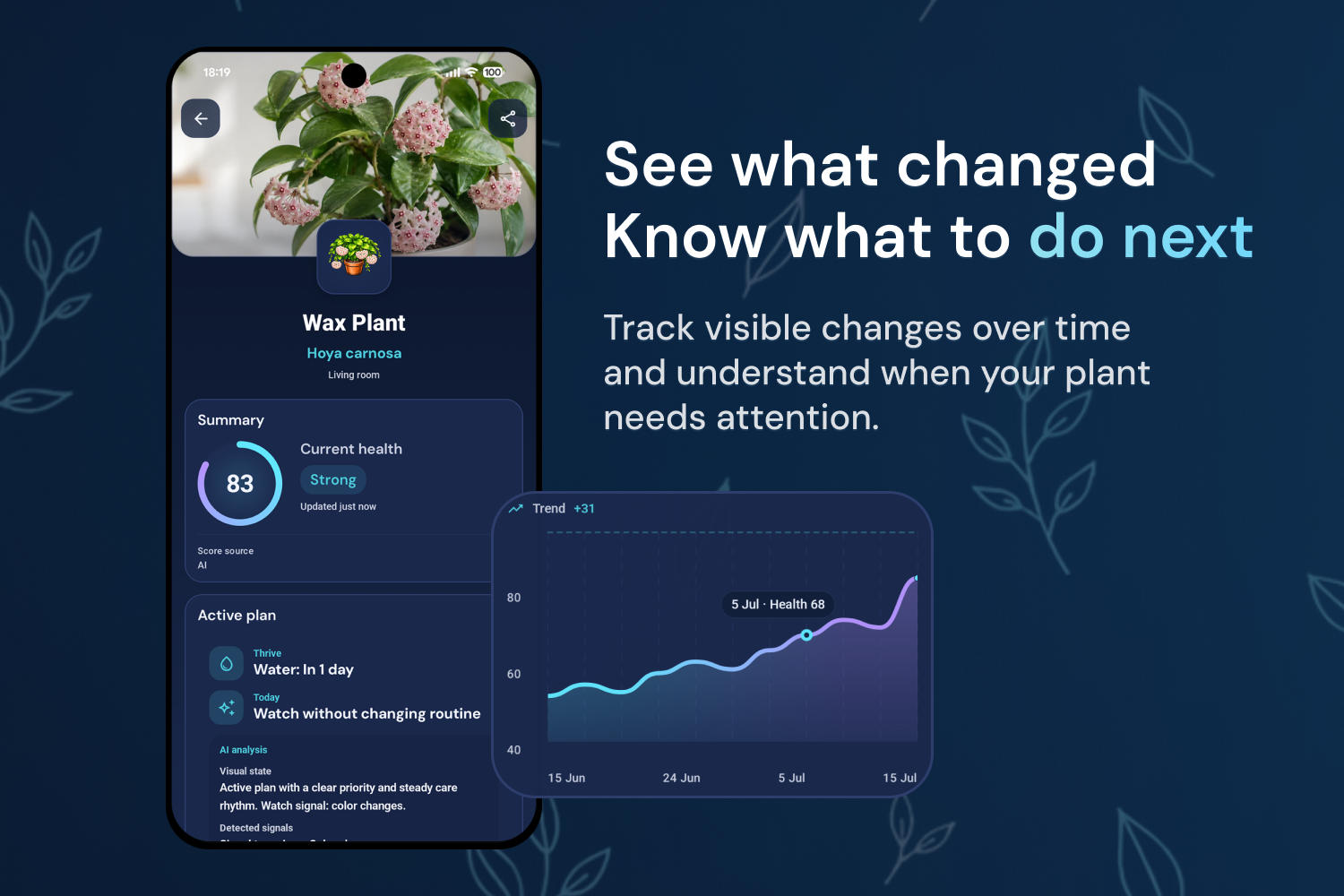
AI-assisted health review with a visual score, change tracking and clear next-step guidance.
-
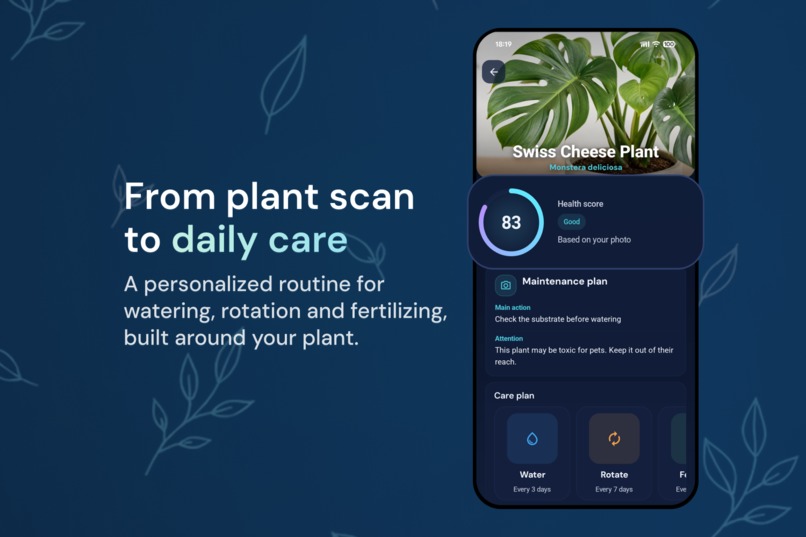
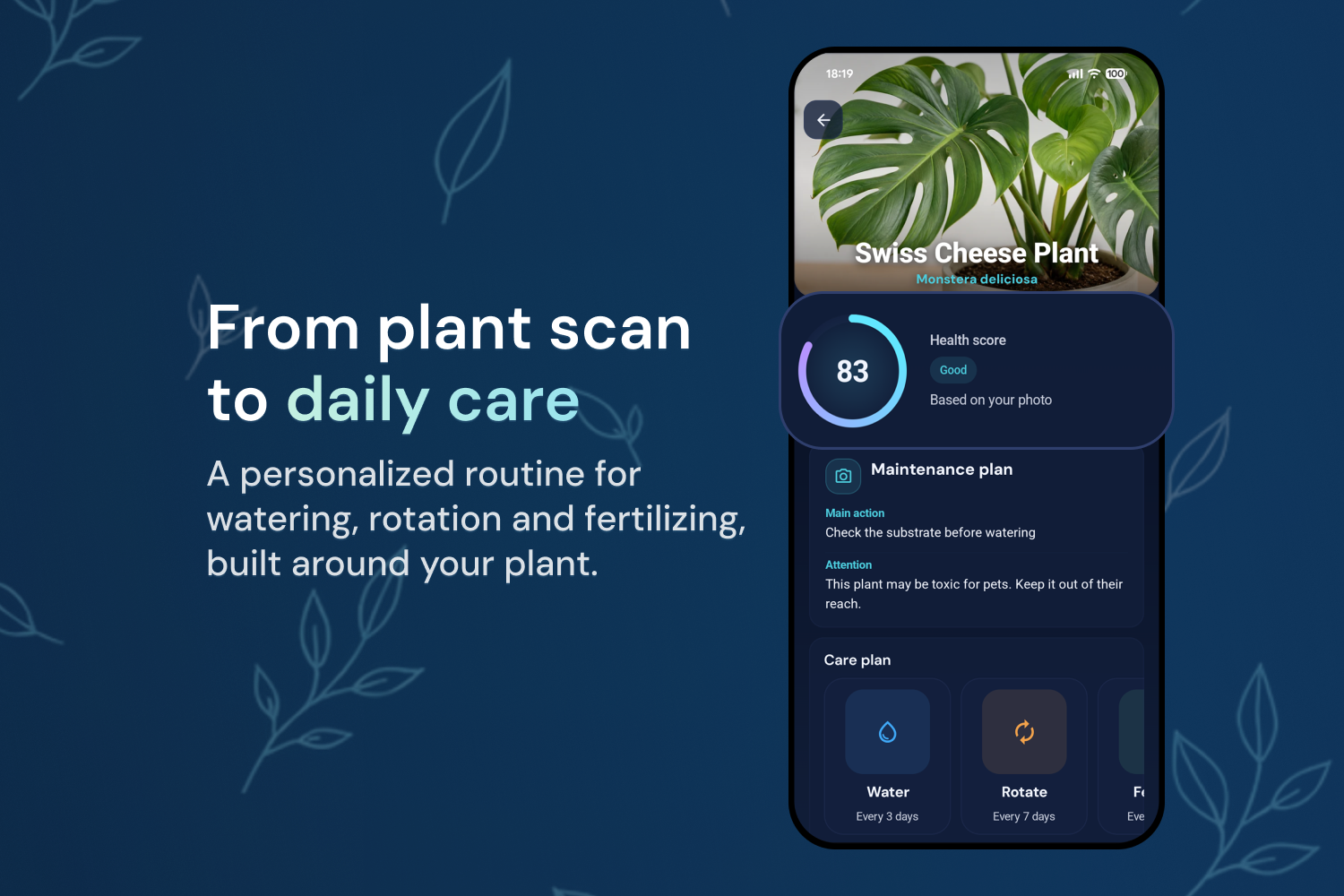
Personalized care plan with watering, rotation and fertilizing routines based on each plant.
-

-
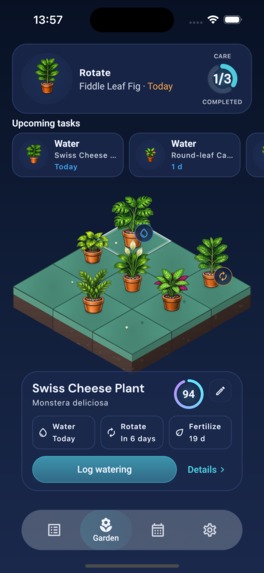
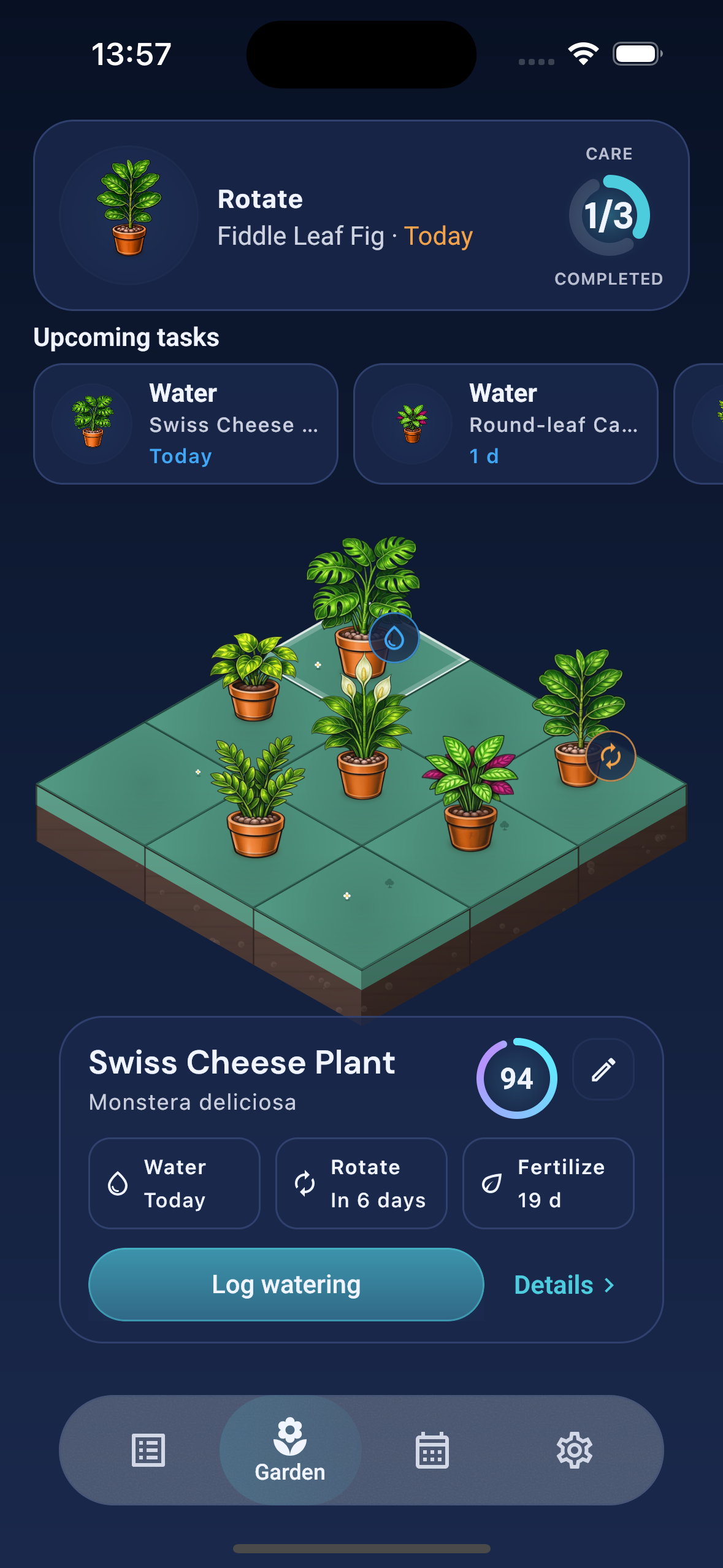
Live iPhone screenshot of Grovia's Garden screen, shown without a device frame.

Inspiration
Grovia started with a simple problem I kept seeing at home.
My mother loves having plants, but some of them would eventually die. A lot of the time, she also could not remember when she had last watered them or what each plant needed.
That was the original idea behind Grovia. I wanted to build something that could tell people when their plants needed attention and help them stay consistent with their care.
I started working on Grovia at the beginning of 2026. I had to pause the project for a few months while preparing for my university entrance exams, but I came back to it during the summer with the goal of finally turning it into a real product.
At first, the idea was mostly about keeping track of watering. As I kept building, it became clear that watering was only one part of the problem. Different plants also need different schedules for fertilizing, rotation and general care.
Grovia gradually became a place where users can keep their plants organized, understand what each one needs and know what they should take care of today.
What started as a small solution for something I saw at home eventually became my first app with real paying users.
What it does
Grovia is a plant care app built around a simple question: what do my plants need today?
Users can add their plants manually or identify them from a photo. Once a plant is added, Grovia creates a personalized care plan and keeps its upcoming tasks organized inside a visual garden.
The current app includes:
- Plant identification from a photo
- Personalized plant care plans
- Watering schedules and reminders
- Rotation and fertilization tasks
- A visual garden for organizing multiple plants
- A calendar with upcoming care tasks
- Individual plant details and photos
- AI-assisted care guidance
- Grovia Pro, with subscriptions managed through RevenueCat
For identification, Grovia combines PlantNet with multimodal AI.
PlantNet first helps determine the species. Grovia then uses that identification together with the original photo as context when generating the care plan and recommendations for that specific plant.
The important part for me is what happens after identification.
I did not want Grovia to be an app that someone opens once just to discover the name of a plant. Identification is only the beginning. The goal is for Grovia to remain useful afterwards by helping users remember what their plants need and when they need it.
How I built it
Grovia is built with Kotlin Multiplatform and Compose Multiplatform and is available on both Android and iOS.
Kotlin and Compose were already the technologies I was most comfortable with, so Compose Multiplatform felt like the natural choice when I decided that Grovia should become a real cross-platform product.
A large part of the UI and application logic is shared between Android and iOS. This allows me to work on Grovia as one product instead of maintaining two separate applications, while still handling platform-specific parts where necessary.
The backend uses Firebase, including:
- Firebase Authentication
- Cloud Firestore
- Firebase Storage
- Cloud Functions
- Analytics
- Crashlytics
One decision that became especially important was using anonymous Firebase Authentication.
I did not want someone to download Grovia and immediately be forced to create an account before they had even seen what the app could do.
Instead, Grovia automatically creates an anonymous user. People can start adding plants straight away, and if they later decide to sign in, the anonymous account can be linked to their permanent account without losing the plants or data they already created.
For plant identification, Grovia uses PlantNet as the first recognition layer. The identified species and the original image are then used as context by the AI to generate personalized care information.
For subscriptions, Grovia uses RevenueCat across Android and iOS.
I originally integrated RevenueCat because it made implementing subscriptions across both stores considerably simpler. Once Grovia launched, it also became one of the main tools I use to understand trials, conversions, active subscriptions and how changes to the product affect monetization.
Challenges I ran into
One of the hardest technical parts of Grovia was authentication.
Anonymous authentication looks simple from the user's point of view, which is exactly what I wanted, but getting the complete flow right was much more complicated.
I had to make sure that:
- new users could start immediately,
- their plants were always linked to the correct anonymous account,
- they could later connect that account to a permanent login,
- none of their existing data disappeared during the process,
- and users who already had an account could still log in normally.
There were a lot of edge cases while building this system, but the result is deliberately almost invisible to the user. Someone can install Grovia and start creating their garden without having to go through a registration wall first.
Another challenge was deciding how AI should fit into the product.
I never wanted Grovia to become another chatbot where users have to manually ask questions about their plants. The AI needed to fit naturally into the identification and care flow and provide useful information without making the technology itself the center of the experience.
Shipping the same product on Android and iOS also brought challenges that sharing code does not completely remove. Store requirements, subscriptions, authentication, permissions and some platform behavior still have to be handled correctly for each ecosystem.
After launch, the challenges became less technical and more product-focused.
Getting downloads, getting someone to start a free trial and getting that person to eventually pay are three different problems. I have had to iterate on onboarding, the paywall, pricing, store listings and acquisition while watching how real users actually behave.
That part has probably taught me as much as building the app itself.
Accomplishments that I'm proud of
The thing I am most proud of is that Grovia became a real product rather than remaining a project on my computer.
I launched the first public Android version on August 10, 2026, and Grovia is now available on both Google Play and the App Store.
Since launch, Grovia has reached over 700 downloads across Android and iOS.
It has also gone through its first real monetization cycle. So far, 24 Grovia Pro trials have been started. Of the 23 trials that have already reached a result, 7 converted into paying subscriptions, giving Grovia a conversion rate of roughly 30% among completed trials.
Grovia has reached a peak of $32.71 MRR and 8 active subscriptions, with paying users coming from both Google Play and the App Store.
The numbers are still small, but they matter to me because they are real. People I do not know have found the app, added their plants, started trials and decided that the product was useful enough to pay for.
Beyond the numbers, I am especially proud of:
- Building and shipping Grovia on Android and iOS with Kotlin Multiplatform and Compose Multiplatform
- Creating a low-friction onboarding flow without mandatory registration
- Building the visual garden instead of representing every plant as another row in a standard list
- Combining plant recognition and AI with an actual long-term care workflow
- Integrating and managing subscriptions across both mobile platforms with RevenueCat
- Taking the product from an idea inspired by my mother to a real product used by people around the world
Grovia is also the first app I have built that has generated revenue, which makes reaching this point particularly meaningful to me.
What I learned
The biggest thing I have learned is that building an app and building a product are very different things.
Before launch, most of my attention was on architecture, UI, features and making everything work correctly.
Once real people started using Grovia, completely different questions became important.
Do users understand the product quickly enough? Do they finish onboarding? Which features make them come back? Why does someone start a trial? Why does another user download the app but never subscribe?
RevenueCat made that transition especially visible.
Grovia has started 24 free trials, with 7 of the 23 completed trials converting into paying subscriptions. At the same time, those conversions have not been evenly distributed across every platform or market.
That taught me very quickly that acquisition and monetization are separate problems.
Getting more downloads does not automatically mean getting more paying users. Grovia has received users from several countries, but different markets and platforms behave differently once they reach the subscription flow.
As a result, I have started looking much more closely at pricing, paywall design, trial behavior, store performance and acquisition instead of treating every download as equally valuable.
Real users have also changed what I build.
One of the most common requests has been support for more plant species. I have been expanding the available plants based on those requests because users understandably want the plants they actually own to be represented properly in their garden.
I have also learned a lot about where AI actually adds value.
A generated answer by itself is not particularly interesting anymore. What makes AI useful in Grovia is giving it context and connecting the result to an actual product workflow: the user's photo, the identified species, the care plan and eventually the history of that specific plant.
Finally, shipping and maintaining the same consumer product on Android and iOS has made me much more confident in using Kotlin Multiplatform and Compose Multiplatform beyond prototypes.
The Shipaton period took Grovia from something I was still building into something I now have to operate, measure and improve.
What's next for Grovia
Now that Grovia is available on both Android and iOS, my next milestone is Grovia 1.0.
The goal is not simply to keep adding features.
I want Grovia to become more useful in everyday use, including on the days when there is no watering, fertilizing or rotation task waiting for the user.
One of the main additions I am working on is a growth journal.
Users will be able to save photos of their plants over weeks and months and build a visual record of how they change.
Those photos can also provide much better context for future AI-assisted reviews. Instead of evaluating one isolated image, Grovia will eventually be able to understand how a particular plant has changed over time.
I also want to continue expanding species support based on what users request and improve the parts of the product that I can now measure with real data: onboarding, retention, subscriptions and the overall care experience.
Growth is another major priority.
Reaching more than 700 downloads has given me enough initial data to start understanding where Grovia works and where it does not. The next step is to keep testing acquisition channels, improve conversion and find the users for whom Grovia can become part of their regular plant-care routine.
Long term, the goal is still very close to the reason I started building it.
I want Grovia to become the kind of app I originally wanted for my mother: simple enough for someone who is not a plant expert, but useful enough to help them understand what their plants need, stay consistent with their care and enjoy seeing their collection grow over time.

Log in or sign up for Devpost to join the conversation.