-
-
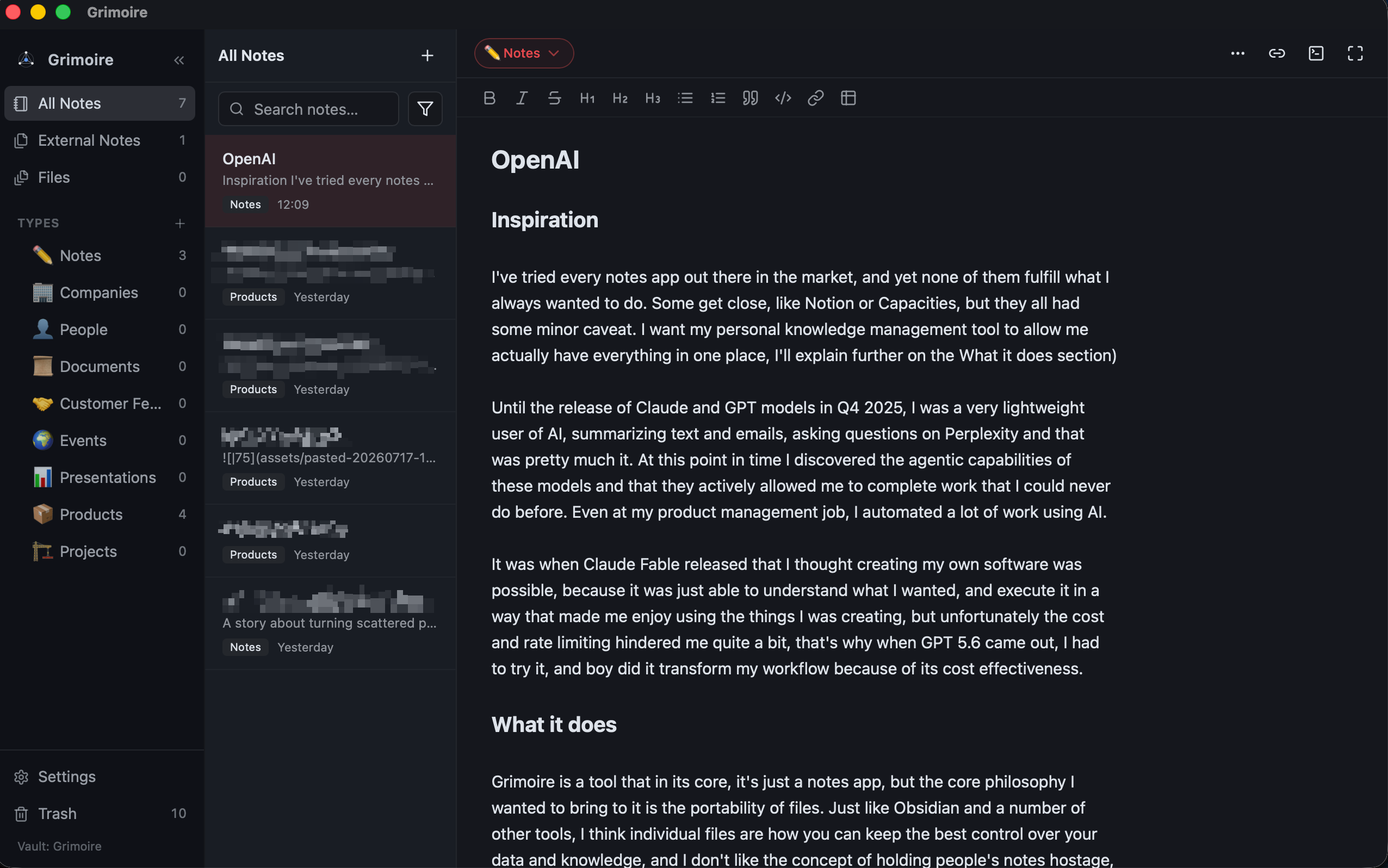
Grimoire app
-
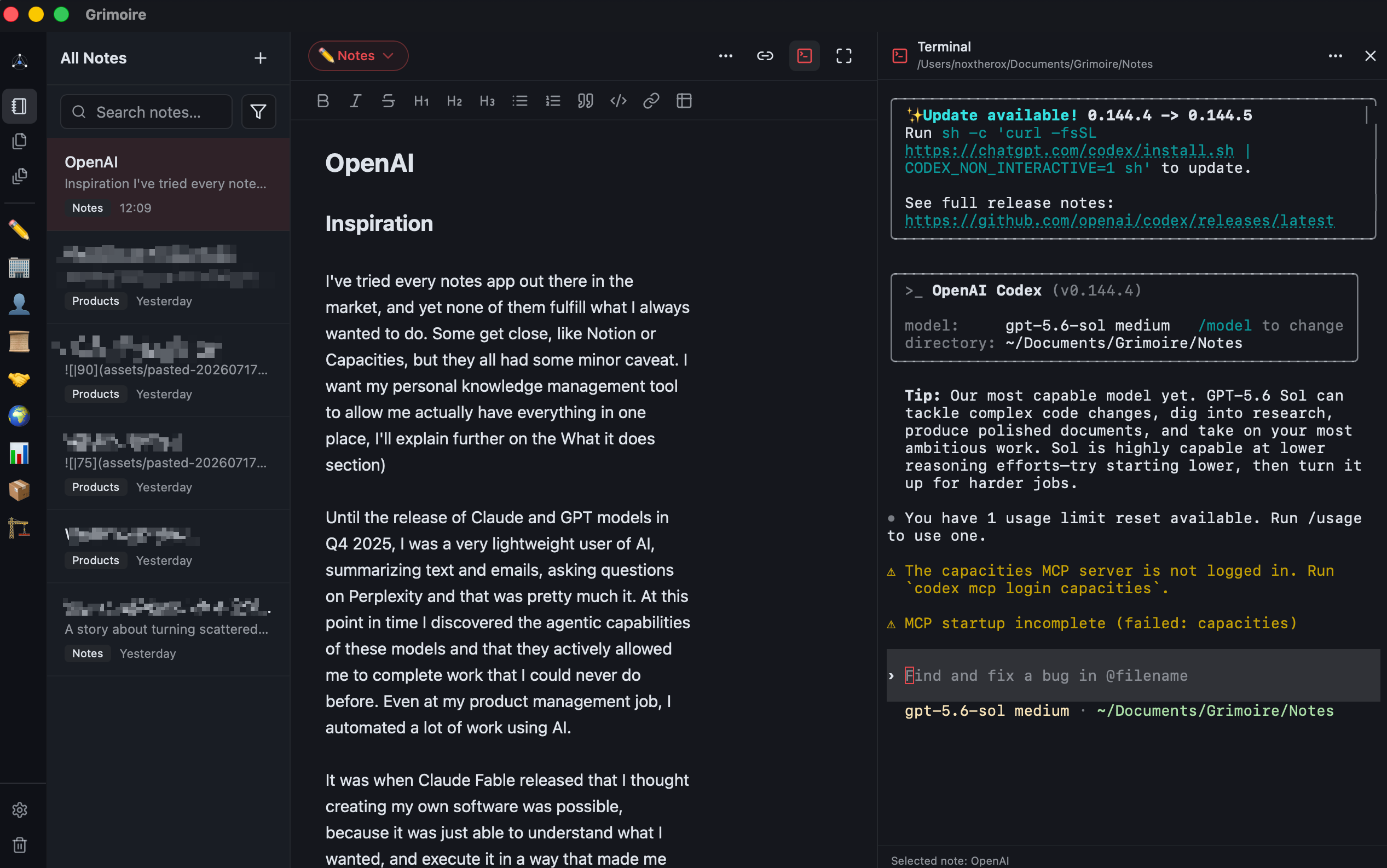
Terminal panel
-
Logo
-
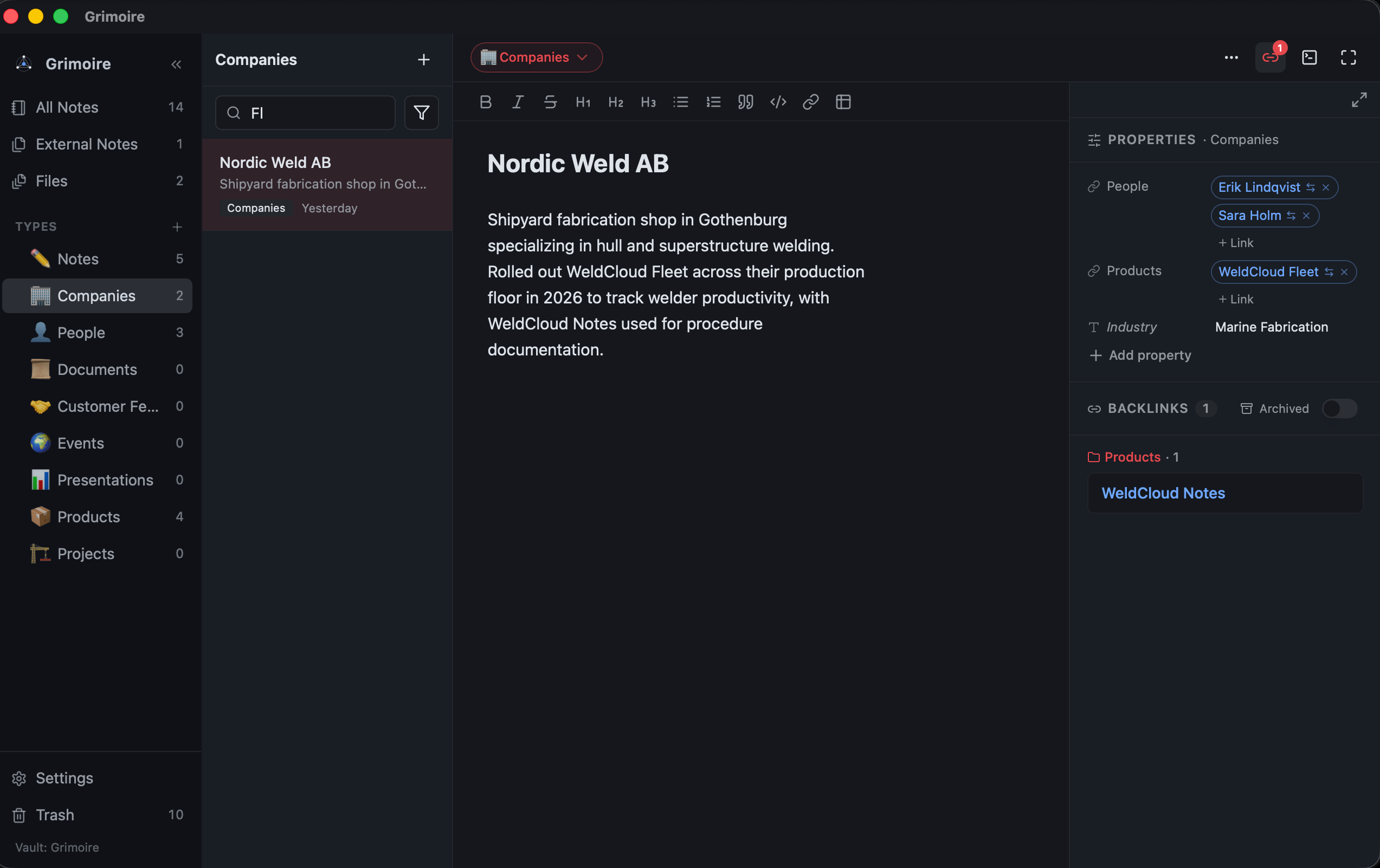
Properties panel
Inspiration
I've tried every notes app out there in the market, and yet none of them fulfill what I always wanted to do. Some get close, like Notion or Capacities, but they all had some minor caveat. I want my personal knowledge management tool to allow me actually have everything in one place, I'll explain further on the What it does section)
Until the release of Claude and GPT models in Q4 2025, I was a very lightweight user of AI, summarizing text and emails, asking questions on Perplexity and that was pretty much it. At this point in time I discovered the agentic capabilities of these models and that they actively allowed me to complete work that I could never do before. Even at my product management job, I automated a lot of work using AI.
It was when Claude Fable released that I thought creating my own software was possible, because it was just able to understand what I wanted, and execute it in a way that made me enjoy using the things I was creating, but unfortunately the cost and rate limiting hindered me quite a bit, that's why when GPT 5.6 came out, I had to try it, and boy did it transform my workflow because of its cost effectiveness.
What it does
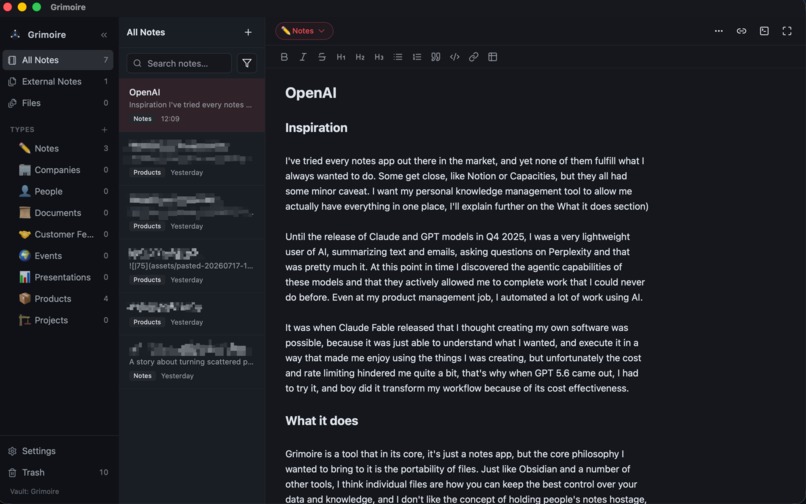
Grimoire is a tool that in its core, it's just a notes app, but the core philosophy I wanted to bring to it is the portability of files. Just like Obsidian and a number of other tools, I think individual files are how you can keep the best control over your data and knowledge, and I don't like the concept of holding people's notes hostage, so you point Grimoire at a folder and all the sub-folders and markdown files in it will be shown.
I created the concept of Note Types, and the idea is that you have a folder for notes about a Project, or notes about people, or notes about products, because these are the things I deal with daily in my product management and sales role. These note types are essentially the main property of a Note.
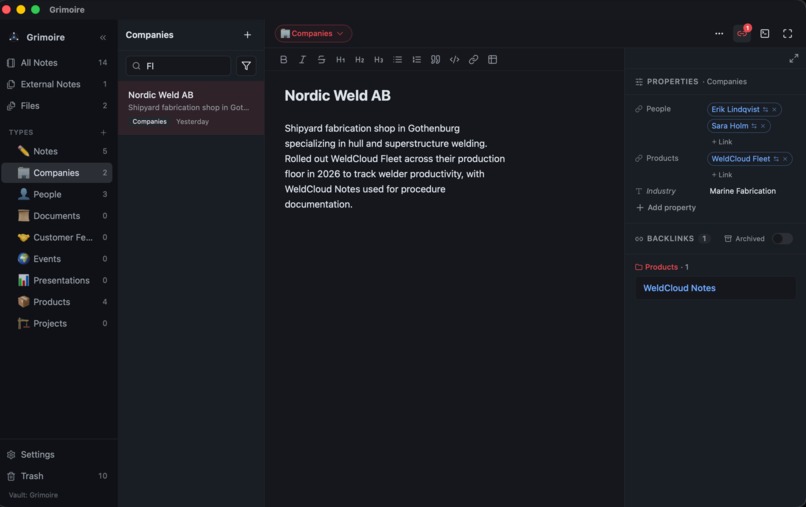
Grimoire also allows you to set note properties which can be static properties (like a number, text, or list) or relations to other notes. The main purpose of these relations is that I want bi-directional information on each note. If I have a product note and this product was made by Mr. John Doe, I will link these two together. In the product note I will see the 'owner' relation with John Doe, and when I open the John Doe note, I will see the backlink for that product under the product category or type. I found this to be very basic functionality but it took most note taking tools years before they considered this.
Now, one thing I do like about markdown files is that I can open a random markdown file and see its contents. But I don't always want these markdown files to pollute my vault, so I created a specific section for 'External notes'. You can use Grimoire to open these markdown files, they will open in this specific section, and you can choose to just close them or move/copy them to your vault if you want to keep them.
Another issue I find with every note taking tool is that, if I have a company onedrive or google drive, the files in these drives are usually shared with other teammates and we need to collaborate, and most note taking tools either allow you to copy the file into the cloud (which then most of the times you have to open it in the browser and only then can you edit it locally), or into your local vault, but if you do that, you cannot keep your local file in the drive folder that preserves the editing capabilities with your team so, in Grimoire, you preserve the local folder location. You can open these files (PPTX, DOCX, etc) in Grimoire, and it creates a markdown note with the same name, and the interface displays buttons for you to either show it in Finder/Files Explorer, or to open directly in the default app (powerpoint, word, etc).
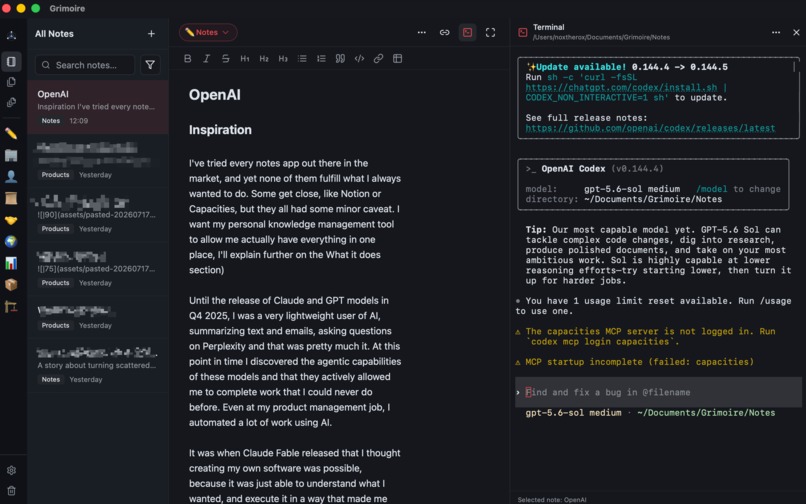
Last thing. I find chatting with AI to be a very good way to find knowledge about your notes, but I don't want you to be forced to pay for something I provide if you already have an AI subscription or plan. So this first version has an embedded terminal that matches your existing shell where you can run Claude, Codex, Hermes, any tool that has a CLI really.
How we built it
I'm gonna be honest. I am not a coder, the whole thing was vibe coded but I do have some experience in the realm of building software so I understand how the pieces should work together and how the whole structure of a software should be, but like I said, I never even glanced at a line of code.
The whole project started in July 2nd, 2026, Dyad (open source vibe coding app, where I used a mix of open weight models and Claude). The real shift came when GPT 5.6 released and I paid for the $20 sub to test it out. I was amazed at the Codex app, very refined and really good quality of life features. It was at this point where I just kept creating sessions for every feature I wanted to implement.
The stack
- React builds everything the user sees: the sidebar, note list, editor, properties, dialogs, themes, backlinks, and terminal panel.
- TypeScript contains almost all of the product logic: note organization, filtering, Markdown behavior, file synchronization, wikilinks, frontmatter, and conflict detection.
- CodeMirror 6 powers the Markdown editor. We extended it with live preview, styled titles, tables, wikilinks, images, tags, and clickable external links.
- Tailwind CSS handles styling, with Radix UI and shadcn-style components supplying accessible dialogs, menus, popovers, and controls.
- Tauri 2 packages the web interface as a desktop application. It connects TypeScript to native OS capabilities without requiring an Electron-style Node.js backend.
- Rust handles work that belongs at the operating-system level: safe file creation, native open-file events, revealing files in Finder, importing documents, and running the embedded terminal.
- portable-pty creates a real native terminal session, while xterm.js renders that terminal inside the React interface.
- Vite compiles the frontend, Cargo compiles the Rust layer, and Tauri combines them into the macOS application and DMG.
- Vitest and Rust tests cover the application logic and native file-safety behavior.
In the current authored source, there are roughly 19,300 lines of TypeScript/TSX and about 600 lines of Rust. So Grimoire is primarily a TypeScript application with a small, focused Rust foundation.
Challenges we ran into
In general using GPT 5.6 it was almost entirely a breeze to do the whole thing, but here are a bunch of minor challenges.
One major challenge was making Markdown feel like a polished document without changing the underlying source. Grimoire hides or styles some Markdown syntax through CodeMirror, but this created subtle cursor problems. The cursor could appear after bold text while technically remaining before the hidden closing **, causing subsequent typing to break the formatting. Tables, links, lists, and nested styles introduced similar edge cases. We solved these problems using syntax-tree inspection, cursor remapping, and presentation-only decorations.
Keeping the files portable remained a strict principle. Features such as large title lines, indented lists, and rendered tables could have been implemented by rewriting the Markdown. Instead, we changed only how the content is displayed. The files themselves remain ordinary Markdown that works in other editors.
Filesystem synchronization was another significant challenge. Grimoire is not necessarily the only application editing a note. Files can also be changed through another editor, Git, the terminal, or an AI tool. A basic autosave system could accidentally overwrite those external changes. To prevent this, Grimoire keeps snapshots of the last known disk content. Before saving, it checks whether the file has changed externally. If both versions were edited, the user is shown an explicit conflict rather than losing either version.
Tauri’s security model also required careful attention. Sometimes a feature was correctly implemented in React but still failed in the desktop application because the necessary native permission was missing. Clickable links needed the correct opener capability, while the hidden .trash directory required explicit filesystem permissions. We learned that every native feature has two parts: the code that performs the action and the capability that authorizes it.
macOS introduced its own lifecycle challenges. At one point, the red close button caused Grimoire to hang because calling close() from inside the close-request handler triggered another close request. We fixed this by saving pending changes and then destroying the window directly. Opening Markdown files from Finder also required a native queue because macOS could deliver files before the React interface was ready.
The embedded terminal crossed nearly every part of the architecture. Rust creates the real shell process, while React and xterm.js render it and handle interaction. We also had to ensure terminal changes could not silently overwrite unsaved editor changes, place the panel correctly without compressing the rest of the layout, and restore keyboard focus after menu actions.
Finally, packaging proved to be separate from compiling. React and Rust could build successfully while DMG creation still failed. In one case, old temporary disk images remained mounted and blocked subsequent packaging attempts.
These challenges ultimately strengthened Grimoire’s architecture: TypeScript owns the product experience, Rust handles native operations, the filesystem remains the source of truth, and Markdown stays portable throughout.
Accomplishments that we're proud of
Using GPT5.6 Sol and the results it gave me definitely made me feel more ambitious, half of the things I developed were a result of the success I got with the more complex task I was giving the model.
Having the external files (powerpoints, word docs, etc) showing up directly in the software and working in the exact workflow I always dreamed of was something I am really proud of.
In the past my vibe coding experiences were just toys and experiences. This is the first time I expect to be actually using something I created for my personal work.
What we learned
Building Grimoire taught us that the most difficult parts of desktop development happen at the boundaries between systems.
A local-first application needs more than simply saving files. Because users can edit their notes through other editors, terminals, Git, or AI tools, the app must treat the filesystem as a shared source of truth. Careful synchronization and explicit conflict handling are essential to protecting user data.
Tauri gave us a useful separation of responsibilities: React and TypeScript handle the interface and product logic, while Rust manages native operations. However, native features require attention to permissions, platform lifecycle events, and packaging—not just working code.
Finally, testing complete user journeys proved more valuable than checking features in isolation. A button rendering correctly does not mean the underlying action, native permission, filesystem change, and resulting UI state all work together.
What's next for Grimoire
Well, the first step was just to build the macOS version which is where I work mostly. Using it in Windows and Linux is relevant for me because I have a number of devices with these OS and I need to support them if I wanna use this everywhere.
I also need to have mobile applications and I've already started drafting the iOS version, so that's the obvious next step
I want to essentially keep this project open source, might look into accepting contributions but not sure yet.
Monetization is not planned, and I don't know yet if it will ever be a thing. In the very least, everything in the current functionality of the app will forever be free.
Built With
- codemirror
- react
- tauri
- typescript
- vite
- vitest


Log in or sign up for Devpost to join the conversation.