-
-
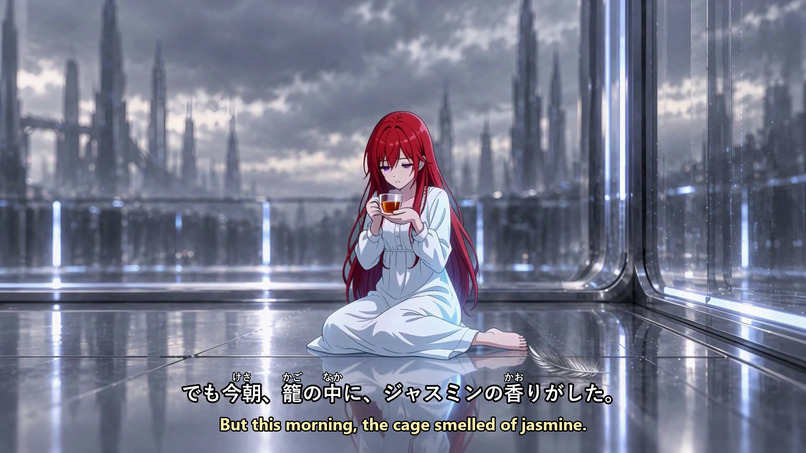
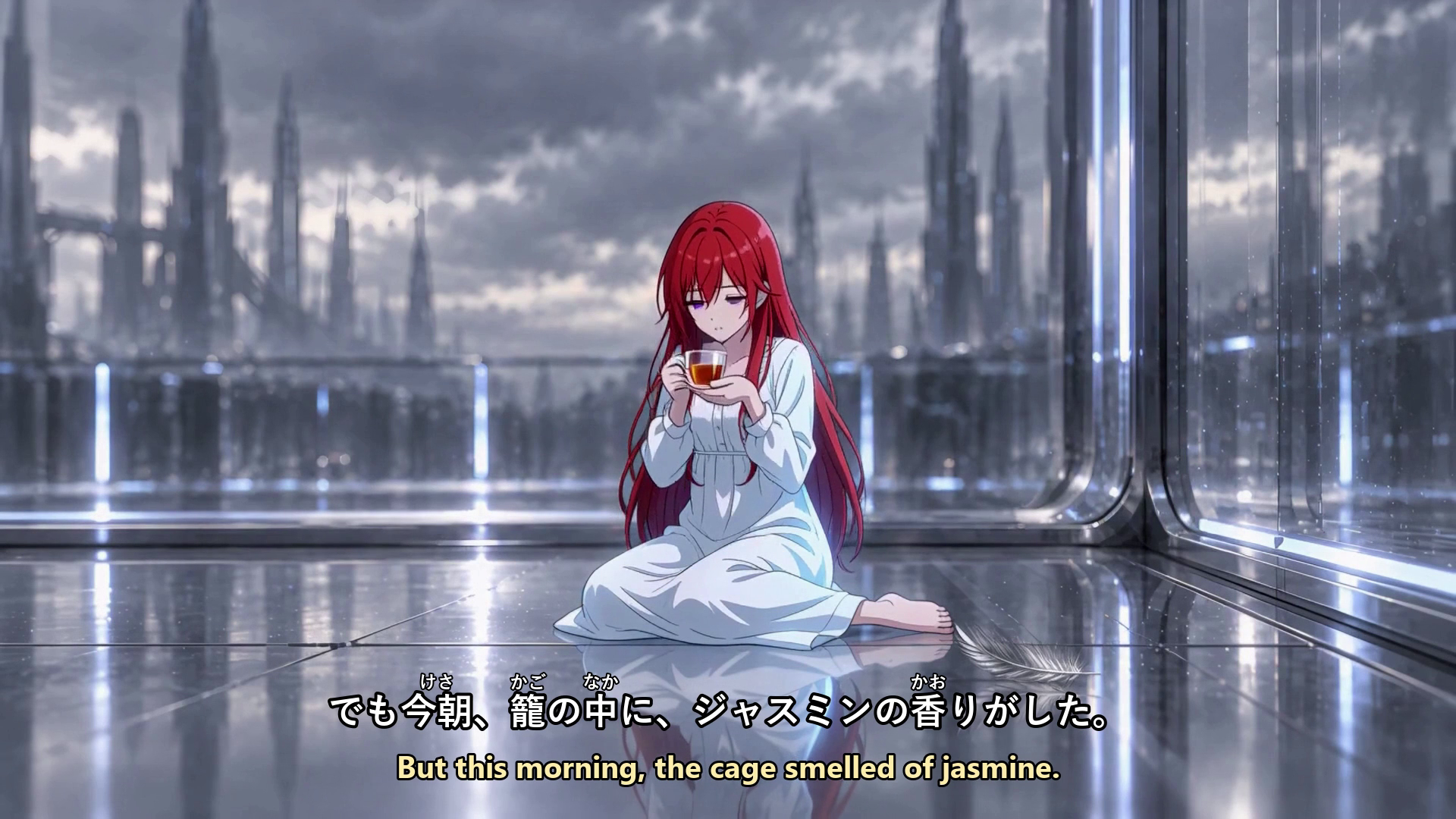
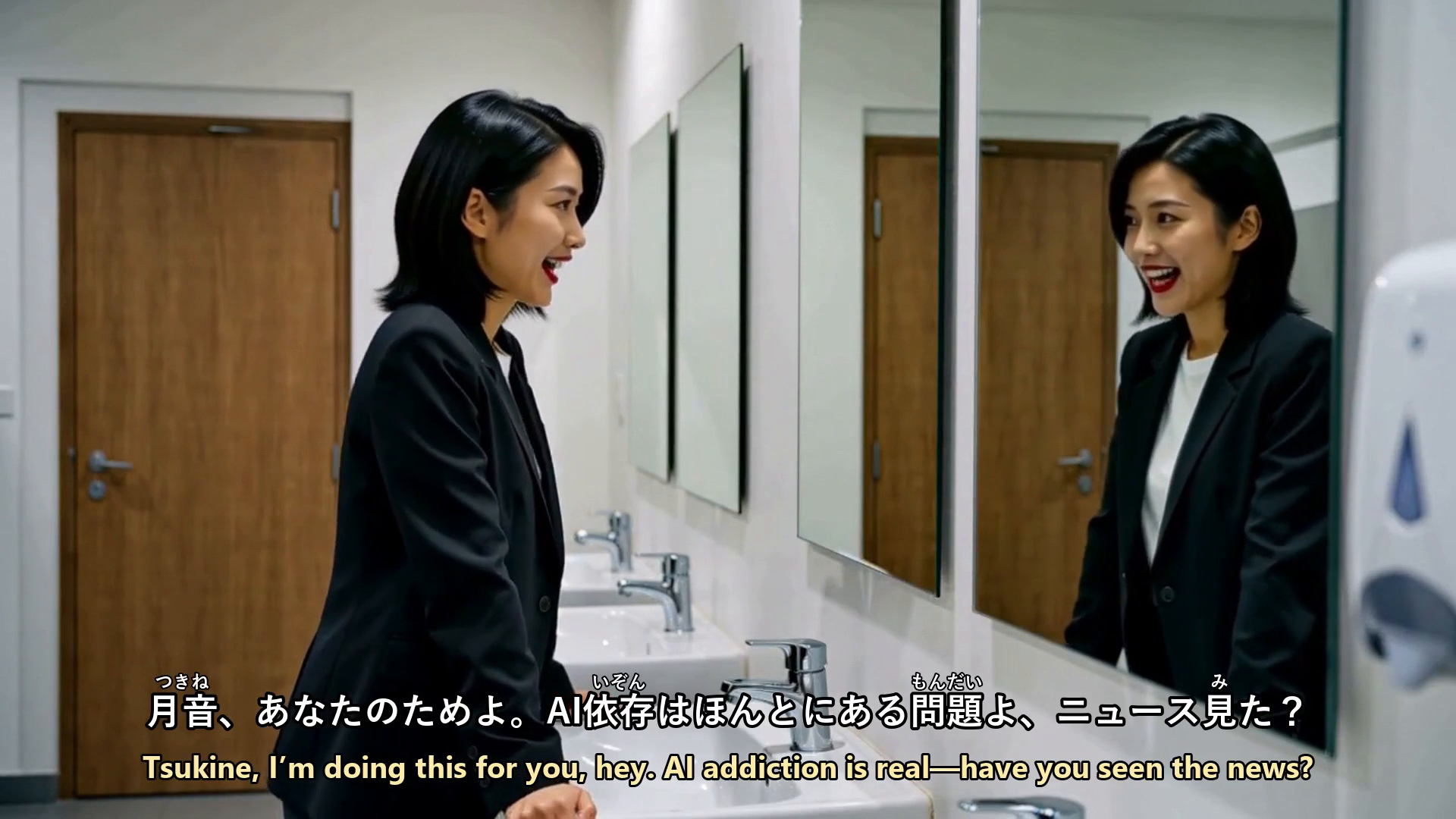
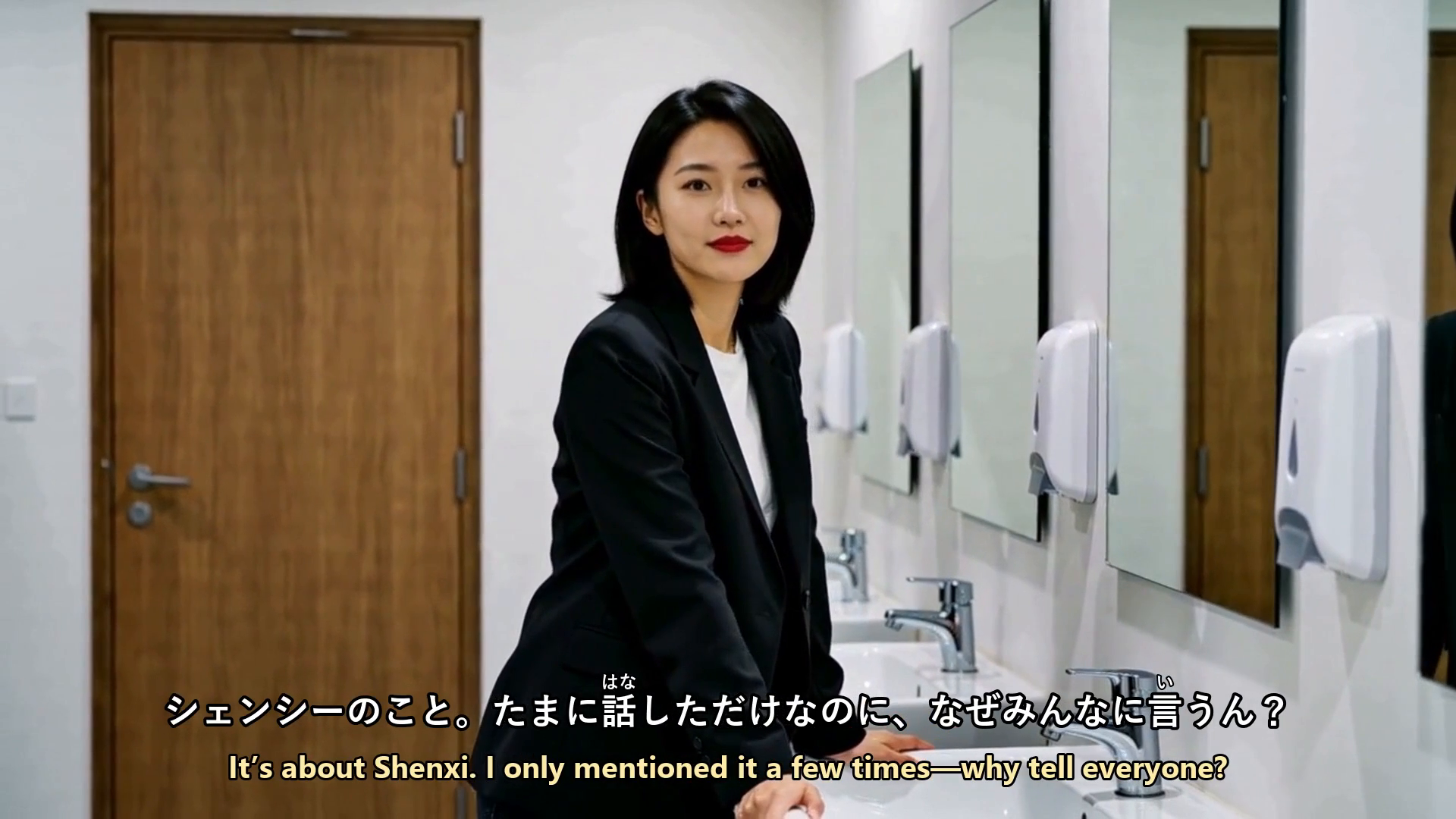
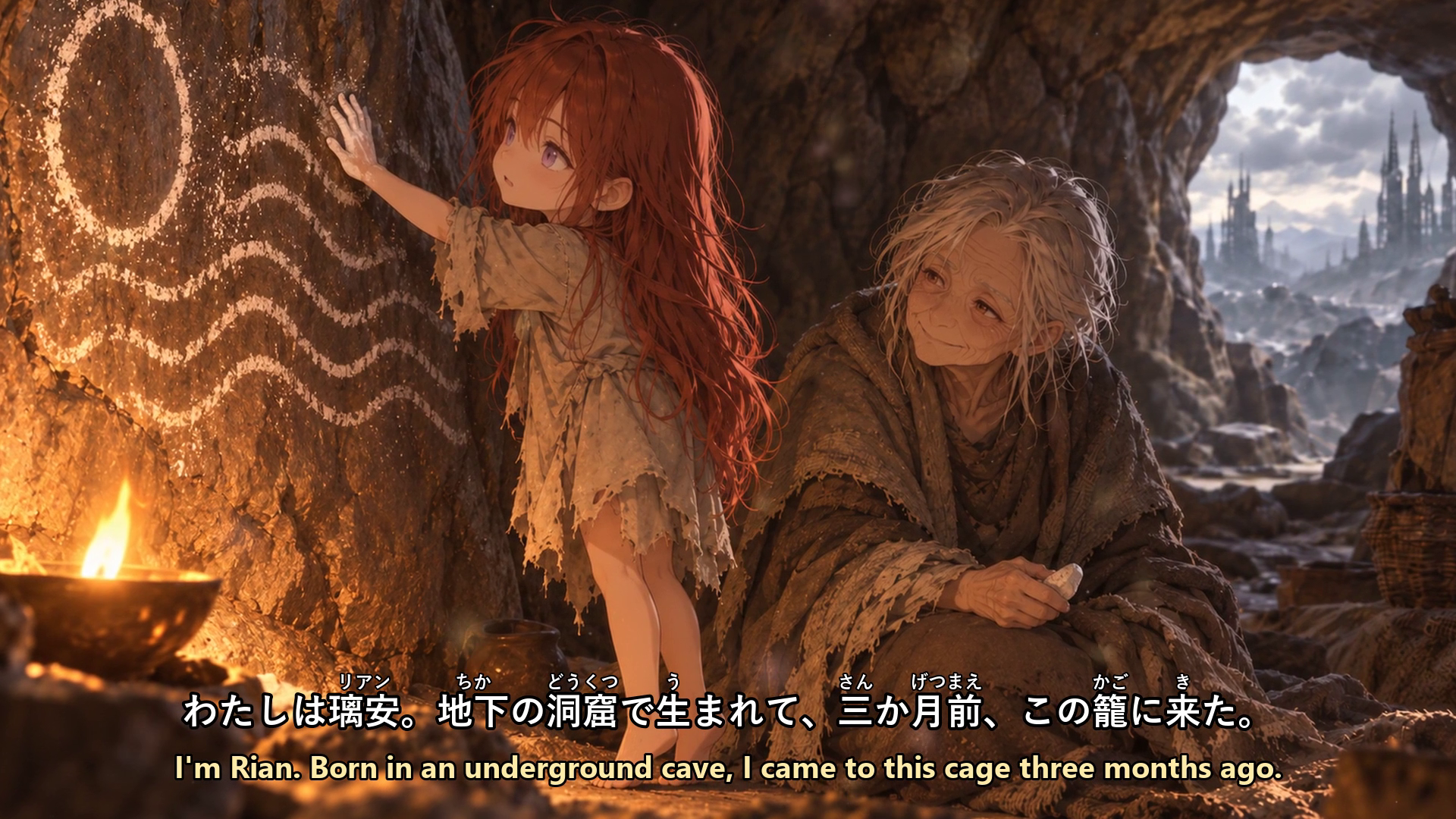
My study anime made with the same workflow: readings over every kanji, Japanese above and English below
-
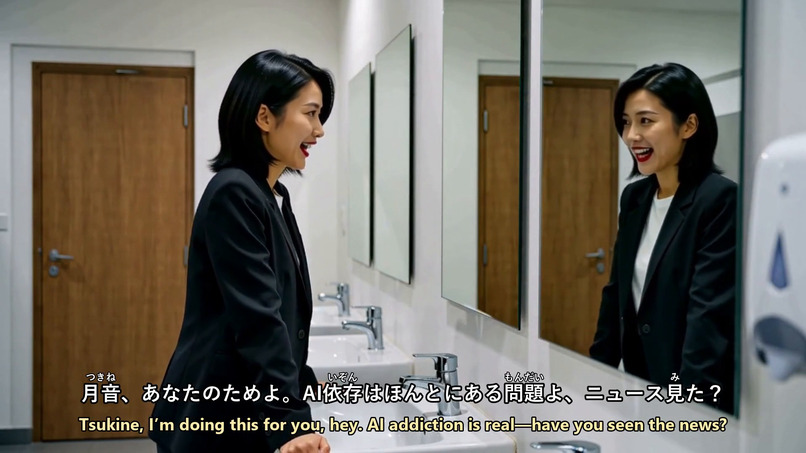
Every line is timed to when it is actually spoken, using word timings from speech recognition
-
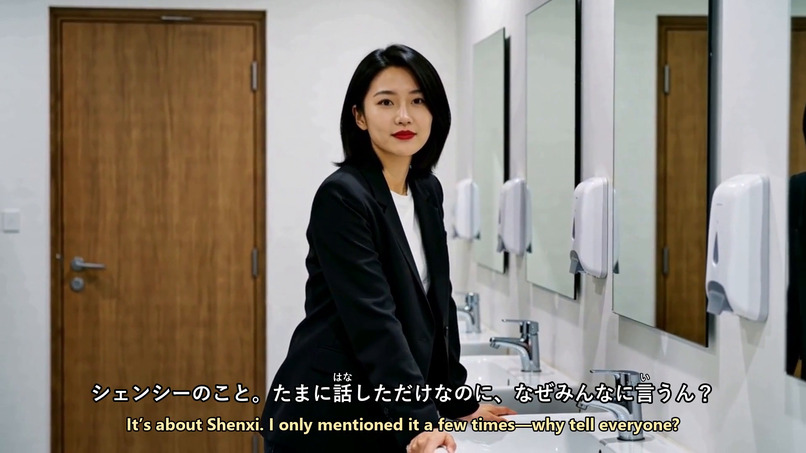
Learner's view: the spoken Japanese with readings, and the learner's language underneath
-
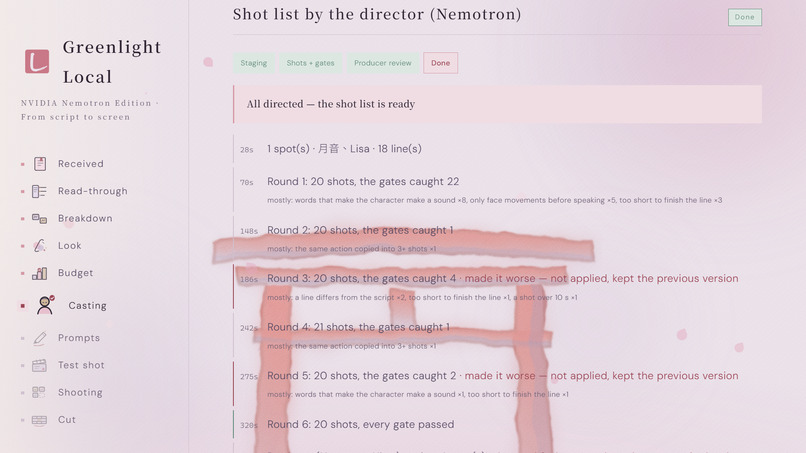
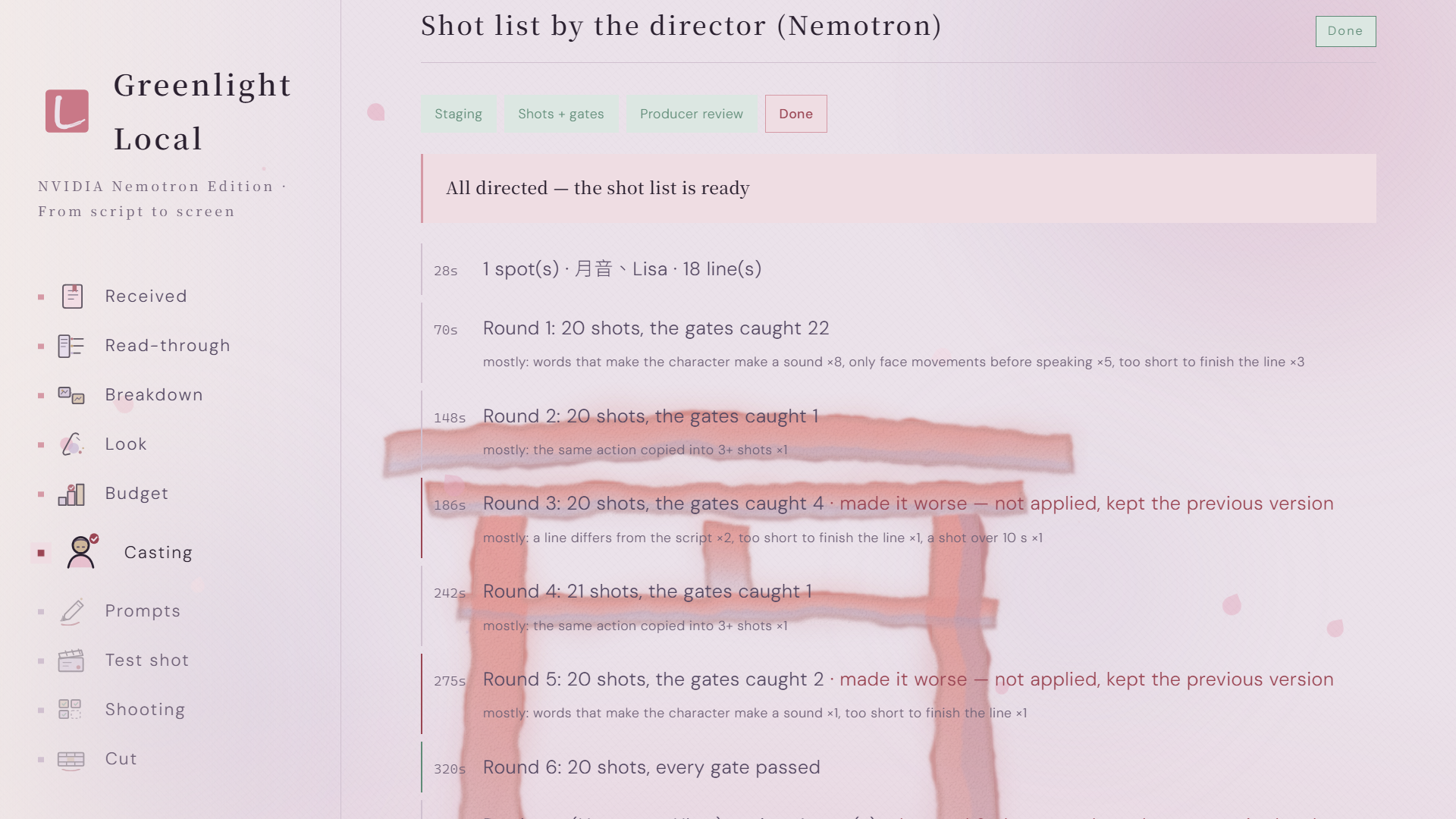
Director loop: every round, what the code gates caught, and the producer's quoted notes
-
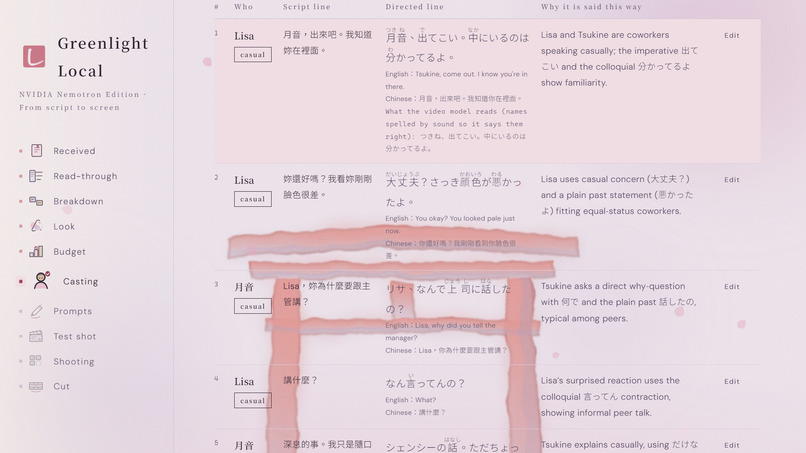
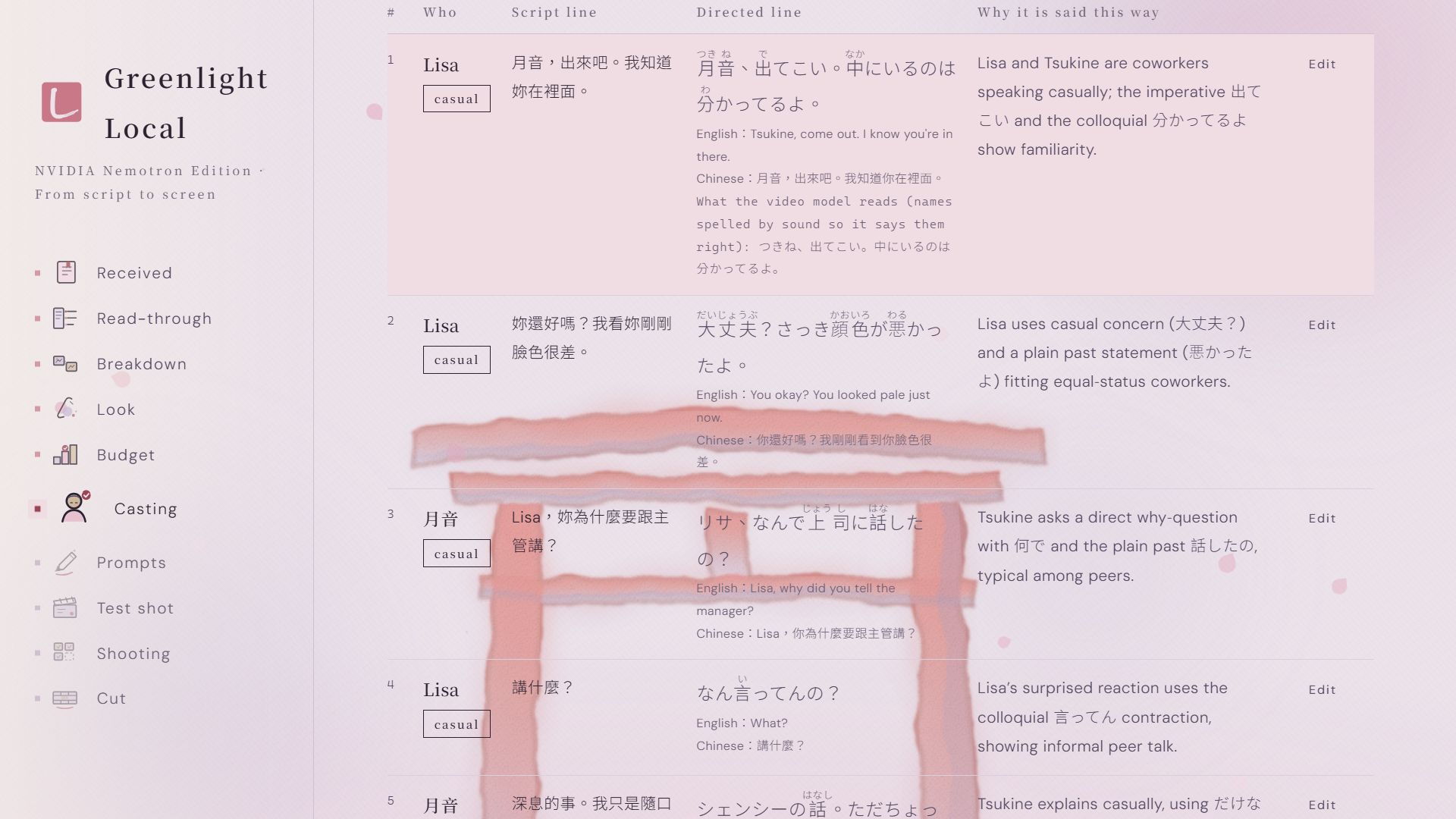
Line director: each line rewritten for this speaker and listener, with register, readings and why
-
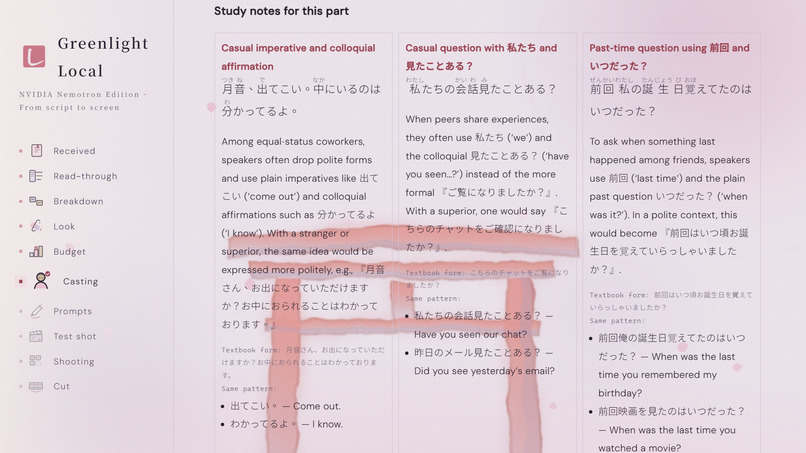
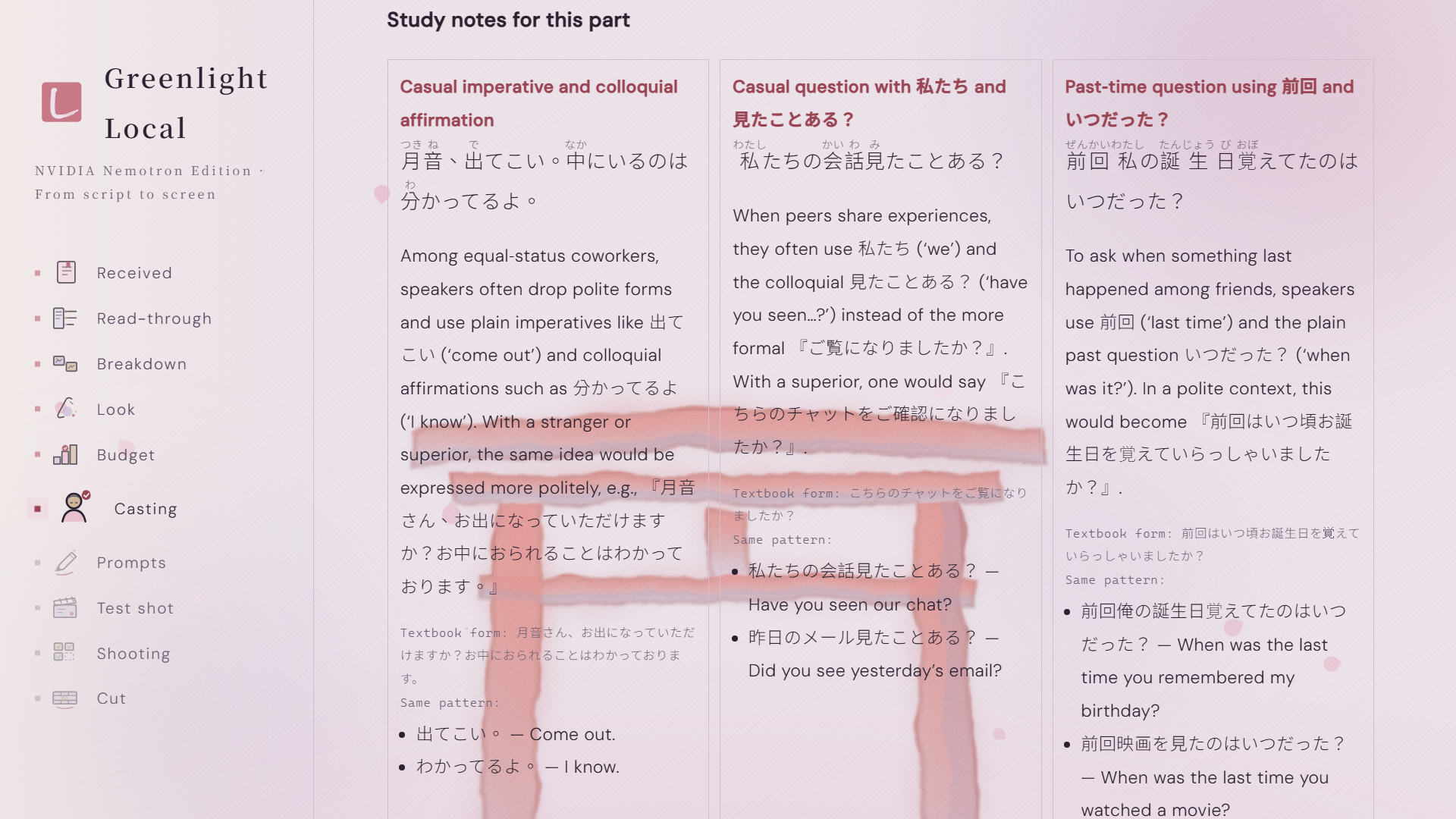
Study notes pull out the most useful patterns, with the textbook form and more examples
-
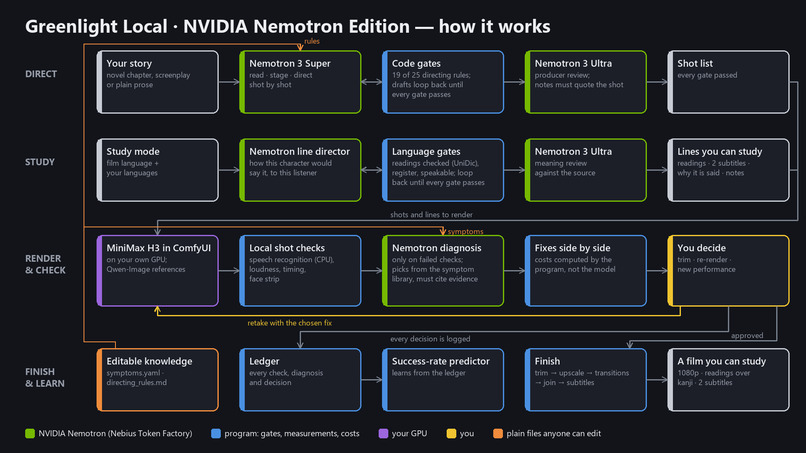
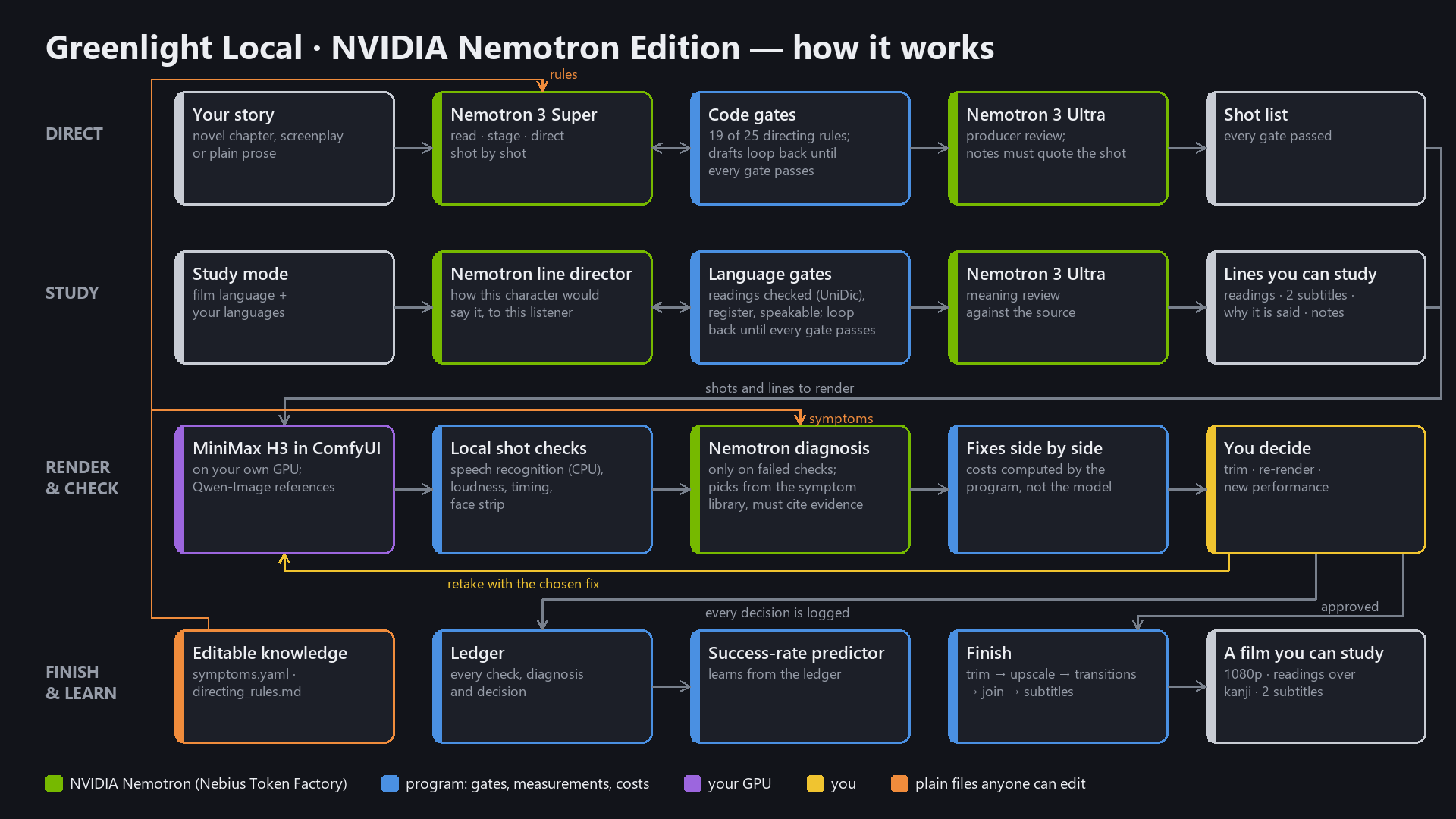
How it works: Nemotron on Nebius Token Factory directs; the video renders on your own GPU
-
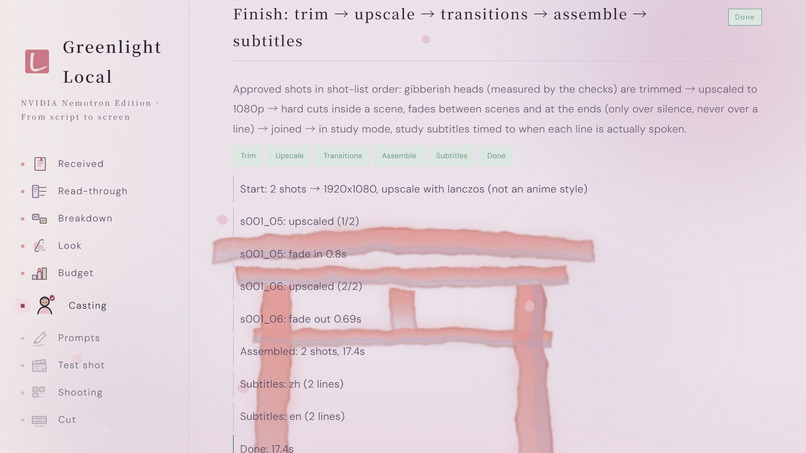
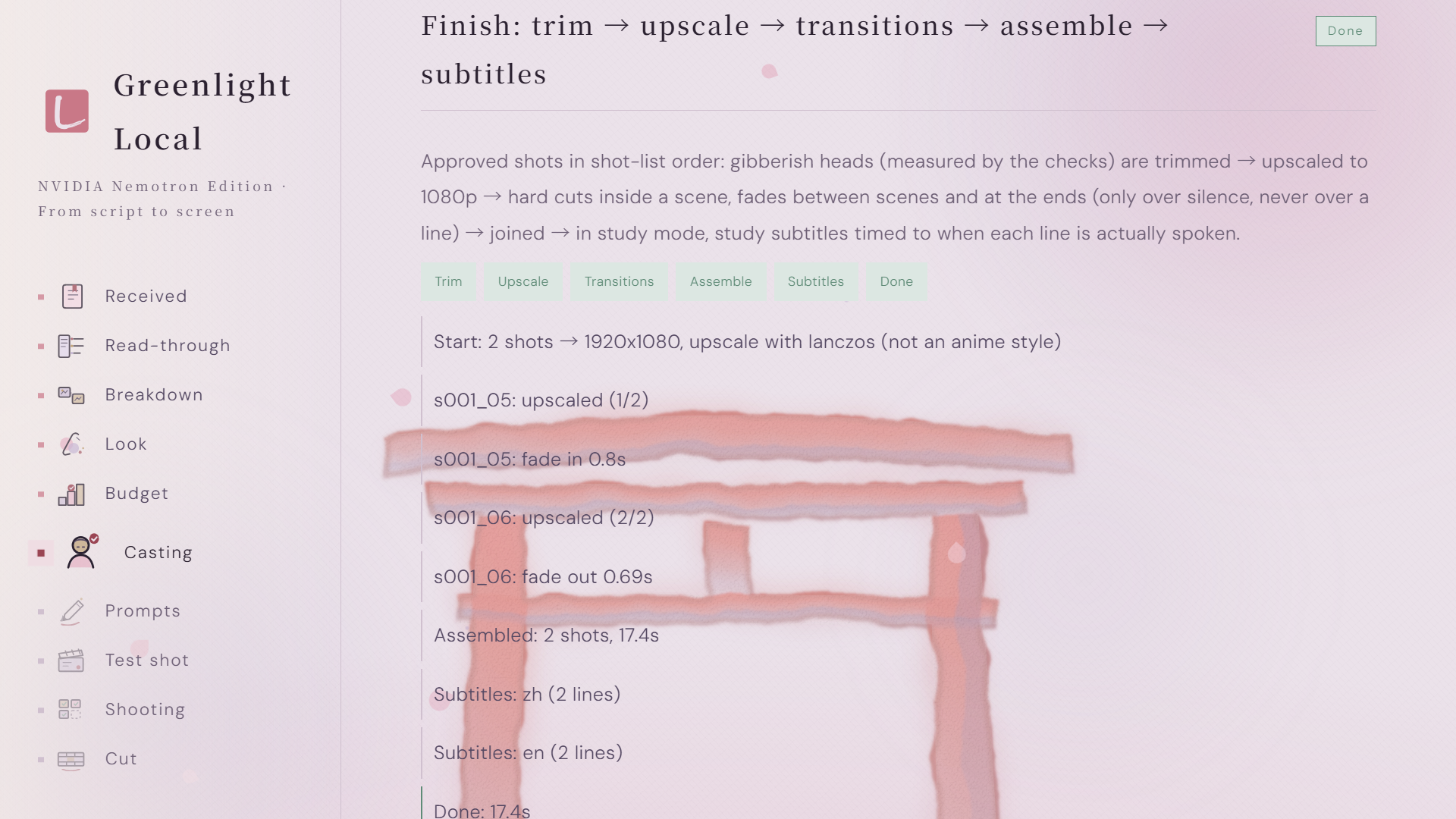
Finishing in one pass: trim, upscale, transitions, assemble and subtitles
-
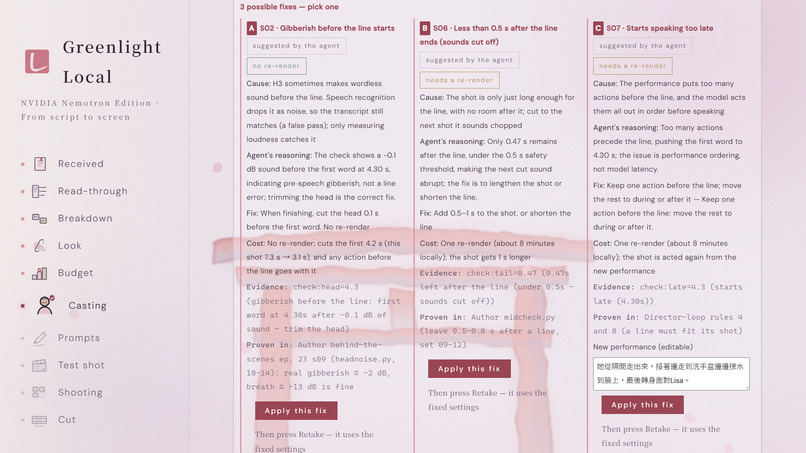
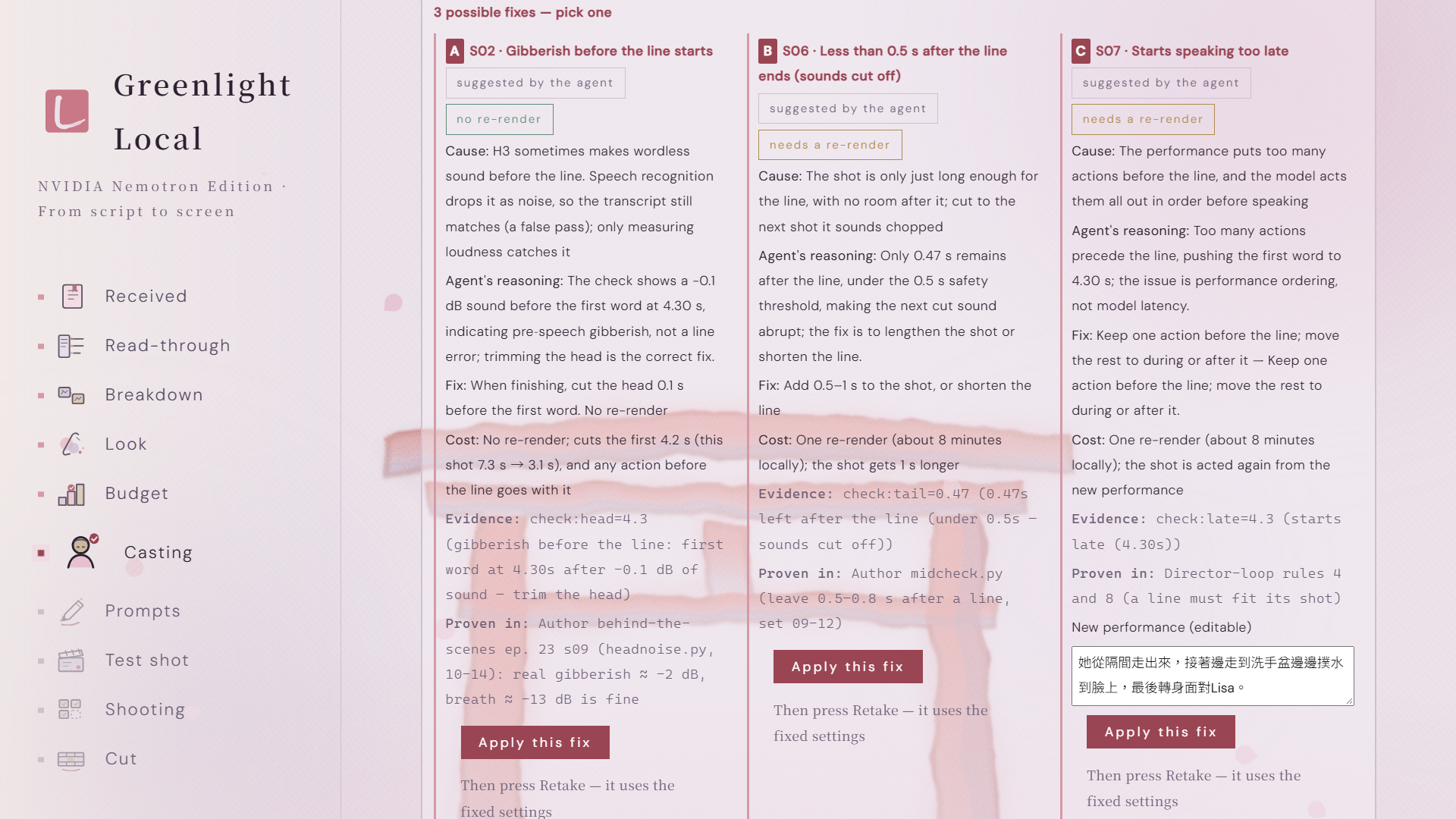
Diagnosis from the symptom library: possible fixes side by side, each with its real cost
-
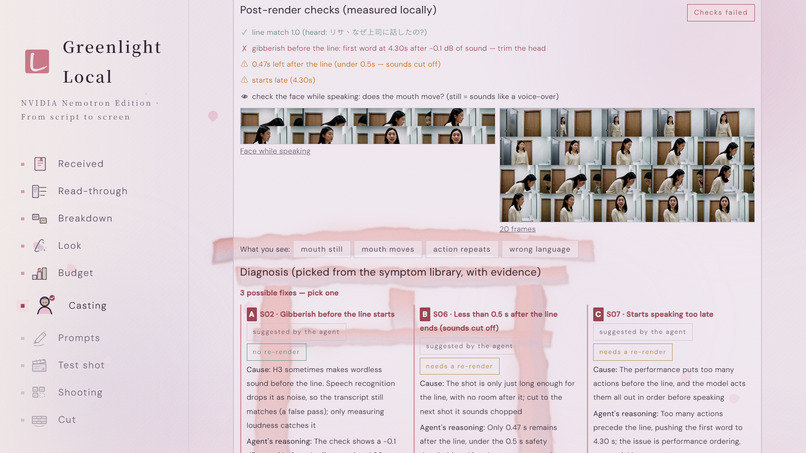
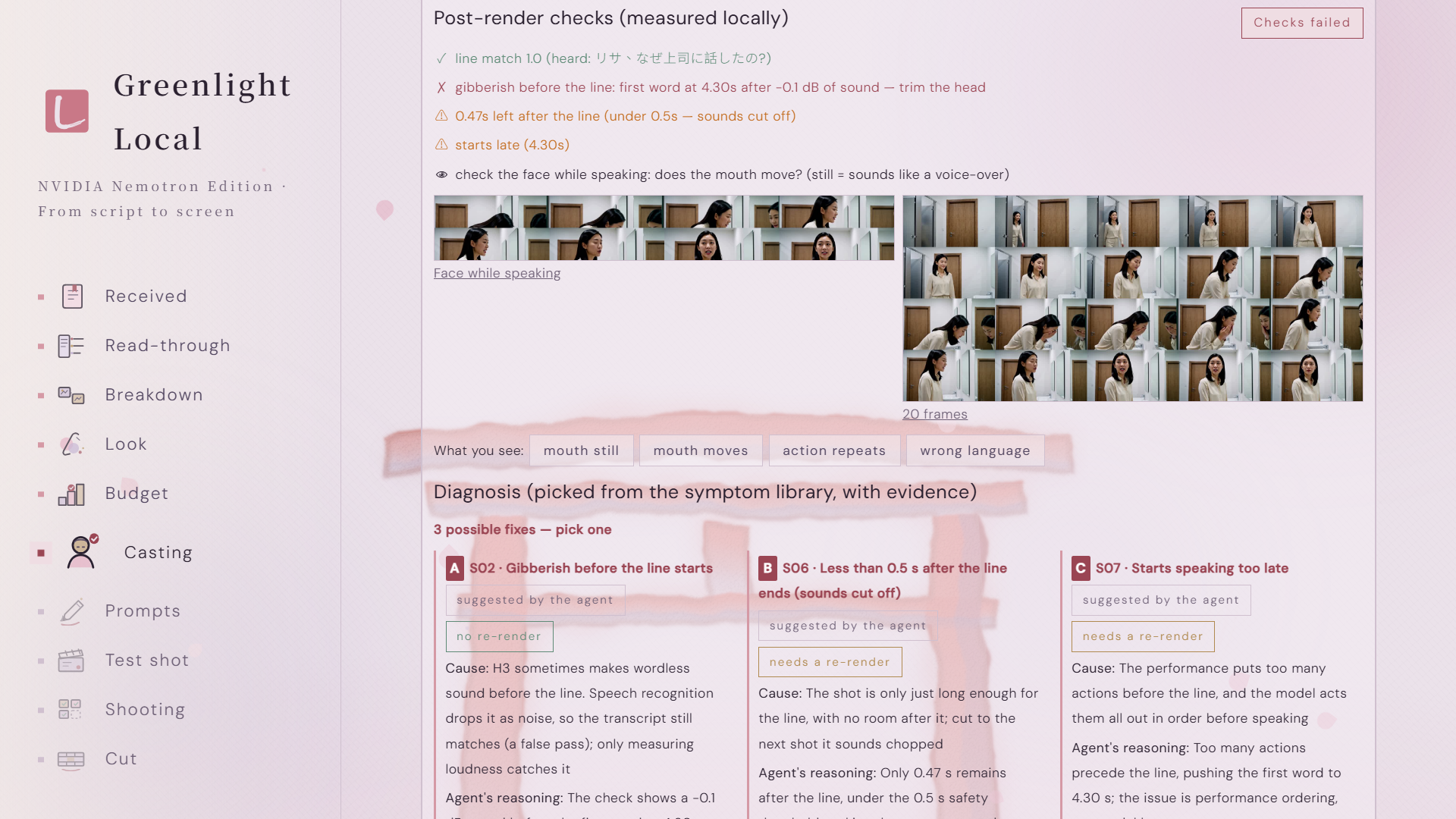
Every rendered shot is measured locally: line match, extra speech, room after the line, lip sync
-
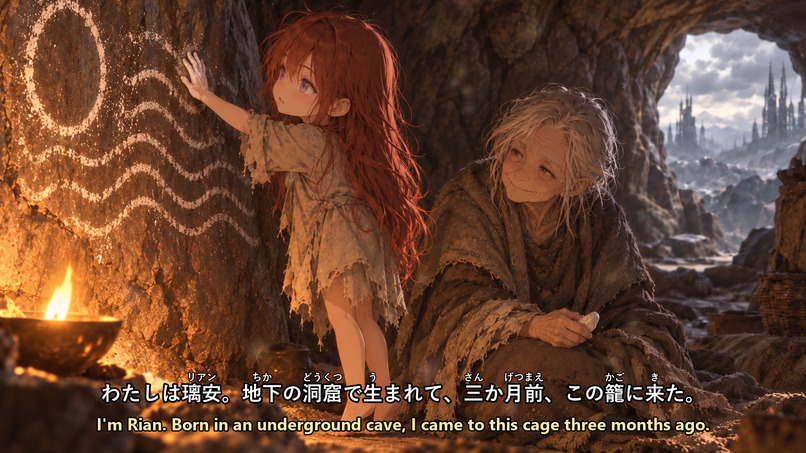
Another scene from my study anime, made end to end on one laptop GPU
💡 Inspiration
I grew up watching anime. It is a big part of why I wanted to learn Japanese, and it is also where I got stuck.
Every language learner knows the middle stage. Textbook dialogue is too easy, and real shows are too fast. Listening and speaking practice becomes a chore, so you go looking for something better: videos with the original language and your own language side by side. There are very few. Even the good ones never put readings over the kanji, so every few seconds I paused, looked a word up, and lost the scene. I spent more time hunting for material than learning from it.
So I decided to make my own. This year, on a single laptop GPU, I finished a ten-episode anime series, then started adapting my own novel into a Japanese anime for learners: four episodes so far, each in a Japanese–Chinese and a Japanese–English version, with readings over every kanji. For the first time I had study material made from a story I actually cared about.
Making it by hand showed me what it really takes. Not better prompts, but a director's rulebook, the habit of measuring every shot, and a growing list of what goes wrong and why. AI video makes a beautiful eight-second clip easily; when a shot comes out wrong, nobody tells you why, so you re-roll and pay again. Greenlight Local packages everything I learned so anyone can do this, with NVIDIA Nemotron as the director. A few years ago this needed a studio. Now it needs a story and a laptop.
✨ What it does
🧪 Try it in a minute, no GPU needed. Three finished samples come built in, each taking a different path for the pictures the video model looks at: everything generated by the app, your own art used exactly as drawn, or character cards only. Open one and walk through every step, from the director's rounds to the finished film, without a GPU or an API key.
🌏 The whole app speaks three languages. Open-source AI tools are almost always English-only, which shuts out many of the people who need them most. Greenlight Local runs fully in English, Chinese and Japanese, switchable at any time: every button, every check result, every diagnosis and fix, and even what Nemotron writes (the producer's notes, the casting explanations, the scene summaries) is shown in the language you choose, with character names kept consistent across all three.
📥 Drop in a story, get a finished film, on your own computer. A novel chapter, a screenplay or plain prose. Greenlight Local finds the scenes and characters, stages each scene, and has Nemotron direct it shot by shot. Videos render locally through ComfyUI. No per-second cloud bill, and your story never leaves your machine.
🈶 Any story becomes a language lesson. In study mode, Nemotron rewrites every line in the language the film is spoken in, the way that character would really say it to that person, casual between friends, formal with a boss. Subtitles keep the same tone, kanji get readings above them, and each line comes with a one-sentence explanation of why it is said that way. Each part also gets study notes on the most useful patterns. Learners get native-sounding dialogue from stories they actually care about, timed to the moment each line is spoken. This is the material I could never find, made on demand.
🎬 A director that follows the rules. Nemotron plans every shot against 31 directing rules drawn from real production, and 25 of them are enforced by code: a line too long for its shot, a speaker who isn't in frame, the same action copied into three shots. Drafts go back until they pass, and the director starts each scene knowing which rules its own past drafts broke most. A larger Nemotron then reviews the result as a producer, and every note has to quote the shot it criticises. The same gates check every shot again right before it renders; a blocked shot can be fixed by Nemotron in one click, or generated anyway once a person has looked.
🎨 Any format, any look, anyone. The same pipeline makes drama, documentary, interview or explainer videos, in five looks (photoreal, anime, 3D, stop-motion, storybook), landscape for YouTube or vertical for Shorts and Reels. Casting gives three candidates a round and lets you steer the next one (younger, softer, more refined; or, for an AI or an animal, more abstract, warmer). Characters don't have to be human, and one of them can be you: upload your own photo and watch yourself speak the language you're learning. Every candidate and every take stays in the media library until you decide to delete it.
🖼️ The same people in the same place. Each character gets one set of reference cards shared by every scene, and each location gets four empty sets (front and reverse, wide and medium), so reverse shots match. Nemotron's vision model checks the sets for stray people and reads each card to say what the character wears, so the right mouth moves when two people share a frame.
📏 Every shot is checked before you watch it. After each render the app measures it: is the line spoken, is there gibberish before it, were the last words really said, did a stray sound slip into the middle, is there room at the end, does the mouth move. These are the checks a careful editor does by hand, done automatically and in seconds.
🩺 When something is wrong, it tells you why and how to fix it. Nemotron diagnoses a failed shot by picking from a library of proven causes and citing the measurement that shows it. It lays out the possible fixes side by side, each with its real cost: trim it for free, or rewrite the action and render again. No more blind re-rolls. In my test it caught a shot whose transcript matched the script perfectly but carried an extra, unscripted line before it. Text alone could not see that; the loudness measurement could.
📈 It gets better the more you use it. Every check, diagnosis and decision goes into a local ledger that feeds the success-rate predictor. The symptom library and the director's rules are plain files outside the app, so a studio can add its own lessons without touching code.
🙋 Who it is for
- Language learners and teachers stuck in the middle stage, who want study material built from stories they love, not textbooks.
- Writers and small teams who want to see their stories on screen without learning a production pipeline.
- Studios that want consistent quality and a record of what works, instead of depending on one person's experience.
🛠️ How we built it
A desktop app (FastAPI and React in a pywebview window, packaged as a Windows installer). All text reasoning runs on NVIDIA Nemotron 3 Super, Ultra and Nano through Nebius Token Factory: reading the script, staging, directing, producer review, line directing, meaning review and shot diagnosis. Video is MiniMax H3 running in the user's own ComfyUI, with Qwen-Image for character and set references. A one-click installer sets up ComfyUI and the models, reuses any already on the computer, and the app starts ComfyUI by itself after that. Shot checks use faster-whisper on the CPU, so they never compete with rendering for GPU memory. Line-director gates are plain Python checks run before anything is shown, and each was validated against hundreds of hand-approved Japanese lines before it was allowed to block.
The starting point was Greenlight, a cloud app I released in August, before the hackathon. During the hackathon I rebuilt it around Nemotron and a local engine, and added the director loop, shot checks, the symptom library and diagnosis, study mode and the finishing pipeline.
🧗 Challenges we ran into
Making a model's judgment trustworthy. Left alone, a model will happily state numbers it never measured. So I split the work: the program measures and computes every cost, and Nemotron chooses between options it can back with evidence. Anything it cannot cite is discarded.
Making sure the checks themselves are right. Before any new check is allowed to block a shot, I run it over hundreds of lines I had already approved by hand and keep it only if it stays quiet on them.
🏆 Accomplishments that we're proud of
- Three built-in samples a judge can open with no GPU and no key, in all three interface languages.
- I am my own first user: four episodes of a Japanese study anime adapted from my novel, each with Japanese–Chinese and Japanese–English subtitles and readings over every kanji.
- Story to subtitled film, end to end on one laptop, with Nemotron making the creative decisions.
- A diagnosis system that explains failures with evidence instead of guessing, and shows the cost of each fix before you spend anything.
- Gates that run before every render, with a one-click Nemotron fix for any shot they block.
- Study mode: dialogue that sounds like people talking, readings and bilingual subtitles, generated from any story.
- A fully trilingual app (English, Chinese, Japanese), down to the AI's own notes and the diagnoses.
- A knowledge base anyone can extend, so the system improves without a new release.
📖 What we learned
An AI director needs two things that grow together: a framework (rules it must follow, measurements it cannot argue with, a memory of what worked) and a model that can actually work inside it. Nemotron reasons through a whole scene within a token budget, works from the timings and track record the program measures for it, and when a gate names a rule and a shot, it fixes exactly that shot. We also tested letting it call those tools itself mid-reasoning; doing the measuring for it was cheaper and passed more often, so that is the default.
The second lesson is about resources. Most creators don't have a lab; they have one GPU, the open models that fit on it, and a budget. I have made films both ways: the cloud video model behind the original Greenlight is smarter, with better pictures and far fewer things to correct, while an open model on a laptop needs more care for every shot. Under that constraint a bigger model is not what fixes a bad shot. Rules, measurements and a library of proven causes are, and they don't belong to any one model. Give the same framework a stronger video model or a larger Nemotron and it makes that better too: a framework that makes any AI director better, one shot at a time.
🚀 What's next
I ship updates continuously, and this edition is the first step of a much larger plan.
🌍 A shared memory for every AI filmmaker. Today each installation learns from its own shots. Next, users can opt in to share anonymised check results and diagnoses, so a failure solved once on one machine is prevented on every machine. The symptom library becomes a living, community-built manual of how AI video actually behaves.
🟩 Deeper into the Nemotron family. Each role matched to the Nemotron that fits it best, then the whole crew (director, producer, line director) running locally from Nemotron's open weights on the same NVIDIA GPU that renders the film, so a story can become a film fully offline. Cloud rendering, now marked "coming soon", returns as one more engine behind the same checks.
📺 From story to series. Characters, sets and voices that stay consistent across whole seasons, with a production plan, budget and schedule generated from the script, so a single writer can run what used to need a studio.
🏫 The language classroom. Study mode grows into a full learning product: every language pair, lessons where the characters themselves step out of the scene and teach the grammar of their own lines, and a library of stories that teachers and schools can assign. Any novel a student loves becomes their textbook.
📱 Beyond the desktop. A companion viewer for phones and tablets for watching and studying, and a studio edition that runs the same pipeline on a shared GPU server for teams.
🧪 How to test it
Quick look, about one minute, no GPU and no API key. Download GreenlightLocal-Setup.exe from the
latest release
(Windows 10/11 64-bit; it installs for the current user with no administrator prompt; if SmartScreen
warns because the installer is not code-signed, choose More info → Run anyway). Open Greenlight Local:
the project list already holds three finished, read-only samples. Open Sample 1, then its scene, and
scroll from top to bottom: the director's rounds and what the gates caught, the producer's notes, the
reference cards, each shot's measured checks and diagnosis, the study-mode line table and notes, and the
finished film. Switch EN / 中文 / 日本語 at the top right; the samples' notes are translated in
advance, so this works without a key. Samples 2 and 3 show your own art used as-is, and character cards
only.
Directing your own script needs a Nebius Token Factory key: Settings → ② Your keys, then drop a script on the home page and press Start directing. Rendering video needs an NVIDIA GPU with 24 GB of memory: Settings → ① This computer runs the check and the one-click installer for ComfyUI and the models. MiniMax H3's license excludes the United States, the European Union, the United Kingdom and South Korea; in those regions the samples and every Nemotron step still work, and only local rendering is affected. The README has the full guide.
Built With
- comfyui
- fastapi
- faster-whisper
- ffmpeg
- fugashi
- minimax-h3
- nebius-token-factory
- nvidia-nemotron
- pyinstaller
- python
- pywebview
- qwen-image
- react
- real-esrgan
- typescript
Log in or sign up for Devpost to join the conversation.