-
-
Choose, Act, Make Change.
Inspiration
The high levels of carbon emissions contributing to air pollution and the water scarcity experienced in our country inspired me to create Green2Swap. The goal is to help people understand the environmental impact of the products they choose and encourage them to make more responsible choices.
What it does
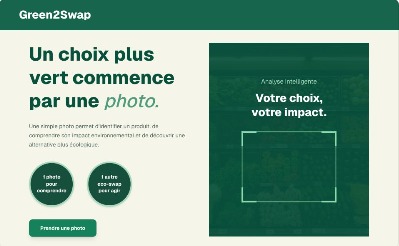
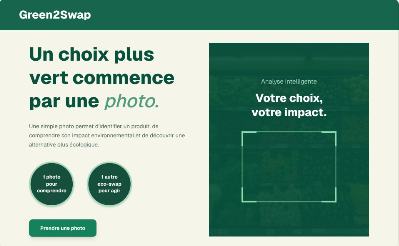
Green2Swap allows users to simply scan a product using their webcam or upload an image. The artificial intelligence (Google Gemini) instantly analyzes its carbon footprint and water consumption, then suggests a more eco-friendly and sustainable alternative called an “Eco-Swap.” The application is designed to be fast, intuitive, and educational, encouraging users to take action for the planet through small changes in their food choices. The analysis returns an error when users scan images of objects or items other than food.
How we built it
My Approach to Creating Green2Swap
1. Designing the User Experience I first designed a very simple user journey:
- The user uploads an image or uses their camera.
- The artificial intelligence identifies the product.
- The application estimates its carbon footprint and water consumption.
- It suggests an alternative called Eco-Swap.
- The user can see the potential savings in CO₂ emissions and water consumption. The goal was to make complex environmental information easy to understand, without using overly technical vocabulary or making users feel guilty about their choices. 2. Researching the Technologies For the development of Green2Swap, I used:
- Next.js as the framework
- TypeScript as the programming language
- Tailwind CSS for styling
- Google Gemini API for AI-powered product analysis
- React Webcam for camera access
- Vercel for deployment
3. Working on the Project I started with the backend and API. This is where the application receives the image, converts it into Base64 format, and sends it to the AI for analysis. The API then processes the response and sends the result back to the frontend. I then worked on the frontend, including the home page, where we introduce the idea, raise environmental awareness, and encourage users to take action. I also developed the scanning section, which manages camera access, image uploads, and the display of the analysis results. 4. Testing and Validation Before deployment, I performed several tests and validations to make sure that the main features were working correctly and that the user experience was smooth.
5. Deployment
Finally, I deployed Green2Swap on Vercel, making the application accessible online.
Challenges we ran into
I am proud to have successfully worked with Next.js and developed an environmental project that aims to encourage more sustainable choices.
Accomplishments that we're proud of
I am proud to have successfully worked with Next.js and created an environmental project.
What we learned
I learned that when developing a project, it is important to consider its impact on all the target users we aim to reach. I also learned how to use Vercel for deploying and hosting a web application.
What's next for Green2Swap
Since Green2Swap is designed to become a full-fledged application, transforming it into a mobile application and deploying it on app stores are part of its future plans. For now, however, Green2Swap is still a Progressive Web App (PWA)..
Built With
- api
- next
- react-webcam
- tailwind
- vercel


Log in or sign up for Devpost to join the conversation.