Inspiration
Green Bin started with something I kept noticing around me. There was litter along the roads and people were often unsure where everyday items were supposed to go. Throwing something away sounds easy, but recycling rules can change depending on where you live and which curbside provider you have. Even if a package has a recycling symbol, that does not always mean your local program accepts it.
I wanted to make that choice a little easier. Instead of making people search through local rules every time they have a question, Green Bin lets them take a photo and get a simple answer.
What it does
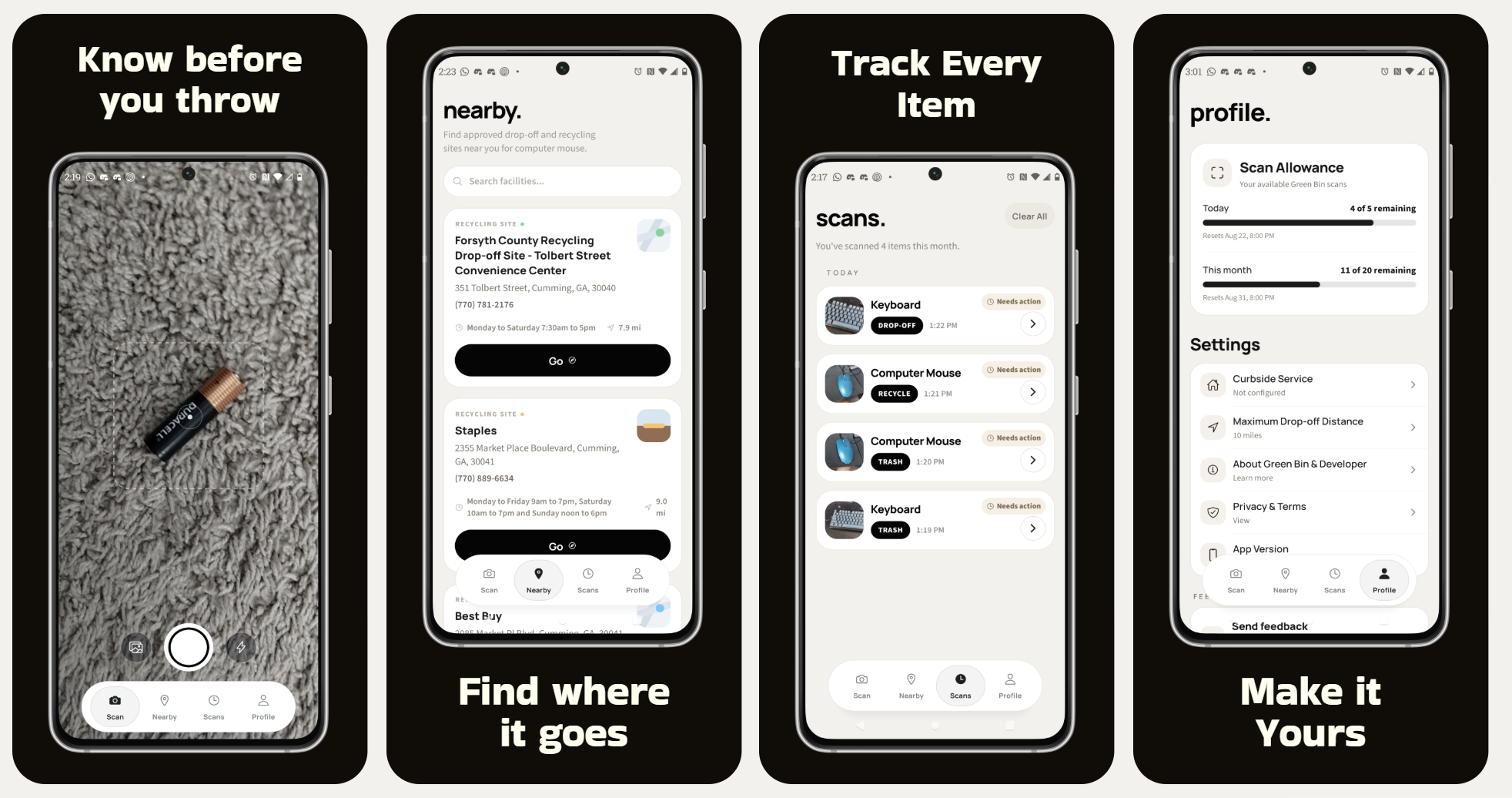
Green Bin is a mobile app that identifies an item from a photo and explains how to dispose of it properly. Depending on the item, it might suggest recycling, composting, donating it, taking it to a special disposal facility, or putting it in the trash.
The guidance can use the person’s location and curbside provider because something accepted in one community might be rejected in another. Green Bin can also scan product barcodes, find nearby drop off locations for items that cannot go in a curbside bin, and show sources behind its recommendations. You do not need an account to use it.
How we built it
I built the mobile interface with React Native and Expo. The Python backend is hosted on Render. Cloudflare Workers AI helps analyze and identify photographed items, while Gemini turns that information and the supporting research into disposal guidance that is easier to understand.
Supabase stores application data and cached results. Tavily finds local and provider specific disposal rules, Earth911 helps find nearby drop off facilities, and Open Food Facts provides product information for barcode scans.
The system keeps item recognition separate from disposal guidance. After an object is identified, the backend cleans up the result, looks for the relevant rules, creates a recommendation, and checks it for consistency before sending it back. This helps stop the app from assuming something is accepted locally just because the material itself can technically be recycled.
Challenges we ran into
The hardest part was not identifying an object. It was figuring out what the person should actually do with it. Disposal rules are different across locations and waste providers, and sometimes the sources are incomplete, old, or even disagree with each other. An item can be made from recyclable material and still be rejected by a local curbside program.
Photos from real life caused problems too. Some had bad lighting, busy backgrounds, strange angles, or objects that were partly hidden. I also had to manage the response time and computing resources needed by several AI services. That was especially difficult while running the backend on limited infrastructure.
I also had to think carefully about how much information to show. Green Bin should explain the reasoning and mention important exceptions, but it should not make a simple decision feel like homework.
Accomplishments that we're proud of
I am most proud that Green Bin grew from a basic waste classifier into a more complete disposal assistant that understands location. It does not just label something as recycling or trash. It brings together image recognition, barcode lookup, local research, nearby facilities, and sources in one experience.
I built the application from end to end and found outside testers through Reddit so they could try it in real situations. Their feedback helped me find confusing instructions and edge cases I probably would not have noticed on my own.
I am also proud that Green Bin does not require an account. It does not depend on ads or unnecessary tracking either. People can open the app, scan something, and get useful guidance without creating another online profile.
What we learned
Building Green Bin taught me that making an AI feature is much easier than making an AI product people can trust. A model can give a confident answer and still be wrong. Good guidance needs current sources, local context, validation, and honest communication when something is uncertain.
I also learned how many different pieces have to work together before an app feels simple. Image recognition, APIs, caching, databases, deployment, privacy, and interface design all support the result that someone sees a few seconds later. A lot is happening behind the scenes.
Most importantly, testing with real people taught me not to assume users will understand an interface the same way its developer does. Their feedback has shaped the design of Green Bin and also the way its recommendations are written.
What's next for Green Bin
My next goal is to make Green Bin more accurate, faster, and useful in more communities. I want to improve recognition for difficult photos, build a lighter image similarity system so the app does not need to call a vision model every time, and add support for more curbside providers and locations.
I also want to improve source checking and make the local evidence easier to understand. There is still a lot to refine, especially as more people test the app.
Eventually, I hope to release Green Bin more widely and make proper disposal feel like a quick everyday choice instead of a small research project.


Log in or sign up for Devpost to join the conversation.