Background
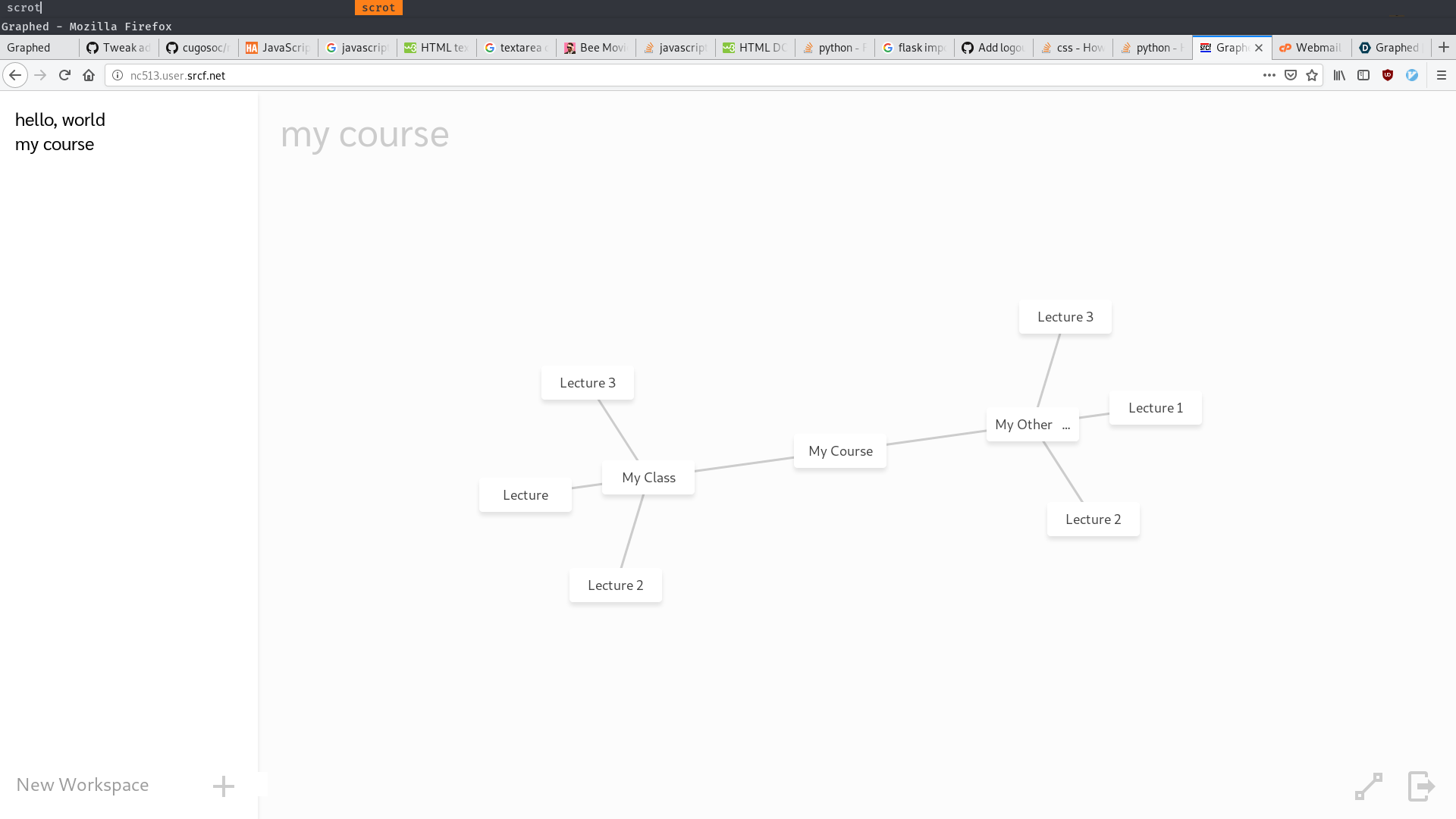
Graphed is a web application for graph-based knowledge modeling and management. Users are able to record information in notes and define connections between these notes, functionally creating their own, custom network of information. In discrete mathematics, this structure, which models pairwise relationships between objects, is formally known as a graph. Now imagine that each node represents a piece of information, and each edge represents a user-defined relation between two pieces of information - this is Graphed.
The Problem
As students, we often find ourselves making complex relations between pieces information that we learn in school. It’s up to us to communicate and represent this information and its relationships through our notes. However, our team found ourselves constantly faced with a simple problem. Traditional note taking apps impose a linear structure onto your note organization. For example, a typical note application may have subjects, each subject may have units, and each of those units will have a note for each lecture.
But what if you want to connect information from lectures in different subjects? What if a note from Lecture 1 in Class 1 has interesting information related to a note from Lecture 7 of Class 5? This connection cannot be semantically represented in a linear structure.
To solve this, we created Graphed. Our goal is to give users full freedom to visually organize their thoughts however they desire, and to present this data in a simple and intuitive user interface.
The solution
Graphed is a web application built with flask, a microframework for python. The front end is built with HTML, CSS and Javascript. The node animations were built with Javascript, using an algorithm that models the distance between nodes as springs, which gives the graph life-like appearance.
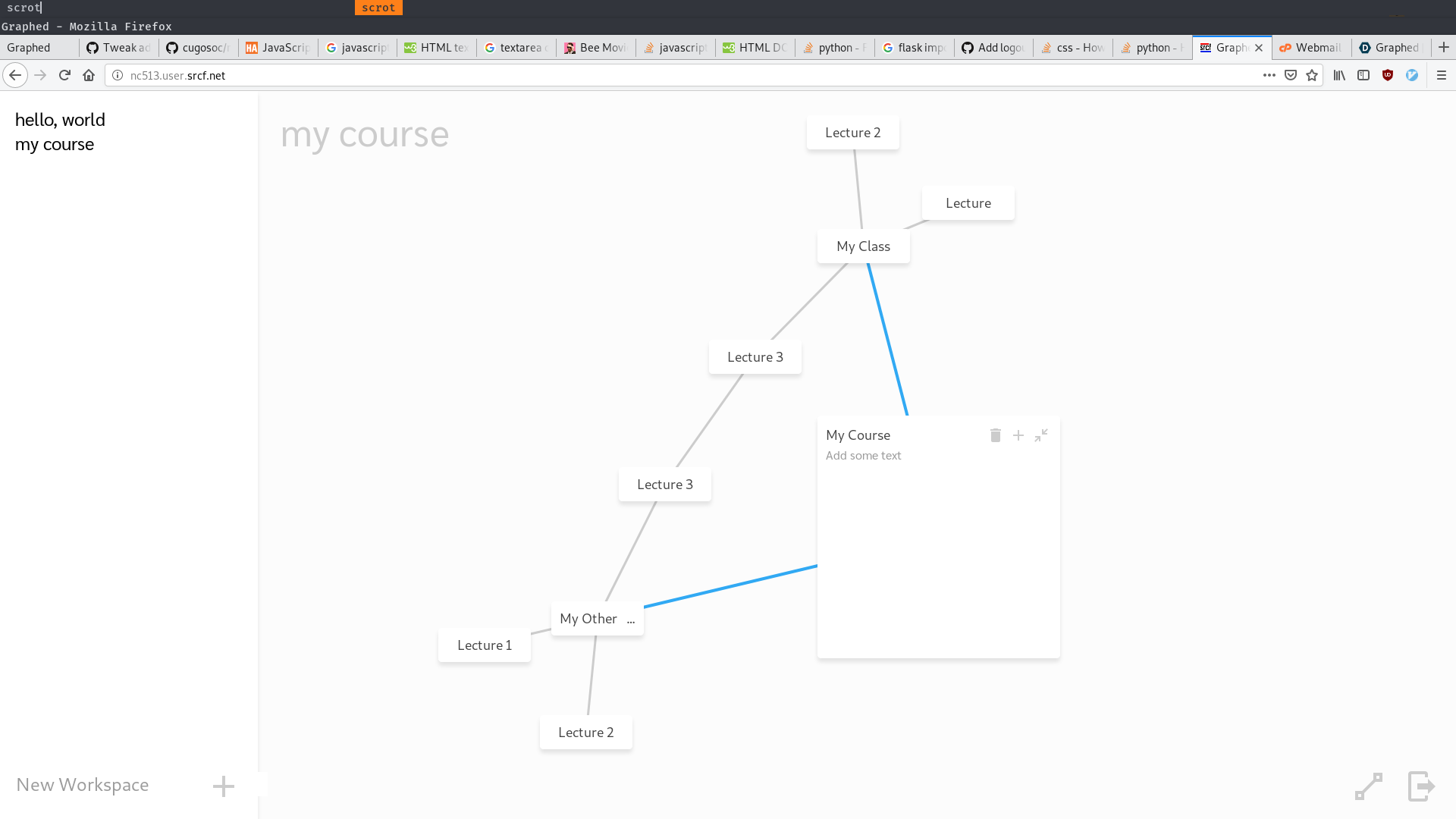
The lefthand side of the main page shows the users workspaces which each contain a graph. Workspaces represent the highest level semantic relationship between nodes. The righthand side of the page contains the current workspace's graph, where users can switch between workspaces and add new workspaces. Below is a list of basic functions of the graph:
- Click a node to expand it's note and edit or add information
- Expanding a node will turn that node's connecting edges blue so users can easily see relationships
- The top right-hand corner of an expanded note is where users can add a connected note, delete the note, or collapse the note.
- Users can enter 'connect' mode to add additional connections between existing nodes.
Why it's needed
Currently, there aren't many digital non-linear note-taking apps. Those that do exist lack in functionality, ease of use, and note-taking is often an unintentional function of the product (e.g. many people use Prezi, the presentation software, for non-linear note-taking).
In addition to filling a gap in the current note-taking product space, non-linear note-taking has actually been shown as a very effective learning technique. Non-linear note taking more accurately reflects the human brain's process when learning new information (Source 1). As noted by the BBC, non-linear note-taking techniques can result in “highly effective visual aids that enable students to group together different ideas and enable teachers to present ideas visually and assess their students’ conceptual development and understanding.”
What's next for Graphed
While the team is very happy with the MVP of Graphed built this weekend, with additional time and resources Graphed would include:
- Improved site-wide styling to establish cohesive brand experience
- Colour coding nodes/notes to represent different classifications of information
- Add hashtags to notes for further information classification, and filter notes by hashtag
- Note search
- Rich-text editing
- Suggested node associations
- Categorical areas of a graph (i.e. 'To Do' nodes on the left-hand side of the screen, 'Done' nodes on the right-hand side)
- Performance improvements to ensure unaffected functionality in high-stress use cases
TEST ACCOUNT
User: julian Password: 12345678


Log in or sign up for Devpost to join the conversation.