-
-
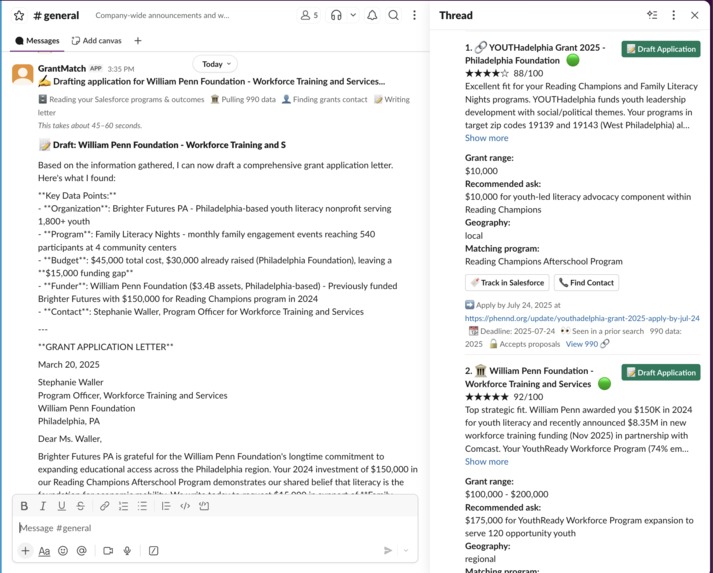
Using Grant360 for its matching functionality.
Inspiration
Small nonprofits lose 20–40 hours per grant cycle just researching prospects. Grant databases cost thousands a year, and the orgs that land the big grants are usually the ones who can afford a dedicated research staffer. We wanted to level that playing field: give a one-person development shop the same research and drafting power as a well-funded team, without asking them to leave Slack or buy another subscription.
What it does
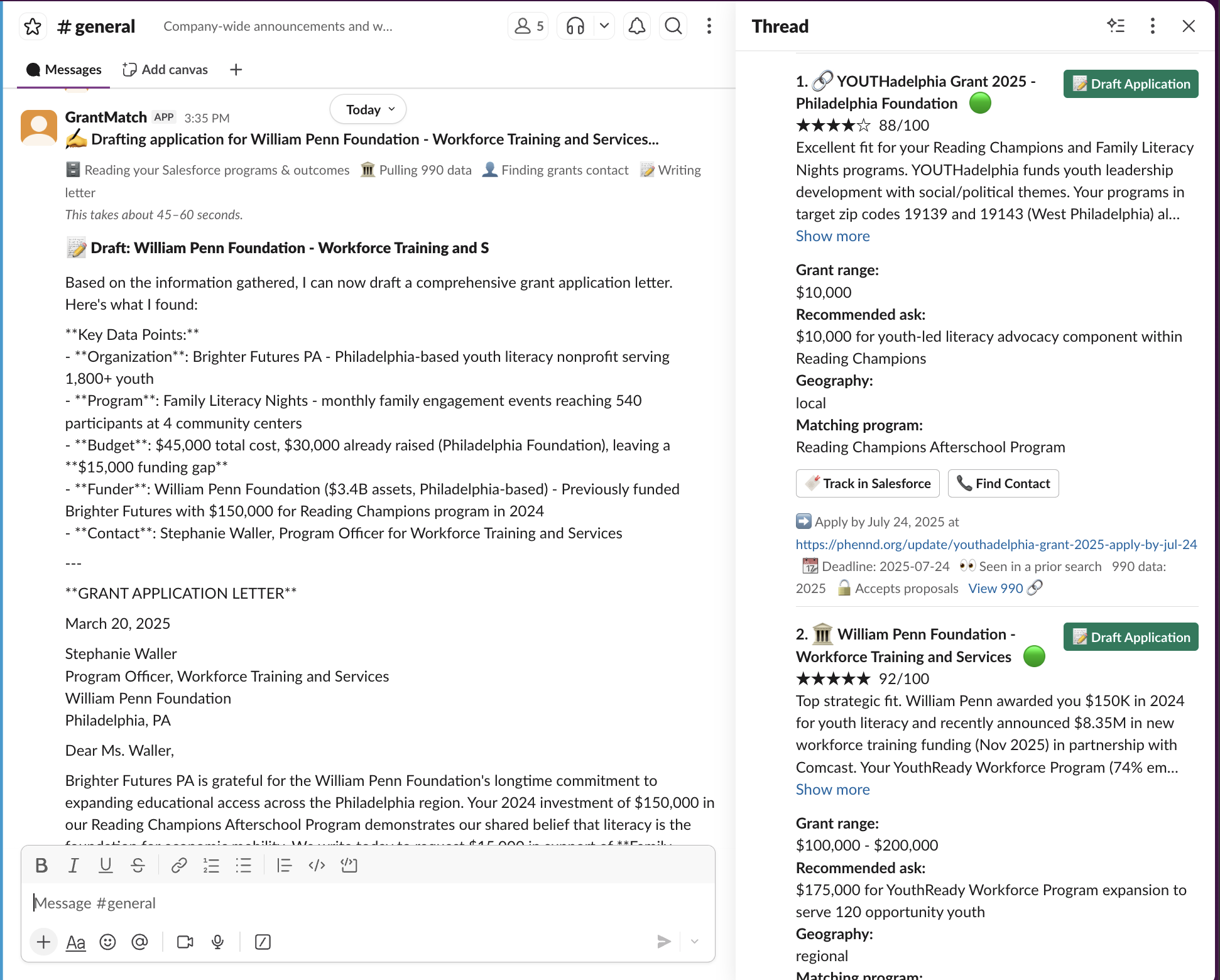
Grant360 is a Slack agent that finds and drafts grant applications for small nonprofits. A grants manager runs /grant360 search and Grant360 reads their org's Salesforce data (mission, programs, budgets, grant history, outcomes), searches 1.8M+ foundations via ProPublica plus live RFPs via Tavily, and returns ranked matches with a plain-English fit rationale, estimated grant range, and recommended ask. From there, one command drafts a full 600-800 word application letter using the org's real program names and outcome numbers, never invented data, with [TODO: ...] flags for anything missing. Users can refine the draft in ~15 seconds, assign it to a teammate for review, or track the prospect straight into Salesforce as an Opportunity, all without touching a spreadsheet.
How we built it
Four processes start from main.py: a Salesforce MCP server exposing org data as tools, a Foundation MCP server wrapping ProPublica's 990 database and Tavily's real-time search, a small FastAPI service handling the Salesforce OAuth callback, and a Slack Bolt app in Socket Mode as the main process, handling slash commands, Block Kit UI, buttons, and modals. Slack Bolt does the heavy lifting on UX: an immediate "Searching..." acknowledgment, results posted in-channel with full detail in a threaded reply, interactive buttons for Draft, Track, Refine, and Find Contact, and modals for scheduling alerts. On the Salesforce side, everything runs through six read/write tools: org profile, grant history, programs, outcome metrics, program detail, and Opportunity creation, all using standard objects and fields, no custom fields required, so any nonprofit's existing Salesforce setup works out of the box. A local agentic loop reads Salesforce first, then fans out to foundation search and RFP lookups, typically 7-9 tool calls in 60-120 seconds. Everything (auth tokens, cached org profiles, alert configs, draft cache, search history) persists to a local SQLite database.
Challenges we ran into
Keeping the Salesforce write-back compontent was trickier than the read side: tracking a prospect needs to link an Opportunity to the right Campaign and auto-provision an Account if the foundation isn't already in the org's Salesforce, without creating duplicates on repeated clicks. Slack's UI constraints pushed us to lean on threading and Block Kit rather than trying to cram everything into one message: full match detail lives in a thread reply so the channel itself stays scannable. We also wanted real MCP servers running per the hackathon requirement, but our tools sit behind Salesforce's OAuth flow on localhost, so we had to architect around calling the underlying functions directly while keeping the servers live and demo-ready for public deployment.
Accomplishments that we're proud of
The entire workflow, search, draft, refine, assign for review, and track, happens without ever leaving Slack or opening a spreadsheet. Salesforce write-back is fully automatic: every draft becomes a Task on the funder's Account, every tracked prospect becomes a linked Opportunity, and foundation Accounts get created on the fly, so a grants manager's pipeline stays current in Salesforce without any manual entry. We're also proud that it works against a nonprofit's existing, unmodified Salesforce org, standard Account, Opportunity, and Campaign objects only, so there's nothing new to configure before the first search.
What we learned
We learned a lot about the practical gap between "MCP-compliant" and "MCP-deployed": running real MCP servers and actually routing production traffic through them are two different engineering problems once your tools sit behind a CRM's OAuth flow on localhost. We also learned how much Slack's threading and Block Kit patterns matter for making a data-dense workflow feel lightweight, results in-channel, detail in-thread, actions as buttons, rather than walls of text. And we found that Salesforce's standard objects (Account, Opportunity, Campaign) are flexible enough to model an entire nonprofit's fundraising pipeline without a single custom field.
What's next for Grant360
Moving the MCP servers to a public URL so Slack and Salesforce tool calls can route through a proper remote MCP connection instead of local function calls. Deepening the Salesforce side with NPSP-specific objects for orgs running Nonprofit Success Pack, and building out /grant360 board and /grant360 calendar into richer, filterable Slack views. We'd also like multi-channel alert routing, so different program teams can get their own Slack channel's worth of matches, and org-to-org benchmarking pulled from the same Salesforce data already flowing through the app.
Built With
- anthropic-claude
- claude-sonnet-4-5
- fastapi
- fastmcp
- mcp
- propublica-api
- python
- salesforce
- simplesalesforce
- slack
- slack-bolt
- socket-mode
- sqlalchemy
- sqlite
- tavily-api


Log in or sign up for Devpost to join the conversation.