-
-
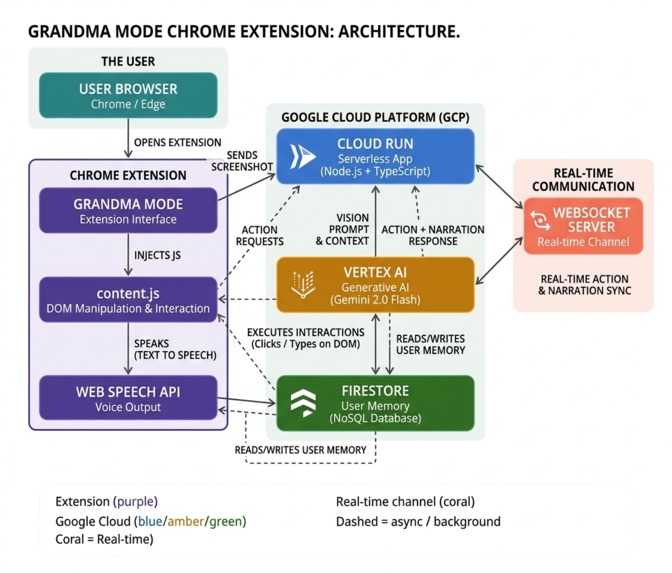
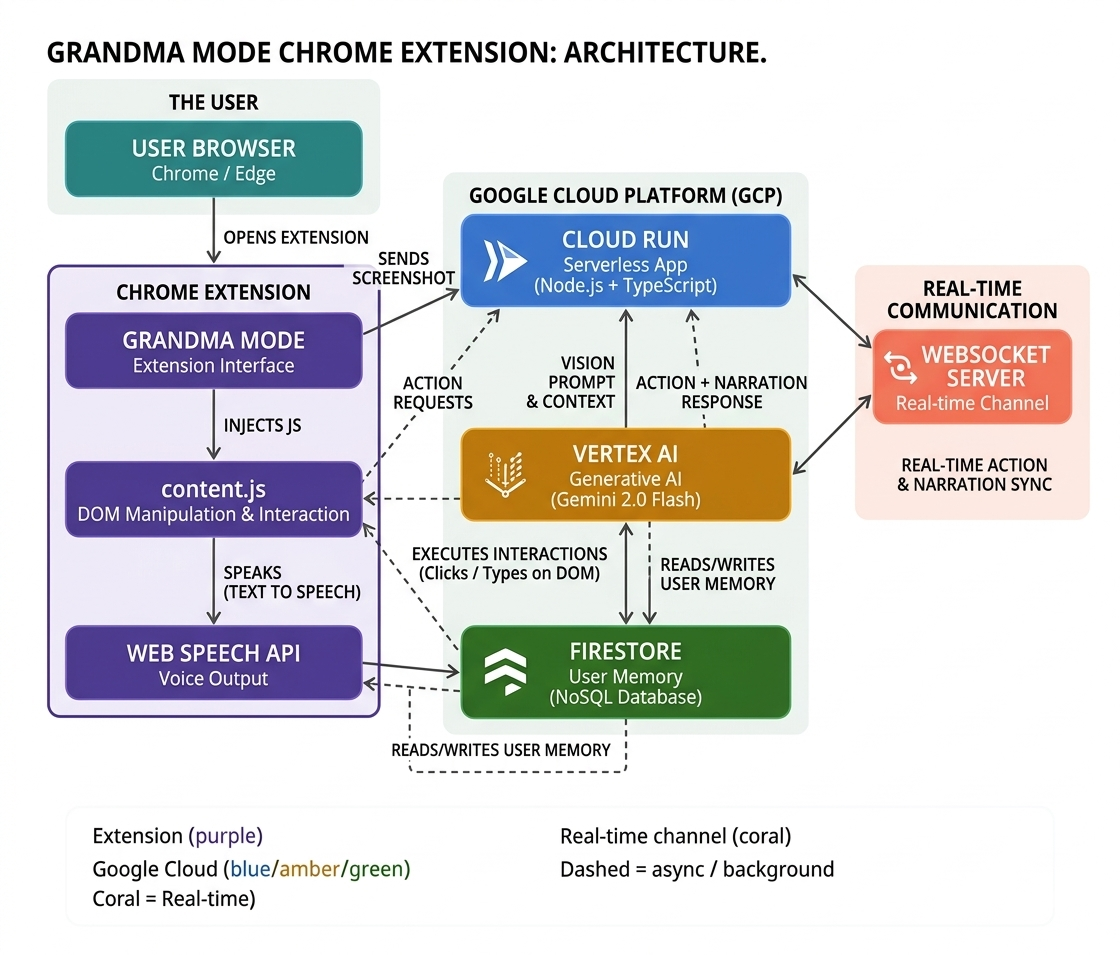
Grandma Mode Architecture Diagram
The Problem
The internet was not built for everyone. Complex layouts, confusing forms, scam-filled pages, and overwhelming navigation leave millions of people frustrated, lost, or vulnerable every single day. Whether you're unfamiliar with technology, navigating a foreign website, or simply dealing with a poorly designed page — the internet can feel like a wall.
The Inspiration
Grandma Mode started with a simple observation: watching someone struggle to book a hotel online because the page was too cluttered, the buttons too small, and the process too confusing. The question became — what if there was someone sitting next to you who could just explain it, guide you through it, and do it for you if needed? That's Grandma Mode.
What It Does
Grandma Mode is a Chrome/Edge extension powered by Gemini 2.0 Flash that acts as a personal AI web navigator. It:
- Sees your screen — captures real browser screenshots using the Chrome Extension API
- Understands any page — sends screenshots to Gemini Vision for multimodal analysis
- Completes tasks — clicks, types, scrolls and navigates on your real browser DOM
- Detects scams — visually analyzes pages for suspicious patterns before you engage
- Simplifies forms — rewrites every form field in plain English and highlights it on click
- Answers instantly — responds to factual questions from Gemini's own knowledge
- Detects confusion — notices rapid scrolling, back-clicking, and idle behavior and proactively offers help
- Remembers you — stores preferences in Firestore (cheapest option, free delivery, no subscriptions)
- Speaks clearly — uses Web Speech API for warm, clear voice output
How We Built It
The architecture has three layers working together in real time:
Chrome Extension (frontend)
- Captures live screenshots via
chrome.tabs.captureVisibleTab - Executes actions on the real DOM via
content.js - Highlights elements with a golden glow overlay before every action
- Communicates with the backend via REST and WebSocket
Node.js Backend (Google Cloud Run)
- Receives screenshots from the extension
- Sends multimodal prompts to Gemini 2.0 Flash via Vertex AI
- Returns structured JSON actions
{action, target, value, narration} - Maintains a WebSocket connection for real-time updates
Google Cloud Services
- Vertex AI — Gemini 2.0 Flash for all vision and language tasks
- Cloud Run — serverless backend deployment
- Firestore — persistent user memory and preferences
The Challenges
Getting Gemini to act, not just describe. Early versions of the prompts returned beautiful narration but vague actions. We had to engineer prompts that force structured JSON output — specific element targets, exact values to type, and clear action types — so the extension could execute them reliably on any page.
Making it work on real websites. Sites like Amazon and Google are
heavily dynamic — elements load asynchronously, React re-renders the DOM,
and automation flags trigger CAPTCHAs. We built a multi-strategy element
finder in content.js that searches by text, placeholder, aria-label,
and role — with character-by-character typing to simulate real user input.
API key security. During development our Gemini API key was accidentally exposed in a public GitHub push and immediately revoked by Google's automated scanner. We migrated to Vertex AI with Application Default Credentials — a more secure and production-appropriate approach that uses Google Cloud's IAM instead of raw API keys.
Keeping it genuinely helpful without being overwhelming. The original design used emojis everywhere and spoke like a stereotypical elderly assistant. We stripped it back — cleaner UI, warmer but more universal tone — because the tool is for anyone who needs help navigating the web, not just one demographic.
What We Learned
- Gemini Vision is remarkably capable at interpreting real browser screenshots — it identifies buttons, forms, layouts and even subtle scam signals without any DOM access
- Structured JSON prompting is the key to turning a language model into a reliable agent — the model needs a strict output contract to be actionable
- Chrome Extension Manifest V3 side panels are the right UI pattern for persistent browser assistants — they stay open as you navigate, unlike popups which close on every page load
- Cloud Run cold starts can kill user experience — lazy browser initialization on the backend was essential to keep response times acceptable
What's Next
- Multi-user support — right now Grandma Mode uses a single default user ID; a proper auth layer would make it genuinely personal
- Chrome Web Store submission — the extension is currently installable via zip; store approval would make distribution instant
- Mobile support — the same backend architecture could power an Android accessibility overlay
- More languages — the prompts and voice output could be localized for non-English speakers with minimal changes
Built With
- chrome-extension-manifest-v3
- css
- express.js
- firebase-admin-sdk
- gemini-2.0-flash
- google-cloud-run
- google-firestore
- html
- javascript
- node.js
- playwright
- typescript
- vertex-ai
- web-speech-api
- websocket


Log in or sign up for Devpost to join the conversation.