-
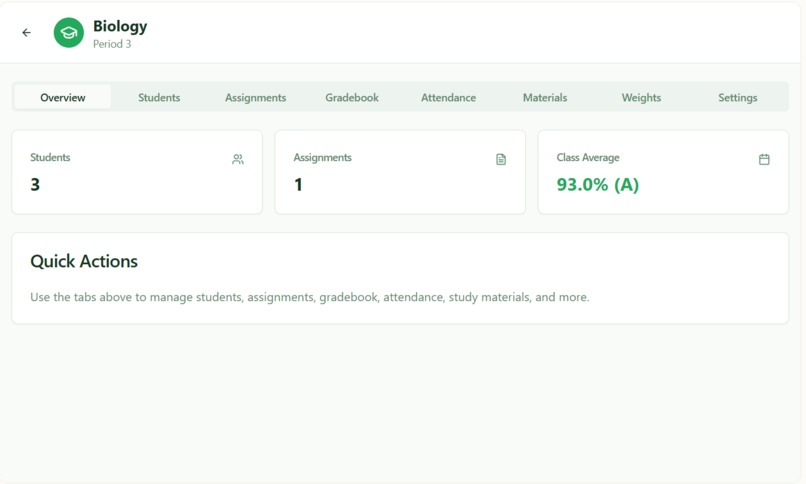
Understanding the setup of the UI

Inspiration
We noticed that many small schools still rely on outdated or confusing Excel spreadsheets to track grades and student progress. Having worked with one of these schools, we saw how frustrating and error-prone it can be for teachers. We wanted to build something simple, modern, and intuitive — a tool that actually makes grading easier instead of harder. That’s how Graderly was born.
What it does
Graderly is a lightweight web-based gradebook system for teachers and students. Teachers can log in, manage classes, input grades, and calculate weighted averages automatically. Students have their own logins to view their grades and track progress in each class. The interface is clean, simple, and built to make managing school data fast and organized — no more spreadsheet chaos.
How we built it
We built Graderly using HTML, TypeScript, and CSS for the front end. TypeScript helped us maintain structure and type safety while coding dynamic interactions. The project uses a mock data structure to simulate a database, but it can easily connect to an SQL backend in the future. We designed the layout with accessibility and simplicity in mind so it works smoothly on any browser.
Challenges we ran into
We initially planned to integrate a full SQL database, but connecting it properly with our TypeScript front end was more complex than expected. We also faced some challenges designing a clean login system and managing role-based access between teachers and students. Balancing functionality with a beginner-friendly codebase was another challenge we overcame through teamwork and persistence.
Accomplishments that we're proud of
We’re proud of building a functioning and visually clean web app in a short amount of time. Our team successfully created separate interfaces for teachers and students, and we made something that could realistically help a real school. We’re also proud of how much we learned about front-end logic and organizing project files effectively.
What we learned
We learned how to use TypeScript to add structure to front-end code, how to manage simple user flows (like login and role-based access), and how important user experience design is when creating educational tools. We also learned how to collaborate effectively under time pressure, communicate ideas, and debug issues quickly.
What's next for Graderly
Next, we want to: Connect Gradelt to a real SQL database for secure data storage. Add features like attendance tracking and report card generation. Improve UI design and add analytics to help teachers visualize class performance. Deploy it online so small schools can start using it for free.
Built With
- figma
- html
- typescript


Log in or sign up for Devpost to join the conversation.