
Inspiration
GradeDash was inspired by one question: why does studying feel so boring when games feel so exciting? After researching, we found out that studies such as that by Alotaibi et al (2024), expound the benefit of game-based learning in early childhood education. We wanted to merge the fun, fast energy of an obstacle-runner with the memory-boosting power of active recall. The idea came from noticing how easy it is to zone out while reading notes, yet how focused we become when a game demands quick decisions. So we set out to build a study tool that students would actually want to use—something energetic, colorful, and game-like, without losing the value of real learning. We included innovative features such as the ability to personalize questions through user-uploading and AI chat interaction; adaptive learning to match the personal learning pace of the user; and fact-checking use of AI to ensure that uploaded content remains correct and ethical.
How GradeDash Builds Resilient, Better Learners
GradeDash isn’t just a study tool. It's a mindset shift. By turning class material into a fast-paced obstacle-dodging game, students learn to embrace mistakes, adapt quickly, and keep moving forward, just like in real learning. Instead of being discouraged by wrong answers, players are encouraged to try again, experiment, and improve through repetition. This transforms studying from a passive activity into an active challenge that builds grit, confidence, and real academic resilience. When learning feels fun and rewarding, students naturally push themselves harder, stay engaged longer, and retain more information. In this way, we increase the cognitive resilience of our audience, making users more prepared to tackle any challenge in their everyday lives.
How We Built It
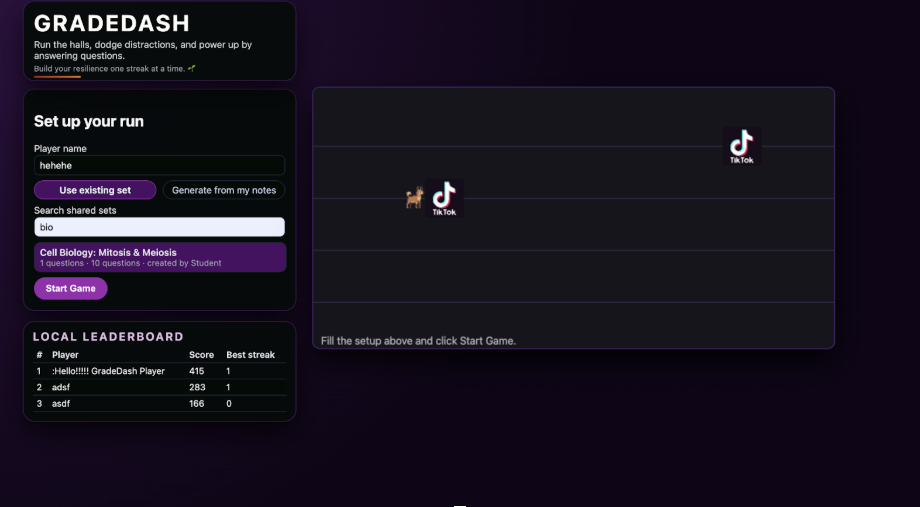
We built GradeDash using a combination of HTML5 Canvas, JavaScript, Node.js, Express, and the Claude API. The frontend handles the game loop, animation, GIF obstacles, sound effects, and text-rendered answer blocks directly inside the canvas. The backend handles PDF/text uploads, formats them, and sends them to the AI to generate clean JSON questions. We also added audio unlock handlers for background music, asset preloading for smooth playback, and a custom system to render centered multiline text inside moving answer blocks. Everything works together to convert any study material into an interactive, fast-paced game.
Challenges We Faced
We ran into plenty of obstacles (just like the game itself).
One of the biggest challenges was getting the AI to produce clean, predictable question formats, which required validation and corrections. Browser audio restrictions blocked our background music until we built a user-interaction unlock system. Loading GIFs and images caused flickering issues until we wrote a custom preloader. Text inside canvas blocks refused to center properly, so we built our own wrapping + centering function. And reorganizing assets after accidentally putting code inside the .idea folder forced us to rethink our project structure. Each challenge made the final game smoother and more polished.
What We Learned
We learned how complex real-time animations and user interactions can be, especially when mixed with AI-generated content. We became much better at structuring prompts, validating JSON, handling asynchronous loading, and working within browser limitations. We also learned a ton about UI/UX—specifically how important readability, color contrast, and layout consistency are for a fast-moving study game. Most importantly, we learned how to turn a simple idea into a fully functioning, engaging learning experience.
Works Cited: Alotaibi MS. Game-based learning in early childhood education: a systematic review and meta-analysis. Front Psychol. 2024 Apr 2;15:1307881. doi: 10.3389/fpsyg.2024.1307881. PMID: 38629045; PMCID: PMC11018941. https://link.springer.com/chapter/10.1007/978-3-032-00444-4_51
Built With
- anthropic-ai/sdk
- cors
- css-backend:-node.js-ai:-claude-api-(anthropic)-frameworks-and-libraries:-express
- dotenv
- fetch
- frontend:-javascript
- html
- local
- multer
- pdf-parse

Log in or sign up for Devpost to join the conversation.