-
-
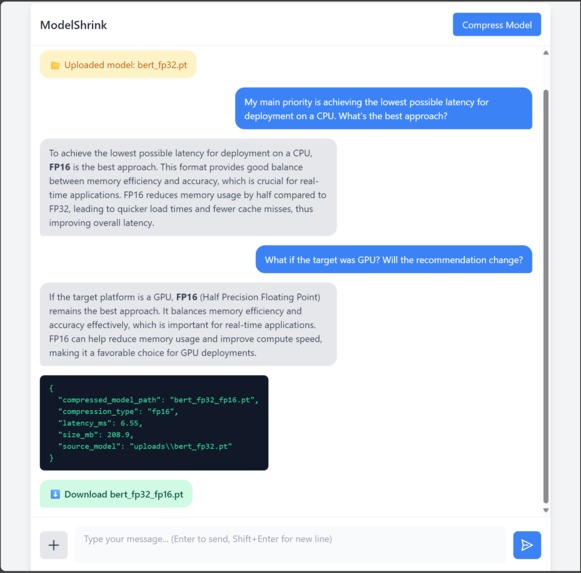
User Interface
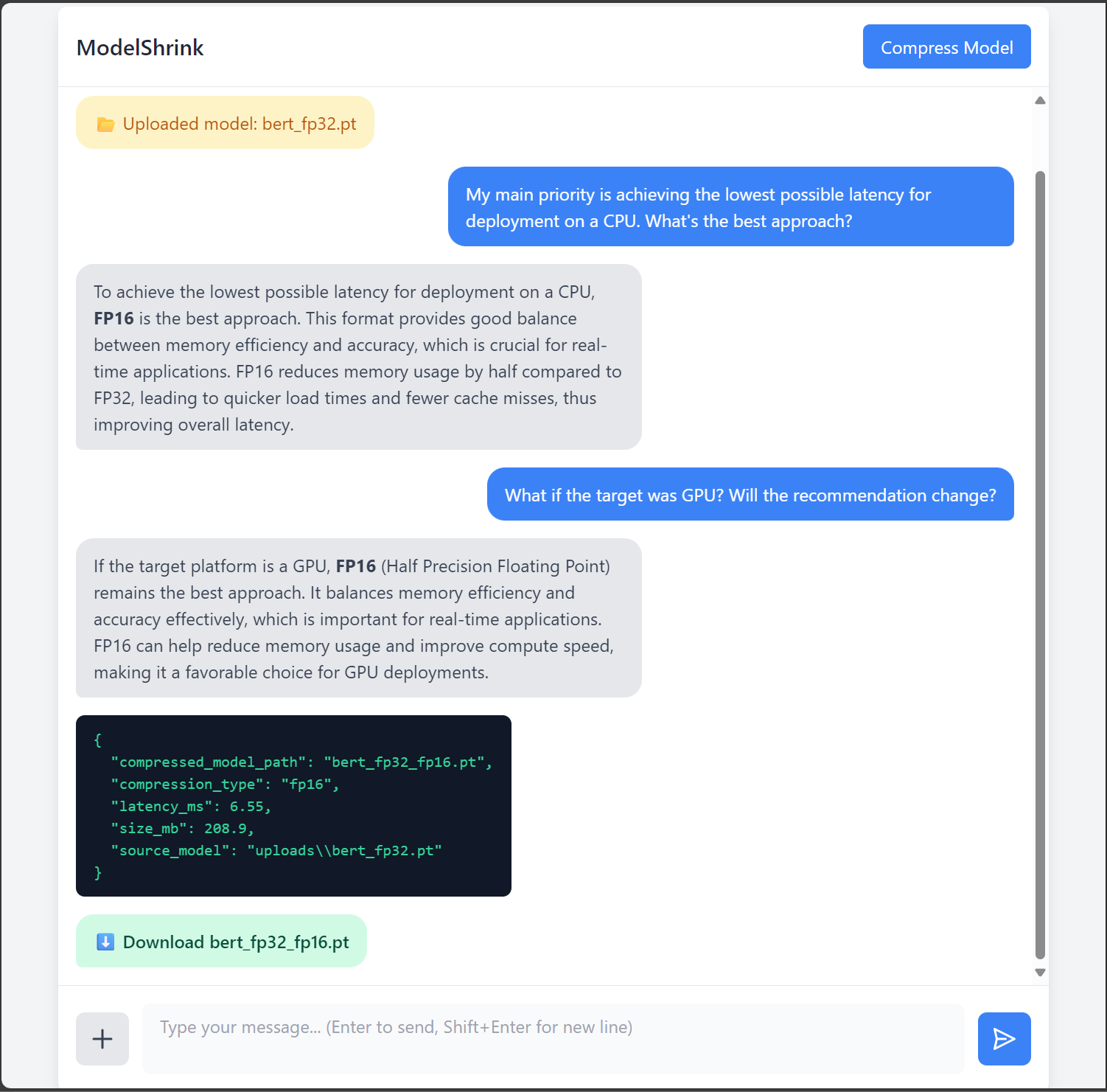
Inspiration
The inspiration for ModelShrink came from the growing need to make machine learning models more accessible and efficient for deployment on resource-constrained devices. Deep learning models are powerful, but they’re huge, slow, and hard to deploy on edge devices or limited hardware. During this hackathon, we realized that model compression is still a highly technical process, requiring knowledge of FP16, INT8, pruning, and hardware-specific trade-offs. We wanted to build a tool that democratizes compression—so that anyone, from a student experimenting on a laptop to a researcher deploying to mobile devices, can shrink models interactively with the help of AI.
What We Learned
Building ModelShrink taught us several key lessons:
- LLMs can be effective domain experts when grounded with structured metadata.
- Architecture matters—clean separation between AI logic, backend ops, and frontend saved us time.
- Simplicity wins: turning a complex workflow into a chat experience makes adoption much easier.
- Model Compression Nuances: We gained a deeper understanding of PyTorch's compression techniques, such as INT8 quantization and FP16 optimization, and their trade-offs in terms of model size, latency, and accuracy.
- AI-Assisted Decision Making: Fine-tuning a gpt-oss model to analyze metadata and recommend compression strategies was a significant learning curve. We explored how to integrate conversational AI into a technical workflow effectively.
How We Built It
- Frontend: A clean, chat-like web interface (HTML, Tailwind CSS, JS) where users can upload a model, interact with the AI, and download compressed outputs.
- Backend: Flask-based API handling uploads, metadata extraction, hardware detection, and compression pipelines.
- AI Reasoning Engine: GPT-OSS LLM prompted to act as a compression expert, providing tailored recommendations (e.g., FP16 for GPU, INT8 for CPU).
- Compression Layer: Once the user approves the AI's recommendation, the backend executes the appropriate PyTorch compression script. PyTorch-based implementation of FP16 (half-precision) and INT8 (dynamic quantization), with JSON reports showing size/latency trade-offs.
Challenges We Faced
- LLM Guidance: Making the AI give precise, hardware-aware advice instead of vague responses.
- State Persistence: Ensuring uploads, recommendations, and compression status stayed synced across multiple API calls.
- Frontend Polish: Handling async calls, live chat rendering, and smooth layout under hackathon time pressure.
What We’re Proud Of
- We built a full-stack OSS project in a short timeframe.
- Integrated an AI co-pilot into a real MLOps workflow.
- Created an end-to-end experience: upload → analyze → recommend → compress → download.
- Proved that AI + human-centric design can make technical tasks approachable.
Core Features
Model Upload & Analysis
- Drag-and-drop support for
.pt,.pth, and.onnxmodels - Automatic extraction of model architecture, layer count, and parameter size
- Drag-and-drop support for
AI-Powered Compression Advisor
- GPT-OSS powered reasoning engine suggests optimal strategies:
- FP16 for GPU acceleration
- INT8 for CPU efficiency
- Pruning ratios based on accuracy goals
- Explains trade-offs (accuracy vs. latency vs. size) in plain language
One-Click Compression
- Apply FP16 (half precision), INT8 (dynamic quantization), or structured pruning
- Supports post-training quantization (PTQ) with accuracy thresholds
- Apply FP16 (half precision), INT8 (dynamic quantization), or structured pruning
Real-Time Insights
- Live display of model size before/after compression
- Estimated latency improvements for different hardware targets
- Generates JSON reports for reproducibility and CI/CD pipelines
- Live display of model size before/after compression
Chat-Like Workflow
- Conversational interface: upload → analyze → approve → compress → download
- Keeps user in control at every step
- Conversational interface: upload → analyze → approve → compress → download
Easy Download & Sharing
- One-click download of compressed models
- Includes compression report (JSON or PDF) with metrics and recommendations
- One-click download of compressed models
Developer-Focused Functionalities
Modular Plugin System
- Add custom compression methods or hardware-specific optimizations
- Add custom compression methods or hardware-specific optimizations
Multi-Model & Batch Support
- Compress multiple models in one session
- AI provides comparative recommendations for each model
- Compress multiple models in one session
Visual Analytics Dashboard
- Side-by-side comparison of size, accuracy, and latency
- Interactive charts for visualizing trade-offs
- Side-by-side comparison of size, accuracy, and latency
Customizable Compression Profiles
- Define profiles to prioritize accuracy, minimize latency, or balance both
- Define profiles to prioritize accuracy, minimize latency, or balance both
Privacy & Security
- Temporary storage with auto-cleanup after session
- No external API calls — runs locally for sensitive models
- Temporary storage with auto-cleanup after session
Mobile & Responsive Design
- Frontend works seamlessly on mobile, tablet, and desktop
- Frontend works seamlessly on mobile, tablet, and desktop
ModelShrink is our attempt to make model compression accessible, efficient, and AI-driven. We’re excited to contribute to the open-source community and look forward to seeing how developers use this tool to optimize their models!


Log in or sign up for Devpost to join the conversation.