Team Information
Project title - GPT Genius
Project Description
GPT Genius falls under the "Education" category, because it is meant primarily for students. It relates to the theme of Tech for Good because the app is meant to make the life of a student more productive and facilitate learning through its many features.
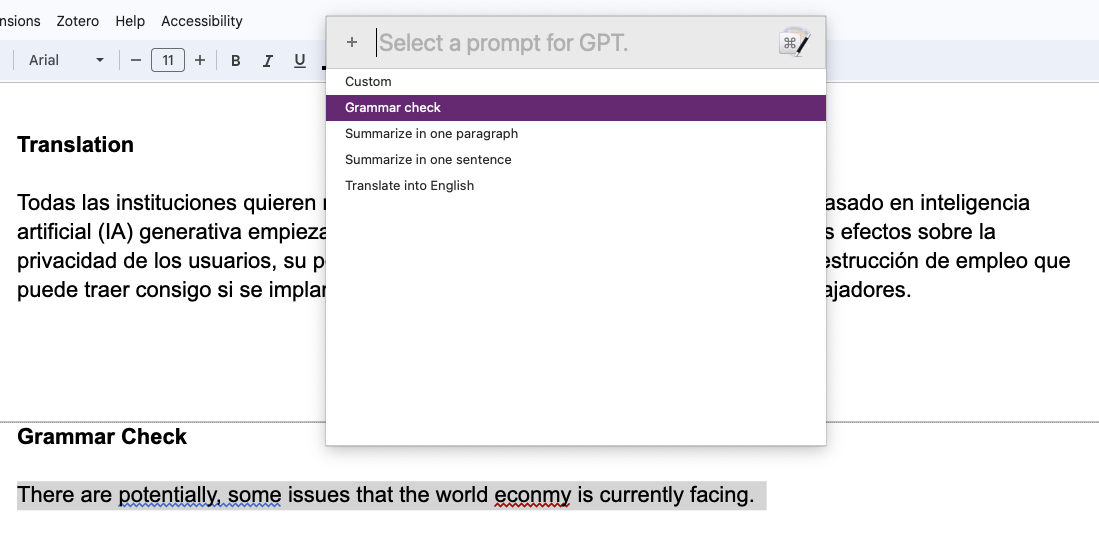
To build this project, we used Python as the primary programming language. We used Keyboard Maestro, a macro and automation app for Mac that provides GUI capabilities, to create a user-friendly interface for the app. Python was used to handle the GPT API requests and to process the responses, while Keyboard Maestro was used to create a simple and intuitive interface for users to interact with.
Our product is intentionally ethical for a few reasons: First, by providing a tool that makes learning easier and more productive for students, the app can help improve educational outcomes and empower individuals to achieve their goals. Second, the project is intended to be accessible to everyone. By using a simple interface, the app makes it easy for students of all abilities to access and benefit from GPT's capabilities.
Purpose
The inspiration behind developing GPT Genius came from a desire to utilize the powerful capabilities of GPT for the benefit of students. GPT has the ability to perform many natural language processing tasks, such as summarizing text, correcting grammar, and translating. With the help of this GUI desktop app, students can fully take advantage of GPT.
How It Works
The app provides the ability to quickly and easily receive help from GPT via a keyboard shortcut. For example, the user can highlight a passage of text on the screen, press the keyboard shortcut to activate the app, then select "Summarize in one paragraph." The app then copies the highlighted text and returns a response in a new window with the summarized response.
Built With
- gpt
- keyboard-maestro
- python


Log in or sign up for Devpost to join the conversation.