-
-
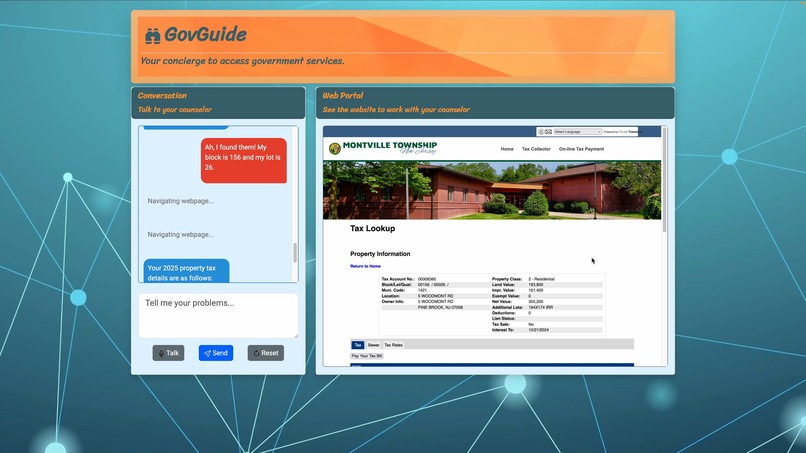
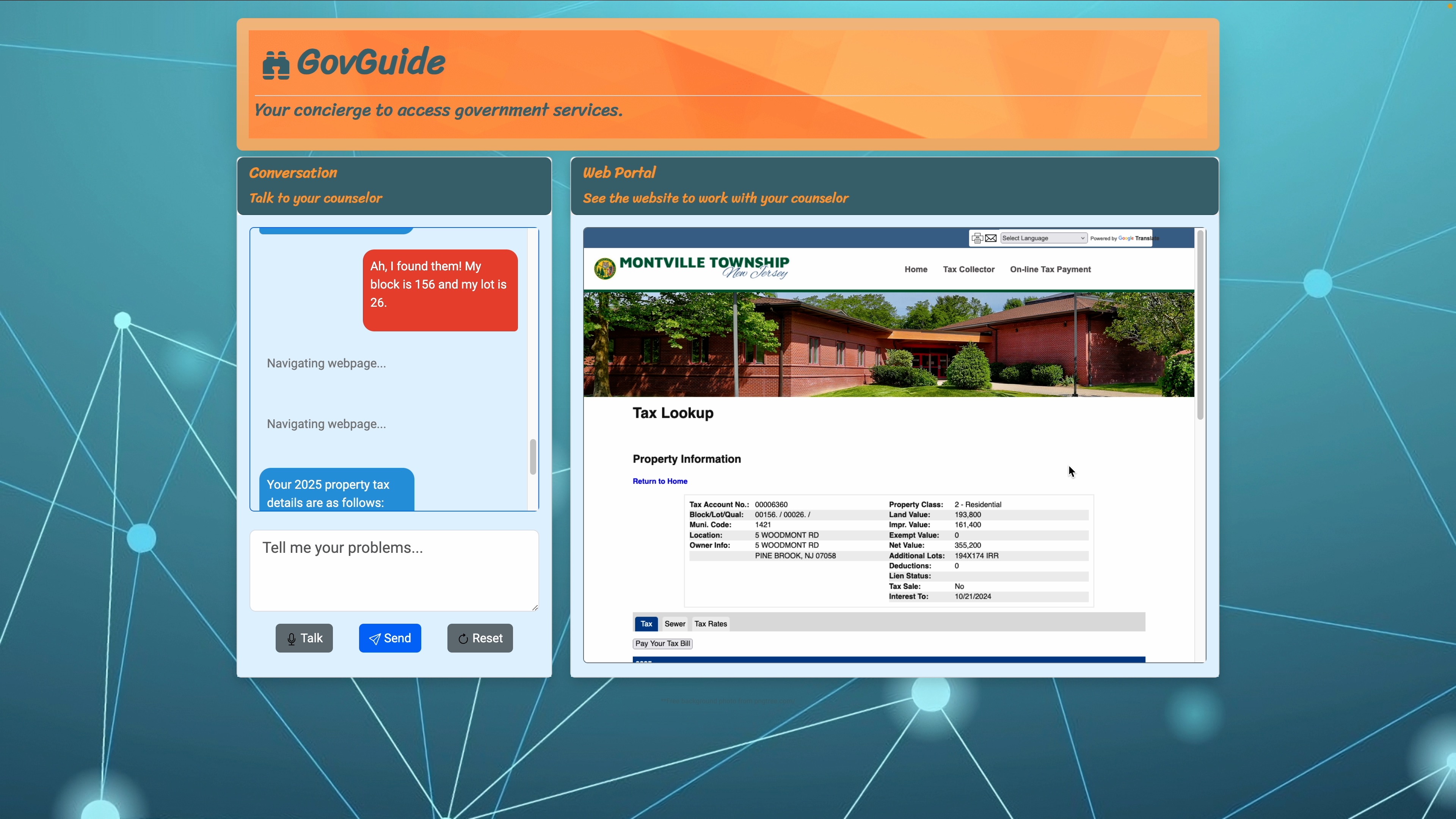
GovGuide at work.
Inspiration
An elderly friend of our family periodically needs help with her Social Security and my mother visits her to help. I wondered how she would have managed otherwise, and how many people like her struggle to have their questions answered and issues resolved. This was the spark behind GovGuide.
Last summer I attended an AI course by Dr. Robert Ghrist at UPenn where I learned to build ensembles of Large Language Models (LLMs) with OpenAI’s APIs to solve problems like accurate translation. Since then, I have been experimenting with multi-modal models, function APIs, and tuning LLMs with custom training data. This inspired me to try to solve this problem with LLMs, employing the techniques he taught.
What it does
There are hundreds if not thousands of government services and programs that are provided by federal, state, and local governments. Not all citizens may even be aware of what they are eligible for. Even if they do, they may not be able to access them easily as each program has its own website, forms, and procedures. This is especially hard for the elderly, people with limited technical skills, or those that don’t speak English.
GovGuide gives citizens a simple, streamlined method of navigating these websites by leveraging the power of LLMs to automatically navigate websites, retrieve information, and complete tasks on their behalf.
GovGuide is personal - unlike chat bots, it doesn’t just give generic answers but actually does the search, site-navigation, and data entry for the user. GovGuide works across all services - from different departments, agencies and townships without any customization for each. Citizens now have a common interface through which they can access federal, state, and local resources. GovGuide is envisioned to run on kiosks in public libraries or township offices where citizens can access services.
How I built it
GovGuide uses a multi-LLM framework to achieve its astonishing results. I use one LLM which interacts with Google Search to find websites, one LLM which has been trained to interact with websites in the optimal manner, and one LLM which strings these two together, to produce one working product that can interact with the user. A more detailed system diagram can be seen in my video for this project.
Challenges I ran into
I ran into 4 main challenges:
Web navigation is an extremely complex task to automate as there are infinitely many HTML-CSS-JavaScript combos and functions to teach. To successfully navigate a site, an LLM needs to understand the structure, controls and context. It was not possible to navigate with just the HTML, and supplying an image of the site provided the necessary context.
Another issue with processing web sites is the large number of tokens - it would easily exceed the processing limit of LLMs. Therefore I had to build scripts to reduce them to the bare minimum required for navigation.
To programmatically navigate web sites, I integrated Selenium with LLMs exploring many different control strategies - generating JSON for navigation commands.
I used Selenium IDE to create training data by manually browsing several government service sites and recording the navigation steps for each as JSON.
Accomplishments that I'm proud of
There are three major accomplishments I am proud of:
I was able to "teach" an LLM to navigate a website - using an LLM in a way that it was not made to do. Achieving this goal required much experimentation, both in methods to make the problem of navigating a website more manageable for an LLM, and in changing the LLM's parameters to create reliable, reproducible results.
I was able to reduce the HTML/CSS/JavaScript into the bare minimum components, so that an LLM can understand it. This required me to research HTML, CSS, and JavaScript, and how they interact, something I did not have any context on before getting into this project.
I was able to make this into a working website, that updates on its own and is also relatively stable! Again, one of my first times using HTML, CSS, and JavaScript, making this hard for me.
What's next for GovGuide
To make GovGuide ready for deployment, I need to:
- Collect more training data and train the LLM models further to improve consistency.
- Privacy and security needs to be assured through automatic clearing of data and preventing credentials from being transmitted to OpenAI.
- Conduct a supervised pilot project in a local library and evaluate the system and identify areas of improvement.
- Integrating a scanner would allow citizens to “show” documents they receive in the mail and ask questions.
- On this kiosk, I would like to expand the domain of this application to not only include government websites, but also any website and, if possible, any application on a computer.
- Finally I would like to add accessibility features for citizens with disabilities (e.g. text to speech, braille readers, etc) so that anyone, no matter their abilities, can be a part of our expanding digital world.
Please note that my REPO does not contain an OpenAI key for security purposes.

Log in or sign up for Devpost to join the conversation.