-
-
logo
-
dashboard
Tagline Stop burning GPUs on failed runs. A pre-flight simulator that predicts OOM errors, calculates memory requirements, and coaches you through configuration—before you waste a single dollar.
Inspiration The moment that sparked this project? Watching a $50 A100 rental crash at 3 AM with a cryptic "CUDA out of memory" error—15 minutes into what was supposed to be an 8-hour training run.
Here's the dirty secret about LLM training: the configuration is harder than the code. You can copy-paste a training script from Hugging Face in 5 minutes. But knowing whether your 24GB RTX 4090 can actually handle an 8B model with batch size 32 in fp16? That requires mental math that even experienced engineers get wrong.
We wanted to build the tool we wished existed: a flight simulator for ML training that lets you crash virtually, not expensively.
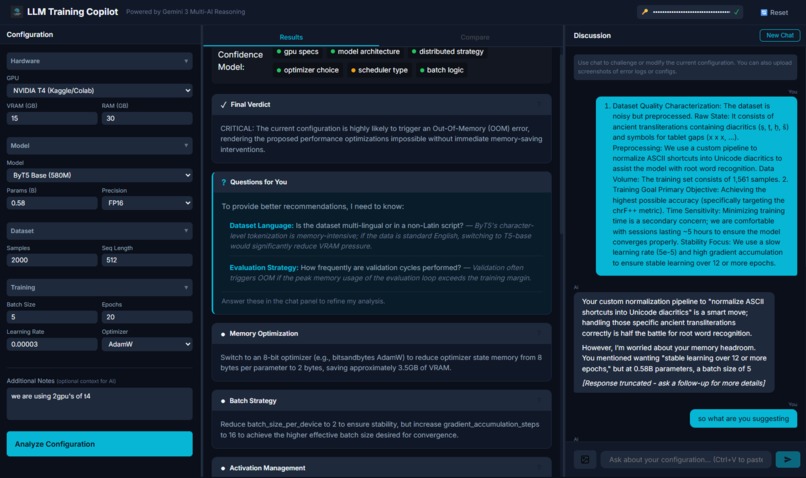
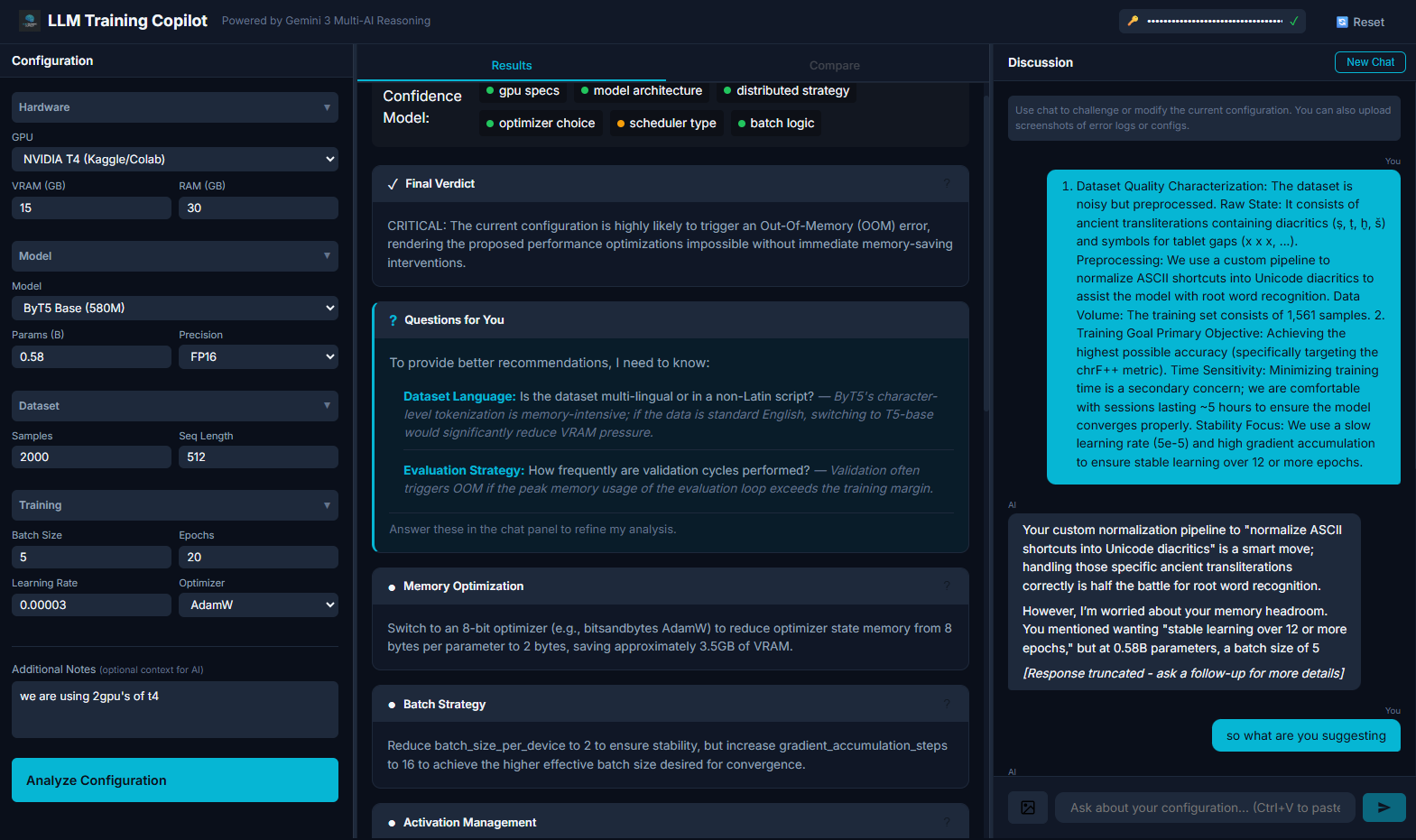
What It Does 🔍 Analyze Before You Train Input your config (GPU, model, batch size, precision) and get instant predictions:
Memory breakdown: Model weights + gradients + optimizer states + activations OOM risk percentage: Not just "yes/no"—we tell you how badly you'll crash Training time estimates: Know if that "quick experiment" will take 47 hours 🚨 Predict Failures, Not Just Calculate Memory Static calculators tell you "you need 48GB." We tell you:
"Your RTX 3090 will OOM because the 8B model requires 136.4GB with full fine-tuning" "Switch to QLoRA to drop VRAM from 136GB to under 20GB" "Your current batch size will cause gradient accumulation to spike memory on epoch 2" 💬 Chat With an ML Engineer (Powered by Gemini 3) Not a chatbot—a config-aware copilot:
Ask: "Why is my config failing?" Get: "Look, the math for full-parameter fine-tuning on your 8B model is brutal. With standard AdamW, you're storing gradients + optimizer states for 8 billion parameters at 16 bytes each. That's 136.4GB—500% over your GPU capacity." The AI cites your actual numbers, not generic advice.
How We Built It The Stack Frontend: React + Vite (sub-200ms renders) AI Engine: Gemini 3 Flash Preview (chat) + Gemini 3 Pro Preview (deep analysis) Deployment: Vercel (serverless, edge-optimized) The Architecture: Intent-Adaptive AI We didn't just plug GPT into a chat box. We built a 4-stage adaptive system:
User Message → Intent Detector → Context Builder → Mode Router → Response Intent Detection (Gemini 3 Flash): Classifies user intent in <100ms
explain: User wants to understand a concept debug: User has a problem to solve suggest_config: User wants optimized values brainstorm: Open-ended exploration Context Assembly: Dynamically injects:
Current config values (GPU, model, batch size, precision) Live analysis results (OOM %, memory breakdown) Failure predictions with specific numbers Mode-Specific Prompts: Each intent gets tailored instructions:
Explain mode: Paragraphs, analogies, "Does that make sense?" Debug mode: Systematic hypothesis → evidence → fix Advise mode: Bullets, specific actions, "Update this in config and hit Analyze" Robust Delivery: Retry logic with exponential backoff, safety filter bypass for technical content, 2048 token output limit
The Secret Sauce We spent more time on prompt engineering than on React components. The breakthrough was giving the AI permission to be opinionated:
❌ "You might consider reducing batch size" ✅ "Your batch size of 32 will crash. Use 4, then gradient_accumulation_steps=8"
Challenges We Ran Into
- The "Internal Error" Nightmare Gemini 3 Flash Preview kept returning 500 Internal Error randomly (~30% of requests). After debugging with 4 different AI assistants, we discovered:
systemInstruction field breaks on preview models Safety filters trigger on technical ML content (GPU specs, memory calculations) Fix: safetySettings: BLOCK_NONE + retry logic with exponential backoff (1s, 2s, 4s)
- Response Truncation Responses kept cutting off mid-sentence: "Your RTX 3090 with 24GB shows—"
Root cause: Our 600-token prompts were eating into the output budget. The unified context window means input + output ≤ limit.
Fix: Compressed history to 6 messages, truncated old messages to 500 chars, increased maxOutputTokens to 2048.
- Making AI "Feel" Like an Engineer Early prompts produced ChatGPT-style responses: polite, hedging, generic. We wanted grumpy-senior-engineer energy.
Fix: Explicit instructions like "Be opinionated. Say 'Definitely use X' not 'You might consider X'" and examples with actual config values.
Accomplishments We're Proud Of ✅ The "Tight Loop" After every AI suggestion, we prompt: "💡 Update these in the config and hit Analyze to see the impact!"
This creates a feedback loop where users learn by doing, not just reading.
✅ Sub-Second Chat Latency Despite the 4-stage architecture, chat responses feel instant. We achieved this by:
Parallel intent detection + context assembly Keeping Gemini 3 Flash for the response stage Compressing conversation history ✅ Real Numbers, Not Platitudes The AI doesn't say "you need more VRAM." It says:
"Your 8B model in fp16 with AdamW needs 136.4GB. Your RTX 4090 has 24GB. That's 500% over capacity."
What We Learned Preview models are unstable. Budget 30% of dev time for API error handling. Prompt length matters more than you think. Every token you send reduces output capacity. AI personalization is an engineering problem. The difference between "helpful chatbot" and "senior ML engineer" is ~200 tokens of carefully crafted instructions. What's Next Export to Code: Generate TrainingArguments for Hugging Face, config.yaml for Axolotl Cost Estimator: Real-time pricing from Lambda Labs, RunPod, Vast.ai Training Dashboard: Monitor actual runs and compare predicted vs. actual memory usage Multi-GPU Support: Predict FSDP/DeepSpeed configurations Try It 🔗 Live Demo: llm-training-copilot.vercel.app 📦 GitHub: github.com/jmgreat-bit/LLM-TRAINING-COPILOT

Log in or sign up for Devpost to join the conversation.