Inspiration
Doing mundane tasks is boring, so why not speak to Google Chrome and tell it what to do. Whether it's something easy like opening a new tab or googling something, get it done using Voice. This could simply be the Alexa or Siri for Google Chrome.
What it does
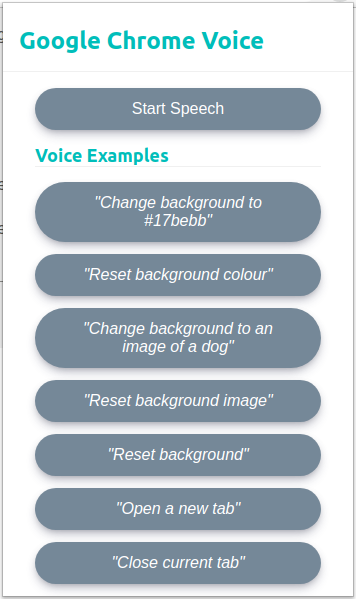
It's a Google Chrome Extension that simply performs tasks that you ask it to do. Currently limited to a set of actions like setting the background colour or image and then resetting it, and also opening and closing tabs. The next action to add was to ask it to Google something for you and show you the results.
However, this Chrome Extension could also help people that struggle to browse the web, perfect for people with limited hand movement or mobility.
How I built it
As this is a Chrome Extension it is built fully with JavaScript, HTML and CSS. In the future, we could build an API where people can create accounts and have settings, which change the experience using the extension.
Challenges I ran into
The first challenge I ran into was how to create a Chrome Extension. How to structure the project and how to build the files to use JS dependencies was the top of the challenges with setting me back a lot of the time. However, now I know more about the structure and more about building JS and CSS using Webpack the next Chrome Extension should be a breeze.
Accomplishments that I'm proud of
Training the AI was a new experience as I have never really jumped into AI projects. Using Wit.ai was fairly simple to use and seeing the bigger picture when training what should happen really helped.
What's next for Google Chrome Voice
The next stage for Google Chrome Voice is to firstly add more actions so you can do more with it, but secondly make it more customisable so the user can change default options like which Search Engine the would like to use when searching the web. This would require a database and an API to make requests to which would increase the complexity of this project.


Log in or sign up for Devpost to join the conversation.