Inspiration
Revolutionize Data Exploration with AI-Powered Google Analytics Reporting! Introducing Google Analytics AI - Insights - Your AI-powered Google Analytics Report Builder
Struggling to extract meaningful insights from your mountains of Google Analytics data? Drowning in spreadsheets and wasting time building basic reports?
What it does
Google Analytics AI - Insights leverages the power of Google's cutting-edge AI, Gemini-1.5-Pro, to unlock a revolutionary report building experience.
- Seamless Integration: Login effortlessly with Google Oauth2 or utilize a pre-configured service account.
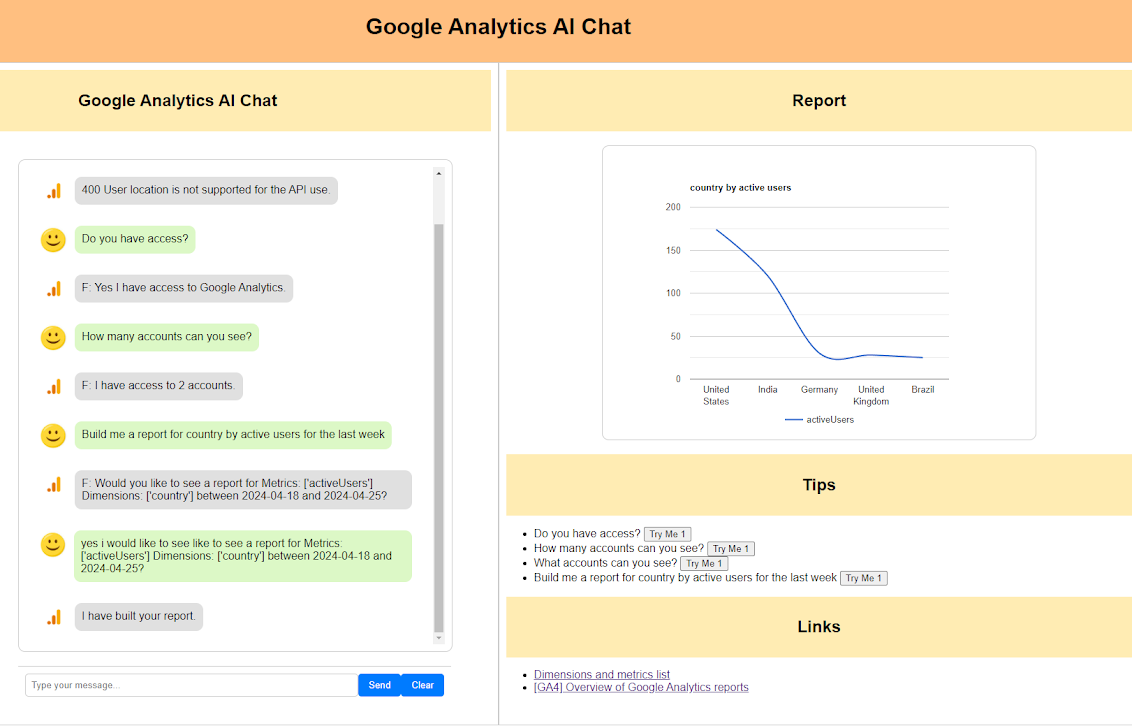
- AI-powered Prompting: Ask natural language questions about your data. No complex queries required! Imagine asking, Build me a report for country by active users for the last week
- Selecting account: Google Analytics AI - Insights can access your Google Analytics account though the Google Analytics admin API to help you pick the correct Google Analytics profile to extract data from. (WIP)
- Gemini Analyzes: With my extremely fine tuned AI prompt. Gemini AI intelligently interprets your request and then requests the relevant data from your Google Analytics account using the Google Analytics Data API.
- Displaying Reports: "Google Analytics AI - Insights" automatically converts the data received from google analytics into an insightful reports with clear and visually appealing using Google Charts and Graphs.
- Flexibility: Easily configure the system to use the latest Gemini models for optimal performance.
Benefits:
- Effortless Data Exploration: Ask questions, get answers. Gemini handles the heavy lifting, saving you valuable time.
- Deeper Insights: Uncover hidden trends and patterns with the power of AI.
- Visual Clarity: Gain immediate understanding through clear and impactful graphs.
- Scalability: Future-proofed system adapts to incorporate the newest and most powerful Gemini models.
Beyond the Hackathon:
- Save & Share: (Future Feature) Save report prompts for future reference and share reports with colleagues for collaborative decision-making.
- Email & Export: (Future Feature) Effortlessly share reports via email or export them as editable PDFs for further analysis and document creation.
How we built it
This started as a simple prompt in Google Ai Studio, I just wanted to see if it would work. Overtime it has developed into something bigger. The current system loads the dimensions and metrics the users profile has access to this way we can include any custom dimensions and metrics the user may have configured within their Google Analytics account.
Once I had a working prompt i moved onto a Python console application which simply stored the data as a CSV, which then lead to uploading the data into a Google Sheet. I began to think of adding Graphs to the Google Sheet.
It was then that I had the idea to Create a web application and display the Graphs using Google Charts and Graphs.
This system has grown all on its own.
Technology used:
- PyCharm
- Python version 3.12
- Fast API
- Gemini API extensive function calling
- Google Analytics Data API
- Google Analytics Data API
- Google Charts and Graphs
Challenges we ran into
Building the prompt has been very hard. The AI seems to have issues sometimes choosing the correct Dimension and Metric. A user will most often prompt using the UI name for the metadata however the API needs the api_name for the metadata. This has caused some failures with the report it requests to be built.
The AI also decides which chart type to display to the user currently line charts and pie charts are supported. The AI seems to have a preference for Line charts. I am not sure why. I plan to make changes so that the user can request a specific chart type be built.
Accomplishments that we're proud of
Well it works and it looks cool. I am a backend software developer. I have very little frontend experience and have not used JavaScript professionally in years. I'm very proud that I got the front end to work and look nice.
What we learned
Developing an application to use AI is not the hard part. I have been developing applications for years. AI is just another API to add to my application.
The Hard part is getting the prompt to work. To get the response you want. Foremost to get that response consistently. AI is not like a database where you will get the same response with every time you run a select. With AI there is a chance that the response will come back different from time to time. That's why tuning your prompt is so important.
Every time i Test this application I end up tuning the prompt a bit more.
What's next for Google Analytics AI - Insights
I have a list of nice to have features i want to add that i am not sure will be added in time for the hackathon.
- more chart support (user request a chart type, support more chart types)
- saving of the chat prompt and loading it again.
- If a service account has been configured I would like you to be able to share access with others. So the whole company could run it without needing to have access to the account in google analytics
- Save the Graph report or send it to someone. better yet use it to create a document and then send the document to someone.
I would like to release it. However there are some questions with the pricing I would need to charge for it as I will have to pay for a users usage of the Gemini API. I wish I could just offer a free version for people to play with. Its fun watching it create reports that would have taken me ages to create myself.


Log in or sign up for Devpost to join the conversation.