
Inspiration
It started at the Atlanta airport station. Two of our teammates, Roshan and Aadi, boarded a Red Line train, realized it was the wrong one, and switched to a Gold Line train right before the doors closed. Roshan's backpack stayed on the Red, with valuable items like his laptop, iPad, and passport inside. Find My was no help: it stayed frozen on "Airport" while the bag was already moving down the line. While Roshan was panicking, Aadi pulled up MARTA's routes and worked out a plan: the Red and Gold lines share the same track out of the airport, and the Red train was running right behind theirs. If they got off at the next station and waited, the bag would come to them. They did, and grabbed the backpack as it pulled in.
They only got it back because Aadi put that plan together in time, and most riders won't. The official route is slow: MARTA's Lost and Found is open only on weekdays, 8:30 AM to 5 PM; items can take up to 5 business days to arrive; and the report form asks for the bus or train car number, which almost nobody knows. By then, your bag has ridden the whole line many times over, and every stop is another chance for someone to walk off with it.
That's why we built Bring It Home: to be that calm friend for everyone.
What it does
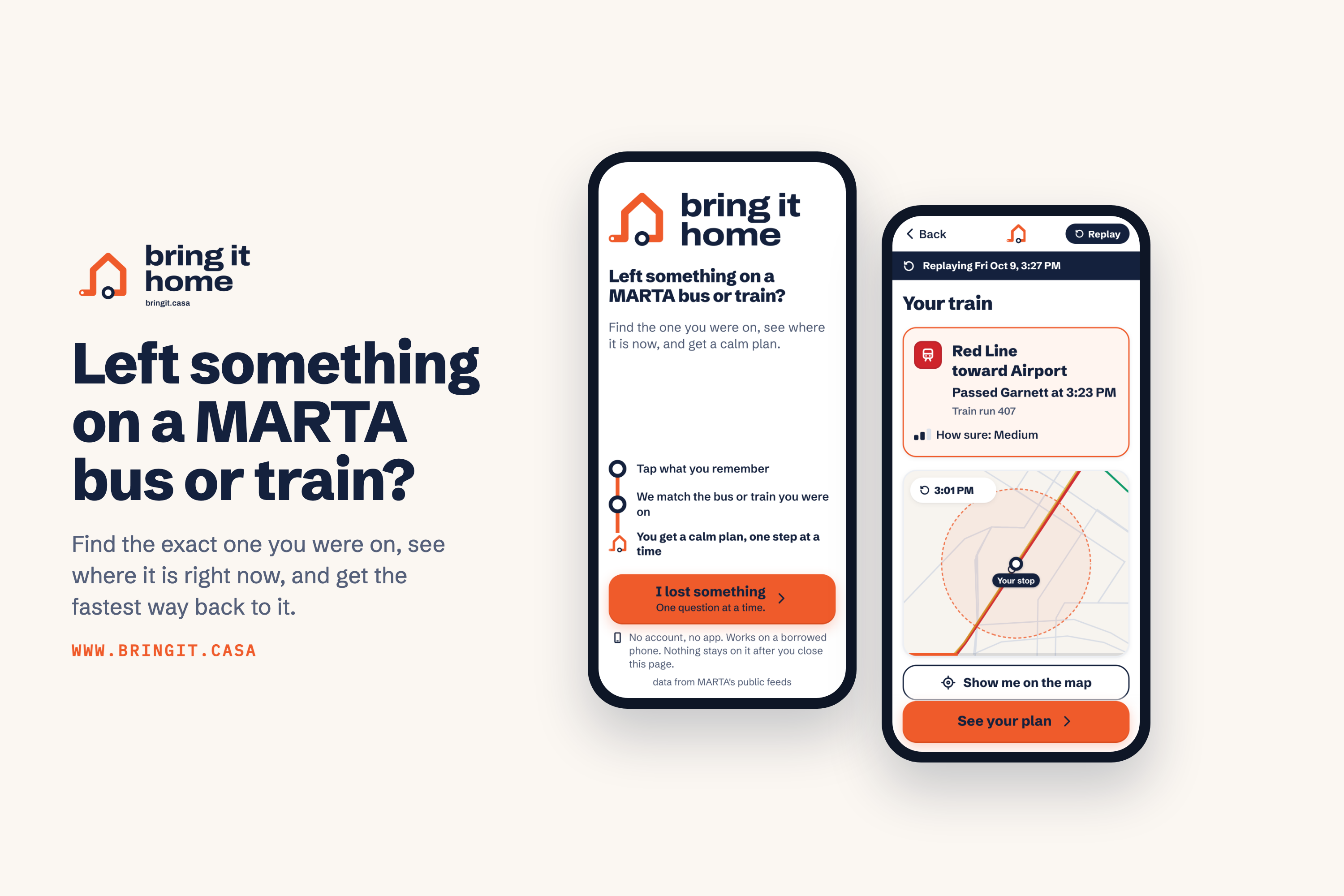
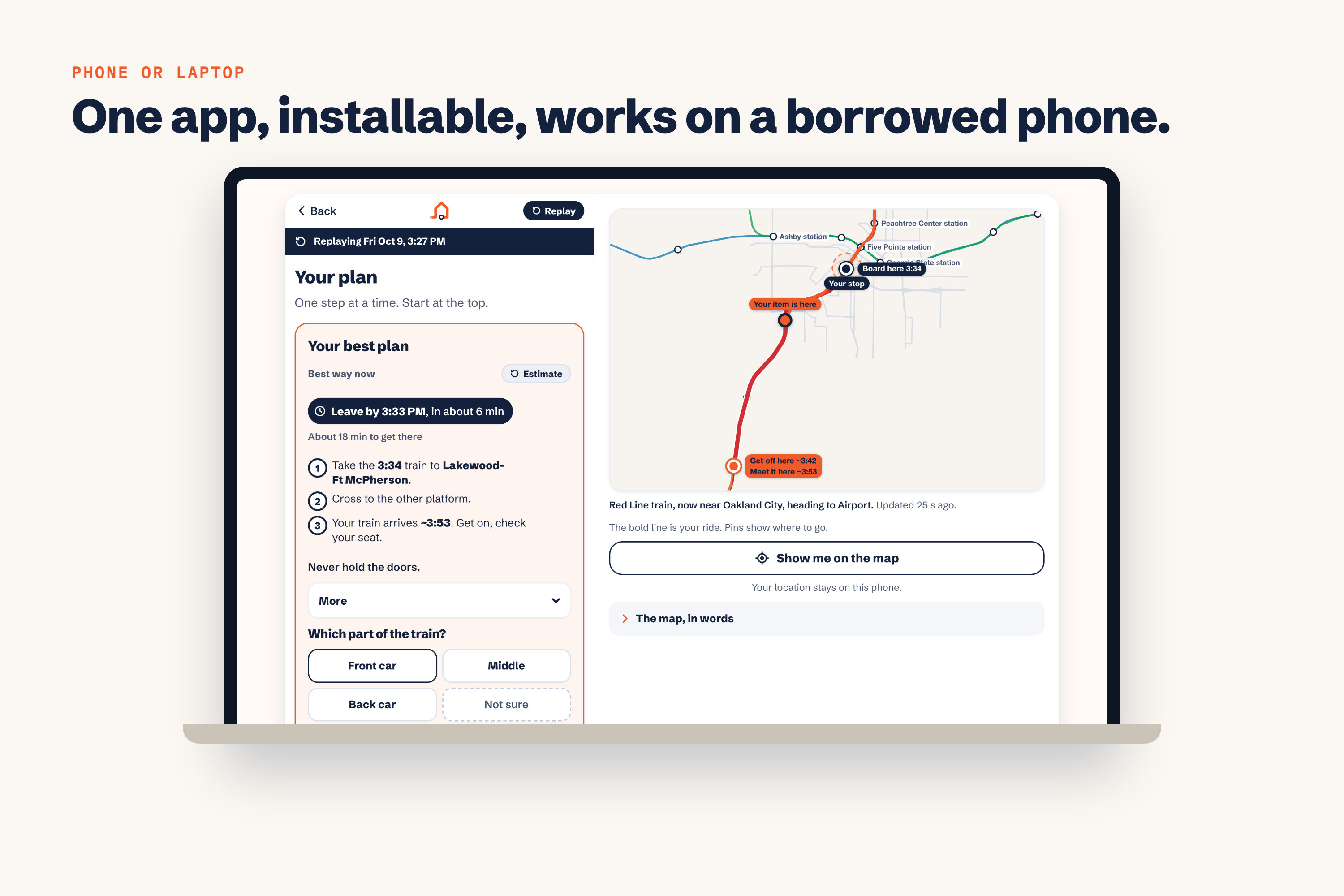
If you leave something on a MARTA bus or train, just answer three quick questions. Bring It Home then finds the exact vehicle you were on, shows you where it is right now, and tells you the fastest way to get your stuff back.
Find My shows where it was. Bring It Home shows where it is.
Features
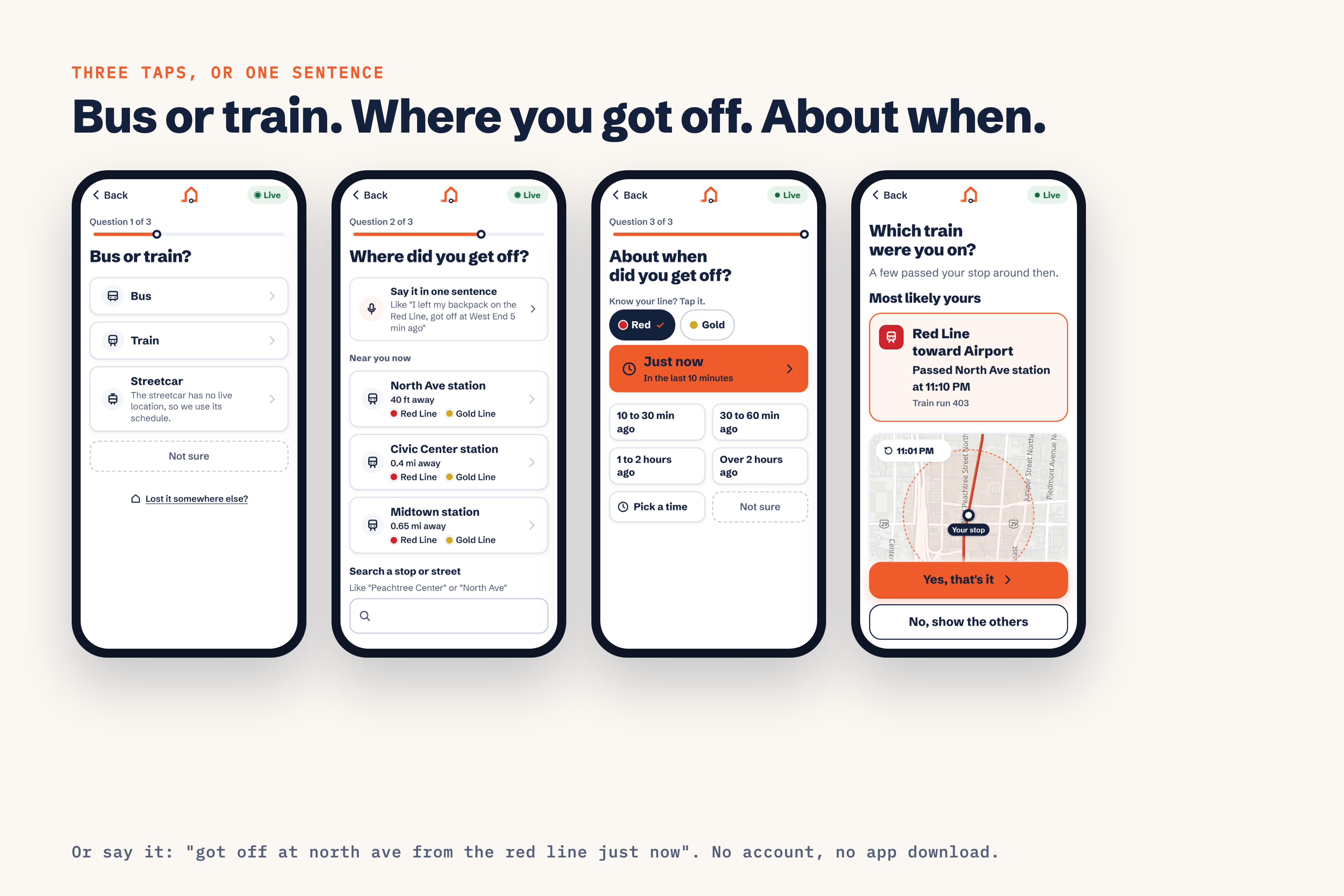
- Three taps. Bus or train? Where did you get off? About when? You can also just say it: "I got off at Five Points from the Blue Line just now."
- Finds your exact vehicle. We check which buses and trains actually passed your stop at that time. If the answer is clear, we tell you: "Your train." If a few could fit, you pick yours.
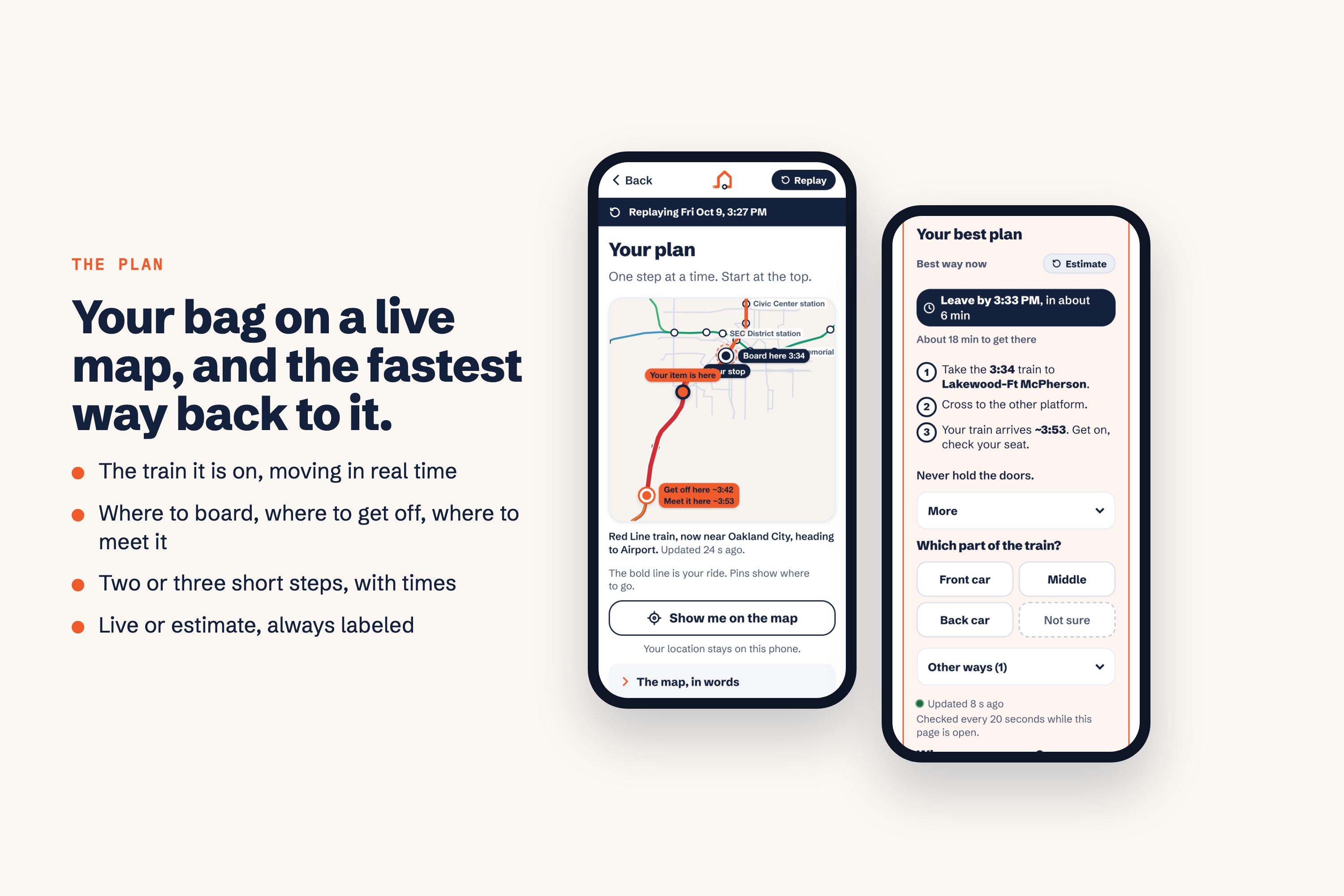
- Live map. See where your bag is right now as the train or bus moves.
- A simple plan. Get two or three steps to meet your bag, like "Take the 12:17 train to East Lake, cross to the other platform, and wait." The plan updates every 20 seconds.
- Honest about what it knows. Every time is marked as live or as an estimate. If we can't see a bus, or a train might be done for the night, the app says so instead of guessing.
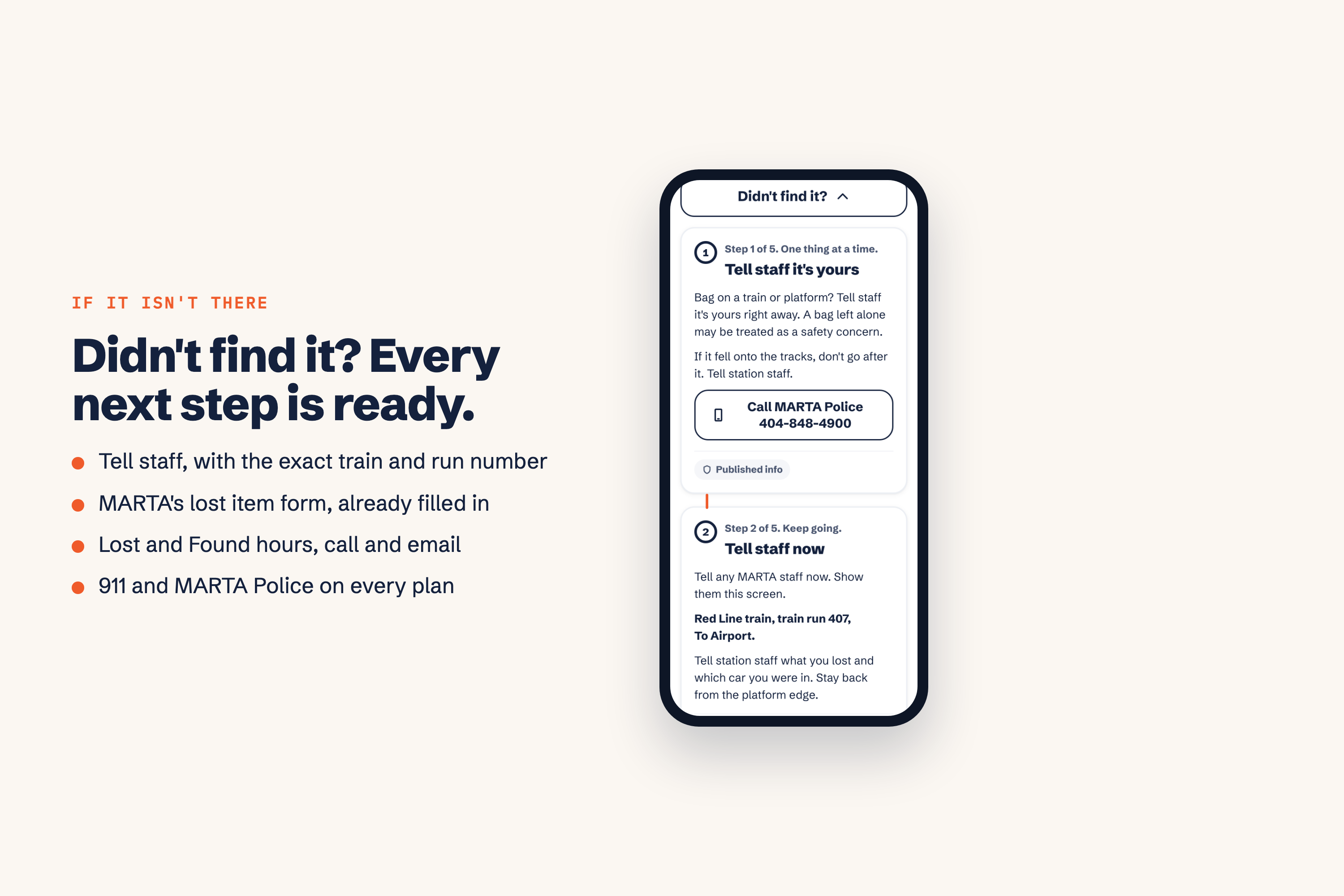
- Lost-item report, already filled in. If you can't get your stuff back in time, the app fills in MARTA's report for you with the exact vehicle, time, and place.
- No account, no download. It works on a friend's phone in case yours is what you lost. Your search deletes itself after 2 hours.
- Safe by design. The app never tells you to run or hold doors. "Tell staff" steps and buttons for MARTA Police and 911 are always on screen.
Who it helps
Most lost-item tools assume you own a tracker, have your phone, and can wait until Monday. Bring It Home is built for the riders those tools leave out:
- People without a tracker, which is most riders. We follow the bus or train, not the bag.
- People whose phone is what they lost. With no login and no download, it works on a friend's phone, and it leaves nothing behind.
- People who are stressed. There's one question at a time, big buttons, and a calm plan instead of a list of options.
- People who walk slowly or use a mobility aid. One tap adjusts the walking times, so the plan never asks you to rush.
- Anyone who loses something after hours. MARTA's Lost and Found is closed nights and weekends, but the app works any time a bus or train is running.
Safety and privacy matter just as much. The app never tells you to run or hold doors, it always shows buttons for station staff and MARTA Police, and it never stores your location. We track the buses and trains, not people.
How we built it
The big idea: we don't need to know where you were. We just need to know where every bus and train was, so we record all of them, all day, every 15 to 20 seconds.
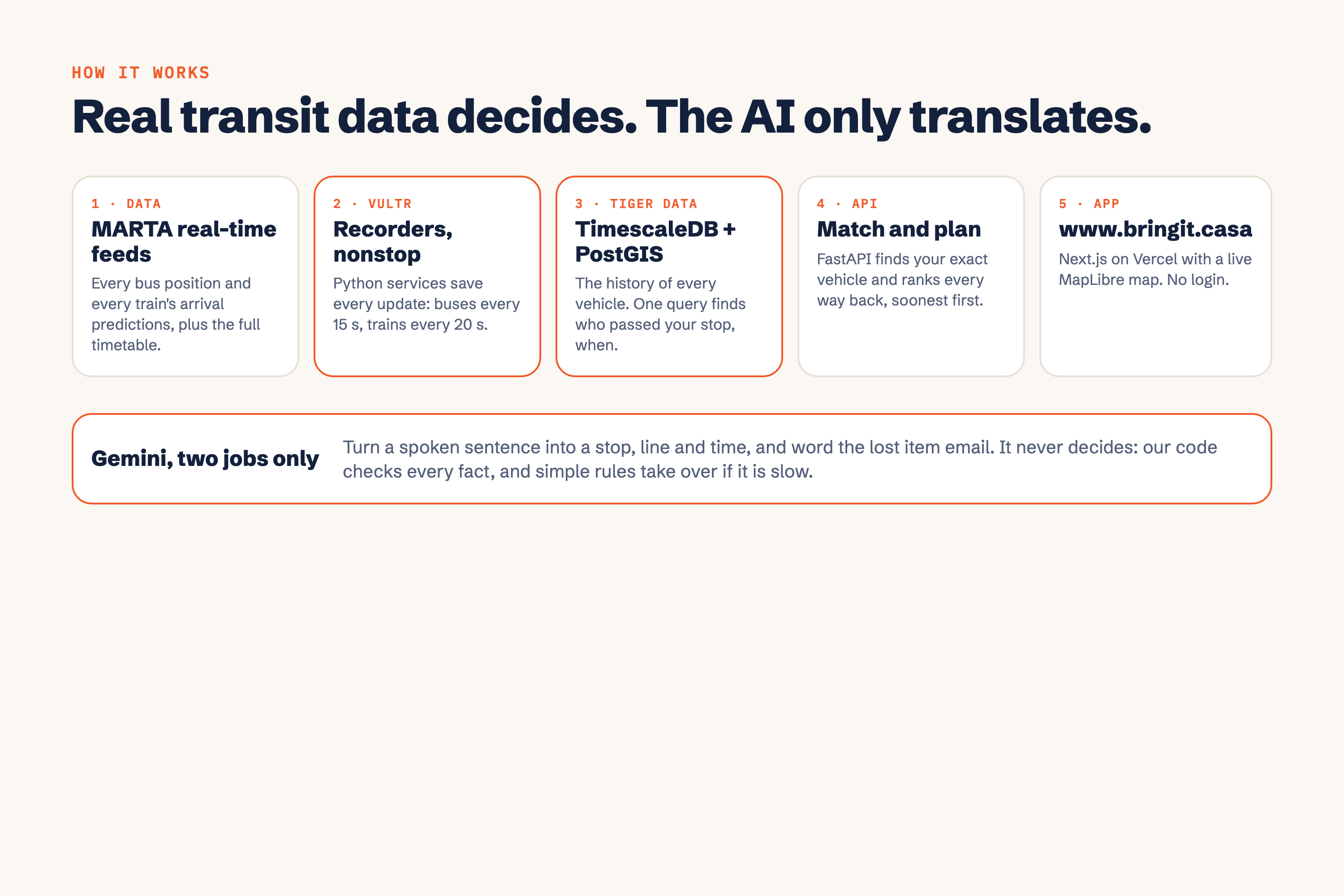
Here's how the pieces fit together, from the data to your phone:
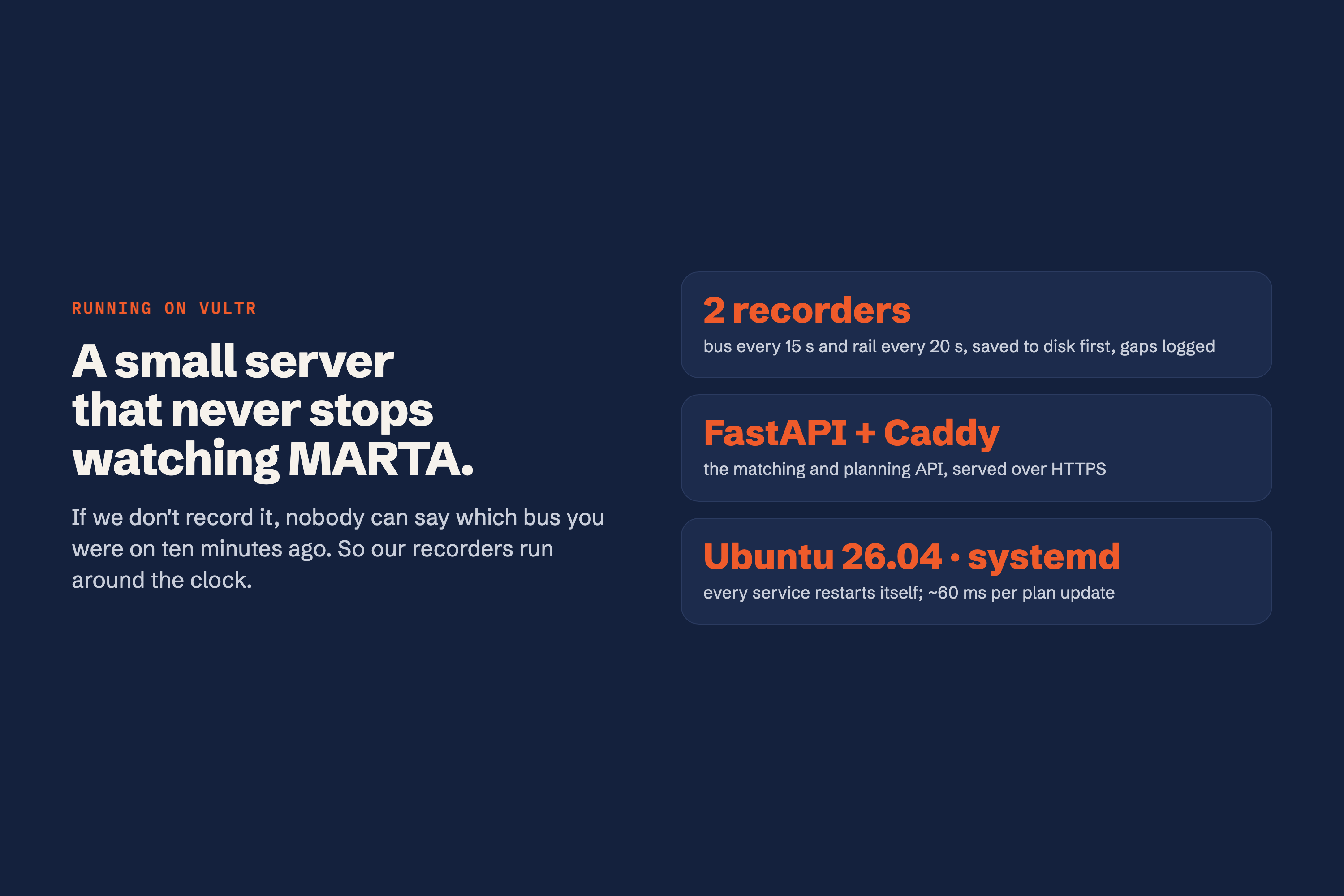
- Recording (Vultr): A cloud server records the location of every MARTA bus and train, nonstop. We've saved over 400,000 location points so far.
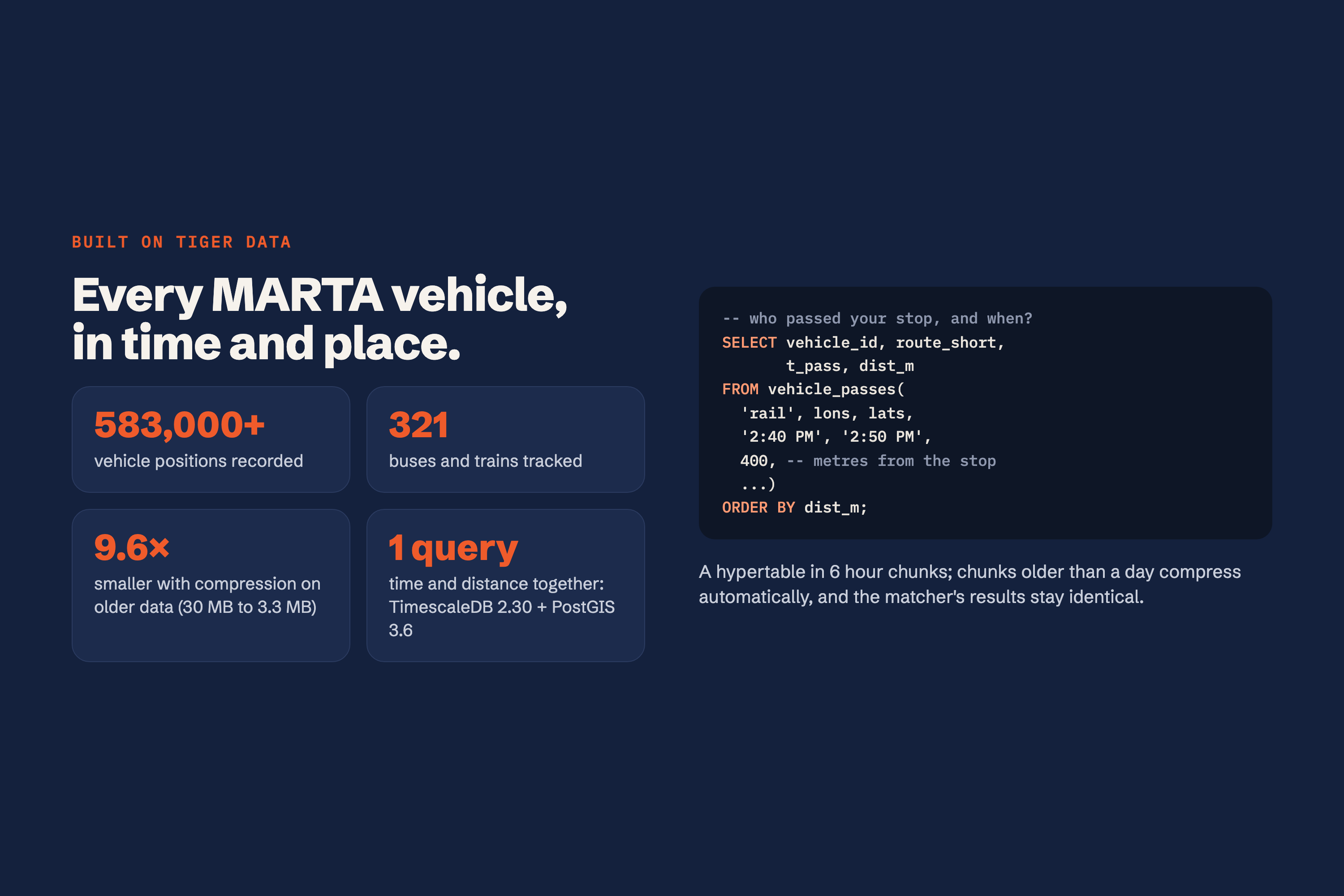
- Storing (Tiger Data): Those location points go into a database built for time and map data. With one search, it finds every vehicle that passed your stop around the time you gave.
- Planning: Our own code then compares every way to meet your bag (wait here, ride ahead and switch platforms, or meet it at the end of the line) and picks the fastest safe one. Its timing rules come from measuring how real MARTA trains and buses behave.
- Understanding you (Gemini): AI handles two small jobs. It turns a sentence like "got off at Five Points just now" into answers for the form, deploys an agent to fill out the Lost & Found form if necessary, and it rewords the lost-item email. Our code checks everything it returns, so it can't make up a stop, a time, or a train. The AI is the translator. The decisions come from real transit data.
- The app: Finally, everything shows up on bringit.casa, a website that works like a phone app, with a live map.
| Part | What we used |
|---|---|
| Website | Next.js, MapLibre (maps), hosted on Vercel |
| Server | Python + FastAPI, running on Vultr |
| Database | Tiger Data (TimescaleDB + PostGIS) |
| AI | Google Gemini |
| Data | MARTA's free public bus, train, and schedule feeds |
| Domain | bringit.casa from GoDaddy Registry |
Challenges we ran into
- Trains turning around. You'd think you could just take the first train coming back, but that's your bag's train only about 4% of the time. To fix this, we follow each train's ID through its turnaround.
- Missing buses. About half of MARTA's buses weren't sharing their location on Saturday morning. When that happens, we use the bus schedule instead and tell you it's an estimate.
- Our own mistakes. We replayed past days through the app to test it, and it caught bugs in our timing rules. After we fixed them, plans that would have missed the train dropped from about 8% to about 1%.
Accomplishments that we're proud of
- When we replayed real Saturday data, the app's first choice was truly the fastest way back 96% of the time.
- In a live test, it said a Red Line train would come back at about 8:57, and it showed up at 8:57 and 30 seconds.
- We wrote over 1,500 automated tests to make sure it keeps working.
What we learned
- Real-world transit data is messy. Trains disappear, buses stop reporting, and schedules aren't always right.
- AI works best as one small, checked step, not as the thing making the decisions.
- Measure first, then build. Almost every assumption we started with turned out to be wrong somewhere.
What's next for Bring It Home
- More cities. Most transit systems publish the same kind of bus data, so adding a new city is a small step.
- More testing on Sundays and weekday rush hours.
- Working with MARTA. Reports with the exact vehicle number make their job easier too.
Sponsor Challenges
🏠 Best Domain Name from GoDaddy Registry: bringit.casa
Casa means "home" in Spanish, so bringit.casa reads as "Bring It Home." That makes our domain both our name and our mission. It's also short and easy to say, which matters when someone is stressed and typing it into a borrowed phone.
🐯 Best Use of Tiger Data
Tiger Data is the heart of the app. Because it's built for data that changes over time and across a map, it can store every bus and train location and answer our most important question, "which vehicles passed this stop around this time?", in a single search. We also turned on Tiger's compression: older data takes up about 9.6 times less space, and our search results stay identical. A Tiger retention policy backs up our privacy promise: each search is deleted 2 hours after last use, and never kept past a day.
☁️ Best Use of Vultr
The app only works if every MARTA bus and train is being recorded around the clock, and free serverless hosting can't run anything nonstop. That's why we run our recorders on a Vultr server. The same server also runs our backend; every service restarts itself if it crashes, saves each update to disk first, and logs any gap.
Notes for Judges
- Try it: bringit.casa. It works best right after a train leaves a station.
- Recorded example (works anytime): bringit.casa/?mode=offline&set=hero-rail
- No login needed.
- Tools: Built with help from Claude Code (an AI coding assistant), open-source libraries, and MARTA's public data. We aren't partnered with MARTA.
Built With
- caddy
- fastapi
- gemini
- godaddy-registry
- gtfs
- maplibre
- nextjs
- postgis
- postgresql
- python
- tiger-data
- timescaledb
- vercel
- vultr


Log in or sign up for Devpost to join the conversation.