-
-
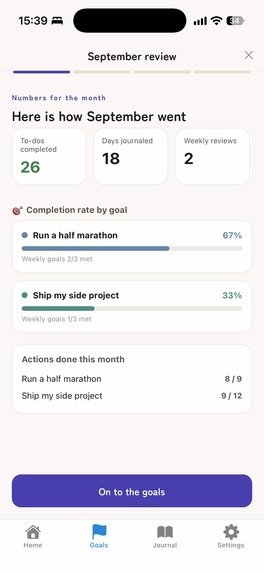
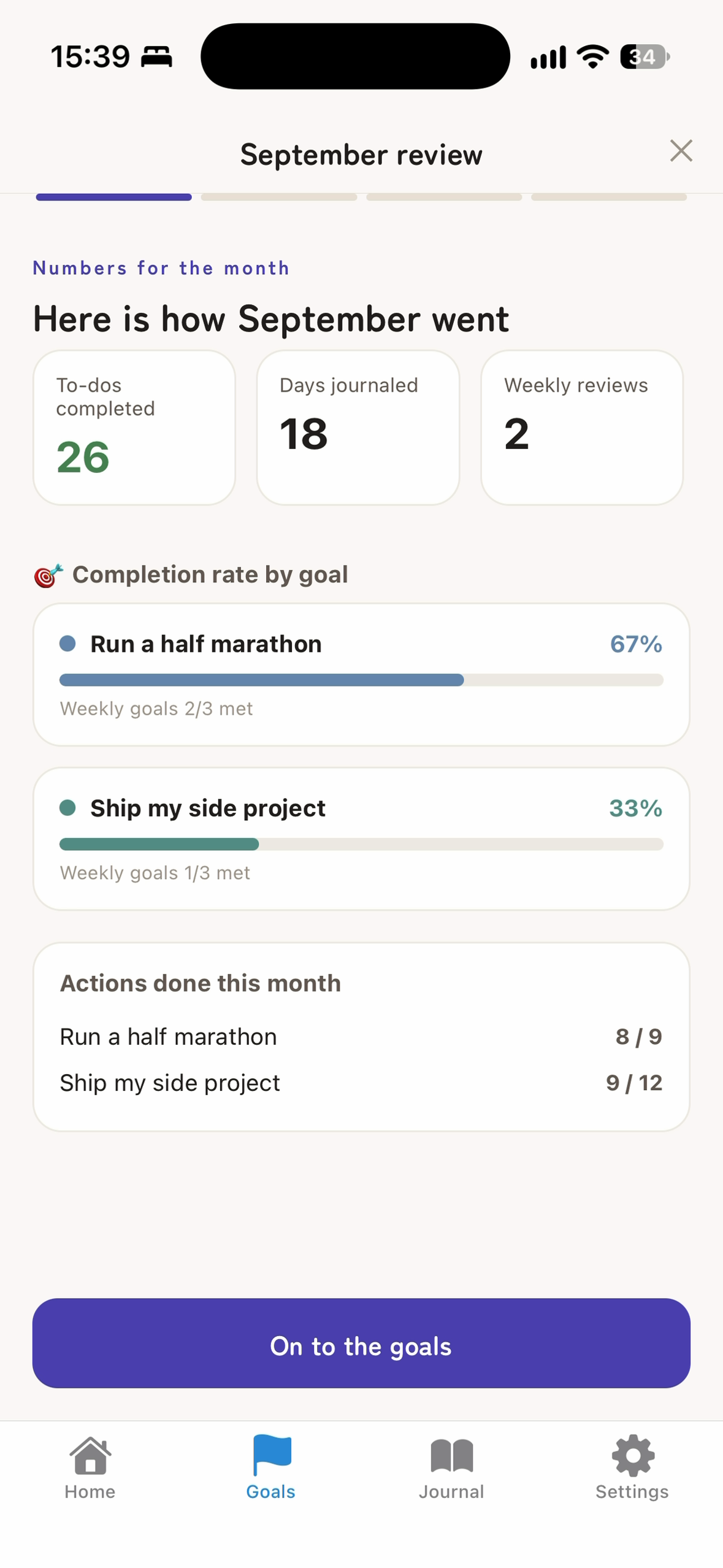
Monthly review. Completion rate for each goal, so you can decide next month's direction.
-
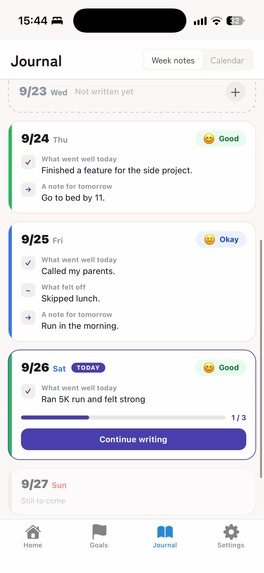
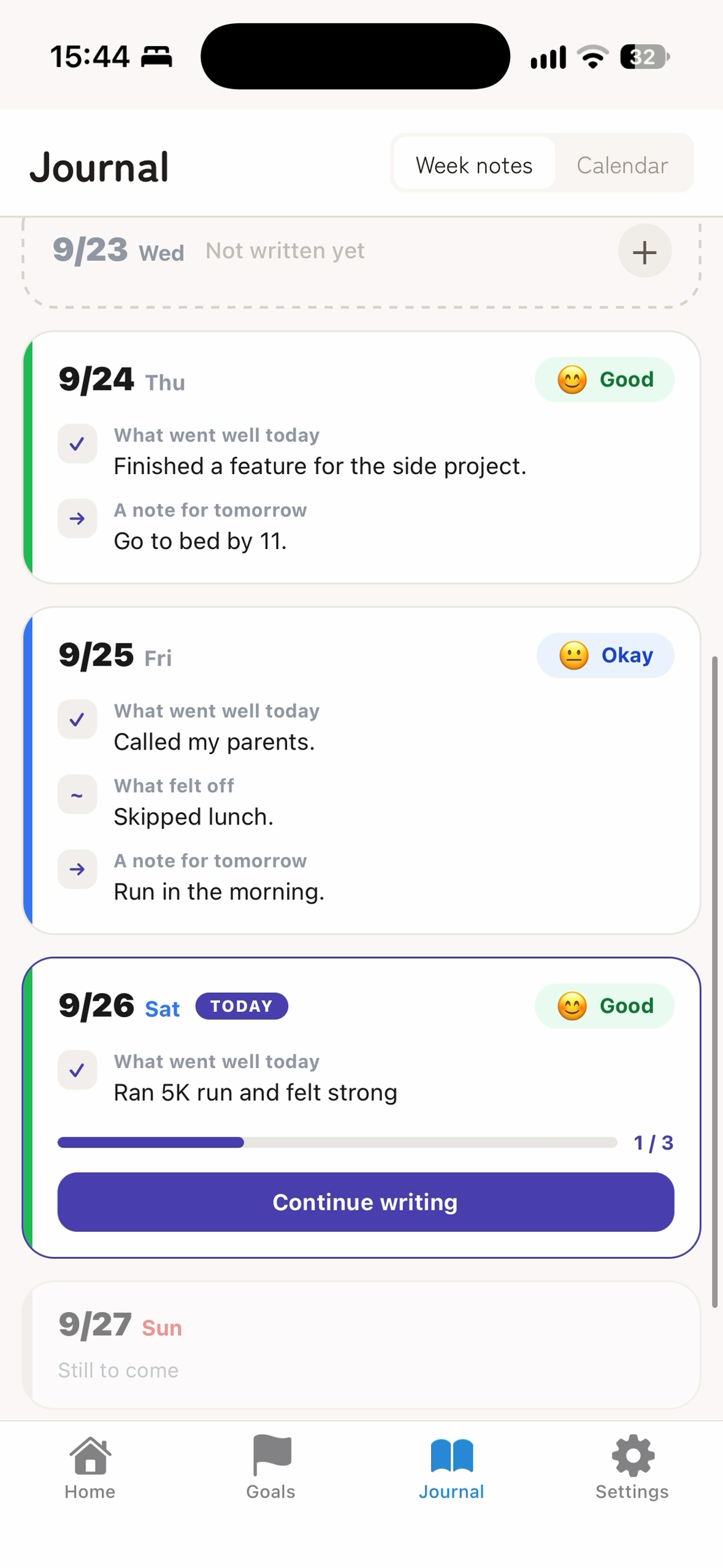
Journal. A few lines and a mood for each day, collected into week notes.
-
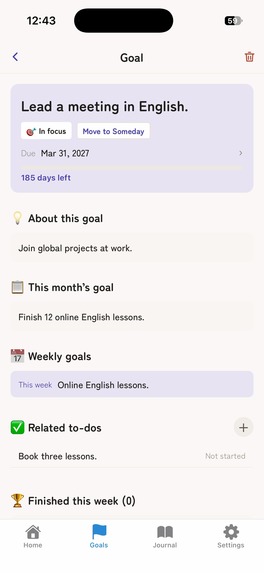
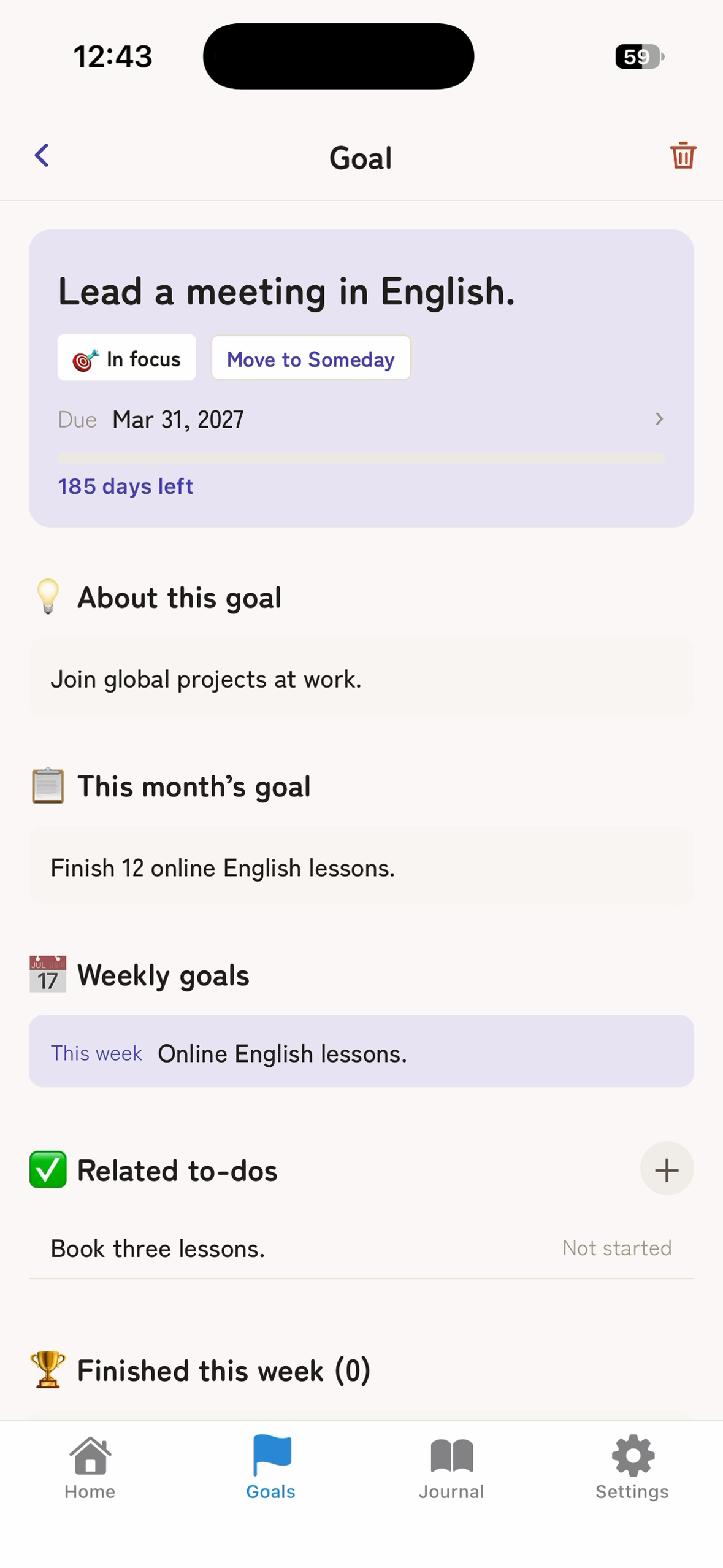
One goal, cascaded. The due date, this month's goal, this week's goal and the related to-dos, all in one place.
-
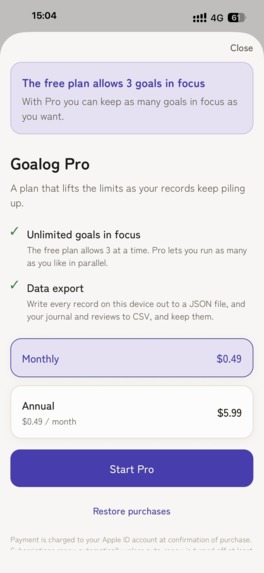
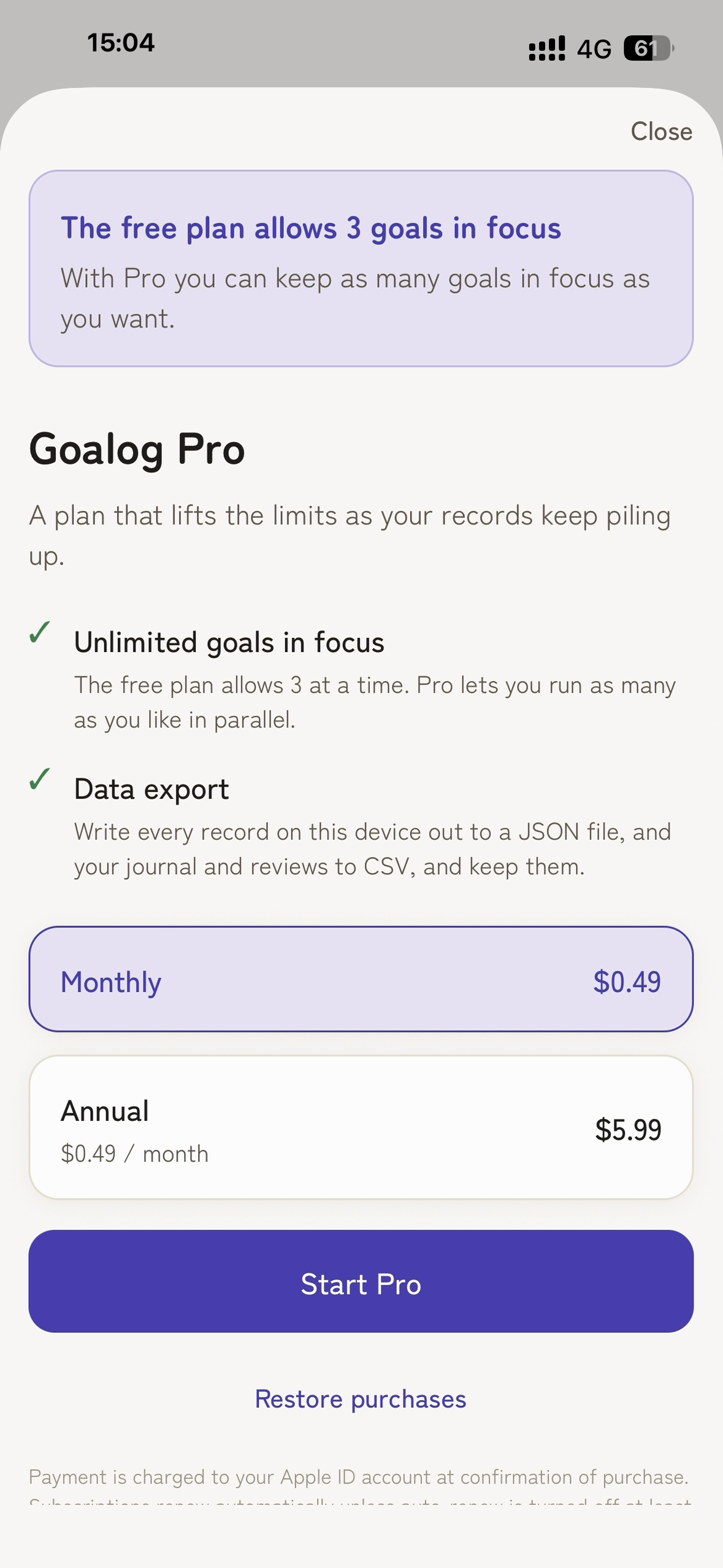
Goalog Pro. The paywall appears only when you hit the free limit of three goals in focus. Monthly or annual, powered by RevenueCat.
-
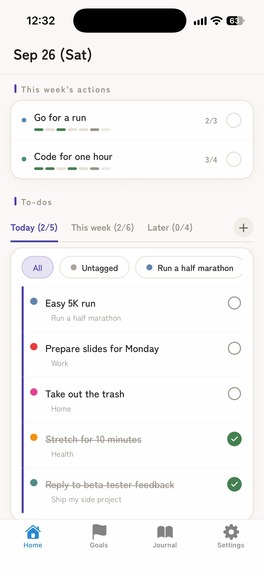
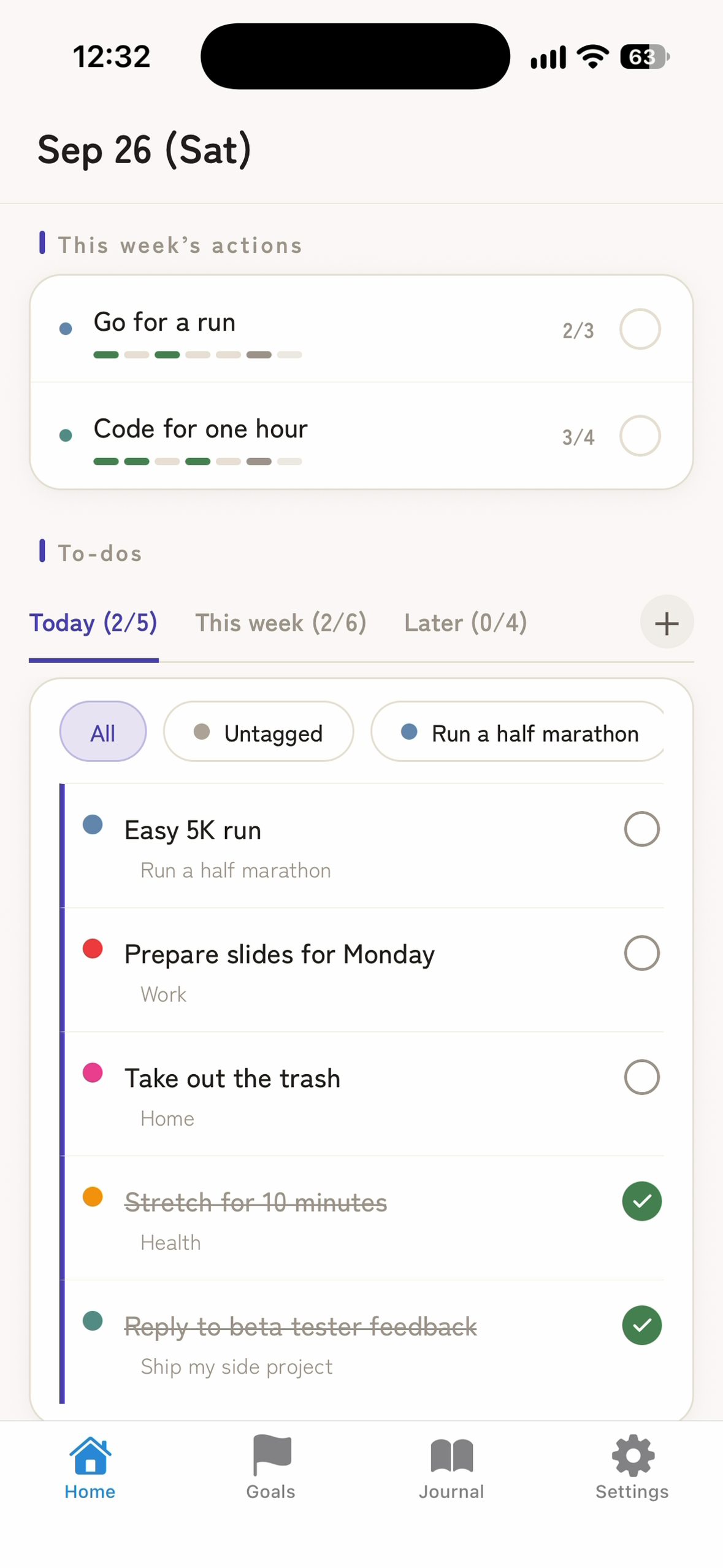
Home. This week's actions on top — tick today and watch "2/3" fill up — and today's to-dos below.
-
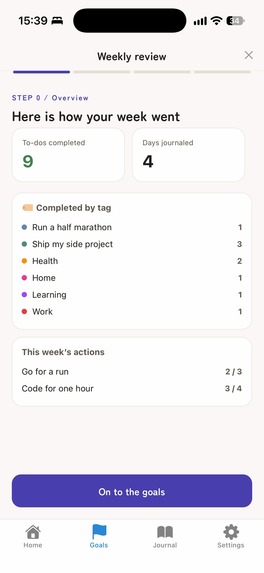
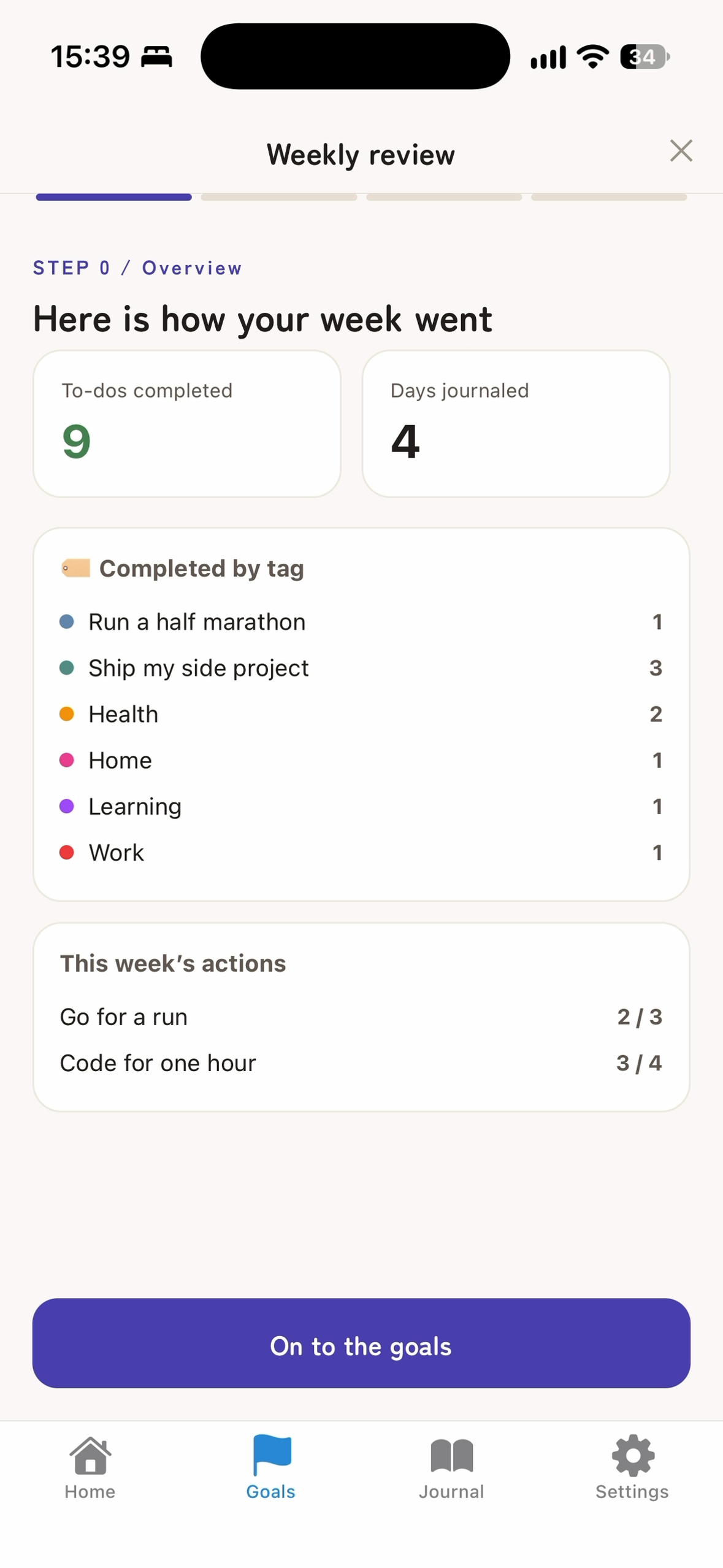
Weekly review. To-dos finished, days journaled and a breakdown by tag — then you write how the week went.
-
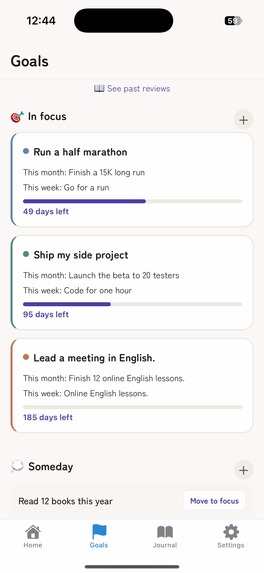
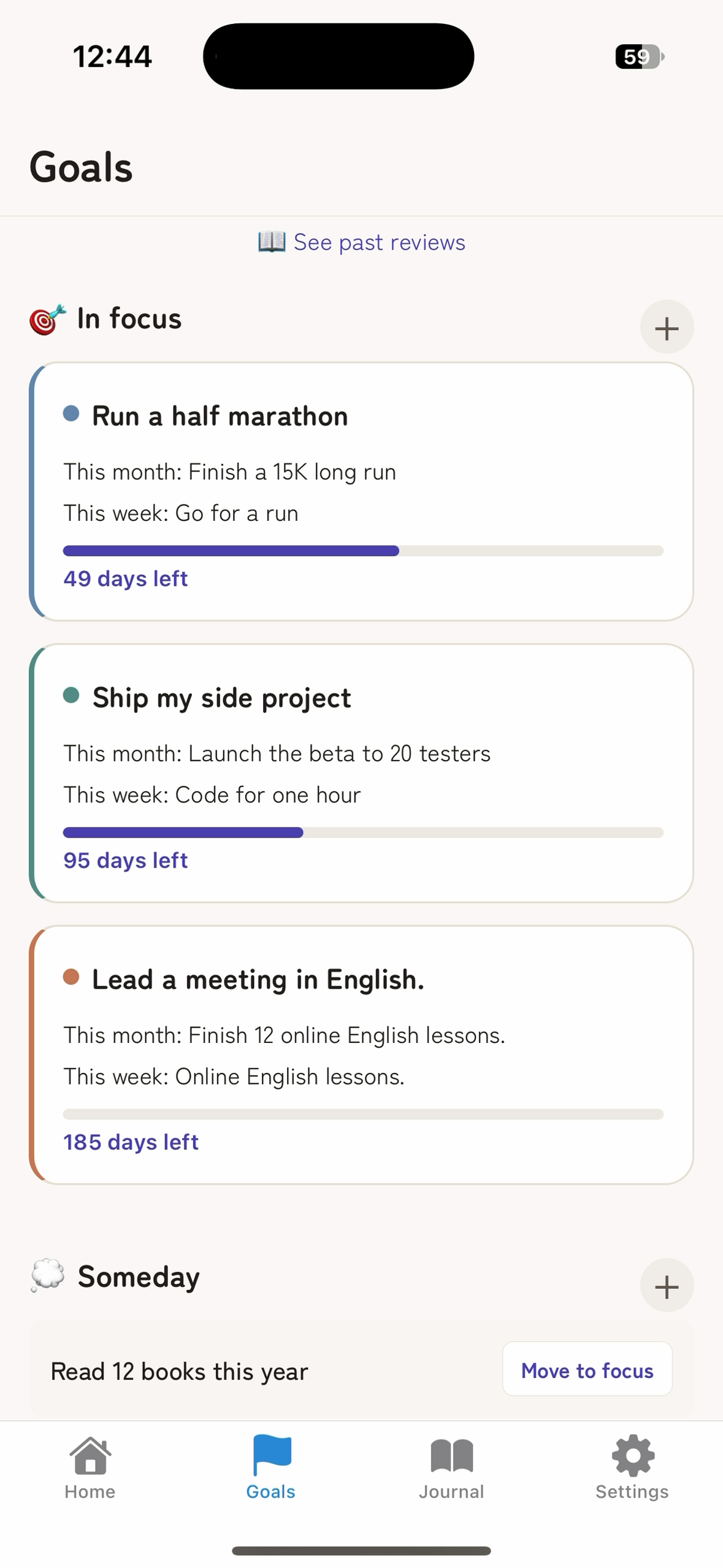
Goals in focus. Each goal shows this month's and this week's goal, with a bar that fills as the deadline approaches.
Inspiration
Most people who set a big goal don't fail for lack of motivation. They fail because the goal, the to-do list and the journal live in three different places, and nothing connects "become a senior engineer by 35" to what they should do this Tuesday. By the third Sunday night, they're too tired to look back, and the notebook goes into a drawer.
Goalog is for working adults who set goals in their careers or personal lives, have tried planners and to-do apps before, and dropped them after a few weeks. They want structure, but not a system that takes more time than the goal itself.
What it does
- Goals that cascade down. Add a goal "in focus", and Goalog walks you straight through this month's goal, this week's goal and this week's to-dos — so a big goal becomes something you can act on this week.
- This week's actions. One repeating action per goal with a target count, like "online English lesson, 3 times". Tick it off on Home and watch "2/3" fill up.
- To-dos in one list. Sorted into Today, This week and Later. Goal tasks and small chores live side by side; tags let you filter.
- Journal. Record how the day felt and what happened.
- Weekly review. Shows how many to-dos you finished, how many days you journaled, and a breakdown by tag. Then, goal by goal, you write how the week went and set next week's goal.
- Monthly review. Completion rate per goal and each week of the month, so you can decide next month's direction.
- Reminders. Local notifications for the morning plan, the evening look-back, and the weekly and monthly reviews.
- Private from the first tap. No sign-up — open the app and start. English and Japanese.
How it makes money. Goalog is free with up to three goals in focus — and for most people three is the right number, because focus is the point. Goalog Pro (monthly or annual) is for people who run more goals in parallel, and adds data export: a JSON backup to move everything to a new phone, and CSV for your journal and reviews. The paywall appears only at the moment you hit a limit, and everything you already use — to-dos, journal, reviews, reminders — stays free, so a free user never loses their routine. Subscriptions are powered by RevenueCat, so a purchase unlocks Pro instantly and can be restored or managed from Settings.
What makes it different
- Every to-do has a reason. Most to-do apps start from tasks, so the list keeps growing and the goal gets lost. Goalog starts from the goal and breaks it down to this week. When you open the app, you see not just what to do today, but why — and that is what keeps a goal alive past week three.
- You write the reflection, not an AI. It would be easy to generate a weekly summary for you. We chose not to: reading a summary is not the same as reflecting, and putting your week into your own words is what changes next week. Goalog does the counting — to-dos finished, days journaled, a breakdown by tag — so you start from facts instead of a blank page.
- Your journal stays on your phone — on purpose. Goalog has no account and no cloud sync, by design. A journal is where you write things you wouldn't tell anyone, so we built it so that nobody else can read it — not even us. Your goals, to-dos and entries never leave your device. It also means there is nothing to sign up for: you can start writing the moment you open the app, and everything works offline, on a train or a plane. The trade-off is that your records live on one phone; Goalog Pro includes a backup file to move them when you change devices.
How we built it
Goalog is built by a two-person team with Expo (React Native), TypeScript, Expo Router and Zustand, an on-device SQLite database, and RevenueCat for subscriptions.
Technical highlights:
- Data that never half-saves. Everything lives in SQLite on the device. Actions that touch several tables — achieving a goal, carrying it over into a new one, rolling unfinished to-dos forward — run as a single transaction, so an interrupted action never leaves your data in between.
- One definition of "a week". Weeks run Monday to Sunday, and all week math goes through one date module, so Home, the weekly review and the monthly review always count exactly the same days.
- Free and Pro defined in one place. A single entitlements module reads RevenueCat's
proentitlement and holds the free limits, so the rules can't drift between screens. Prices come from RevenueCat as localized strings, and if purchases can't be set up, the app keeps working on the free plan instead of breaking. - Safe restore. Backups are versioned JSON. Importing runs in one transaction and rolls back if anything fails, so a bad file can't wipe your data.
- Guides that measure the real screen. The first-run spotlight and tours measure the live layout, so they stay on target with larger text sizes and in both languages.
Challenges we ran into
Choosing privacy over convenience. Sync across devices is what people expect from an app, and leaving it out was a real product decision. For a journal, we decided that "nobody else can read this" matters more than sync, and put our effort into making the app feel complete on a single phone.
Taking the AI out. Our original design was AI-led: an AI would pick the week's highlights, analyze what went wrong and suggest next week's to-dos. We realized that approving an AI's summary is not the same as reflecting — the value comes from writing it yourself. We recorded the decision in an architecture decision record: reviews are user-driven, AI is an optional layer for later, and the app must stand on its own without it.
Turning a habit tracker into weekly actions. Goalog used to have a classic habit tracker, but habits belonged to no goal: a tick on "Run" said nothing about the goal it was meant to serve. We rebuilt it as "this week's actions." Each goal in focus gets one action for the week and a target count. You tick it on the Home screen and watch "2/3" fill up; on Sunday, the review shows how many times you actually did it, and you set next week's action right there.
First-run confusion. When we asked someone to try the app for the first time, they couldn't find how to add a goal — the "+" was a small button at the end of a header. We added a three-screen intro, a coach mark that points at the "+" on the Goals tab, and short guided tours of the goal screen and this week's actions.
Accomplishments that we're proud of
- A real app on the App Store, built by two people — from the first commit in March 2026 to release in September.
- Private by design. Your goals and journal never leave your phone, and there is no account to create.
- A paywall that respects free users. It appears only at the moment you hit a limit, and nothing you already use is ever locked away.
- One small design system across the app — paper background, one indigo accent, rounded headings — so the app feels like a calm notebook instead of a dashboard.
What we learned
- Reflection only works when you write it yourself. Removing the AI summaries made the weekly review simpler to build and more useful to use.
- A good first minute matters more than features. One person trying the app for the first time found more real problems than weeks of building.
- Saying "no" can be the feature. No account, no sync, no AI summaries, no charts — each "no" made the app calmer and easier to trust.
What's next for Goalog
Our aim is for Goalog to be the place where a year of small weeks adds up to one big change.
- Private sync, done our way. End-to-end encrypted backup and sync through your own iCloud, so your records can follow you to a new phone while staying readable by no one but you.
- Beyond the phone. Home Screen widgets and Apple Watch, so checking off this week's action takes a glance — and Android, so more people can plan their weeks with Goalog.
- A year in review. Weekly and monthly reviews roll up into a yearly one: the goals you reached, the ones you let go, and how your weeks changed along the way.
- A coach, not a ghostwriter. An optional AI layer that asks better questions during your review. It can prompt and suggest, but the reflection stays yours.
Built With
- expo.io
- ios
- react-native
- revenuecat
- sqlite
- typescript
- zustand

Log in or sign up for Devpost to join the conversation.