-
-
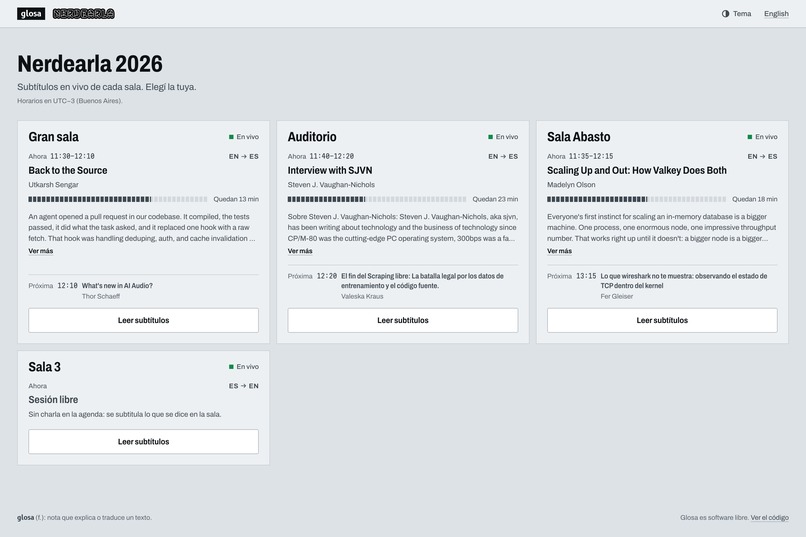
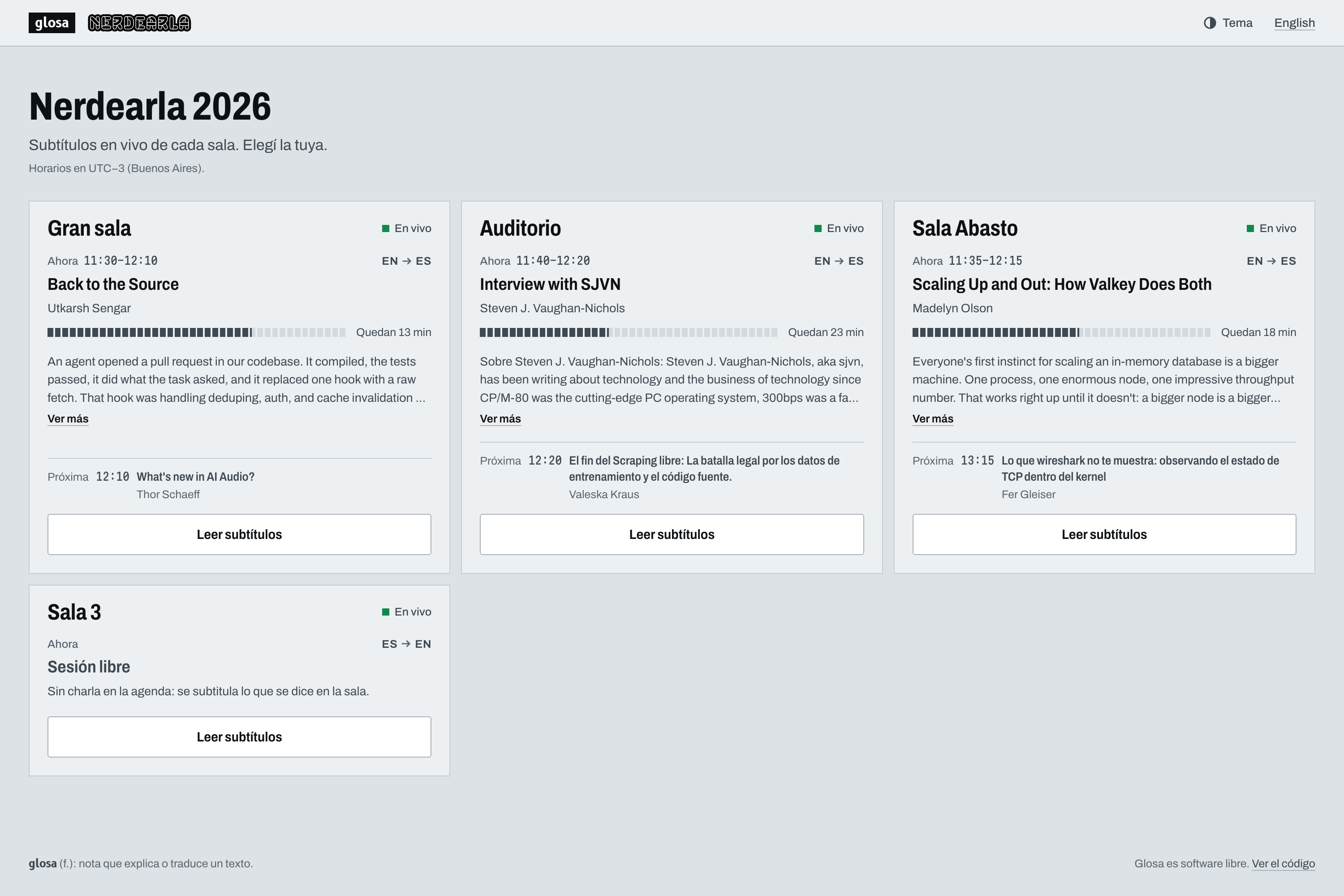
Audience home: every Nerdearla room live, with the agenda's current talk, time left and next talk. Scan a QR, pick a room and a language.
Inspiration
A conference thinks in rooms and an agenda, not in one loose session that someone starts and stops. Today, live captioning at an event like Nerdearla means a paid tool that someone has to start and watch room by room, with a remote desktop open "in case it needs an F5 because it froze". That is money per session and manual work that doesn't scale to an agenda with parallel talks in several rooms.
The name comes from glosas: margin notes that translated and explained Latin texts. A glossary is exactly what makes an engine understand a technical term the way the people in the room do.
What it does
- Live captions and translation, room by room. The audience scans a QR code, picks a room and a language, and reads on their phone. No app, no login.
- Agenda autopilot. Import the schedule once (CSV or Nerdearla's sessions JSON) and every room in
automode opens its talk 60 s before its slot and closes it at the end, switching language, engine, targets and glossary with it. The operator switches a room to manual only when reality drifts from the agenda. - Two Gemini engines, chosen per talk: fast (Gemini Live Translate, fluent) or glossary (Gemini Transcribe Live + Flash-Lite, faithful to the talk's glossary).
- Control room (
/admin). Each room is a monitor with its live captions, a status light and its time on air. The Attention bar lists only what needs action now (a room down or degraded and why, budget at 80 %, a silence alarm). Each room's drawer has auto/manual, reconnect, "test with audio", exports, the audience QR page and, for a room station, its connection state, link, QR and a remote reload. - Room stations (one mini PC per stage). The mini PC opens
/station/<room>?key=...: it captures the audio desk's feed in the browser, streams it, and shows the captions full screen for the stage screens. A remote reload button ("remote F5") replaces walking over to the stage. - Stream overlay (
/overlay/{room}): a transparent, chrome-less page that an OBS or vMix browser input reads directly, burning translated captions onto the stream. - "What did I miss?": a short summary of the talk so far, for whoever arrives late.
- Local mode (no cloud).
engine_mode: localruns captions and translation 100 % on-device on Apple Silicon — meant as a demo/fallback ("no internet at the venue"), not a replacement. - Open source, Apache-2.0, one-command start (
git clone+make demo, ordocker compose up).
How I built it
- Python, FastAPI and
asyncio, with oneRoomWorkerper room that owns its whole life: audio source (ffmpeg), voice activity detection, engine session, segmenter, translation lane, and persistence in SQLite. - Session relay. Live API sessions have a limited lifetime, so Glosa pre-opens the next session and hands the audio over at a natural pause in speech. No lost or duplicated text across an hour-long talk.
- SSE fan-out. One model connection per room, not per viewer:
CaptionBusis an in-process pub/sub with a replay buffer per (room, language), so a reconnecting phone catches up without gaps. - No-framework frontend (Jinja2 + vanilla JS) and a Docker deployment.
- Fast engine: Gemini Live Translate. One session does speech-to-text and translation together; stable, but blind to the glossary.
- Glossary engine: Gemini Transcribe Live (verbatim, with custom vocabulary) followed by a Flash-Lite translation pass that carries the talk's glossary in the prompt — the only path that respects the configured terms.
- Built solo withan AI coding agent in under 24 hours, during the vibeathon.
Challenges
- Transcribe Live freezes on monologues with its default server-side VAD: finals every 12–18 s. A light client-side VAD that marks the end of each phrase fixed it. The glossary engine's source latency dropped to p50 ≈ 0.7–0.9 s.
- Limited-lifetime Live API sessions vs. 45+ minute talks solved with the session relay.
- The most fluent engine ignores the glossary. Real example: where the glossary says "cumplimiento normativo", fast outputs plain "cumplimiento", losing the configured term, while the glossary engine gets it right.
- Sessions cut mid-run (Live API
GoAwayevents) and the Gemini project's rate limits and monthly spending cap during testing.
Accomplishments
- 100 % of glossary terms right with the glossary engine in both directions (EN→ES and ES→EN) on the real-audio benchmark; the fast engine reaches 94–100 % depending on the clip.
- Glossary engine source latency ≈ 0.7–0.9 s p50 from the end of speech.
- Simulated load test (real server, fake engine with no API cost, 50 rooms / 500 concurrent clients / 60 s): 0 lost messages, fan-out p50 0.8 ms / p95 1.9 ms / p99 4.8 ms, server CPU average 17.9 % / peak 62.5 % of one core.
- Up to ~30× below the list price of a commercial live-captioning SaaS: ≈ US\$0.72/h per room with the glossary engine and ≈ US\$2.21/h with the fast engine, vs ≈ US\$24/h per translated language (list price to list price, surveyed 2026-09-23).
- Local/offline mode with Parakeet + TranslateGemma via MLX, shipped as an honest fallback.
- ~1200 tests passing, with a final whole-branch review by three independent reviewers.
What I learned
- Gemini Live Translate is stable but glossary-blind hence the second engine.
- Deciding "when to translate" didn't need a model. A simple punctuation heuristic beat TypeSafe Jev as a segmenter; Jev instead turned out to be a good translation quality meter (AUC 0.975 separating 20 faithful from 20 corrupted translations), and it now powers the admin's optional "Quality" metric.
- The glossary is cheap: ≈ US\$0.72–0.75 per room-hour vs ≈ US\$2.21 for the fast engine. About 3× less, and the only one faithful to the glossary.
What's next
- More languages and more agenda importers beyond CSV and Nerdearla's sessions JSON.
- Evaluate Soniox hands-on for a v2: the only third-party option found that both streams and supports a glossary.
- Validate at real event scale. The event cost figures are illustrative arithmetic and the load test is simulated; the next step is a real multi-room event.
- Raise the SSE fan-out ceiling: at 100 rooms / 1000 clients fan-out itself was fine (p95 1.6 ms), but opening 1000 SSE connections within ~1 s spikes the process CPU at startup.
Honest limitations
- Local mode: 1–2 rooms per machine, no glossary, no cross-segment context, sliding-window transcription rather than true streaming, Apple Silicon only.
- Benchmark quality numbers are from a single run (LLM judge 1–5, noisy at n=1): read them as directional.
- The quality meter is optional, scores only the English↔Spanish pair once every 15 s per room, and is weaker at catching omissions or numbers than wrong terms.
Built With
- caddy
- css3
- docker
- fastapi
- ffmpeg
- gemini
- gemini-live-api
- html5
- javascript
- jinja
- mlx
- parakeet
- python
- server-sent-events
- sqlite
- translategemma
- typesafe-jev
- web-audio-api
- websockets
- yt-dlp


Log in or sign up for Devpost to join the conversation.