-
-
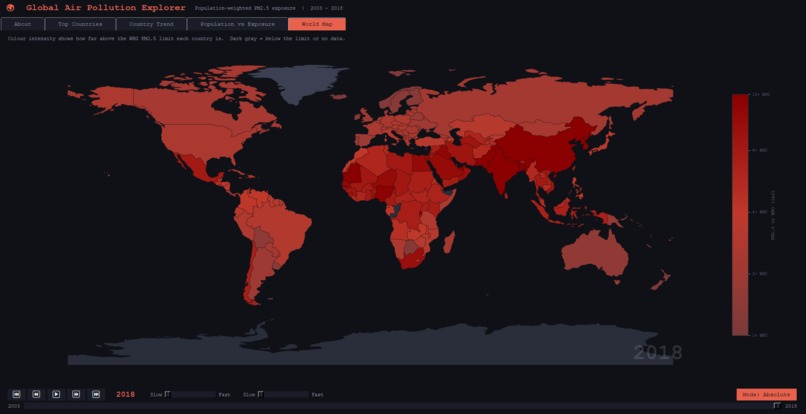
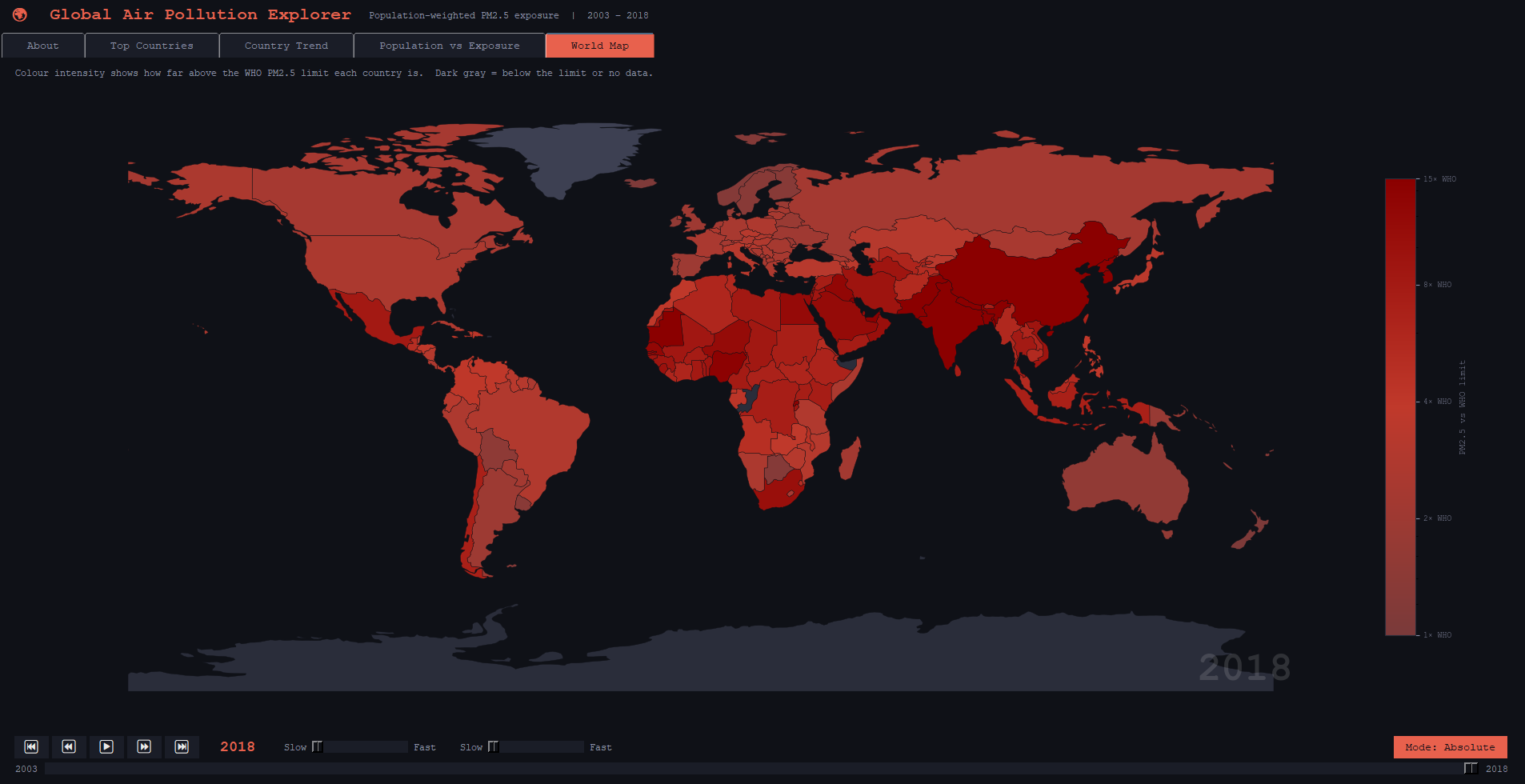
Heat map of PM2.5 Pollution
Global Air Pollution Explorer
16 years of global air pollution data — made explorable.
Inspiration
Air pollution kills 7 million people every year — yet most of us have never seen that data in a way that actually means something. Numbers in a spreadsheet don't communicate urgency. A country listed as "35 µg/m³" doesn't tell you that's seven times the WHO safe limit, or that it's been getting worse every year for a decade.
We wanted to build something that made the scale of this crisis visceral and personal — where you could watch pollution spread across the globe in real time, click on your own country, and immediately understand what those numbers mean for the people living there.
What It Does
Global Air Pollution Explorer is a desktop dashboard that turns 16 years of NASA satellite-derived PM2.5 data into five interactive views:
- World Map — an animated choropleth that plays through 2003–2018 year by year, with a toggle between absolute exposure and change-since-2003 views. Click any country for a popup showing its PM2.5 level, population, WHO status, and how it has changed since the baseline year.
- Top Countries — a bar chart ranking the 15 most polluted nations for any given year, benchmarked against the WHO annual guideline of 5 µg/m³.
- Country Trend — a line chart tracing a single country's PM2.5 exposure across the full 16-year period.
- Population vs Exposure — a scatter plot comparing population size against pollution levels, where clicking a dot pins that country's details to a side panel.
- About — a plain-language introduction to PM2.5, the WHO guideline, a health risk table, and links to the underlying data sources.
All figures use population-weighted PM2.5 values, meaning they reflect the actual exposure of residents rather than a simple geographic average.
How We Built It
The app is built entirely in Python as a desktop application using Tkinter for the UI and Matplotlib for all charts and the choropleth map. Country boundary geometries are loaded at runtime from Natural Earth via GeoPandas, which handles the spatial join between pollution data and map polygons.
The data pipeline reads population-weighted PM2.5 values and population counts from the NASA SEDAC dataset using openpyxl, converts units from kg/m³ to µg/m³, and normalises country names to match the Natural Earth shapefile. A dedicated MapPlayer class handles the animation state machine — play, pause, step, and scrub — completely independently of the rendering layer, keeping the two concerns cleanly separated.
Challenges We Ran Into
Getting the five separate modules to talk to each other cleanly took more iteration than expected. A few specific issues we hit:
- Country name mismatches — the NASA dataset and the Natural Earth shapefile use different names for the same countries. Turkey is
"Turkey"in the shapefile but the mapping table had it pointing to"Türkiye", and North Korea was mapped to"Dem. Rep. Korea"when the shapefile simply uses"North Korea". Both showed up as blank on the map with no error, making them hard to spot. - CRS warnings on the map click handler — using
.distance()on geometries in a geographic coordinate system (EPSG:4326) produces incorrect results because it operates in degrees rather than metres. We fixed this by reprojecting to EPSG:3857 before the distance calculation and adjusting the tolerance threshold from degrees to metres. - Duplicate scrubber widgets — the year scrubber on the world map tab was being packed twice, producing two identical sliders stacked on top of each other. The widget tree dump (
winfo_children) was the tool that finally surfaced it. - Pick events on the scatter plot — wiring Matplotlib's
pick_eventto a Tkinter canvas required disconnecting and reconnecting the handler every time the slider redraws the chart, otherwise clicks would fire against stale scatter objects from previous years. - Popup persistence across tabs — the world map popup was a
Toplevelwindow that stayed visible when switching to other tabs. Binding to the notebook's<<NotebookTabChanged>>event solved it cleanly.
Accomplishments That We're Proud Of
The world map is the centrepiece of the project and the part we're most proud of. Beyond a static choropleth, it supports full animated playback with play/pause/step controls and a scrubber, and a mode toggle that switches between absolute PM2.5 exposure and change-since-2003 — letting you see at a glance not just where pollution is bad, but where it is getting worse. The colour scales were designed deliberately: a log-normalised red ramp for absolute exposure anchored at the WHO limit, and a diverging blue-to-red scale for the delta view so improvement and deterioration are immediately distinguishable.
The interactive click-to-pin popups on both the map and the scatter plot also turned out well — they keep the interface clean until you want detail, and the popup on the map updates live as you scrub through years with a country pinned.
What We Learned
Separating data, state, and rendering into distinct modules from the start paid off throughout the project. When bugs appeared in the map animation, the MapPlayer class could be reasoned about independently of the rendering code. When the scatter plot needed interactivity, the plot function stayed a clean standalone function while the event wiring lived in the app class.
We also learned that silent data mismatches — like a country name that doesn't join — are some of the hardest bugs to catch because nothing crashes, the country just disappears from the map with no warning.
What's Next for Global Air Pollution Explorer
The most natural extension is bringing in CO2 emissions data and mapping it alongside rising temperature records. PM2.5 tells the story of air quality and human health; CO2 tells the story of climate. Overlaying the two — showing which countries are driving both problems, and whether any are decoupling economic growth from pollution — would make the dashboard a much more complete picture of the environmental pressures facing each region.
We'd also like to extend the dataset beyond 2018 and add regional drill-down views so users can explore below the country level in areas where subnational data is available.


Log in or sign up for Devpost to join the conversation.