Inspiration
The Africa Deep Tech Challenge asks a pointed question: what happens when AI runs on the hardware Africa actually has? Across the continent, students, professionals, and self-learners spend hours reading dense material on the web(academic papers, documentation, news in a second language) and constantly encounter terms they don't fully understand. The reflex is to open a new tab, Google it, lose context, and break flow. For many, that search also requires a stable internet connection and enough data to hit a cloud API. I wanted to eliminate that process. Glimpse was born from a simple observation: Chrome already ships a capable on-device language model (Gemini Nano) and a privacy-preserving inference API, yet almost no one uses it. I saw an opportunity to build a learning tool that is radically local: no cloud calls, no API keys, no accounts, no data leaving the device. A tool that works the same on a $200 laptop in Accra as it does on a MacBook Pro in San Francisco.
What it does
Glimpse is a Chrome extension that turns any webpage into an interactive learning surface.
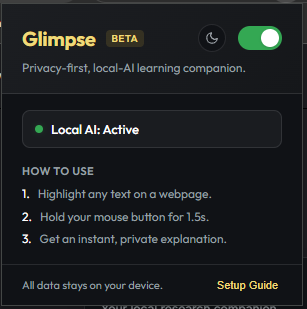
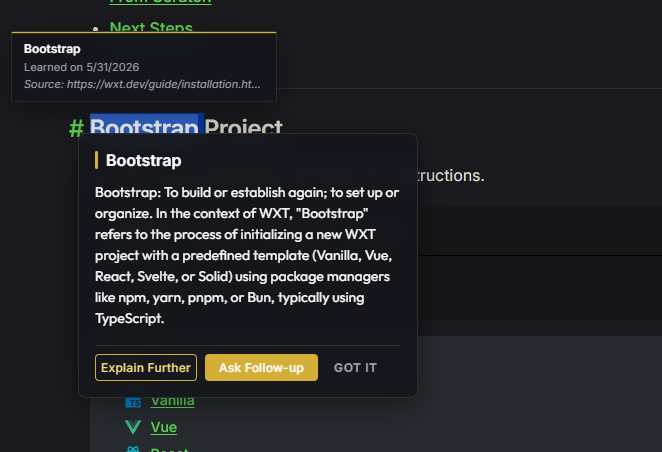
- Highlight any word or phrase and hold your mouse button for 1.5 seconds. A radial animation gives tactile feedback.
- A floating card appears at the selection point with a two-part explanation: the general dictionary definition, then the meaning in the specific context of the page you're reading (using surrounding text, page title, and URL as context signals).
- One click deepens the explanation without leaving the page.
- Tap "Ask Follow-Up" to open a multi-turn conversational panel seeded with the term, explanation, and page context.
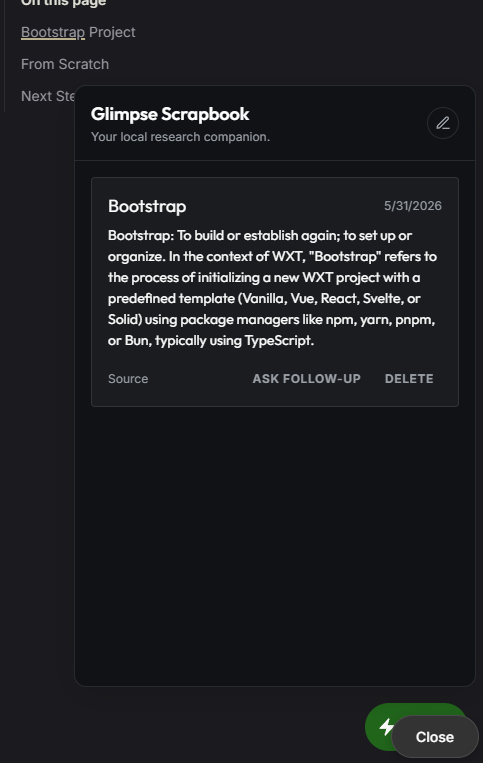
- Every term you've ever looked up is automatically underlined when you revisit it (or encounter it on new pages), creating a persistent, growing knowledge map across the entire web.
- All interactions are saved locally in IndexedDB (via Dexie.js) and can be reviewed or deleted. Nothing ever leaves the browser.
- Works inside Chrome's native PDF viewer using the
postMessagebridge, with a PDF.js fallback for non-standard viewers.
All inference is performed entirely on-device by Gemini Nano through the Chrome Prompt API. The extension uses zero network requests for AI functionality.
How we built it
Architecture. Glimpse follows a clean three-layer Chrome Extension architecture built on the WXT framework (Vite 8 + React + TypeScript, Manifest V3):
| Layer | Responsibility |
|---|---|
| Content Script | Detects text selection, manages the Magic Hold gesture, renders overlays (Popover, Codex Tooltip, FAB) via Shadow DOM isolation |
| Background Service Worker | Owns the AI bridge — creates LanguageModel sessions, streams tokens back to the content script over a long-lived chrome.runtime.connect port |
| Popup / Welcome Page | Settings, AI health check, onboarding |
Key engineering decisions:
- Shadow DOM isolation: All UI is injected into a Shadow Root (
glimpse-overlays) so styles and DOM never leak into the host page. - Port-based streaming: We use
browser.runtime.connect(named portai-bridge) instead ofsendMessageto support long-lived, multi-chunk AI streams without hitting Manifest V3's single-response limitation. - Context-aware prompting: The prompt includes the page URL, title,
<h1>headings, and up to 2,000 characters of surrounding text. This grounds explanations in the reader's actual context without any cloud retrieval. - Codex Underliner with density control: A
TreeWalkerscans the DOM for previously learned terms, wraps them in<span>elements, then anIntersectionObserverenforces a viewport density limit of 10 active underlines to avoid visual clutter. - Local-first identity: An Ed25519 keypair is generated on first install via the Web Crypto API and stored in
browser.storage.local. No accounts, no auth servers. - PDF dual-path: Native PDF selection via
postMessageto Chrome's<embed>element, with an automatic fallback to PDF.js text extraction.
Testing. Vitest with @testing-library/react, jsdom, and fake-indexeddb for unit and integration tests across hooks, database operations, and utility modules.
Challenges we ran into
Gemini Nano's context window. The on-device model has a significantly smaller context window than cloud models. We had to carefully engineer our prompt templates to be maximally informative within tight token budgets: balancing page context richness against prompt length.
Streaming under Manifest V3. Service Workers in MV3 are ephemeral and can be terminated mid-stream. We mitigated this by using persistent port connections and designing the streaming protocol to be resilient to disconnection (the
onDisconnecthandler gracefully updates UI state).Shadow DOM + Google Fonts. Fonts loaded inside a Shadow Root aren't available unless also loaded in the main document. We inject
<link>tags into the host page's<head>so our Shadow DOM UI renders with the correct typography (Outfit, Inter, Changa One).PDF viewer interop. Chrome's built-in PDF viewer uses an
<embed>element with its own internal DOM. Text selection requires apostMessage-based protocol (getSelectedText/getSelectedTextReply) with origin checks, and a fallback to PDF.js for non-standard viewers.Codex Underliner performance. Naively scanning and wrapping every occurrence of every learned term on every page would thrash the DOM. We solved this with: (a) a
TreeWalkerthat skips<script>,<style>, editable elements, and already-processed nodes; (b) aMutationObserverfor incremental scanning of dynamically loaded content; and (c) anIntersectionObserverthat limits active underlines to 10 per viewport.Preventing UI interference. The overlay container spans the full viewport at
z-index: 2147483647but usespointer-events: noneglobally, withpointer-events: autoonly on interactive children. This ensures the extension never blocks clicks, scrolling, or text selection on the host page.
Accomplishments that we're proud of
True zero-network AI. Glimpse makes exactly zero network requests for inference. Every explanation is generated entirely on-device by Gemini Nano — no API keys, no cloud proxy, no "local-first with a fallback." It is local-only by construction, not by configuration.
The Magic Hold interaction. We invented a gesture that doesn't exist in any other extension: highlight text, hold 1.5 seconds, get an explanation. It feels like the browser reads your mind. The concentric glow animation gives tactile feedback during the hold, and the popover appears directly at the selection point — no context menu, no toolbar button, no friction.
Codex Underlining. Every term you've ever looked up is quietly underlined across every page you visit. It's a subtle, persistent signal that turns the web into a personalized textbook. The density-limited
IntersectionObserverensures it never feels cluttered — at most 10 underlines per viewport.PDF support. We built a dual-path PDF text extraction system: a
postMessagebridge to Chrome's native<embed>viewer, with an automatic PDF.js fallback for non-standard viewers. Glimpse works on academic papers, government reports, and textbook PDFs without the user doing anything different.The Bloom transition. One click takes you from a 2-sentence popover explanation into a full multi-turn conversational panel — with the term, explanation, and full page context already pre-loaded. No re-prompting, no lost context.
An interactive onboarding flow. The Welcome page doesn't just tell you how to use Glimpse — it requires you to perform a successful Magic Hold before marking onboarding as complete. Users learn by doing.
Comprehensive test coverage. Every hook, database operation, and utility has corresponding Vitest tests using
@testing-library/react,jsdom, andfake-indexeddb. The codebase is designed to be maintained and extended with confidence.
What we learned
On-device LLMs are production-ready for focused tasks. Gemini Nano's quality is more than sufficient for concise, context-grounded explanations. You don't need a 70B parameter model to define a term in context — you need the right prompt and the right framing. The constraint forced us to write better prompts.
Privacy-by-architecture beats privacy-by-policy. When there is no server, there is no data to leak. There are no terms of service to read, no cookie banners to dismiss, no compliance frameworks to navigate. This is a fundamentally different trust model — and it's the one Africa's learners deserve.
The "last mile" of on-device AI is UX, not inference. Making the interaction feel instant (< 200ms to first UI response) despite multi-second inference required careful separation of gesture detection, UI rendering, and token streaming. The user sees the popover in under 200ms; the AI text streams in progressively. Perceived latency is near-zero even when actual inference takes several seconds.
Shadow DOM is powerful but demanding. Isolating UI inside a Shadow Root protects your styles from host-page interference — but fonts, scroll position, and event propagation all require explicit handling. Every assumption about "how the browser works" needs to be re-validated inside a shadow boundary.
Context-window engineering is a discipline unto itself. Gemini Nano's small context window forces you to think carefully about every token in the prompt. We learned to extract page metadata (URL, title, headings, surrounding text) and compress it into a structured prompt template that maximizes grounding without exceeding limits. This is applied prompt engineering, not prompt "crafting."
Manifest V3 Service Workers are adversarial to streaming. Chrome can terminate a Service Worker at any time. Designing a streaming protocol that degrades gracefully under termination required the
onDisconnecthandler pattern and resilient state management on the content script side.What's next for Glimpse
Glimpse's current release covers the core learning loop, but our roadmap has concrete next steps already spec'd and ready:
Markdown & Anki Export Engine: One-click export of your entire Scrapbook to Markdown (compatible with Obsidian, Notion, and any markdown editor) or Anki
.apkgflashcard format. All processing happens locally in the browser.Scrapbook Dashboard: A full Side Panel view where you can browse, search, filter, and delete all your saved terms. Each entry shows the original term, the AI explanation, the source URL, and the timestamp.
Privacy Metrics Dashboard: Local-only usage statistics: total explanations triggered, export frequency, most-queried domains. All data from IndexedDB, zero telemetry.
Google Drive BYOS (Bring Your Own Storage): Optional, opt-in sync of your Scrapbook to your personal Google Drive. No intermediate server — the extension writes directly to your Drive. Multi-device persistence without sacrificing the privacy model.
African language support : Expanding prompt templates and Gemini Nano session configuration to support explanations in Yoruba, Swahili, Hausa, Amharic, and other widely spoken African languages. On-device inference makes this feasible without per-language API costs.
Offline-first resilience: Pre-loading the PDF.js worker and all extension assets so Glimpse works identically with no internet connection at all — critical for learners in regions with intermittent connectivity.
Chrome Web Store publication: Packaging, store listing, and distribution so any Chrome user on the continent can install Glimpse in one click.
Built With
- ai
- css
- dexie.js
- gemini
- html5
- indexeddb
- intersectionobserver
- javascript
- mutationobserver
- pdf.js
- react
- typescript
- v3
- vite
- vitest
- web
- wxt

Log in or sign up for Devpost to join the conversation.