-
-
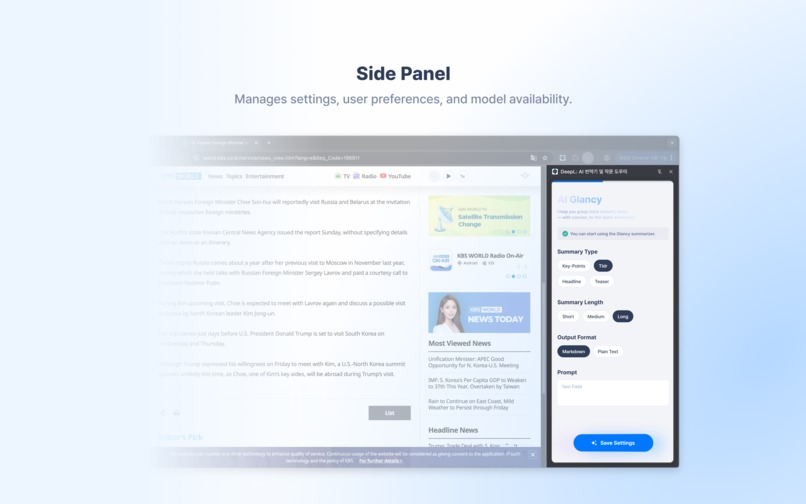
Manages settings, user preferences, and model availability.
-
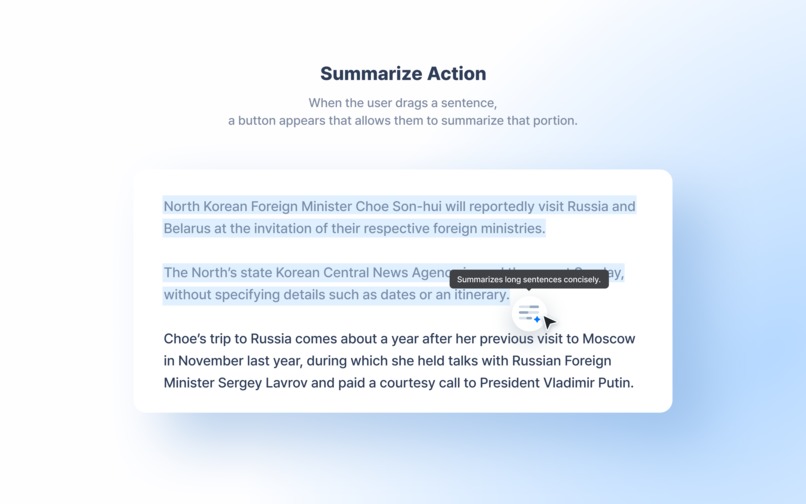
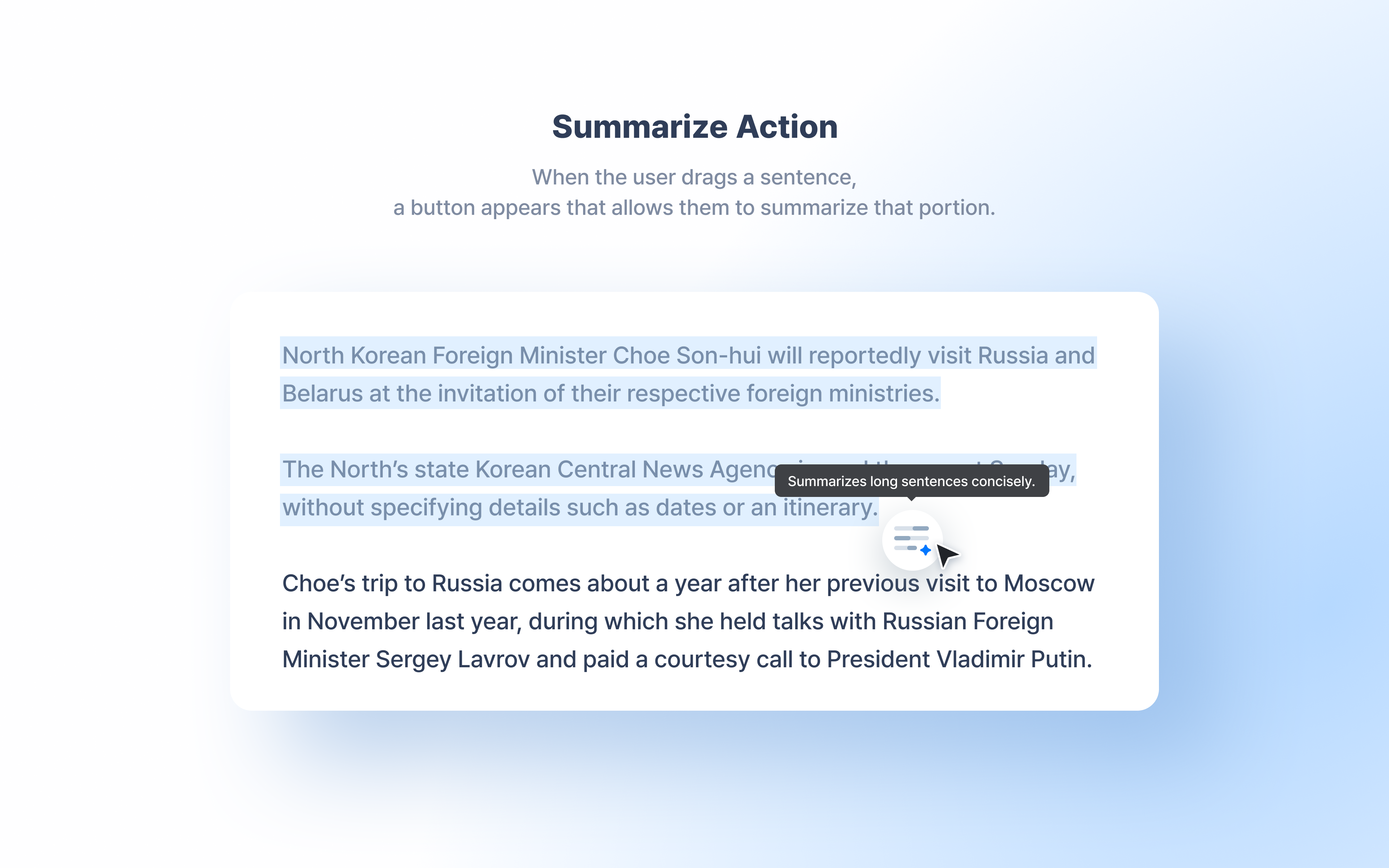
When the user drags a sentence, a button appears that allows them to summarize that portion.
-
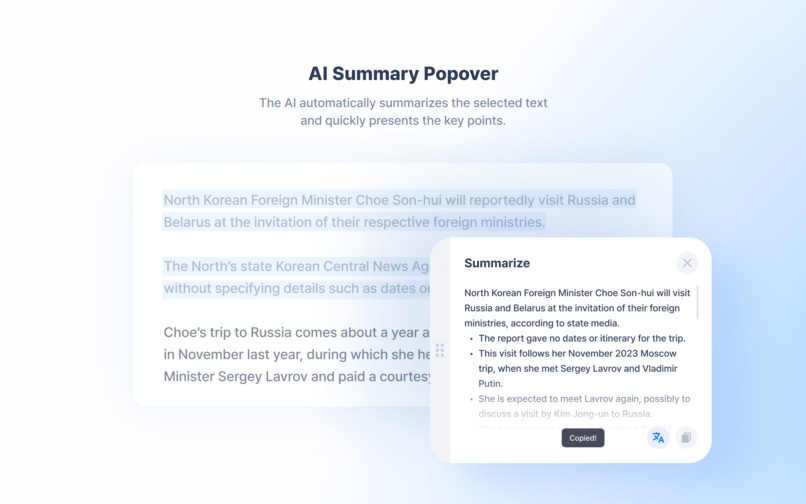
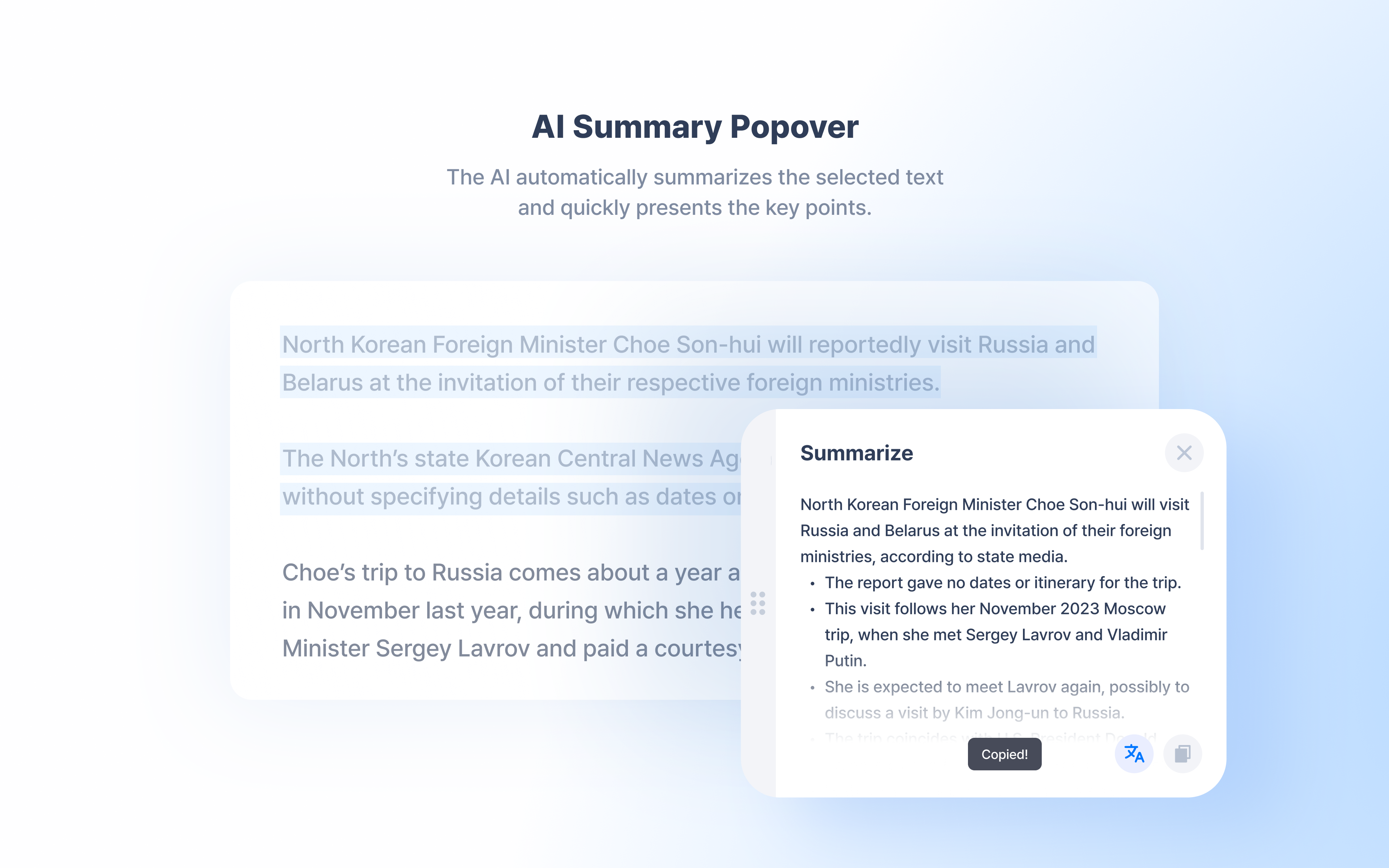
The AI automatically summarizes the selected text and quickly presents the key points.
Inspiration
Every day, countless meaningful writings pass us. But we’re always busy. Faced with long, complex texts, we stop before we even start. We want to read, but we don’t know where or how to begin.
The problem runs deeper than it seems. In Korea, there are over 2.31 million adults with low literacy skills. Many of them try to read books or long articles, but soon feel overwhelmed and lose focus within minutes. They want to understand, but the longer the text, the heavier it feels.
Then we realized. This may not be a problem of reading ability, but of an environment where people can’t even begin to try.
So we asked ourselves. What if AI could help lower that barrier? What if anyone could grasp the essence of any text instantly, without feeling burdened?
Glancy is the first step toward that vision. It uses AI to capture the core ideas of long texts quickly and clearly so anyone can engage with the world’s knowledge and stories with ease.
Whether it’s a research paper, a news article, or a technical document, the purpose is the same. To lower the barrier to reading, and to turn every piece of writing into something everyone can understand.
We hope people will no longer give up on reading because it feels too hard or takes too much time. Glancy stands at that starting point—building a world where people can rediscover the power to read.
What it does
Glancy is a Chrome extension that uses the Chrome built-in Summarizer API to let users instantly summarize any selected text on a webpage. With just a highlight, users get concise, context-aware summaries directly in the browser—no external tools or tabs required.
Core Functionality
- On-Page Summarization: Highlight any text on a webpage, and a floating action button appears. One click generates a real-time streaming AI summary inline.
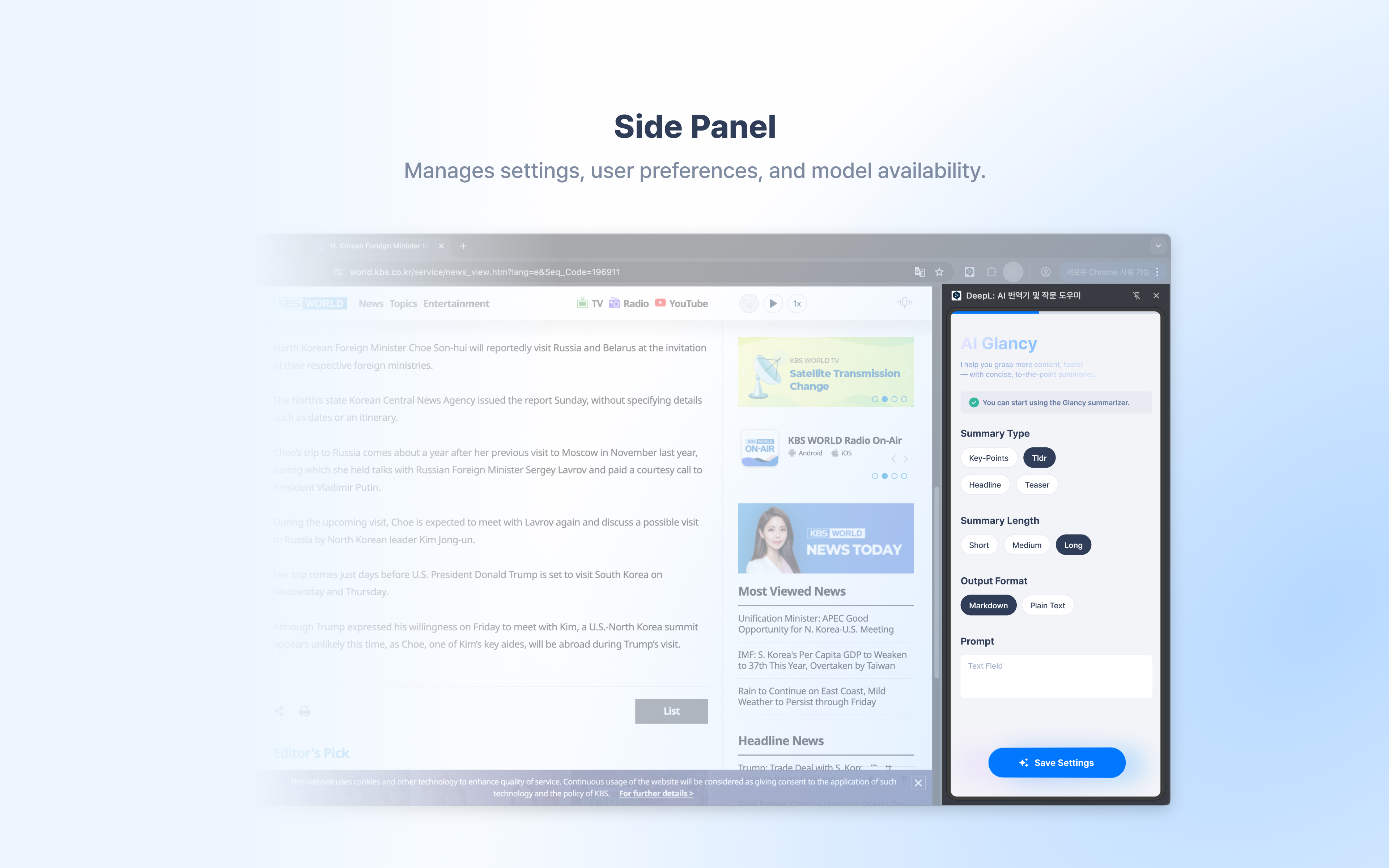
- Flexible Summary Styles: Choose from 4 summary types (Key Points, TL;DR, Teaser, Headline), 3 length options (Short, Medium, Long), and 2 output formats (Markdown, Plain Text)—for a total of 12 unique summary modes.
- Custom Context Prompts: Tailor summaries by adding instructions such as “focus on technical details” or “explain simply.”
- Privacy-First Design: Built entirely on Chrome’s native Summarizer API, all processing occurs locally on the user’s device with zero external data transmission.
How we built it
Tech Stack Overview
Glancy was built as a Manifest V3 Chrome Extension powered by React, TypeScript, and Chrome’s built-in Summarizer API. We used Vite with @crxjs/vite-plugin for fast bundling and hot reload, and leveraged Shadow DOM to isolate UI components from host page styles.
Core technologies:
- React
- TypeScript
- Chrome Summarizer API, Manifest V3, Chrome Storage API
- Shadow DOM
- Vite with
@crxjs/vite-plugin
Architecture Highlights
1. Content Script (src/content/)
Implements all in-page interactions and summary rendering.
- Shadow DOM isolation using
react-shadowto prevent CSS conflicts with host pages useTextSelectionhook captures user text selections and calculates floating button positioninguseSummarizerhook manages summarization lifecycle with streaming updatesuseFloatingUIhook handles popup positioning and visibility state
2. Side Panel Configuration (src/sidepanel/)
Manages settings, user preferences, and model availability.
useCheckAvailabilityverifies Summarizer API readinessuseDownloadSummarizertracks model download progress in real-timeuseSummarizerOptionssyncs user preferences with Chrome Storage- Built with Radix UI primitives for accessibility
3. Type System (src/@types/, src/types/)
Ensures strong type safety across the extension.
- Global type augmentation for Chrome’s experimental Summarizer API
- Discriminated unions enforce valid option selections
- Centralized type exports maintain consistency across hooks and components
4. Chrome Storage Integration
Provides persistent user configuration and cross-context syncing.
- Settings persist between sessions and sync between the side panel and content scripts
Challenges we ran into
1. Shadow DOM Styling Isolation
Problem: The content script UI needed to coexist with arbitrary webpage styles without conflicts.
Solution: Implemented Shadow DOM using react-shadow, which successfully isolated styles—but broke default font sizing. We solved this by dynamically reading the host page’s root font size and setting it as a CSS custom property (--font-size) within the shadow root, then using our pxToRem() function for responsive sizing across different websites.
2. Type Safety for Experimental APIs
Problem: Chrome’s Summarizer API currently lacks official TypeScript declarations.
Solution: Authored complete TypeScript type definitions in src/@types/Summarizer.d.ts based on Chrome’s experimental documentation, including discriminated unions for all enum types. This provided full IDE autocomplete and compile-time validation while working with a cutting-edge, evolving API.
3. Testing After Summarizer Model Download
Problem: Once the Summarizer model was downloaded locally, it became difficult to test the “pre-download” experience again.
Solution: To simulate a fresh user environment, we had to manually delete Chrome profile data or reinstall Chrome entirely to reset the Summarizer model state. This added friction to QA and regression testing, especially for validating first-time user flows.
4. Limited Language Support
Problem: As a Korean developer, we faced challenges because the Summarizer API currently supports only English (en), Spanish (es), and Japanese (ja).
Solution: We continued development and UI testing primarily in English, but noted that expanding language support—especially for Korean—would significantly improve accessibility and adoption for non-English users.
Accomplishments that we're proud of
🎨 Polished User Experience
The floating button appears exactly where users expect it. Summaries stream smoothly without jarring transitions.
The side panel provides clear status feedback during model downloads. Every interaction feels intentional and refined.
🔒 Privacy-First by Design
By leveraging Chrome's built-in AI, we achieved zero external API dependencies.
No user data ever leaves their device. No telemetry. No analytics.
Privacy isn't a feature—it's the foundation.
🌐 Real-World Utility
We solved a genuine problem: information overload.
Glancy doesn't just summarize text—it helps people read smarter, decide what matters, and reclaim their time.
What we learned
About Chrome's AI Capabilities
- Chrome’s Summarizer API showcases the potential of on-device AI—fast, private, and deeply integrated with the browser.
- Building with streaming responses significantly improves user experience compared to traditional async calls.
- Working with experimental Chrome AI features taught us how browser-native AI can reshape how users consume web content.
About Extension Development
- Shadow DOM is essential for ensuring content script isolation and style integrity across arbitrary websites.
What's next for Glancy
🌍 Multi-Language Support
Expand beyond English by integrating Chrome’s Language Detector API and Translator API.
If the Summarizer API does not support the user’s native language, Glancy will automatically detect the text language, summarize it in an available language, and then translate the result back into the user’s preferred language.
Users will also be able to customize expectedInputLanguages and outputLanguage options for finer control over multilingual workflows.
📊 Advanced Summarization Options
- Domain-Specific Templates: Offer pre-configured contexts for academic papers, news articles, and technical documentation, enabling summaries tailored to each domain.
💾 Summary History & Management
- Save summaries for later reference with bookmarks and searchable history.
- Organize summaries into collections by topic or project for improved knowledge management.
- Potential integration with Chrome Sync Storage to allow seamless access to saved summaries across devices.
Built With
- crxjs/vite-plugin
- radix-ui
- react
- react-error-boundary
- react-shadow
- tanstack/react-query
- typescript


Log in or sign up for Devpost to join the conversation.