About the Project
GlanceScribe is a hands-free clinical documentation assistant designed for high-pressure medical environments. It enables clinicians to document patient encounters in real time while actively providing care, eliminating the need to pause, remove gloves, or rely on manual charting.
By capturing both what the clinician says and what they’re looking at, GlanceScribe transforms natural clinical behavior into structured, usable medical documentation using a real-time multimodal AI pipeline, all without interrupting workflow.
Inspiration
In modern healthcare, documentation has become one of the biggest bottlenecks.
Physicians can spend up to 40% of their time on documentation, and in many workflows, charting time rivals or exceeds patient interaction time. In environments like the ER, this directly translates to longer wait times, fragmented care, and increased burnout.
We asked a simple question: What if documentation didn’t require stopping at all?
What It Does
GlanceScribe works as a real-time documentation layer during patient care:
Captures clinical speech as the doctor speaks using low-latency streaming transcription (ElevenLabs Scribe API over WebSockets) Understands medical terminology and extracts key findings using LLM-based processing (Google Gemini) Associates observations with visual context (e.g., body part being examined) using pose estimation (TensorFlow.js + MoveNet) Generates structured outputs such as SOAP notes and patient summaries using JSON schema-based generation Displays everything in a live dashboard for review and refinement
The result: documentation happens in parallel with care, not after it.
How We Built GlanceScribe
GlanceScribe is built as a real-time, end-to-end multimodal system that captures, understands, and structures clinical information as care is happening.
At a high level, our system follows a pipeline: Capture → Stream → Process → Structure → Display
- Real-Time Audio Capture & Transcription
We use ElevenLabs Realtime Scribe API to power live transcription.
The clinician’s speech is streamed via WebSocket using a single-use token generated by our backend Scribe returns low-latency (~150ms) transcripts as the doctor speaks It supports complex vocabulary, allowing accurate recognition of medical terms, medications, and conditions Transcripts are continuously sent to our Node.js backend and broadcast live to the dashboard using Server-Sent Events (SSE)
This enables true real-time documentation, not post-processing.
- Multimodal Input (Speech + Visual Context)
In addition to audio, GlanceScribe captures point-of-view context during the encounter.
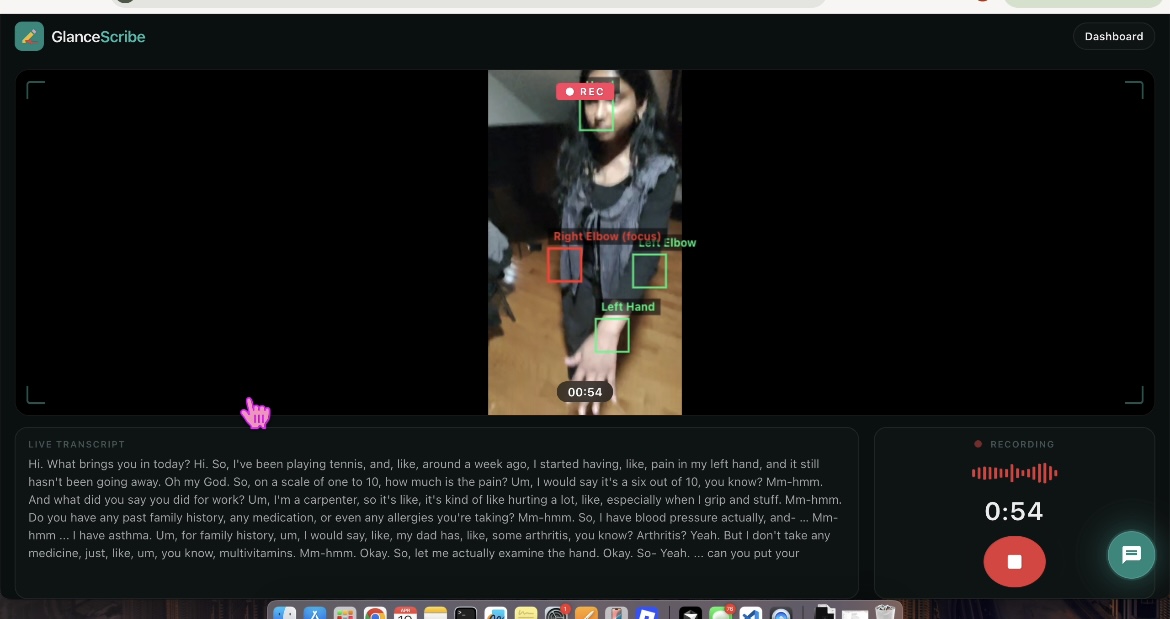
Meta glasses stream video through a custom mobile app built with Swift and Xcode, which serves the live feed over a local IP Our Node.js + Express backend proxies this stream to the frontend, enabling browser-based playback and recording without CORS issues
On the client side:
We use TensorFlow.js with the MoveNet pose estimation model This detects key body landmarks (joints, limbs, etc.) in real time Custom heuristics determine which body part is being focused on based on position and confidence
These signals are logged as time-based “focus events,” creating a timeline of what the clinician is examining.
- AI Processing & Clinical Structuring
We use Google Gemini API as the core intelligence layer.
Instead of training custom models, we built structured prompting pipelines that turn raw data into clinical outputs:
➤ Patient Chart Generation
The full transcript is sent to Gemini with a strict JSON schema prompt The model extracts: Chief complaint Symptoms and findings Body parts examined Clinical plan and flags Output is returned as structured JSON, not free text
➤ SOAP Note Generation
A second Gemini pass converts the transcript into a fully structured SOAP note Includes: Subjective Objective Assessment Plan Designed to stay grounded in transcript data and reduce hallucination
- Video Processing & Highlight Generation
We use FFmpeg to process recorded video:
Video chunks are combined into a full session recording Based on detected focus events and inferred affected body regions, we extract a highlight clip of the most relevant segment We prioritize longer, high-confidence focus intervals rather than random clips
This provides quick visual context for review.
- Backend Orchestration
Our backend is built with Node.js + Express and acts as the central pipeline:
Manages session lifecycle (start, stream, stop) Aggregates transcript and video data Broadcasts real-time updates via Server-Sent Events (SSE) Triggers AI processing when a session ends Stores outputs including structured JSON charts, SOAP notes, and video recordings
This coordinates all moving parts into a single real-time system.
- Dashboard & Clinical Workspace
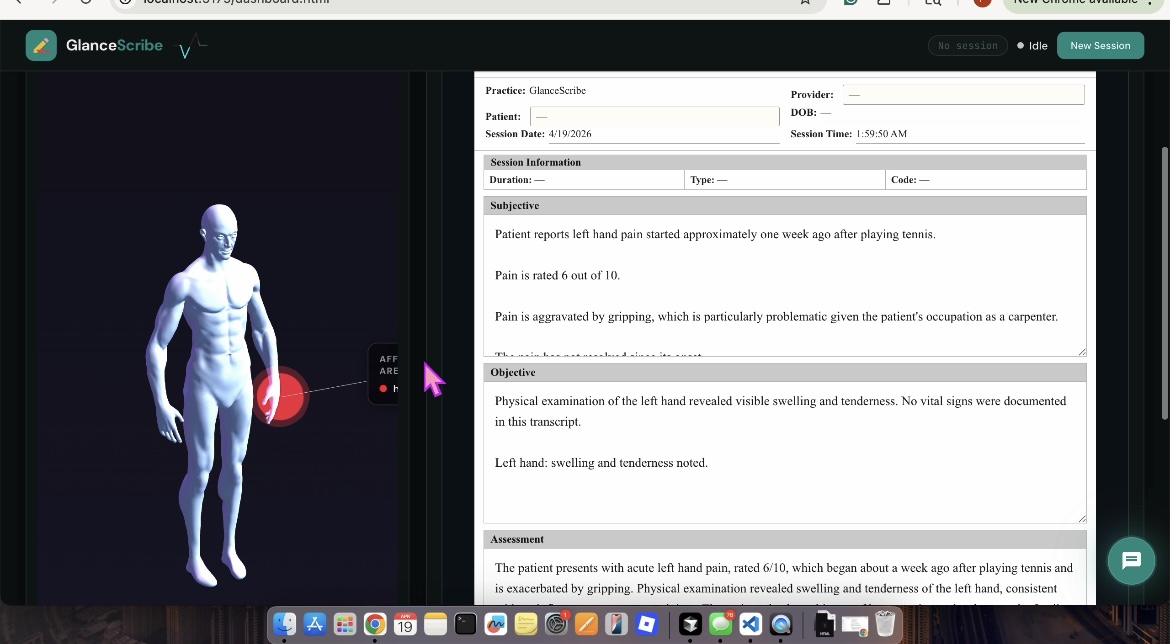
We built a live, clinician-facing dashboard that acts as the central workspace for reviewing and interacting with all generated outputs.
Real-time transcript streaming as the session happens Auto-generated patient chart and SOAP notes Highlight video playback for quick clinical review Interactive 3D body map (Three.js with GLB models) showing examined areas Editable and structured outputs for refinement and export Integrated AI Chat Assistant (Powered by Tavily)
We also built a floating chat assistant directly into the dashboard to support clinicians during or after a session.
Uses the Tavily API to perform real-time, web-augmented search Retrieves information from relevant medical and clinical sources Allows users to ask quick questions like: “What are common causes of knee swelling?” “Recommended ibuprofen dosage for adults?”
Returns concise, contextual answers that can be directly incorporated into the treatment plan, allowing clinicians to quickly add evidence-based recommendations to patient care.
End-to-End Workflow
Clinician starts a session Audio streams → ElevenLabs Scribe → live transcription Video + pose data → processed into context signals Transcript updates → broadcast live to dashboard via SSE Session ends → data sent to Gemini AI generates structured chart + SOAP notes FFmpeg extracts highlight clip Dashboard updates with full patient documentation
Full pipeline:
Capture → Understand → Structure → Visualize
Technical Highlights
Real-time streaming architecture (WebSockets + SSE) Multimodal integration (audio + video + temporal signals) Pose estimation using TensorFlow.js + MoveNet Structured AI outputs (JSON-based clinical documentation via Gemini) Video processing with FFmpeg Backend built with Node.js + Express
Challenges We Ran Into
One of the biggest challenges was tuning the thresholds for body detection to accurately determine what the clinician was focusing on. We needed to balance sensitivity, making sure important movements were captured. This required extensive testing and iteration to find the right threshold values that consistently reflected the correct area of focus.
Another challenge was ensuring that our 3D body model correctly mapped and highlighted the appropriate body part based on the interaction. Aligning what was being seen (visual input) and said (clinical speech) with the correct anatomical region required careful coordination between our pose detection, transcript interpretation, and visualization logic.
Additionally, we faced limitations when working with Meta glasses due to restricted access to direct streaming APIs. To overcome this, we built a custom mobile application using Swift and Xcode to intercept the video feed and serve it over a local IP, which could then be ingested by our backend. This introduced additional complexity in maintaining low-latency, stable streaming while integrating with our real-time web pipeline.
Disclaimer
GlanceScribe is a prototype built for demonstration purposes only. It is not a medical device and should not be used for real clinical decision-making.


Log in or sign up for Devpost to join the conversation.