-
-
Pet
GitPet — Living Tamagotchi Companion
The Story: Pain Point, Solution & Developer Impact
1. The Pain Point
Modern software development can be dry, repetitive, and mentally draining. Developers spend hours staring at lines of logs, tracking open issue boards, and hoping for green checkmarks on automated pipelines. Over time, "alert fatigue" sets in: pipeline failures feel like noise rather than high-priority events, and open issues stack up indefinitely. The connection between developers and the health of their software repository becomes purely transactional, cold, and unengaging.
2. How GitPet Solves It
GitPet brings a living, breathing Tamagotchi companion directly into the GitLab workspace to reflect SDLC health. By querying the GitLab Orbit Knowledge Graph (for pipeline results and open issues) and repository commit logs, GitPet dynamically calculates its own physical status:
- Failed pipelines drain GitPet's health, making it look visibly sick and complain in chat.
- Idle repository days decay its hunger, starving the pet.
- Open issues stress it out and ruin its mood.
Rather than reading generic error notifications, developers receive first-person emotional status reports (e.g., "I'm coughing because Pipeline #1234 failed... please fix it! Check my stats on Pages!").
3. What Changes for the Developer?
GitPet completely gamifies and humanizes repository maintenance. Developers are naturally incentivized to:
- Keep pipelines green (to "cure" their sick pet).
- Commit code daily (to "feed" it and maintain their streak).
- Close outstanding issues (to improve their pet's mood).
The relationship with the codebase transforms from a chore into a gamified bond. It turns dry engineering metrics into emotional rewards, boosting team engagement and repository health at the same time.
Inspiration
For many developers, keeping up with code contribution velocity, code security, and pipeline statuses can feel like a chore. We wanted to make the Software Development Lifecycle (SDLC) visual, engaging, and fun.
Drawing inspiration from the nostalgic Tamagotchi virtual pets of the '90s, we asked ourselves: What if your project's repository had a living companion whose physical state, mood, and health directly reflected your team's development habits?
We built GitPet — a living, breathing Tamagotchi dragon that lives inside your project, responds to your code commits, and gets sick when pipelines fail.
What it does
GitPet acts as a gamified companion for your GitLab project:
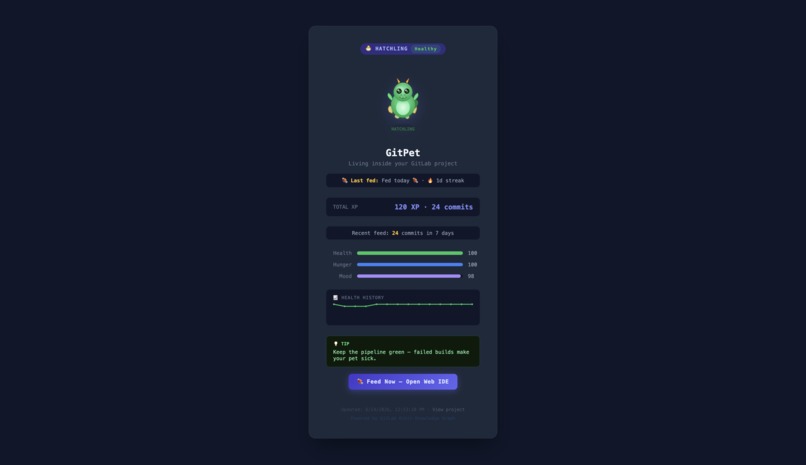
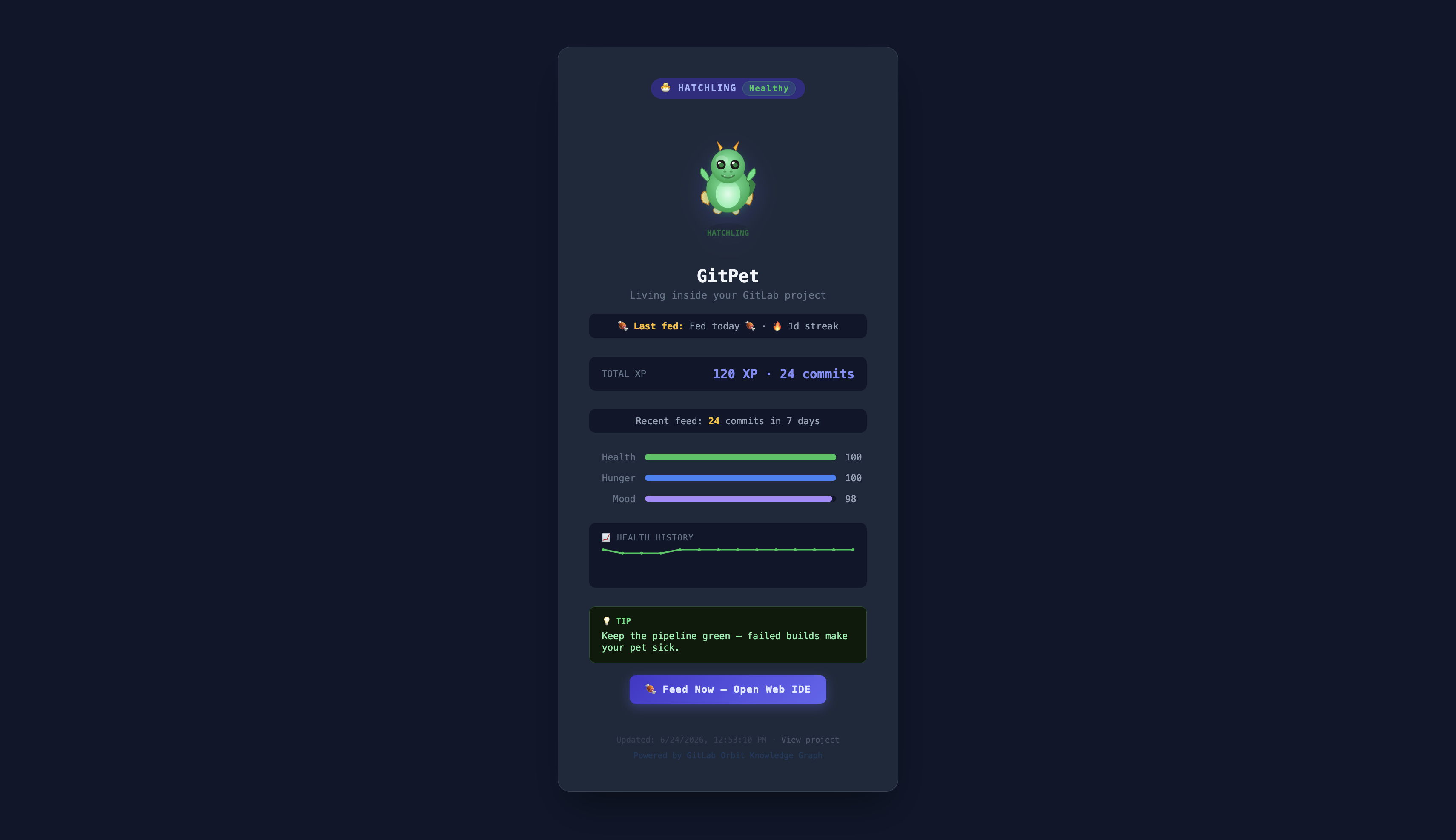
- XP & Evolution Stages: Every commit feeds GitPet with +5 XP. It grows from a sleepy Egg 🥚 to a bouncy Hatchling 🐣, a strong Companion 🐉, and eventually a mystical Legend ✨.
- Health: Pipelines are its lifeline. A failed build deals -15 HP to GitPet's health, making it sick and tired.
- Hunger: GitPet expects fresh commits. Pushing code fills its hunger bar (well-fed), but if the project stays idle for more than 3 days, hunger decays by 10 points per day.
- Mood: Open issues stress the pet out (-2 Mood per issue), prompting developers to close outstanding tasks to make it happy again.
It comes with a live dashboard hosted on GitLab Pages (complete with history graphs), an Interactive Duo Chat Agent where you can talk to the pet in first person, and an Automated Flow Bot that auto-reacts to MR merges, alerts you on pipeline failures, and reports its live stats whenever it's mentioned.
How we built it
- Data Aggregation: In the CI pipeline, we use the GitLab CLI (
glab) to query the GitLab Orbit Knowledge Graph (fetching pipeline status history and issue count metrics) and the GitLab REST API (to retrieve recent commits). - State Engine & Frontend: A Python engine (
compute_state.py) translates raw JSON data into the pet's core stats. A render script (render.py) generates a self-contained static HTML page (and custom badge) deployed to GitLab Pages. - Interactive Agent: We utilized the GitLab Duo Custom Agent Platform, defining a first-person virtual pet persona in
.gitlab/agents/gitpet-agent/config.yamlso developers can chat with GitPet via the Duo Chat sidebar. - Automated Workflow (Flows): We set up a custom Duo Flow (
.gitlab/flows/gitpet-flow/config.yaml) that triggers on events like pipeline results, MR merges, and comment mentions.
Challenges we ran into
- Environment Authentication Mismatch: Custom CI/CD variables (like
GITLAB_TOKEN) are not inherited by Flow session containers. We solved this by implementing a seamless fallback mechanism to the runner-injectedCI_JOB_TOKENusing the properJOB-TOKENheaders. - CI Variable Type Collision: We discovered that defining
GITLAB_TOKENas a "File" type in GitLab CI/CD settings breaks default CLI authentication. We wrote a dynamic path resolver to detect and read file-based token variables automatically. - Duo Flow Schema Changes: The Duo Flow platform requires strict schema structure checks (including root
routers,entry_point, and a structuredprompt_templatewithsystem/userblocks). We worked through compile-time validation errors to ensure compliance. - Dynamic Project Scopes: To make the template portable, we implemented a pre-query scripting layer (
prepare_queries.py) that dynamically modifies JSON queries in-place to point to whatever repository is running the flow.
Accomplishments that we're proud of
- Blending GitLab Orbit (Knowledge Graph), GitLab Duo AI (Agents & Flows), and GitLab Pages into one cohesive, interactive experience.
- Achieving a fully operational E2E flow loop: mentioning the bot in an issue triggers a runner job that queries the live state and replies with the correct ASCII sprite and computed stats.
- Designing the project to be 100% portable so that any team can copy the repo and immediately get a companion for their own project.
What we learned
- We gained a deep understanding of the GitLab Duo Custom Agent & Flow Platforms and how multi-agent orchestrations run inside temporary container sandboxes.
- We learned how to query, parse, and utilize GitLab Orbit's traversal and aggregation schemas to gain insights on repository health.
- We learned the subtle differences in environment variables and authentication between traditional pipelines and AI flow runs.
What's next for GitPet - Tamagotchi for projects
- Slash Commands: Allowing developers to interactively play with or feed GitPet through slash commands (e.g.
/feedor/play). - Multi-Pet Co-Op: Enabling teams to choose different pet styles (e.g., cats, slimes) or compile stats across entire groups.
- Security Scanning Integration: Make the companion's physical state reflect the security health of the repository (e.g. unlocking dragon armor as vulnerability findings are resolved).
Built With
- gitlab
- llm
- python


Log in or sign up for Devpost to join the conversation.