-
-
Audit Report for GitLabs process in an organization
Inspiration
The need for source version control in any software technology SME (Small and Medium Enterprise) is essential at the very start. Various players in the market cater to these needs, but for SMEs with limited budgets, cloud-based versions often become expensive, particularly when accounting for per-user licenses, CI/CD builds, and more.
Gitlab Community Edition is one of the major players when it comes to opensource, strong and complete platform. By complete platform I mean, Source management, Issue management and DevOps. Many enterprise features although not available in the community version but is complete enough for many organizations (the enterprise pricing version by GitLab for additional features is justified).
With GitLab CE and SME, some new process challenges emerge
- No snapshot / overview of deliverables / deadlines
- No audit reports for ensuring organizations GitLab management process is followed
- Having separate tools (if budget permits) to check for productivity (Time Spent on areas)
- Most possible solutions are extremely hard on pockets for the SME's
Introducing GitLab Community Reporting (GCR)
GCR is an open source ETL tool to extract information from GitLab Servers using GitLabs REST API's and load them into a flexible database. Thereby providing reporting tools that refer the dataset to plot information in graphical format. Its does transformation enough so as to achieve the objectives mentioned in this article.
What GCR does
Everyone wants to ensure the GitLab processes are being followed (Currently by means of manual reviews, policy documentation and training). GCR is the one stop solution to audit if any GitLab processes are bypassed.
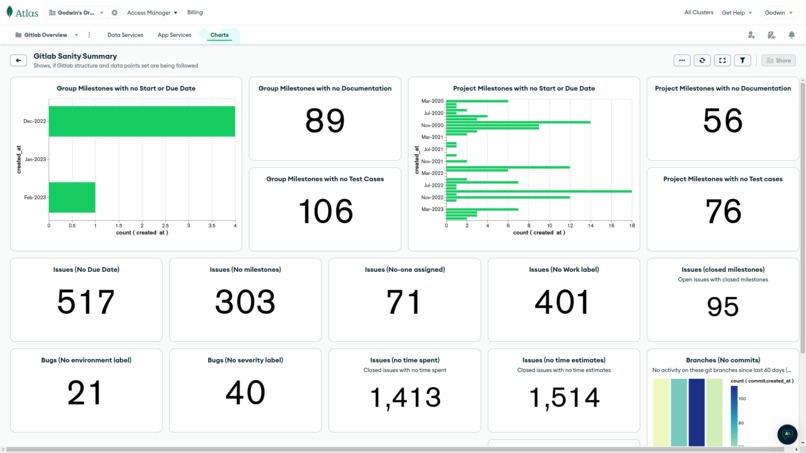
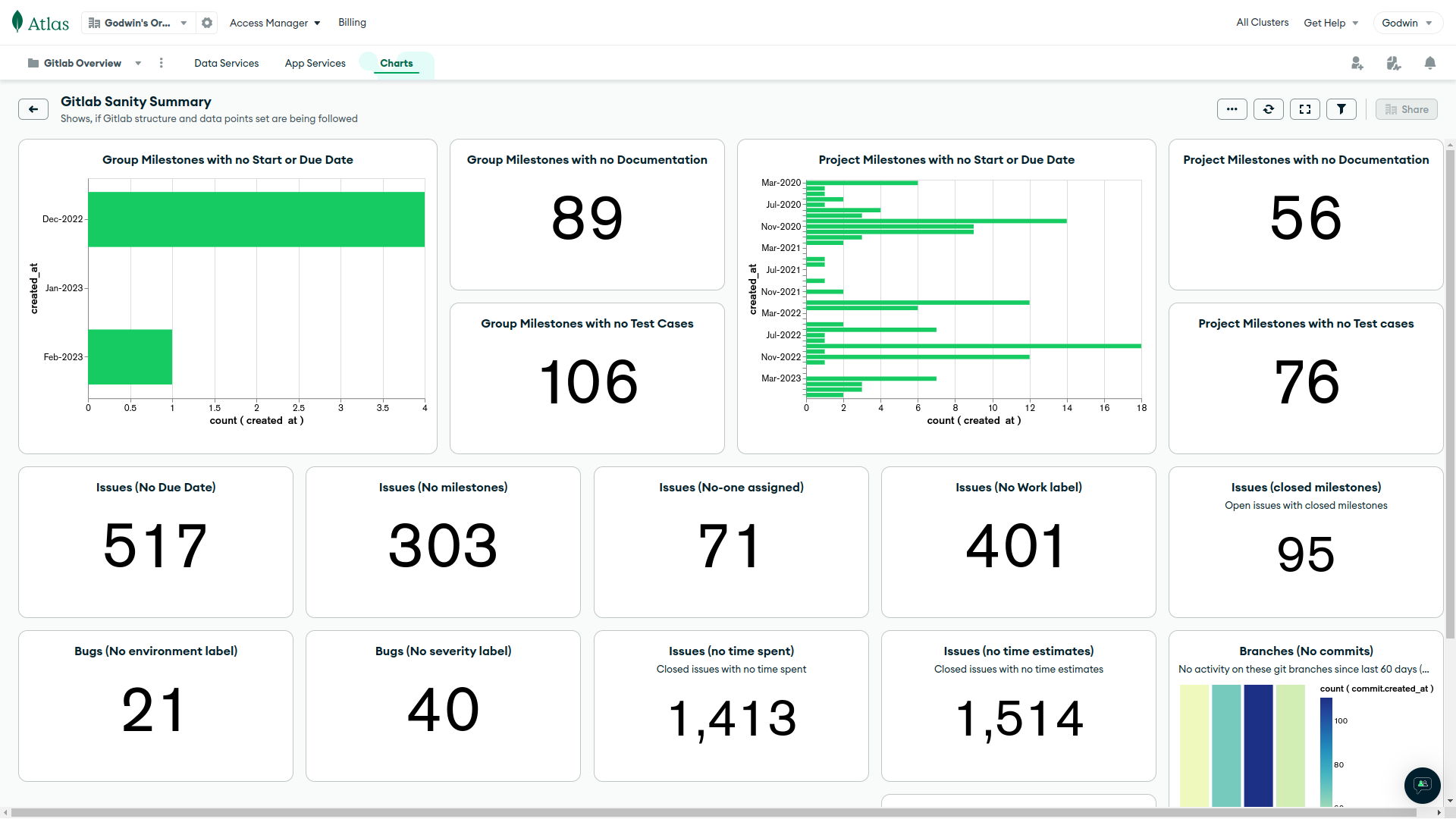
It also allows one to view a dashboard of hot items / deliverables across the organization in a single glance and dig further if needed, thereby covering critical areas like Bugs in production. More in the video.
How GCR works
GitLab provides REST API's to fetch information from its database using access tokens. A Java spring batch program connects to GitLab server using these API's, extracts data, processes(adds / computes) data points and inserts into MongoDB atlas instance. Post which Dashboards are created using MongoDB Atlas Charts (my personal favourite), by querying the collections directly / creating chart views(incase of complex aggregration pipelines).
With GCP, several benefits add to the whole extraction, transformation and loading process. Below are key points;
- MongoDB Atlas and GCR reside in the same GCP instance. Thereby, reducing internet bandwidth cost
- With GCP, the GCR instance can be in a private subnet and does not need to be exposed to the outside world. Biggest security advantage!
- MongoDB Atlas database can be configured to talk only to the GCP instance, thereby not exposing the DB instance to the outside world.
- Cloud Artifactory helps preserve docker image versions for the Java program
- Cloud Secrets managers ensures that my GitLab keys and MongoDB database passwords are safe
- Cloud Run helps run the docker ETL instance when required and not waste resources along with logs that can be viewed simply in the browser
- Cloud Scheduler helps configure and automate the docker batch job as per a schedule (example daily post office hours).
Why MongoDB Atlas is the right fit
- Formats from GitLabs API's are in JSON and many in nested forms. Being able to query on any node was the biggest strength of MongoDB that made me choose MongoDB as the preferred database
- Parsing and normalizing data for any relational DB would be a long development process. MongoDB saves a major-major time here too.
- And then there was MongoDB Atlas on GCP, making the existing GitLab ecosystem even more secure
- Finally, MongoDB Atlas Charts, Thankful for such a product. Saved 40% of development work in creating the dashboard which forms the core of GCR.
- Pricing <3
Accomplishments that I am proud of with GCR
- A soft on pocket solution for SME's which cater their problems (Low cost infrastructure and open source GCR)
- Contributing to Opensource
- Hands on experience with GCP, MongoDB Atlas Database and Charts
What i've learned
Building GCR with MongoDB Atlas and Google Cloud has a major reduction in the time to develop and deploy in production. The documentation of Google Cloud is extremely easy to understand and to the point. It doesn't make you read through bibles to achieve what one needs. Adding GCR with MongoDB on GCP simply irradicates the worry of data security since everything lies within the ecosystem(unless one make charts accessible to the outside world :) ).
MongoDB Atlas with its powerful database and Charts (my favourite) makes the time to market dashboard literally negligible.
GCR together, with GCP and MongoDB Atlas on GCP saves a ton of cost on the traffic routing from the outside world.
What's next for SuperCharged GitLab CE, with MongoDB Atlas and Google Cloud
While GCR was developed to facilitate auditing of GitLab process as the initial goal, it was further extend to provide project deliverable summaries.
With the data extarted and already in place, GCR would be able to showcase information, one may have not envisioned before. A few usecase are listed below;
Productivity/Performance Matrix
- Identity areas(enhancement, bugfixes, support, documentation, training, etc) that a team member has spent on
- Track timesheets of team members
- Identify non-performing team members
- Track team-members who are spending time in non-productive areas
- Track team-members who need help in their areas of work
- Track Efficiency of teams (by tracking ontime and delayed deliveries)
Financial Matrix
- Track Project costs(basis teams per hour) by milestones
Rewards/Penalties Matrix
- Track Rewards and Penalties for team members
Some sample MongoDB Queries
Milestones
Below are some checkpoints that you could derive in the Gitlab’s milestone area (collections name: project_milestones, group_milestones)
//Collections: group_milestones, project_milestones
//Milestones that don't have due dates or start dates
{ "state" : "active", "created_at" : { "$gt" : { "$date" : "2022-08-31T18:30:00Z"}}, "$or" : [{ "due_date" : null}, { "start_date" : null}]}

//Milestones that dont have atleast one Documentation issue. Usually used to store FSD, BRS, Design documents, etc.
{ "$match" : { "state" : "active", "created_at" : { "$gt" : { "$date" : "2022-08-31T18:30:00Z"}}}}, { "$project" : { "title" : 1, "web_url" : 1, "id" : 1}}, { "$lookup" : { "from" : "issues", "localField" : "id", "foreignField" : "milestone.id", "as" : "issues"}}, { "$match" : { "issues.labels" : { "$ne" : "Work: Documentation"}}}, { "$project" : { "title" : 1, "web_url" : 1, "id" : 1, "_id" : 0}}

//Milestones that dont have atleast one Testing issue. Usually used to store testcases
{ "$match" : { "state" : "active", "created_at" : { "$gt" : { "$date" : "2022-08-31T18:30:00Z"}}}}, { "$project" : { "title" : 1, "web_url" : 1, "id" : 1}}, { "$lookup" : { "from" : "issues", "localField" : "id", "foreignField" : "milestone.id", "as" : "issues"}}, { "$match" : { "issues.labels" : { "$ne" : "Work: Testing"}}}, { "$project" : { "title" : 1, "web_url" : 1, "id" : 1, "_id" : 0}}, { "$count" : "total_records"}
Issues
Below are some checkpoints that you could derive in the Gitlab’s issue area (collections name: issues).
//Issues that dont have deadlines
{ "state" : "opened", "created_at" : { "$gt" : { "$date" : "2022-08-31T18:30:00Z"}}, "due_date" : null}

//No milestones attached to issues
{ "state" : "opened", "created_at" : { "$gt" : { "$date" : "2022-08-31T18:30:00Z"}}, "milestone" : null}

//No assignees mapped to issues
{ "state" : "opened", "created_at" : { "$gt" : { "$date" : "2022-08-31T18:30:00Z"}}, "assignee" : null}

//Issues with no Work label
{ "state" : "opened", "created_at" : { "$gt" : { "$date" : "2022-08-31T18:30:00Z"}}, "labels" : { "$nin" : ["Work: Documentation", "Work: Testing", "Work: Enhancement", "Work: BugFix", "Work: Learning", "Work: Interview", "Work: Support", "Work: Meeting", "Work: Call", "Work: Release", "Work: Available", "Work: UnableToWork", "Work: KnowledgeTransfer", "Work: Training", "Work: Analysis", "Work: DevOps", "Work: Discussion", "Work: Suggestion"]}}

//Issues that dont have Environment label
{ "state" : "opened", "$and" : [{ "labels" : "Work: BugFix"}, { "labels" : { "$nin" : ["Env: SIT", "Env: UAT", "Env: PROD"]}}], "created_at" : { "$gt" : { "$date" : "2022-08-31T18:30:00Z"}}}

//Issues that dont have severity tag
{ "state" : "opened", "$and" : [{ "labels" : "Work: BugFix"}, { "labels" : { "$nin" : ["Severity: Critical", "Severity: High", "Severity: Low", "Severity: Medium"]}}], "created_at" : { "$gt" : { "$date" : "2022-08-31T18:30:00Z"}}}

//Issues that are open but their milestone is closed
{ "state" : "opened", "created_at" : { "$gt" : { "$date" : "2022-08-31T18:30:00Z"}}, "milestone.state" : "closed"}

//Time estimates have not been entered for issues
{ "time_stats.time_estimate" : 0, "created_at" : { "$gt" : { "$date" : "2022-08-31T18:30:00Z"}}, "updated_at" : { "$gt" : { "$java" : 2023-03-06 16:58:42.022 } } }

//Time spent not entered for issues
{ "created_at" : { "$gt" : { "$date" : "2022-08-31T18:30:00Z"}}, "time_stats.total_time_spent" : 0}
Branches
Below are some checkpoints that you could derive in the Gitlab’s branches / repository area
//Branches that dont have any commit since 'x' date
{ "commit.committed_date" : { "$lt" : { "$java" : 2022-12-21 16:58:42.093 } }, "commit.created_at" : { "$gt" : { "$date" : "2022-08-31T18:30:00Z"}}, "name" : { "$nin" : ["master", "main"]} }

//Assuming milestone level branch is created with prefix mil-. This tells if they are protected or not
{ "name" : { "$regularExpression" : { "pattern" : "^mil-", "options" : ""}}, "commit.created_at" : { "$gt" : { "$date" : "2022-08-31T18:30:00Z"}}, "protected" : false}
Closing Notes
Sorry, GitLab EE users, incase you missed any of the features. GCR should ideally be compatible but does not include enterprise datasets (epics, etc), since this was developed on CE version.
Built With
- cloud-run
- cloud-scheduler
- gcp
- java
- mongodb-atlas
- mongodb-charts
- secret-manager
- spring-batch

Log in or sign up for Devpost to join the conversation.