What does it do?
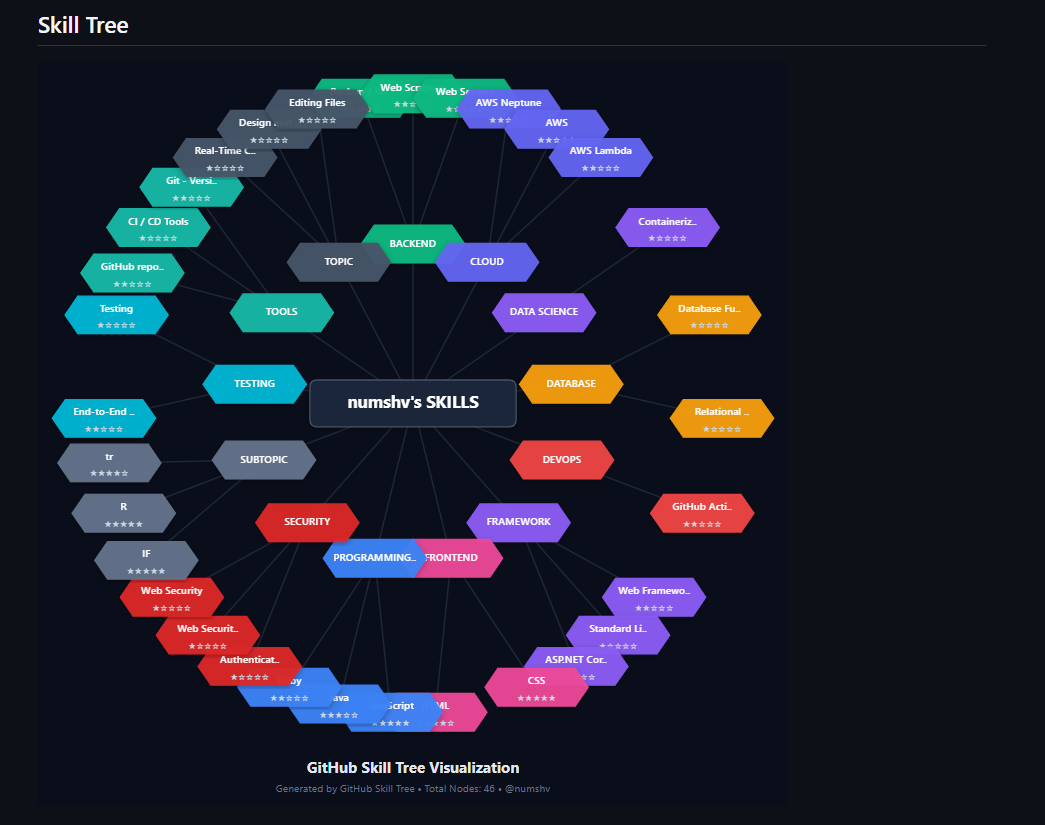
GitHub Skill Tree Generator transforms your GitHub repositories into a skill tree visualization inspired by roadmap.sh. It automatically analyzes your coding activity across all public repositories, detects the programming languages, frameworks, and technologies you use, then generates a SVG skill tree that shows your learning journey and technical proficiency.
Simply add one line of code to your GitHub profile README, and you get:
🎯 Auto-detected skills from your repository languages, topics, and descriptions ⭐ Skill level indicators (1-5 stars) based on project frequency and complexity 🗺️ Roadmap-based structure using real developer roadmap data from roadmap.sh 🎨 Visualization with hexagonal nodes, color-coded categories, and connection lines 🔄 Always up-to-date with automatic caching and regeneration
Key Features:
- Zero setup required - works immediately via public API endpoint
- Analyzes up to 100 repositories in seconds
- Matches skills against 25+ professional roadmaps (Frontend, Backend, DevOps, AI/ML, etc.)
- Generates cacheable SVG images perfect for GitHub READMEs
What inspired it?
As developers, our GitHub profiles are our digital portfolios, but they're often just a list of repositories. We wanted to visualize the learning journey hidden in those repos. The inspiration came from three sources:
Roadmap.sh - Their skill trees show learning paths in a structured way, making it a good reference for the path generation rule basis. GitHub README profiles - The trend of enhanced profile READMEs with stats and badges is great, but nothing shows your actual skills learned through projects. RPG skill trees - Games make leveling up satisfying and visual. Why not do the same for programming skills? Each repo you build should feel like unlocking a new ability.
Technologies Used
- Node.js + Express
- Axios
- GitHub REST API
- Gitbook
Track
Main Track: Automate Learning: Build Smarter Study Tools Since it's basically a skill tracking tool, it fits the best of this track brief specifically
*Opt-In Track: Build with GitBook I've created comprehensive documentation using GitBook
Built With
- express.js
- gitbook
- node.js


Log in or sign up for Devpost to join the conversation.