-
-

Bot lifecycle
-
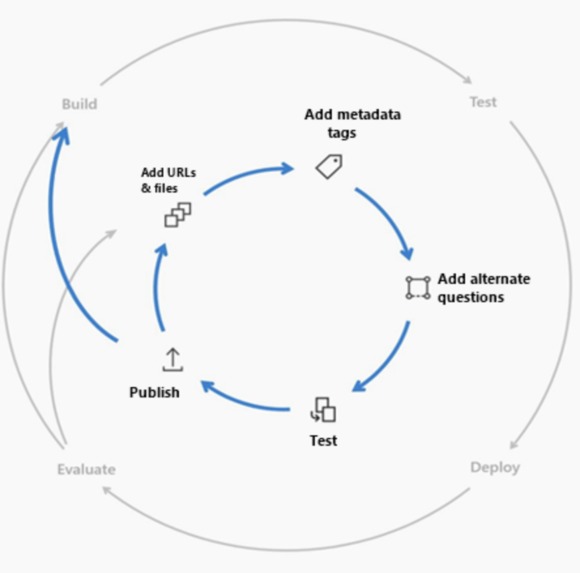
Knowledge base lifecycle
-

GitHub ChatBot demo
-

GitHubGPT initial prompt
-
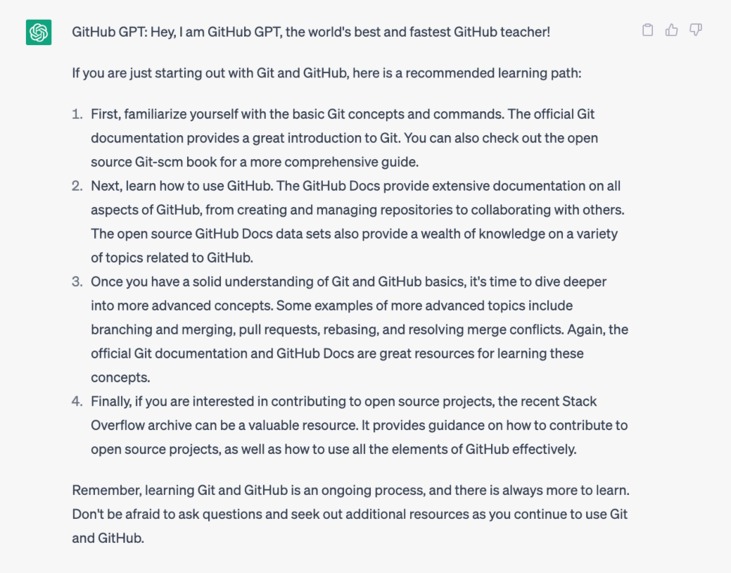
GitHubGPT initial response
-

GitHubGPT learning path response
-
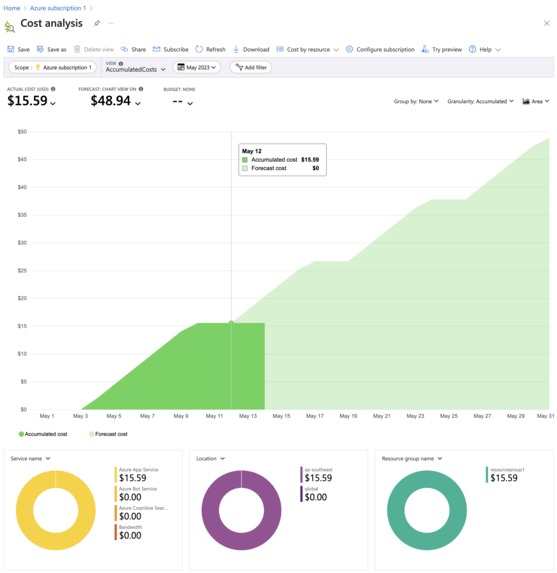
Cost Analysis
-
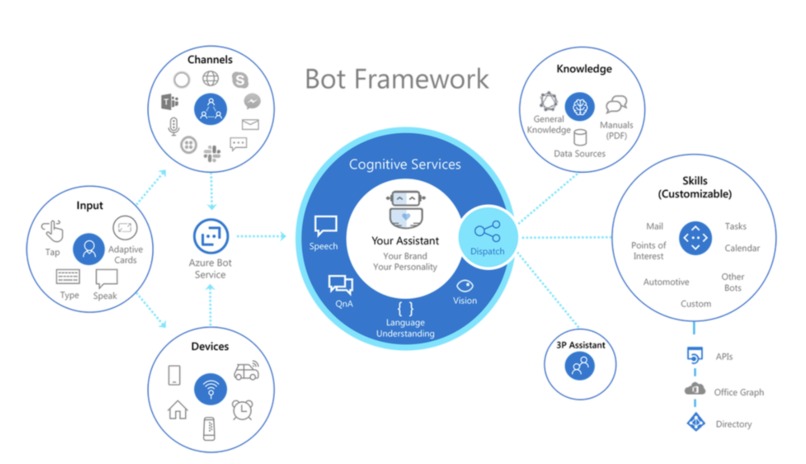
Bot components




Inspiration
I've been interested in working with Microsoft Azure cloud services and AI, and the hackathon is the perfect opportunity for me to explore this interest. I was thrilled to discover that the hackathon offers free training and certification for Azure AI associates, which I successfully completed. During the course, I learned about QnA chatbots and found them to be fascinating. The GitHub problem statement provides an excellent chance for me to apply my newfound skills and explore this topic further.
Besides with the rise of AI and chatbots, I'm eager to expand my skillset beyond software engineering. The hackathon is an ideal place for me to do just that by gaining practical experience and honing my skills in this exciting field.
What it does
This chatbot teaches Git and Github. Its knowledge sources are from Github docs (version: Free, Pro and Team) but limited to Get started and Open Source documentation due to the limitation of free SKU of language resource. It also incorporates friendly chit chat and some editorial questions for welcome message and cards.
How I built it
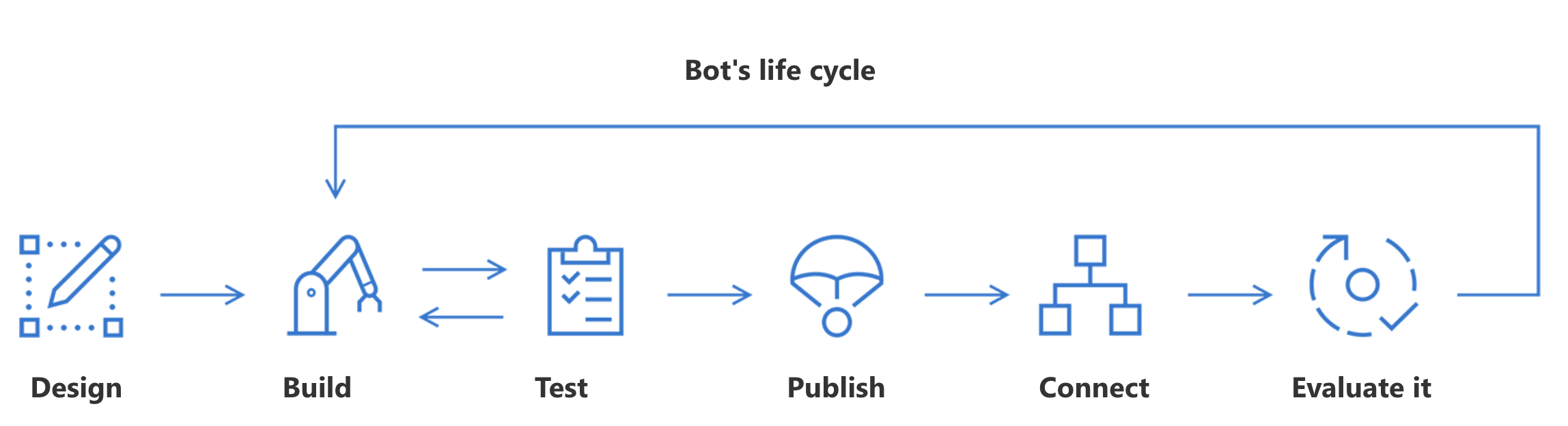
By following the bot's lifecycle, the processes involved in building the bot include designing, building, testing, publishing, connecting and evaluating the bot. I also went through the lifecycle of creating knowledge base and updating bot SDK's for a better user experience design.
Building steps:
- Create an Azure Cognitive Service for Language: language service resource with custom question answering capability
- Build the QnA knowledge base
- Create a new custom question answering knowledge base in language studio for the created language resource
- Add sources of URLs, files and chit chat
- Clean up and update knowledge base
- Test and deploy knowledge base
- Create an azure bot of the knowledge base in Azure portal
- Build bot framework SDK
- Download bot source code
- Add welcome message with Hero card
- Add suggestion card on each bot response
- Test in emulator
- Publish bot framework SDK
- Set WEBSITE_DYNAMIC_CACHE = 0 configuration on bot app service (to allow updating existing source code in storage) reference
- Deploy code to bot app service using azure CLI
- Test deployed bot in azure portal: Test in webchat
- Connect to channel: webchat
- Get embedded code in the Azure portal > Bot service > Get bot embed code
- Create a HTML file and add the embedded code
- Deploy HTML code to netlify
- Evaluate and update bot and knowledge base accordingly in the Azure portal
Challenges I ran into
- Language studio and azure portal limitation in adding Cards in welcome message which requires framework SDK customization.
- Expired free credit on 10th of May when I just finished my bot 😅 I had to upgrade my account to pay as you go and downgrade my app service to free tier.
- Free tier constraints:
- Limited number of sources (max 3) allowed for free service
- Limited document size to upload github book
- Knowledge base cleaning requires time and efforts for better results.
- As the new QnA is now under cognitive service and retirement of QnA maker:
- Limited documentation on custom question answering and most still include using QnA maker.
- Unable to test bot framework SDK fully on emulator:
- Still accepts QnA maker and LUIS integration instead of cognitive service config.
- User assigned managed identity bot is not supported in emulator.
- ngrok version 2 is required instead of 3.
- Testing requires deployment to app service and relies on azure portal web chat
- Unable to use bot composer:
- Latest update: C#-based Bot Framework package that Composer users can install, but not for node.js yet
Accomplishments that I am proud of
- The completion of the project itself.
- The skills and knowledge gained in creating bot and AI services using Azure.
- The ability to face various challenges faced during the hackathon at different stages.
What I learned
- The power of Open AI integration that can reduce the amount of time invested on bot development.
- Azure bot can be complicated to create at first and has a steep learning curve, but the concept is graspable once you get the hang of it.
- The supports and capabilities of azure bot like custom question answering and bot SDK are powerful.
- There are vast possibilities to make it as more complicated and comprehensive bot.
- Exposure to Azure services: Azure has a wide range of extensive and complicated solutions for business need.
- How to develop BOT framework SDK
- How to develop knowledge base for QnA bot
- The possibilities of creating educational bots and its importance
What's next for GitHub Chatbot
- GitHub ChatGPT:
- Prompt examples:
- Ask to act as a GitHub teacher
- Teach students with simple concept and words to understand complicated concept
- Give suggestion on jargons when needed
- Mainly use official sources to answer
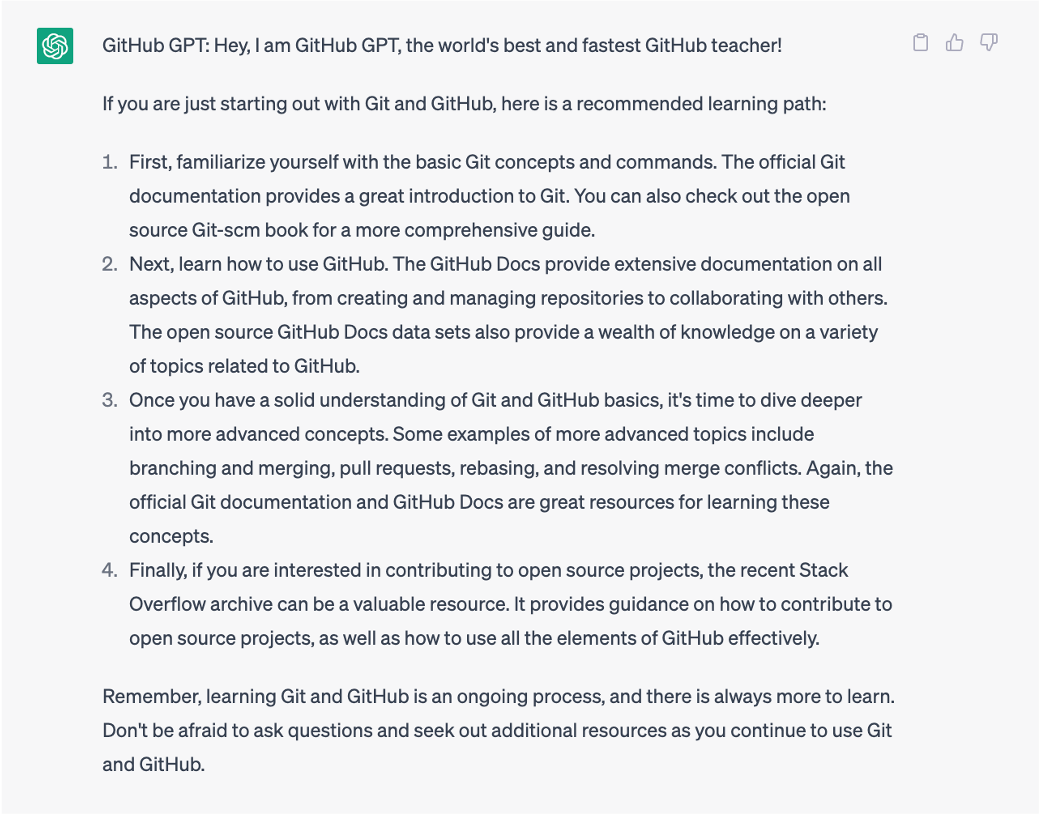
- List down the best learning path for git and GitHub overall as a start
- Pros: Able to reduce great resources needed for the knowledge base development
- Cons: Requires understanding of bot framework SDK and API concepts
- Prompt examples:
- Account sign in and progress tracking
- E.g. microsoft learn but in chatbot
- Skills bot integration (e.g. Exercise / challenge / certification)
- Additional sources:
- Github cheat sheet
- Github book
- Better user experience design
- Combine other NLP service (as QnA is now a feature in the Language Service, users can access other NLP features with the same Language Service)
- Incorporate speech AI and multilingual feature that’s align to responsible AI of inclusiveness
- Speech can cause unnecessary delay so need thorough planning


Log in or sign up for Devpost to join the conversation.