Inspiration
Everyone on our team has sat through a meeting, walked out, and realized nobody wrote down who was supposed to do what. We wanted something that reads the long, messy stuff for you so the important parts don't get lost.
What it does
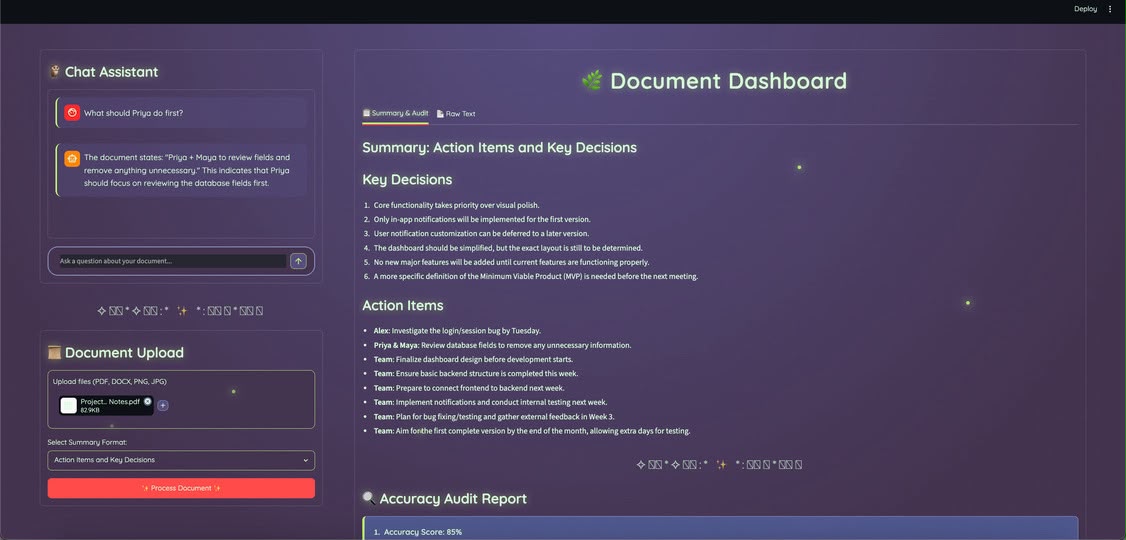
Essentially, you upload a file (PDF, image, Word doc, or meeting transcript) and our application gives you a summary in the format you pick: action items and decisions, a short executive summary, bullet points, or detailed notes. We also wanted to be able to trust the summary, so a second AI checks it against the original file and flags anything that doesn't match. Along with that, our special AI chatbot answers all questions after understanding the concepts.
How we built it
We built the app in python with Streamlit. When a file is uploaded, Azure Document Intelligence pulls the text out of it- tables and lists included. That text goes to Azure OpenAI, which writes the summary. We set the temperature low so it sticks to what's actually in the file instead of getting creative. This way nothing is added or subtracted from the original text. A second model reviews the summary, and a third handles the chat.
Challenges we ran into
Our biggest challenge was just finding the API keys. Azure has a lot of separate services, and we had to figure out which resource each key and endpoint belonged to (OpenAI and Document Intelligence each have their own), then get them into a .env file so the app could read them.
Accomplishments that we're proud of
We got a full pipeline working. You upload a file, the app reads it, and a finished summary comes out the other end. Getting multiple Azure services to hand off to each other without breaking was a bigger deal than we expected.
What we learned
We learned how to use Azure OpenAI and Document Intelligence together, and how to turn a Python script into a web app with Streamlit.
What's next for Girlhacksproject
We plan on upgrading features on the web app. Audio uploads with Azure Speech, searching across old meetings, and different summary styles for different readers. We'd also like it to send action items straight to email or Teams- with the right permissions.

Log in or sign up for Devpost to join the conversation.