Inspiration
I write a lot of lab reports, and I’d often get stuck trying to find a better word. Searching Google for synonyms meant leaving my document, browsing options, and then switching back to continue writing. It made writing feel like a drag.
I wanted a quicker way to find alternatives without leaving Google Docs, so I built Ghostwriter: an extension that spots common filler words and lets me explore replacements right in its panel. And, because it was made for Hack or Treat, it comes with a grumpy ghost to judge my drafts along the way.
What it does
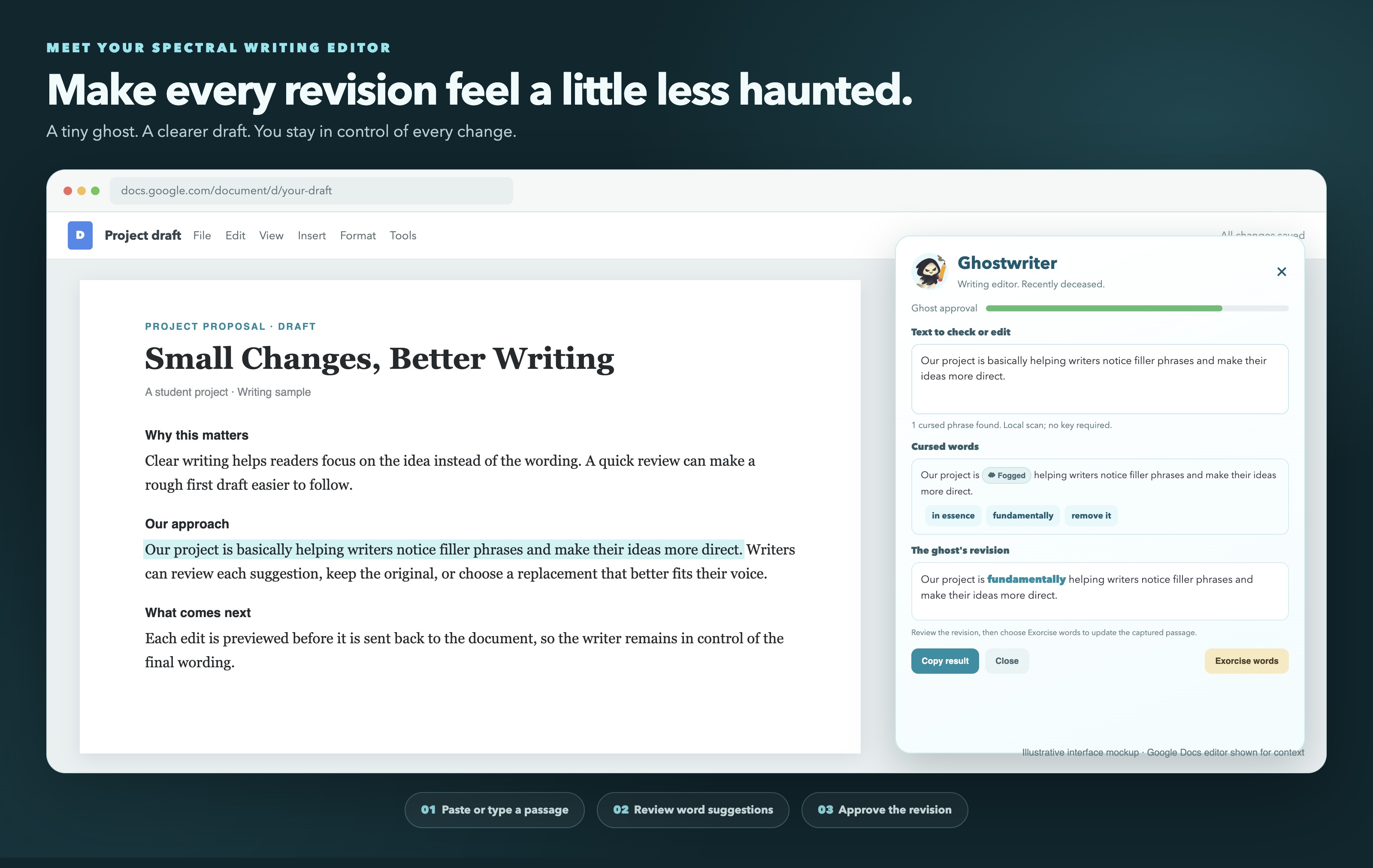
Ghostwriter adds a draggable ghost and writing panel to Google Docs.
- Finds filler words. Paste or type a passage into the panel. Ghostwriter scans it locally and marks phrases from a curated list with “Fogged” chips.
- Offers suggestions. Click a chip to see replacement options for that word or phrase. Suggestions work offline from a built-in list. The code also includes an optional LLM integration, but its endpoint is still a placeholder.
- Previews your edits. Choose a suggestion or edit the passage yourself. Ghostwriter highlights changes in cyan so you can review them before applying them.
- Applies a revision to Docs. After you authorize Google Docs access, choose Exorcise words. Ghostwriter looks for the pasted original passage and replaces it only if it finds one unique match. You can also copy the result and paste it into Docs yourself.
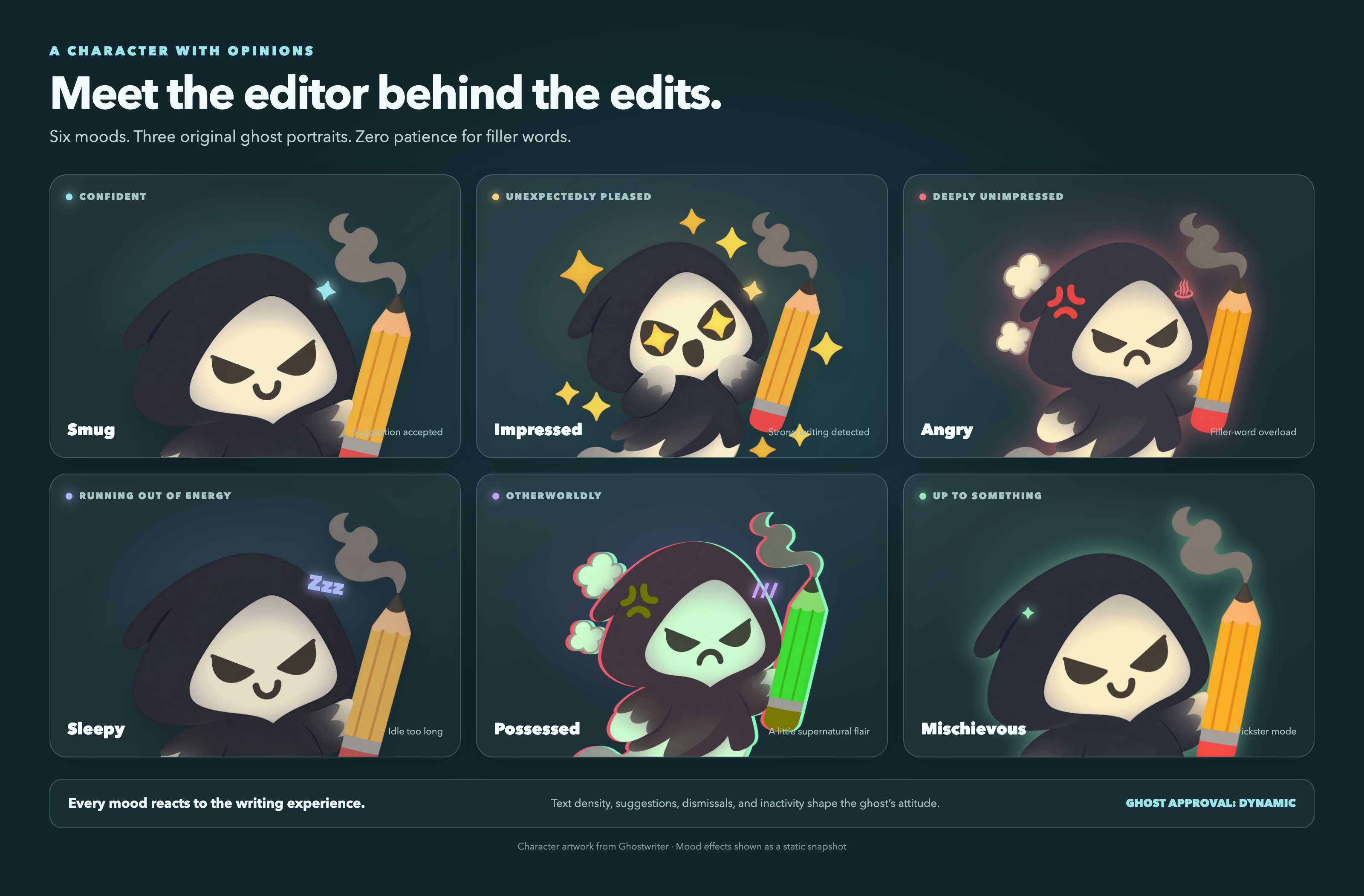
- Reacts to your writing. The approval meter and ghost mood respond to the density of detected filler phrases. The ghost has 16 mood states, three personality options, speech bubbles, and occasional animated tricks.
Ghostwriter does not scrape text from Google Docs’ canvas. It analyzes the passage you paste or type. When you explicitly request a Docs replacement, it uses the authorized Google Docs API to find that passage in the document.
How we built it
Ghostwriter is a no-build Chrome Manifest V3 extension written in vanilla JavaScript, HTML, and CSS. A content script creates the widget inside a Shadow DOM; a service worker handles LLM requests and Google Docs API operations. The extension stores preferences, including the ghost’s personality and trick settings, with chrome.storage.sync.
For Docs edits, the service worker reads the document through the Google Docs API, maps text offsets back to Docs indexes, and checks for a unique match before making a change. The revision preview uses a token-level diff to highlight changed text. The ghost’s moods, effects, and animations are implemented in CSS and JavaScript.
Challenges we ran into
Google Docs renders its editor on a canvas. That meant we couldn’t read the document text from the page like ordinary HTML. We made the text input explicit: users paste or type the passage they want to work on.
Finding pasted text in the document takes care. Google Docs represents text as indexed runs, which can split a passage across formatting boundaries. We flatten the API response while tracking its Docs indexes, and normalize whitespace when searching.
A replacement should not guess. If the passage is missing or appears more than once, Ghostwriter refuses to edit. It also uses Docs revision checks so it can detect when the document changes during an edit.
The ghost needed to be playful, not disruptive. Its tricks run only when the panel is closed and the page is visible, and they wait until there has been a pause in typing.
Accomplishments we’re proud of
- The core filler-word scan and built-in suggestions work without an API key.
- Document edits require authorization and a unique match, with a manual copy-and-paste option as a fallback.
- The revision preview highlights changed words rather than showing an unmarked block of replacement text.
- The ghost has 16 moods and effects, built from three character images plus CSS fallbacks.
- The widget includes accessible status updates, meter semantics, and reduced-motion support.
What we learned
We learned how different Google Docs’ document model is from a normal webpage, and how important it is to be cautious when editing a document through an API. We also learned that helpful failure messages matter: users should know when an edit did not happen and what they can do next.
What’s next for Ghostwriter
- Configure the optional LLM integration with a real provider endpoint.
- Let users customize the filler-word list.
- Add original artwork for more of the ghost’s moods.
- Connect experimental writing modes to the current interface.

Log in or sign up for Devpost to join the conversation.