Inspiration -
I spend a lot of time looking at the enterprise BPO and banking sectors here in Malaysia, and I noticed a massive problem: "Swivel-Chair" data entry. Human agents are forced to manually copy data from modern platforms and type it into clunky, 20-year-old legacy CRMs.
Traditional automation (RPA) tries to solve this by scraping the HTML DOM, but it's incredibly brittle. If a button moves, the bot breaks. Since legacy systems rarely have APIs, I wanted to build an AI that interacts with software exactly like a human does—using eyes and hands. When I saw the "UI Navigator" track, I knew I had to build a Large Action Model (LAM) to solve this.
What it does -
GhostOps is a voice-activated Visual RPA agent. Instead of relying on backend APIs, it physically controls the computer's mouse and keyboard.
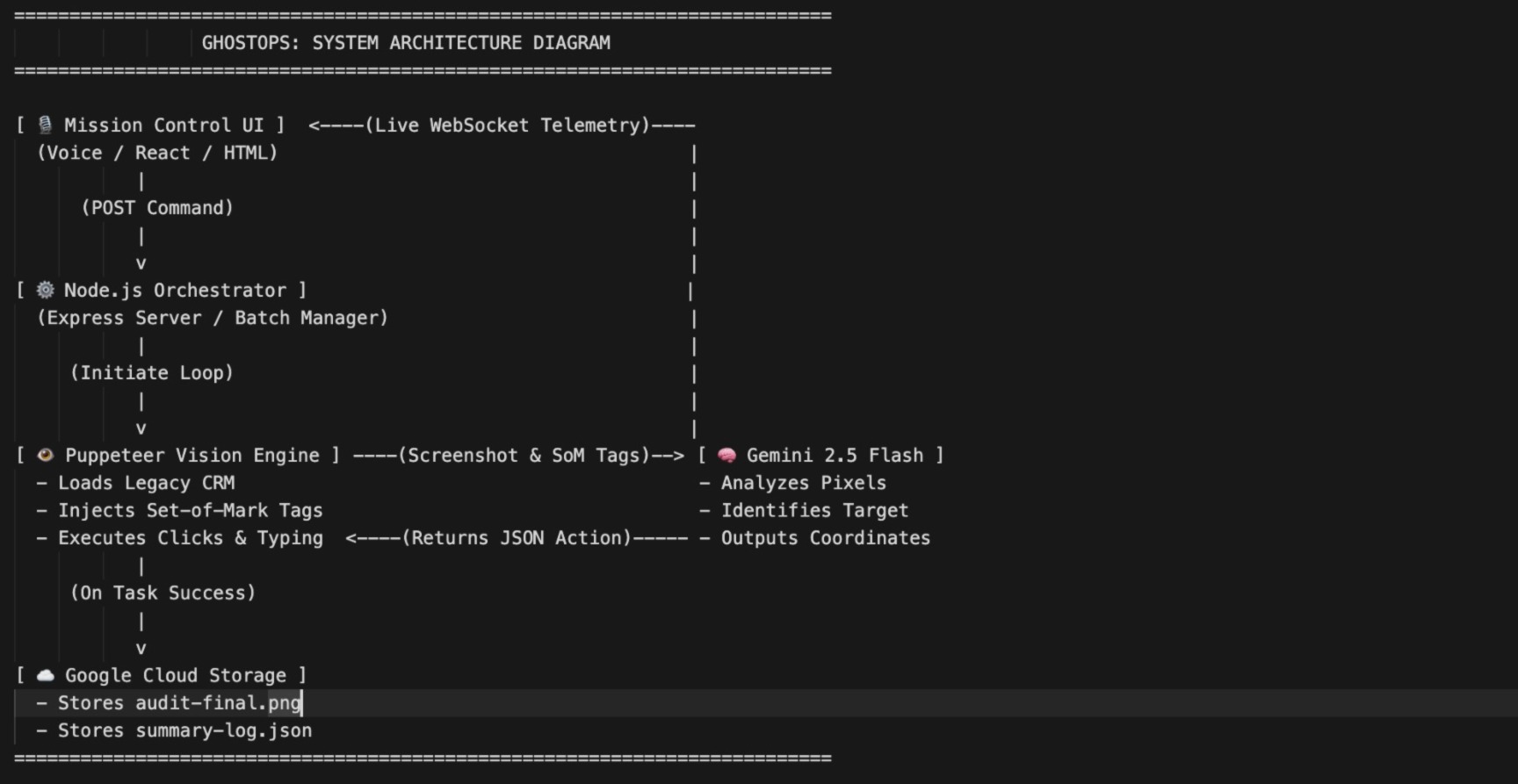
When an operator clicks the microphone on the Mission Control dashboard and says, "Process today's backlog," GhostOps takes over. It autonomously opens a legacy CRM browser window, visually scans the table for specific customers, clicks the "Edit" buttons, types custom resolution remarks, and saves the records. It processes entire batches of users sequentially. Once finished, it captures a final screenshot and JSON audit log and securely uploads them to a Google Cloud Storage bucket for enterprise compliance.
How we built it -
I built the core engine using Node.js and Puppeteer to drive the browser, and an Express/WebSocket server to stream the live vision feed and agentic logs to a React/Tailwind frontend.
The real magic is how I used Gemini 2.5 Flash. LLMs are notoriously bad at guessing raw X/Y pixel coordinates on a blank screen. To fix this, I engineered a "Set-of-Mark" (SoM) injection pipeline. Before taking a screenshot, my script injects high-contrast, numbered yellow bounding boxes over every interactive element on the screen. I pass this marked-up image to Gemini with a strict prompt to identify the target element's ID. GhostOps then maps that ID back to the exact DOM coordinates and physically moves the mouse to click it.
Challenges we ran into -
I hit two massive walls during development:
1) The "Chatty AI" JSON Crash: Gemini would sometimes try to "think out loud" before returning the JSON coordinates (e.g., "The target is not visible, so I will click the search bar... {"action": "click", "id": 8}"). Because my code expected pure JSON, this string caused the execution loop to crash instantly. I had to build a robust Regex extraction pipeline to isolate and parse the JSON block from the conversational text.
2) State-Loss during Batch Processing: Initially, I was closing the Puppeteer browser after every single CRM update. But for a batch of 5 users, this wiped the DOM state and refreshed the page every time, losing the visual context. I had to rewrite the orchestrator into a stateful loop that keeps a single browser session alive, waiting for CSS modals to close and success banners to render before taking the next screenshot.
Accomplishments that we're proud of -
Getting 100% click accuracy on a UI without relying on underlying HTML scraping is a huge win. Watching the script autonomously triple-click an input field, delete the old text, and type new data purely based on Gemini's visual reasoning feels like watching science fiction actually work.
What we learned -
I learned that building Large Action Models requires completely different prompt engineering than building chatbots. You can't just ask for an answer; you have to aggressively constrain the AI to output machine-readable commands, and you have to build failsafes (like retry loops) for when the vision model hallucinates a click target.
What's next for GhostOps: Enterprise UI Navigator -
The next step is containerizing GhostOps. I want to deploy this on Google Cloud Run so enterprise contact centers can spin up 100 headless GhostOps agents simultaneously. Instead of one agent clicking through a local CRM, a fleet of them can chew through massive backlogs of unstructured data entry across isolated, API-less enterprise environments 24/7.
I want to drop enterprise deployment times from 6 months of API integration to just 1 day of visual training.
Built With
- express.js
- gemini
- google-cloud
- node.js
- puppeteer
- react
- tailwindcss
- websockets


Log in or sign up for Devpost to join the conversation.