Fear of being watched/exposed online is very real. Influencers get doxxed; everyday users leak location unknowingly; bad actors exploit visual and textual clues for stalking, harassment, or targeting.
PII (Personally Identifiable Information) is any detail tied to an individual that can reveal or steal their identity—such as a social security number, full name, email, or phone number, which we often unintentionally leak if we do not make deliberate effort to avoid them in the content we create online.
Social sharing feels like a tradeoff: fully public vs completely hidden, so we wanted to create a safe middle ground: privacy that empowers creativity.
AI increases risks (generative models, image-to-location inference) but also offers solutions.
Ghostgram uses AI to detect and defuse privacy risks before they spread.
Goal: give users the flexibility to share on their terms without sacrificing safety.
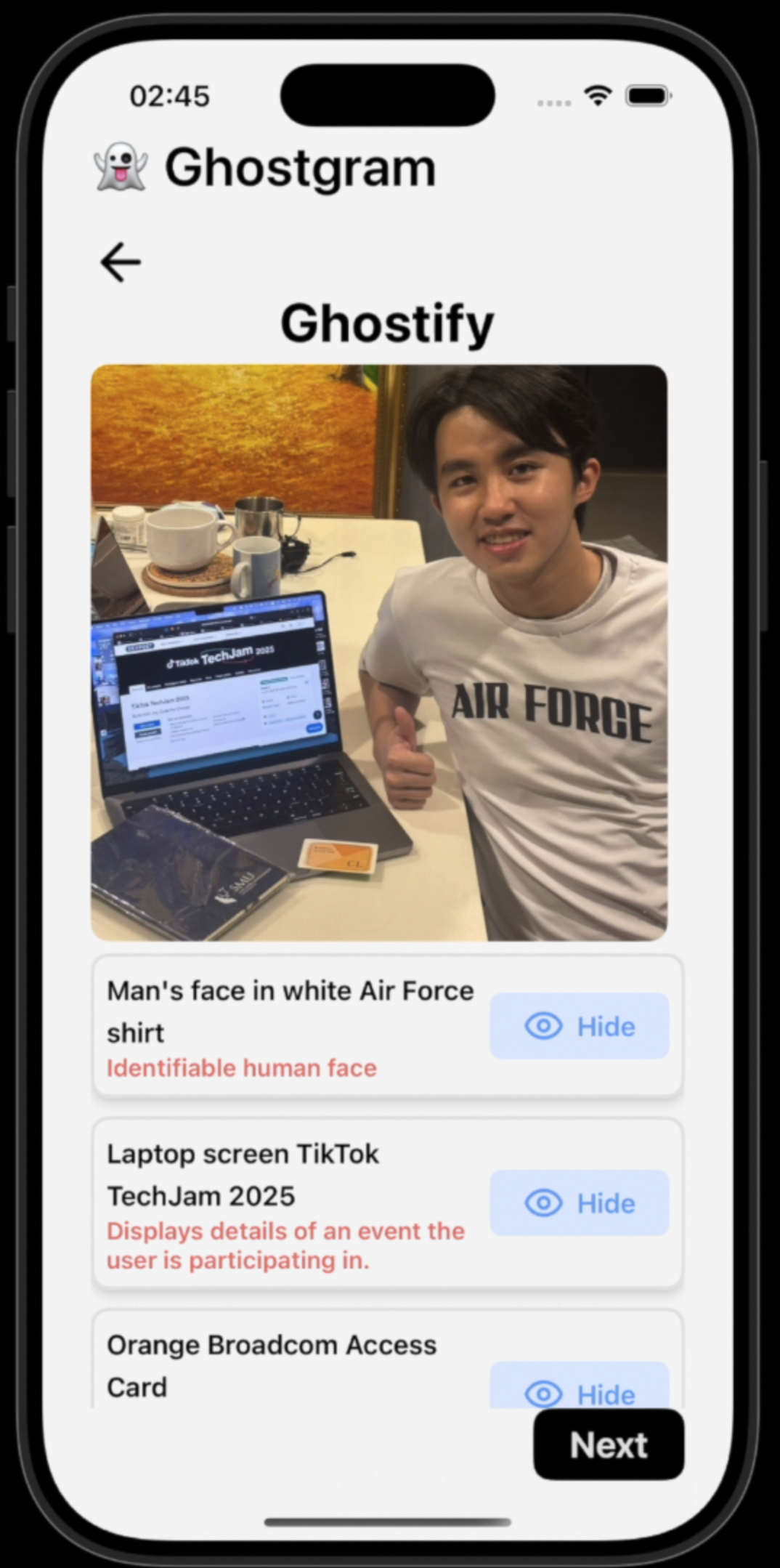
Interactive redaction: User is able to choose which PII to hide, offering flexibility.
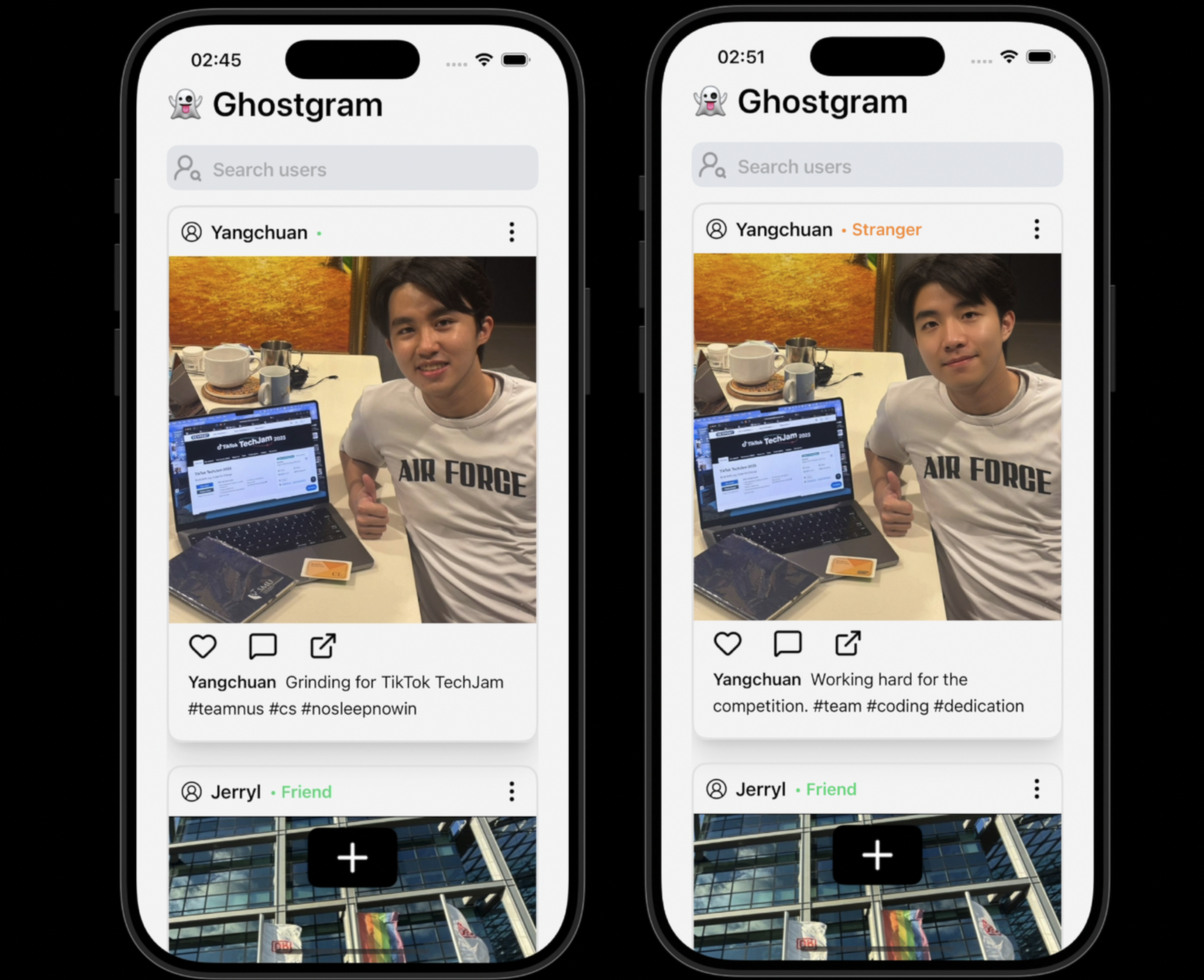
Quality-preserving redaction: Ghostgram preserves photo quality by seamlessly replacing PII with contextually similar content instead of pixelating or blurring. (e.g "Haji Lane" street sign → "Bazaar Street")
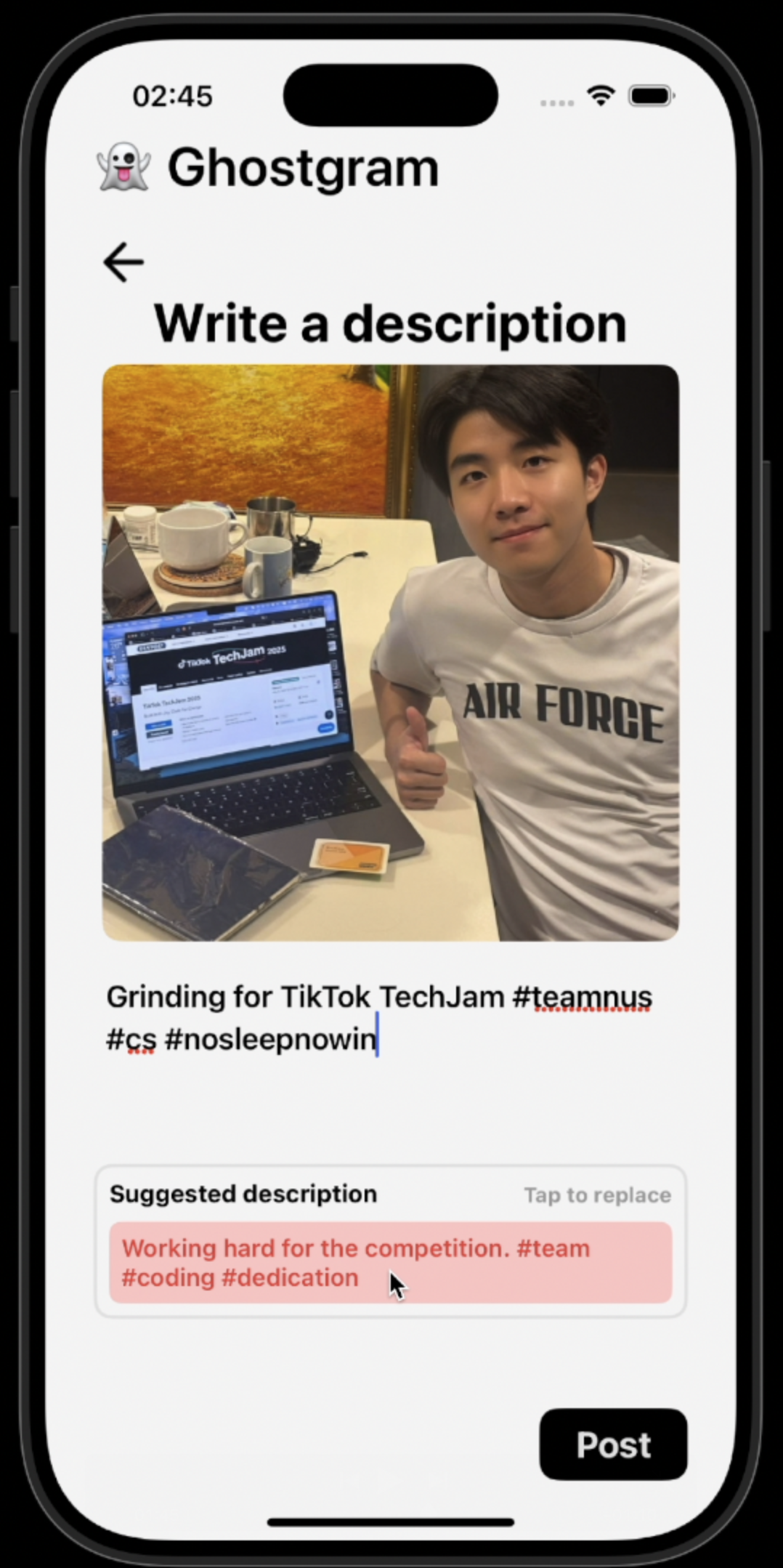
Safe captions: Rewrites text into context-preserving alternatives while removing sensitive info.
Friends vs Strangers: Two views per post — trusted friends see the original unmodified post while strangers see the privacy-safe version.
How we built it
Front-end: Developed using ReactLynx for high performance UI and cross-platform app development.
Back-end: Developed using Express.js and utilised AWS S3 bucket to store images on the cloud for efficiency.
AI Models
Gemini 2.5 Flash
Purpose: Detects PII in both text and images.
Prompt Design (Image Auditor): Uses a privacy-auditor prompt that outputs structured JSON, not prose. Each detection is tagged with descriptive anchors (e.g., “upper-left, green Haji Lane sign”, “lower-center, woman in white shirt”).
Prompt Design (Text Auditor): Uses a rewriter prompt that rewrites captions into a safe version while logging flagged elements. Output includes safe_text plus sensitive_regions.
Features:
Conservative detection across modalities (faces, signs, addresses, IDs, etc.).
Generate easily recognisable PII tags
Short reasons explaining sensitivity.
Area-based descriptions for images (relative positions + anchors) instead of error-prone bounding boxes.
Smooth text rewriting for captions: keeps tone/context while removing identifiers.
Maps flagged sensitive tokens directly to the original text for transparency.
Gemini 2.5 Flash Image Preview
Purpose: Replaces flagged objects with natural, coherent substitutes.
Prompt Design (Image Editor): Enforces realism — generates generic non-identifiable faces, authentic fonts for signs, and consistent lighting/perspective.
Features:
Strict negative rules (no blur/pixelation, no fake celebrity faces, no unrelated or cartoonish elements).
Ensures seamless blending with the scene, maintaining depth-of-field and natural context.
Keeps everything outside the flagged region completely untouched.
Challenges we ran into
Image-to-text issues:
Bounding boxes were often inaccurate for multiple objects detection. i.e Generative AI was not able to produce pixel coordinates of identified objects in a photo accurately.
We solved this issue by switching to locating objects using a combination of their relative positions (top-right, bottom-left) and descriptive attributes (e.g. shirt colour).
Working with Lynx:
Limited support at its early stage — Lynx Explorer only provides prebuilt binaries for iOS simulator and we needed to write custom native modules and build custom Lynx Explorer to run our app.
Accomplishments that we're proud of
Built a functional MVP that validates the concept.
Integrated image-to-text, text redaction, and image redaction into one single pipeline.
Demonstrated end-to-end results with AI + UX flow, despite encountering many UI development challenges.
What we learned
Navigating an emerging framework (Lynx) under hackathon pressure.
Prompt refinement: tuning temperature and reasoning budgets for real-world results.
Importance of human-in-the-loop: AI assists, user stays in control.
Team skills: balancing deep engineering with clear storytelling.
What’s next for Ghostgram
Core foundations: Add authentication, database and polished UI for production.
Cross-platform support: Extend from iOS to Android and Web.
Fine-tuned privacy models: Train on sensitive datasets; explore multimodal detection (image and text).
Richer media formats: Expand to video and livestreams, with frame-level redaction and real-time alerts.
Smart redaction suggestions: Learn user habits, suggest defaults while keeping user control.
Privacy insights: Dashboard with stats on hidden tags, generalised captions, privacy-safe vs original views.
Platform integrations: Direct sharing to Instagram, TikTok, WhatsApp.


Log in or sign up for Devpost to join the conversation.