Inspiration
Most photography feedback comes too late, after you've already taken the shot. I wanted guidance while you're still framing, in the same place your eyes already are. With SPECS, the viewfinder doesn't have to be a screen in your hand. It can be the world in front of you.
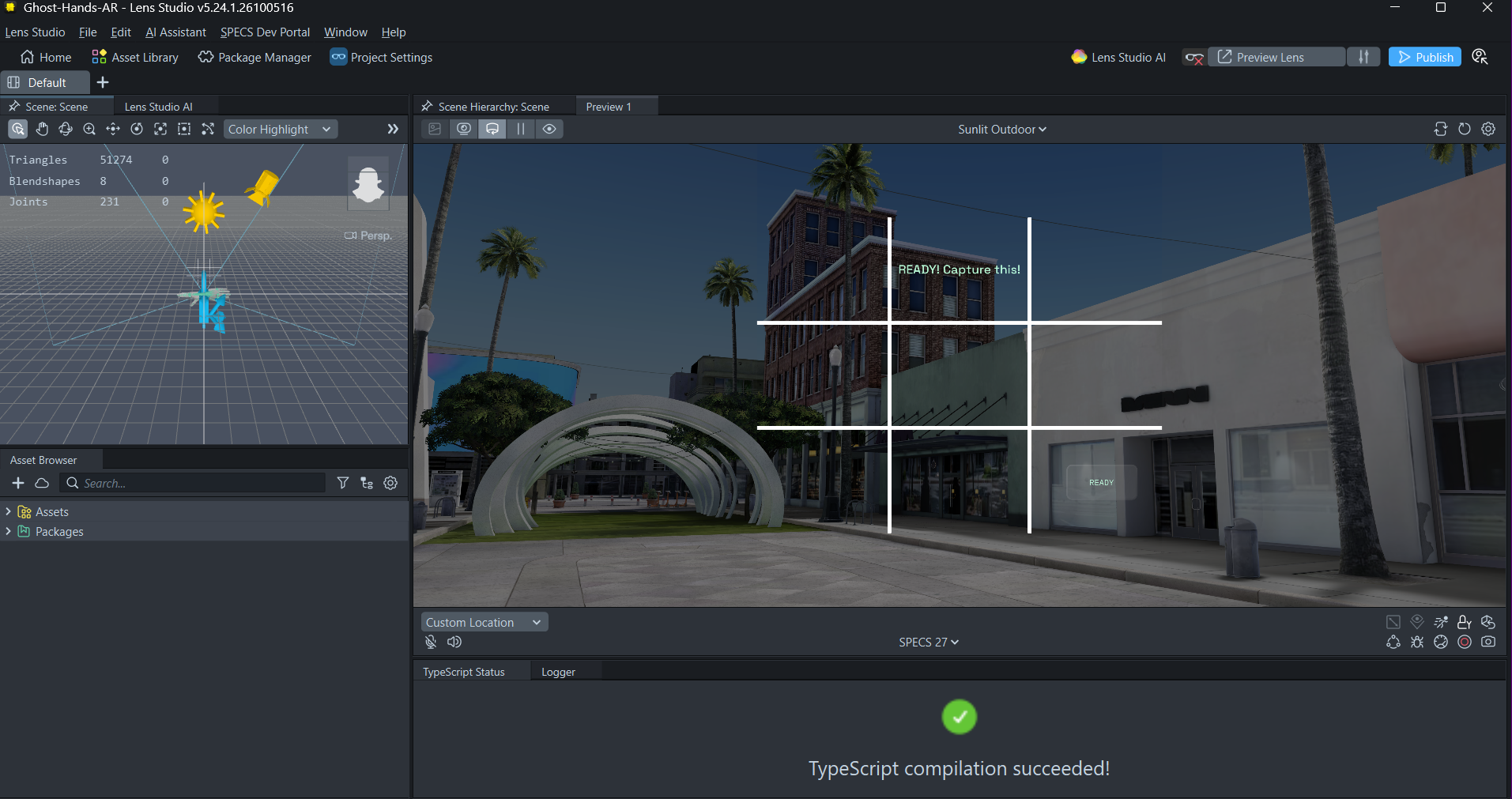
Frame This! (part of Ghost Hands AR) is a quiet photography coach for SPECS. It gives one small cue at a time ("Turn a little right," "Look up a little") until your shot lands on a strong rule-of-thirds point, then tells you: "READY! Capture this!"
From Light It Up! to Frame This!
During early development, I explored an AR-assisted electronics learning concept called Light It Up!. As I evaluated the experience, I decided to pivot toward photography and composition guidance.
That led to Ghost Hands AR: Frame This!, a new Lens Studio experience built around a rule-of-thirds overlay, camera-orientation guidance, and visual readiness feedback.
The earlier electronics experiments remain in the repository as historical work, but they are separate from the submitted Lens.
What it does
Native SPECS Lens (Lens Studio 5.24.1)
- Aim: Look at your subject and pinch Select view.
- Guide: The Lens remembers that direction in world space. As you turn your head, it recomputes where that direction falls in your view and gives one cue at a time to move it toward the lower-left rule-of-thirds point.
- Ready: When you're within tolerance, the cue turns mint green and the button label switches to READY.
- Reselect: Pinch again anytime to choose a new subject. If the subject ends up behind you, the Lens tells you to reselect.
The HUD is flat, warm text with no floating panels, so the scene stays visible and your hands stay free.
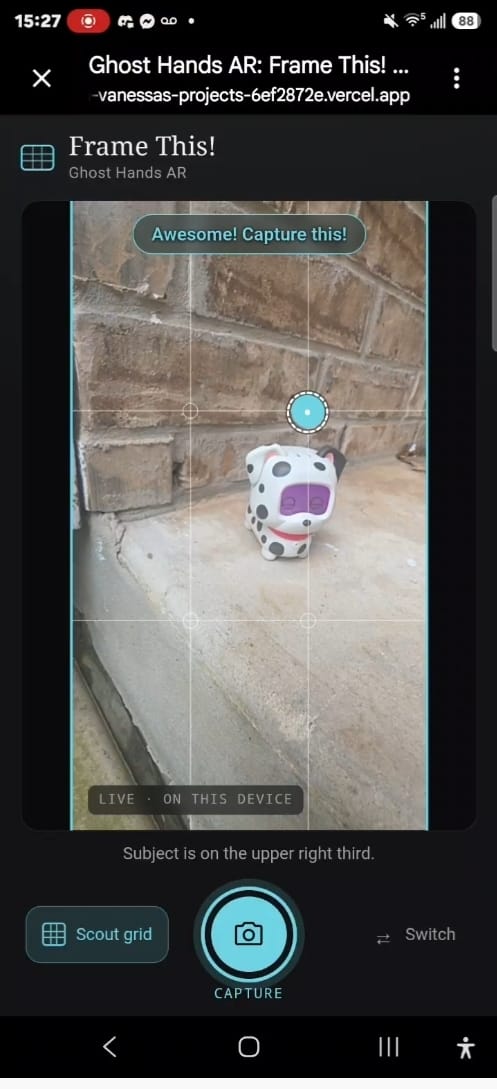
Browser companion demo (for judges without Spectacles) A web version of the same interaction runs on your phone or laptop camera. You tap your subject and get a compact guidance pill ("Look to the right →," "It's too dark," "Ready!"). The shutter lights up only when the analysis engine reports the frame is ready. There's also a no-camera demo with a synthetic scene, clearly labeled as simulated.
How I built it
- Lens Studio 5.24.1 with the Spectacles Interaction Kit and Spectacles UI Kit. A
RectangleButtonhandles the Select/Reselect pinch. - TypeScript
FrameThisControllerruns every frame. It stores the camera's forward vector at selection, transforms it into the current camera space with the inverse world rotation, and projects it to normalized view coordinates:
$$ x = \frac{\ell_x}{-\ell_z}, \quad y = \frac{\ell_y}{-\ell_z} $$
It compares that point with the thirds target and picks the larger axis error, so you only ever get one instruction at a time.
- Claude Code + Lens Studio MCP to inspect and edit the live scene, scripts, and bindings directly from the coding agent.
- Vite + TypeScript for the web companion, with pure, unit-tested
CompositionAnalyzer,LightingAnalyzer, andGuidanceEnginemodules.
Challenges
- Honesty versus magic. Real subject detection on SPECS needs a verified camera pipeline I couldn't validate in time. Instead of faking it, I built orientation-based guidance. It's genuinely live and responsive, and it works well for stationary, distant subjects (landmarks, landscapes, a friend posing). The code and README state plainly that this is not object tracking.
- Choosing the right problem. Photography fit SPECS' "shares your view, leaves your hands free" principles far better than a workbench tutorial, so the pivot meant starting the Lens fresh rather than adapting old work.
- Readable AR typography. Early layouts looked like a website floating in front of your face. I stripped them down to a single line of text that changes color and size on READY.
What I learned
- Head orientation alone carries a surprising amount of useful information. You can build real spatial guidance before reaching for computer vision.
- One cue at a time beats a dashboard. Fewer words made the experience feel more like a coach and less like a HUD.
- Label every limitation clearly. It made design decisions easier and kept the demo trustworthy.
What's next
- Wire the tested composition and lighting analyzers into the native Lens once SPECS camera input is verified.
- Translucent ghost hands that frame the shot with you.
- Let the user choose which thirds point to target, and add real photo capture through supported SPECS APIs.
Built With
- augmented-reality
- claude-code
- github
- javascript
- lens-studio
- lens-studio-mcp
- node.js
- snap-specs
- spectacles
- spectacles-interaction-kit
- spectacles-ui-kit
- typescript
- vite
