-
-
https://youtu.be/h9yDiEMwEJk
GestureControl — Your Hand. Your Gestures. Your Rules.
What if technology adapted to you, instead of the other way around?
Think about how many devices you interact with every day.
Your phone has a touchscreen. Your computer needs a keyboard and mouse. Your television needs a remote. Your smart home has its own apps, buttons, and voice assistants.
Every device has its own rules, and every time we interact with technology, we're expected to learn them.
But what if we flipped that relationship?
What if you could swipe your hand to scroll through a webpage, tense your arm to turn on a light, or flick your wrist to move through a video game?
And what if you decided you wanted those gestures to do something completely different?
Instead of digging through settings, rewriting code, or learning a new interface, you could simply say:
"Hey Gesture, make swiping up move me forward in Minecraft instead."
And your technology would adapt.
That's GestureControl.
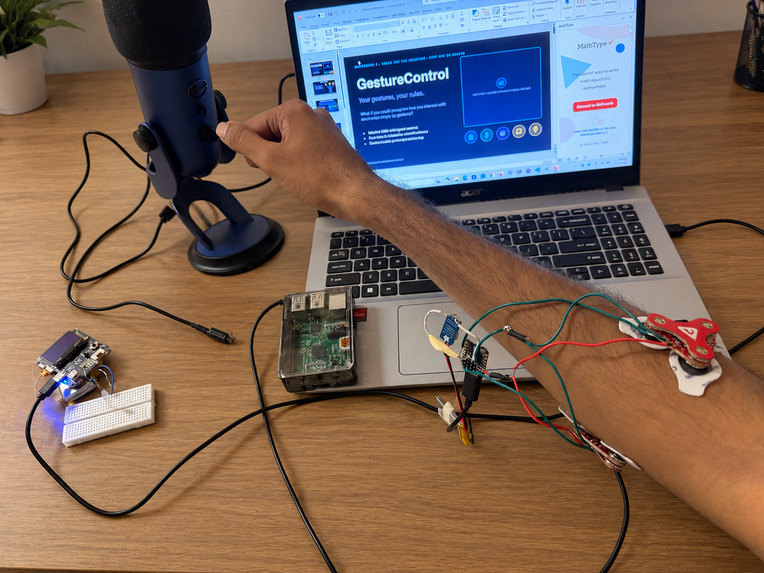
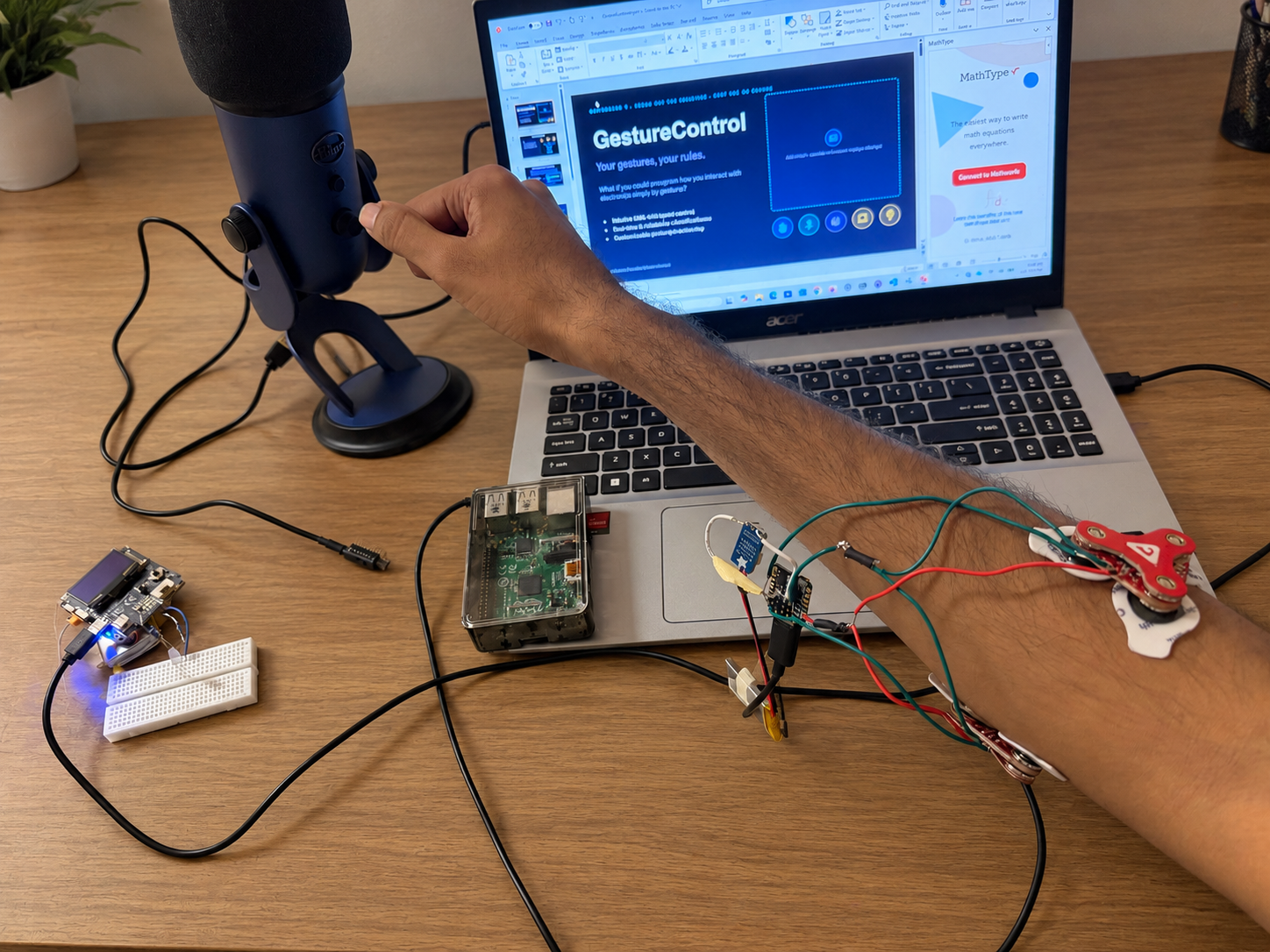
GestureControl is a wearable, AI-powered interface that turns your natural hand movements and muscle activity into customizable controls for the devices around you.
But the real innovation isn't just controlling technology with gestures. It's giving people the freedom to decide what those gestures mean.
A swipe doesn't have to mean scrolling. A tense doesn't have to mean clicking. Your gestures aren't permanently assigned to someone else's idea of how you should interact with the world.
You get to choose.
And with local voice AI, changing those controls can be as natural as explaining what you want.
Less screens. Less Wi-Fi. More you.
We believe the future of technology shouldn't involve adding another screen to our lives.
It should involve making the technology already around us more intuitive, personal, and accessible.
GestureControl is built around three ideas:
- Less friction: Use familiar movements instead of constantly reaching for another device.
- More personalization: Change what your gestures do using ordinary language, without reprogramming the wearable.
- Local intelligence: Recognize gestures, interpret voice commands, and configure controls without depending on a cloud AI service.
The goal isn't to replace every keyboard, mouse, or remote overnight.
It's to demonstrate something much bigger:
AI shouldn't just be something you talk to. It should help the technology around you work the way you want it to.
Inspiration — Why We Built This
GestureControl grew out of an interest in wearable technology, embedded systems, and smart-home control.
Earlier experiments with electromyography (EMG), motion sensors, and Bluetooth showed that a small wearable could recognize intentional movements and turn them into useful actions.
But those early implementations revealed a limitation.
Even when a device could recognize a gesture, its meaning was predetermined in software.
If swiping up meant pressing the up-arrow key, changing that behavior required modifying the program or updating its configuration manually.
That didn't feel like true personalization.
Recognizing a gesture and deciding what that gesture does should be two completely separate problems.
This became the foundation of GestureControl.
The wearable should be responsible for understanding the user's movement. The receiving device should decide what that movement accomplishes. And AI should make it easy for the user to change that relationship.
We were also motivated by the possibilities for accessibility and independence. Not everyone can comfortably use conventional input devices, and not everyone interacts with technology in the same way.
A customizable wearable could eventually offer people more choices in how they navigate computers, interact with their homes, and control their environments.
Rather than designing one fixed set of gestures for everyone, we wanted to build the foundation for controls that adapt to the individual.
How We Built It
GestureControl combines embedded firmware, machine learning, Bluetooth Low Energy, USB Human Interface Devices, offline speech recognition, and Google's FunctionGemma model.
The system has three primary layers:
- Sensing: A wearable recognizes hand movements and muscle activity.
- Interpretation: Local speech recognition and AI translate natural-language requests into configuration commands.
- Actuation: Receivers translate detected gestures into keyboard, mouse, or lighting actions.
The most important architectural decision is that gesture recognition and action assignment are independent.
This allows the same physical movement to control different devices or perform different actions without retraining the gesture detector.
1. The Wearable — Understanding Your Movements
The wearable is built around a Seeed Studio XIAO nRF52840 Sense, using its onboard inertial measurement unit (IMU) alongside two external MyoWare 2.0 EMG sensors.
These provide two complementary ways to understand movement.
Motion Recognition (IMU)
The onboard LSM6DSL provides accelerometer and gyroscope measurements. GestureControl processes these signals to detect four directional movements:
- Swipe up
- Swipe down
- Swipe left
- Swipe right
The firmware uses motion filtering, directional similarity, movement thresholds, and cooldown logic to distinguish intentional swipes from ordinary movement.
Muscle Recognition (EMG)
Two MyoWare sensors are positioned over different muscle groups of the forearm.
Rather than relying exclusively on wrist motion, EMG allows us to recognize muscle activation associated with:
- Flex: Contracting the wrist and forearm flexors.
- Extend: Activating the opposing muscle group during wrist extension.
- Tense: Contracting the forearm more broadly.
Together, the IMU and EMG system provide seven configurable gesture inputs.
The wearable runs custom firmware built with Zephyr RTOS and C, handling sensor acquisition, gesture detection, classification, event processing, and BLE communication.
2. Training a Machine Learning Model for Muscle Recognition
One major technical challenge was distinguishing muscle movements reliably.
EMG signals are noisy, highly dependent on sensor placement, and often overlap between different muscle actions.
Simple voltage thresholds were not sufficiently flexible for distinguishing rest, flexion, extension, and full-arm tension.
To address this, we developed a supervised machine learning pipeline.
First, we collected labeled EMG measurements from both sensors using Python tools. The recorded dataset included four classes:
REST, FLEX, EXTEND, and TENSE.
Measurements were sampled at approximately 100 Hz.
We then divided the recordings into 400 ms windows, advancing in 100 ms increments, and extracted eight features across the two channels:
- Mean voltage
- Maximum voltage
- Variance
- Voltage range
We evaluated several classification approaches, including decision trees, random forests, and logistic regression.
For embedded deployment, we selected a compact depth-3 decision tree.
The exported model achieved 92.36% accuracy (375/406 windows) on a separate recorded validation dataset. This is an offline validation result, not a claim of equivalent accuracy during unrestricted real-world use.
The trained tree was converted into C code and integrated directly into the wearable firmware.
This means muscle gesture classification happens on the microcontroller, without requiring a laptop, cloud API, or continuous transmission of raw sensor data.
The firmware also includes prediction stabilization, rest-state rearming, motion suppression, and cooldown handling to reduce accidental actions.
3. Bluetooth — Connecting Gestures to the Physical World
Once a gesture is recognized, the wearable communicates with a receiver using Bluetooth Low Energy (BLE).
We implemented two primary receiver configurations.
Computer Receiver — XIAO nRF52840
The computer receiver presents itself as a USB Human Interface Device (HID), allowing it to generate standard keyboard and mouse inputs.
Supported actions include keyboard presses, held-key toggles, mouse movement, scrolling, and clicking.
Because the receiver uses standard USB HID, applications can respond to gestures as ordinary input events.
For example:
- Swipe up → Up arrow
- Swipe down → Down arrow
- Tense → Enter
- Swipe up → Toggle holding W for a game
We also incorporated a Chrome extension based on the open-source Couch Browser project, adapting its spatial-navigation functionality for gesture-controlled browsing.
Light Receiver — Wio Tracker L1 Pro
A second receiver uses a Wio Tracker L1 Pro to demonstrate physical-device control.
Its firmware supports lighting operations such as toggling power, turning the light on or off, and adjusting PWM brightness.
The onboard OLED provides status feedback.
The same wearable can switch between computer and light-control modes, demonstrating that gesture recognition is reusable across completely different environments.
4. FunctionGemma — Teaching Technology What Your Gestures Mean
This is the feature that turns GestureControl from a fixed gesture remote into a personalized interface.
We integrated Google's FunctionGemma, a compact 270-million-parameter model designed for function calling.
Instead of using a general-purpose chatbot to produce conversational answers, we use a specialized model to interpret user instructions and produce structured actions.
For example, a request such as:
"Make swiping up press W on my computer."
can be represented as:
{
  "name": "map_gesture",
  "arguments": {
    "target": "COMPUTER",
    "gesture": "SWIPE_UP",
    "action": "KEY_TAP",
    "key": "W"
  }
}
This is not simply generating text. It produces a structured command that the application can validate and translate into a real configuration change.
Training FunctionGemma
We developed training scripts and synthetic natural-language examples covering different ways users might describe gestures and actions.
The training work was performed using GPU resources on the University of Florida's HiPerGator supercomputer.
Our fine-tuning pipeline uses Hugging Face Transformers and PyTorch to teach the model GestureControl's function-calling vocabulary, supported devices, gesture names, and action types.
We also created held-out evaluation prompts to test whether the model produces the intended structured command rather than merely memorizing training examples.
For inference, the model runs locally on the host computer.
A Hybrid Interpretation Pipeline
To improve reliability, GestureControl uses a hybrid approach.
Common, explicitly recognized instructions can be resolved by a lightweight rule-based interpreter, while other supported natural-language requests are passed to FunctionGemma.
This avoids relying on generative inference for every simple instruction.
Critically, neither path can directly send arbitrary commands to the hardware.
All proposed mappings pass through strict validation before being applied.
The design keeps the AI focused on one well-defined responsibility: turning human intent into safe, supported gesture configurations.
5. Offline Voice Control — No Cloud AI Required
We wanted users to change gestures by speaking naturally rather than typing configuration files.
For speech recognition, GestureControl uses Moonshine Small Streaming, running locally with a Blue Yeti microphone.
The speech pipeline supports activation phrases including:
"Hey Gesture" and "Hey Control."
After activation, it collects the user's instructions across multiple speech segments until a completion phrase or inactivity timeout is reached.
This is important because real people don't always speak in perfectly timed, single-sentence commands.
Someone might say:
"I want to play a game. Make swiping up move forward, swiping left turn left, and tensing my arm jump."
The system is designed to collect the request, separate gesture instructions, interpret supported actions, and prepare the corresponding mappings.
The overall configuration pipeline is:
Spoken Request
      |
      v
Moonshine Offline Speech Recognition
      |
      v
Command Collection and Interpretation
      |
      v
Rule-Based Parser / Local FunctionGemma
      |
      v
Validated Gesture Mappings
      |
      v
Bluetooth Low Energy Configuration
      |
      v
Computer or Light Receiver
      |
      v
Updated Gesture Behavior
Once a mapping is installed, the gesture operates directly through the wearable and receiver. The AI does not have to run every time the user moves.
This separation reduces unnecessary inference and allows normal gesture operation to remain independent of the voice interface.
6. A Custom Configuration Protocol
To support changing actions without reflashing firmware, we developed a dedicated BLE configuration protocol.
The host translates validated requests into compact 12-byte binary commands sent to the appropriate receiver.
The protocol supports reading, setting, and resetting individual gesture mappings, as well as resetting the complete mapping table.
Batch configuration allows multiple gestures to be updated through one BLE connection.
Each configuration write is checked against the receiver's response and independently verified with a readback.
The host also validates action compatibility, gesture identifiers, keyboard parameters, and supported device capabilities before attempting the update.
An important current limitation is that configurations are stored in receiver RAM. They survive BLE disconnections but return to defaults after the receiver is power-cycled.
This protocol provides the link between high-level AI-generated instructions and low-level hardware behavior.
Challenges We Faced
Reliable EMG Classification
Muscle signals were one of our biggest obstacles.
The same movement could produce different readings depending on electrode placement, arm position, and how strongly the muscle was contracted.
Distinguishing flexion from extension was especially difficult when both channels responded to overlapping muscle activity.
We experimented with placement, collected new datasets, compared classification algorithms, and introduced temporal filtering to make the predictions more dependable.
Even with a strong offline validation score, real-time classification remains an area for improvement.
Preventing Accidental Gestures
A useful gesture interface cannot activate every time someone moves their wrist.
We had to balance sensitivity against false positives, particularly when motion and muscle contractions occurred simultaneously.
We introduced rest-state requirements, swipe cooldowns, prediction confirmation, motion-based suppression, and dedicated handling for sustained muscle tension.
These changes helped separate deliberate commands from incidental movement.
Integrating Multiple Embedded Devices
GestureControl involves independently programmed microcontrollers, BLE connections, USB HID interfaces, and hardware-specific drivers.
A correct classification on the wearable does not automatically mean the receiving device performs the intended action.
We had to debug communication, connection states, event delivery, HID behavior, and receiver configuration separately.
This reinforced the importance of modular architecture and testing every layer independently before attempting full-system integration.
Making AI Produce Executable Instructions
Natural language is flexible, but embedded protocols are not.
A user might say "move forward," "hold W," or "make this swipe walk in Minecraft." These phrases may refer to similar behavior but require a precise executable action.
We had to design a constrained function-calling interface, build training examples, validate model outputs, and distinguish unsupported requests from legitimate ones.
We also learned that a model's decreasing training loss does not necessarily mean it understands new instructions correctly.
Held-out evaluation and real hardware testing are essential.
Making Voice Control Feel Natural
Streaming speech recognition often divides sentences at pauses.
Initially, this made multi-instruction requests difficult because a pause could cause the application to process an incomplete command.
We developed a wake-word and command-collection system that can accumulate multiple utterances before processing them.
Handling imperfect transcription, incomplete commands, and ambiguous language is still an active part of development.
What We Learned
GestureControl brought together several engineering disciplines that are often explored independently.
Embedded machine learning: We learned how to move from collecting physical sensor measurements to training, evaluating, exporting, and running a classifier on constrained hardware.
Hardware-software integration: We gained experience building complete communication paths from real-world sensing through BLE to device actuation, rather than treating the wearable as an isolated prototype.
Function calling and specialized AI: FunctionGemma demonstrated how a small, task-focused model can serve as an interface between human language and deterministic software systems.
Local-first design: We learned how to distribute intelligence across devices, performing gesture recognition on the wearable and speech understanding and configuration on a local host instead of sending everything to a cloud service.
Designing around people: Perhaps the most important lesson was that recognizing a gesture is only half the problem.
The real value comes from making that recognition useful, customizable, and intuitive.
A technically impressive system isn't necessarily a good interface.
The best interface is one that feels natural enough that users don't need to think about the technology behind it.
Accomplishments We're Proud Of
- Built a physical wearable combining IMU sensing, dual-channel EMG, and BLE communication.
- Implemented seven configurable gesture inputs covering directional swipes and forearm muscle activity.
- Trained and deployed an embedded EMG decision-tree classifier with 92.36% recorded-data validation accuracy.
- Developed separate computer and lighting receivers using USB HID and PWM control.
- Created a binary BLE configuration protocol supporting runtime changes without reflashing firmware.
- Added offline speech recognition and multi-instruction command collection.
- Built a local FunctionGemma training and inference pipeline for translating natural language into structured gesture mappings.
- Integrated strict validation and configuration readback to reduce the risk of incorrect AI-generated actions.
- Built a modular foundation where gesture recognition, interpretation, and actuation can evolve independently.
What's Next
GestureControl is still an early prototype, but its architecture opens up several opportunities.
Our immediate priority is improving gesture-recognition consistency across different arm positions, users, and sensor placements, while expanding real-world testing of the voice-to-configuration pipeline.
Future improvements include persistent gesture mappings, better support for multiple connected environments, personalized gesture calibration, and a smaller dedicated local computing platform for AI inference.
We're especially interested in how this approach could extend into accessible computer interfaces, home automation, gaming, and assistive technology.
The long-term vision is to let users create their own way of interacting with technology, rather than forcing everyone into the same predefined interfaces.
Built With
Hardware
- Seeed Studio XIAO nRF52840 Sense
- MyoWare 2.0 EMG sensors (×2)
- LSM6DSL inertial measurement unit
- Wio Tracker L1 Pro
- RGB LED and OLED display
- Blue Yeti microphone
Embedded Systems & Connectivity
- C / C++
- Zephyr RTOS
- Bluetooth Low Energy (BLE)
- USB HID
- PWM, ADC, I2C, and SPI
AI & Machine Learning
- Google FunctionGemma 270M
- Moonshine Voice
- Hugging Face Transformers
- PyTorch
- Scikit-learn
- Python
- University of Florida HiPerGator GPU computing
Software
- Bleak
- Chrome Extensions
- Git / GitHub
- Custom gesture classification and configuration protocols
Source Code: github.com/Davidbick/GestureControl
The Bigger Picture
We started with a wearable that could recognize a few hand movements.
But the project became an exploration of a much bigger question:
What happens when we stop asking people to adapt to technology, and start building technology that adapts to people?
GestureControl is our first step toward answering that question.
A single wearable capable of turning your own movements into meaningful actions, with local AI that helps you change those actions whenever you want.
Fewer screens to reach for. Fewer interfaces to memorize. More control over your own digital environment.
One wearable. Your gestures. Your rules.
That's GestureControl.
Built With
- c
- emg
- imu
- zephyr


Log in or sign up for Devpost to join the conversation.