-
-
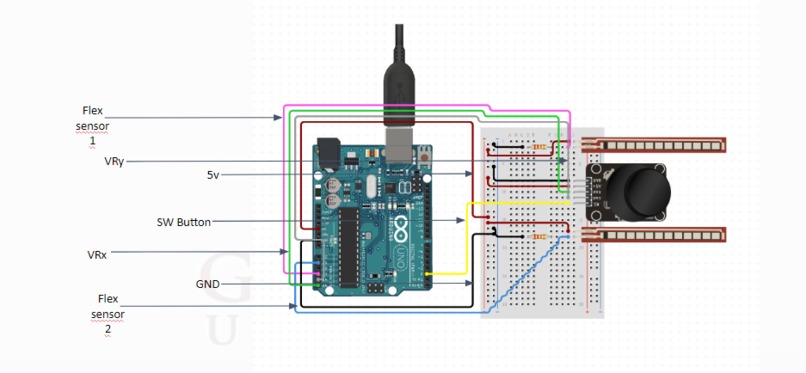
Circuit_Image

Inspiration
I always wanted to do things in my computer with just hand gestures, without needing to buy an expensive VR/AR setup or a body suit for that, why not make a simple project yourself.
What it does
In this project we aim at controlling the conventional mouse & keyboard inputs through gestures.
Want to copy and paste your text just by gestures, well you can !
Want to fire a gun in-game by squeezing your finger, you can !
You can emulate your whole keyboard and also your mouse by using sensors, you can even map key combinations for quick and easy access to shortcuts .
How we built it
We used embedded technology for the hardware of our controller, -Arduino Uno Development Board -Flex Sensors -Gyroscope -Joystick Module
For the software part, -C++ for the Arduino Code -Java for the interfacing of hardware with the operating system.
Challenges we ran into
The main challenge we ran into was finding a way to communicate the sensors reading via the Arduino to the operating system. We had to find a way to map the readings from the sensors to keystrokes(keyboard) and button clicks(mouse).
Since all this data was being transferred over the Serial ports (USB), we had to find a way of keeping the data consistent. E.g. The sensors reading and vary in size ( 3 characters or 4 characters), so we had to find a way to keep the data being transferred over the Serial port of a consistent size (15 bytes in our case) as the serial communication occurs in fixed buffer sizes. So we had to make a fixed format for our data string coming from the Arduino.
Accomplishments that we're proud of
We managed to keep the processing load off of the Arduino board, by making it only transfer a string of data over the serial port. Rest of the processing is done by the user's computer, this ensures that the latency is low as the Arduino isn't busy processing something that could easily be done by the computer.
Our first test was using our controller to play games on my computer, we tested it by using the controller to fire guns in game and using it to walk and control the in-game camera.
What we learned
We learned a lot of new things like, the basics of Serial Communication, this can help in interfacing modules over the serial port . We also learned how to reduce processing load on the development board.
What's next for Gesture Controlled Keyboard and Mouse Controls (IoT based)
The future roadmap for our project includes, 1.Short Term goals -replacing the joystick with gyroscope -smoothing the movement of the emulated mouse cursor
2.Long Term goals -making the project wireless using ESP32 or HC-05 module -making the prototype portable -making a glove housing for the sensors


Log in or sign up for Devpost to join the conversation.