-
-
Node type descriptions
-
Google AI integrations
-
Node types 1
-
Node types 2
-
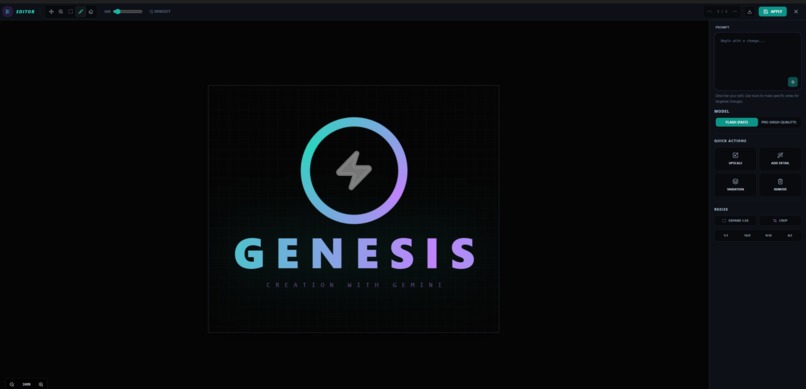
Editor Studio window
Inspiration
At the end of last year I was faced with a big budget problem as a creative generative AI power user -- zero income and too many AI subscriptions. I cancelled everything except those that had multiple uses and Google AI Pro made the cut. Nano Banana Pro and Veo 3.1 were the best generative tools I'd used, so no loss in quality there, but I had come to love node-based creative workflows in my other subscriptions and struggled with the chat-string creation process in Gemini (not to mention the watermarks) and didn't like jumping around from tab to tab and tool to tool.
What It Does
Visual creatives need visual solutions — Genesis is the answer to this need for the Google AI ecosystem. By taking the workflow out of the chat window and into a node graph, creators can build custom creative engines with Gemini’s best-in-class generative models under the hood, where no context is lost and the “big picture” is clearly visible. No longer buried in chat history or third-party subscriptions with incredibly high credit costs, Gemini within Genesis is BYOK (Bring Your Own Key) so you can create a little or a lot without worrying about losing track of assets, monthly caps or credit losses. Genesis also solves the consistency problem in other creative AI systems by maintaining specific style and identity states across the entire creative chain, while natively accessing popular grid-generation techniques without the need for complicated prompts. This drastically reduces the time from initial idea to production-ready asset for artists, filmmakers, game developers, and marketers.
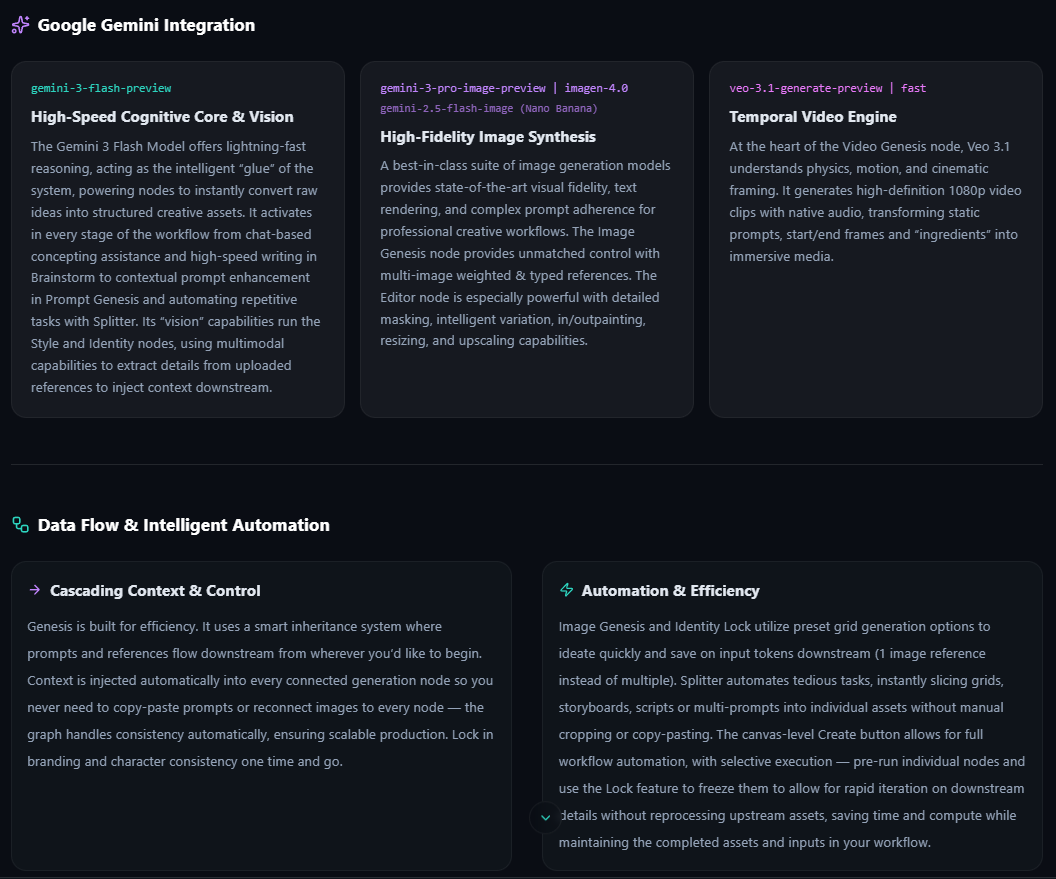
Google Gemini Integration
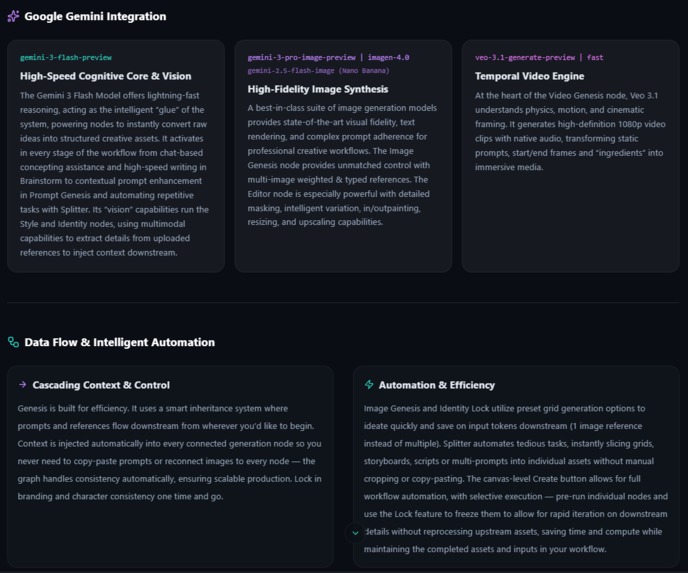
High-Speed Cognitive Core & Vision with Gemini 3: gemini-3-flash-preview The Gemini 3 Flash Model offers lightning-fast reasoning, acting as the intelligent “glue” of the system, powering nodes to instantly convert raw ideas into structured creative assets. It activates in every stage of the workflow from chat-based concepting assistance and high-speed writing in Brainstorm to contextual prompt enhancement in Prompt Genesis and automating repetitive tasks with Splitter. Its “vision” capabilities run the Style and Identity nodes, using multimodal capabilities to extract details from uploaded references to inject context downstream.
High-Fidelity Image Synthesis with Nano Banana + Pro & Imagen 4: gemini-3-pro-image-preview | gemini-2.5-flash-image | imagen-4.0-generate-001 A best-in-class suite of image generation models provides state-of-the-art visual fidelity, text rendering, and complex prompt adherence for professional creative workflows. The Image Genesis node provides unmatched control with multi-image weighted & typed references. The Editor node is especially powerful with detailed masking, intelligent variation, in/outpainting, resizing, and upscaling capabilities.
Temporal Video Engine: Veo 3.1: veo-3.1-generate-preview | veo-3.1-fast-generate-preview At the heart of the Video Genesis node, Veo 3.1 understands physics, motion, and cinematic framing. It generates high-definition 1080p video clips with native audio, transforming static prompts, start/end frames and “ingredients” into immersive media.
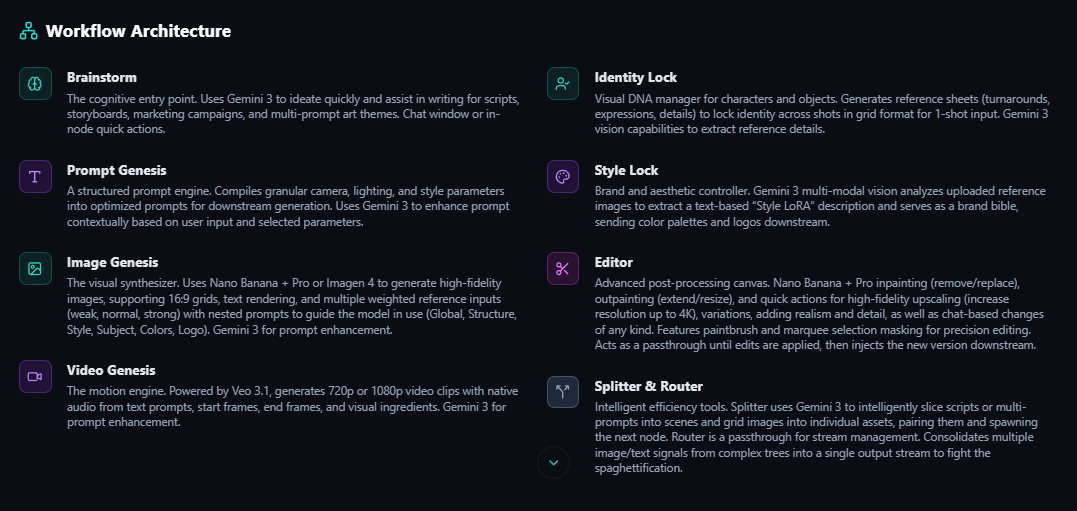
Node-Based Workflow Architecture
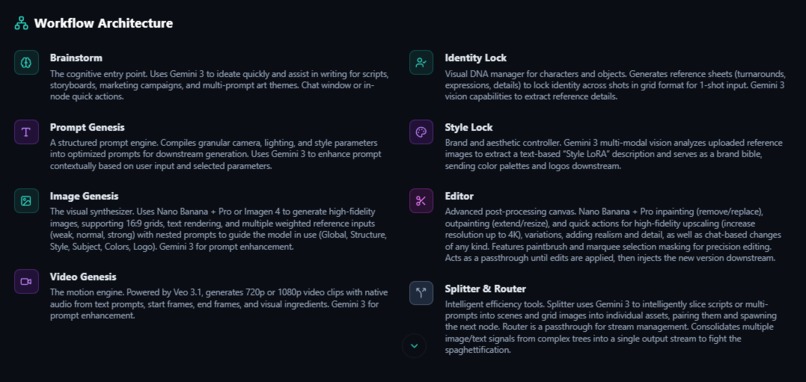
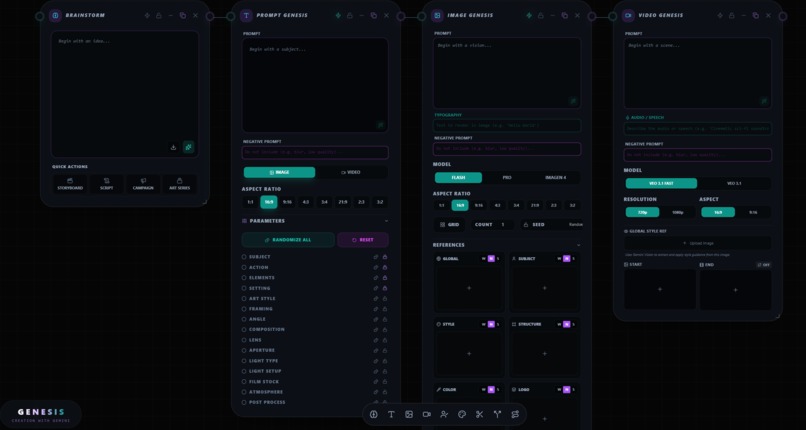
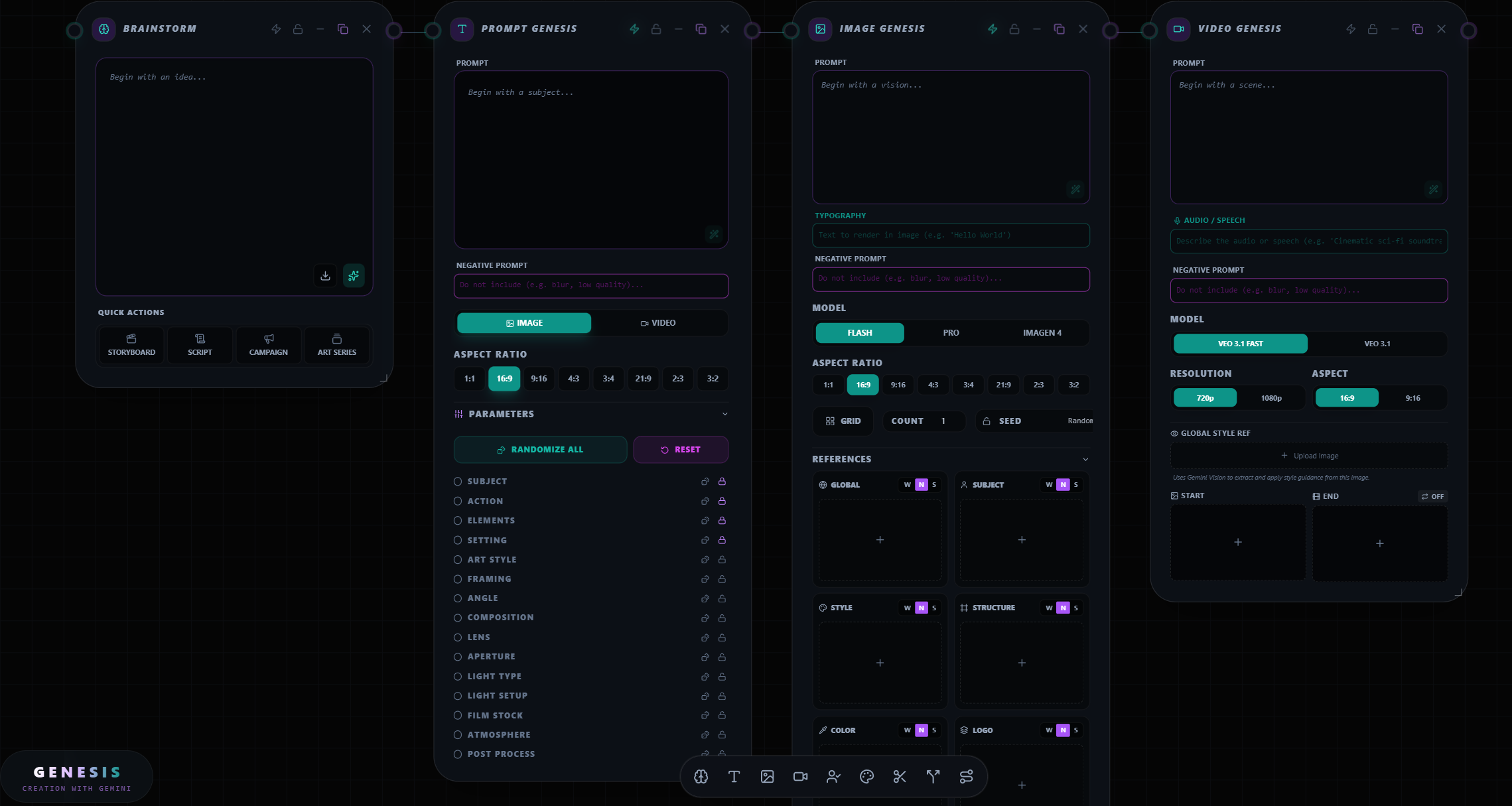
Brainstorm The cognitive entry point. Uses Gemini 3 to ideate quickly and assist in writing for scripts, storyboards, marketing campaigns, and multi-prompt art themes. Chat window or in-node quick actions.
Prompt Genesis A structured prompt engine. Compiles granular camera, lighting, and style parameters into optimized prompts for downstream generation. Uses Gemini 3 to enhance prompt contextually based on user input and selected parameters.
Image Genesis The visual synthesizer. Uses Nano Banana + Pro or Imagen 4 to generate high-fidelity images, supporting 16:9 grids, text rendering, and multiple weighted reference inputs (weak, normal, strong) with nested prompts to guide the model in use (Global, Structure, Style, Subject, Colors, Logo). Gemini 3 for prompt enhancement.
Video Genesis The motion engine. Powered by Veo 3.1, generates 720p or 1080p video clips with native audio from text prompts, start frames, end frames, and visual ingredients. Gemini 3 for prompt enhancement.
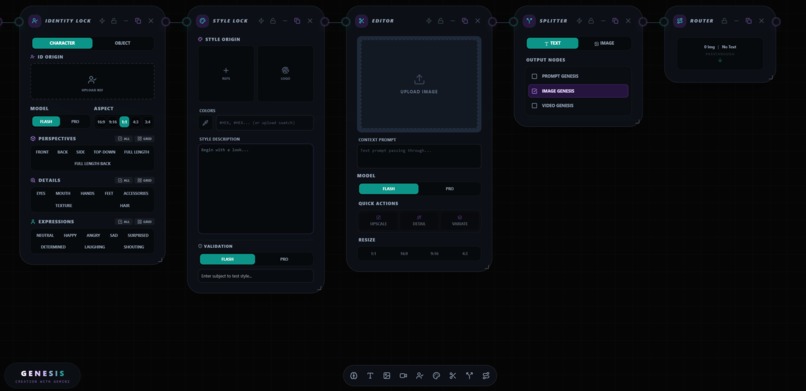
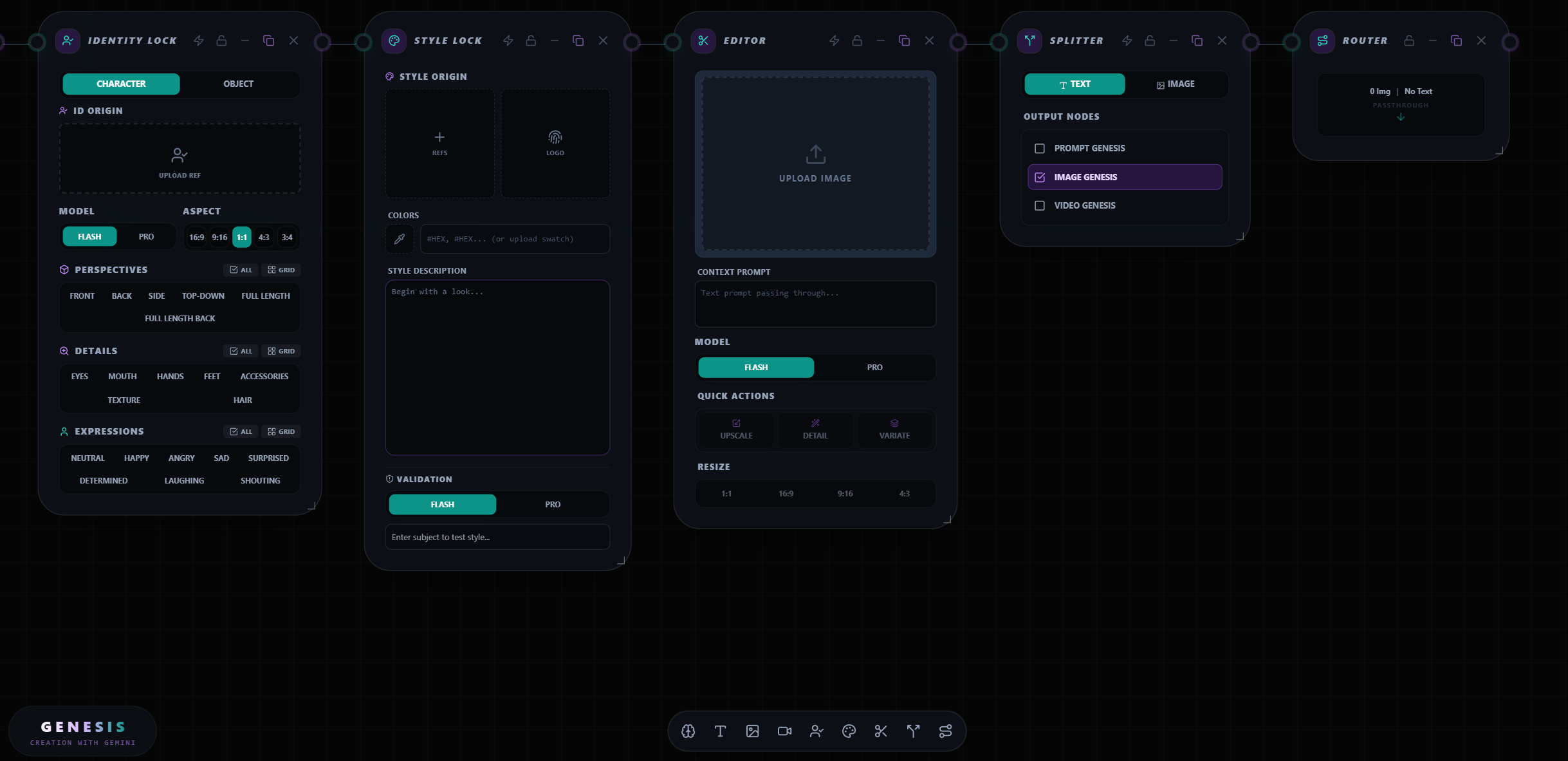
Identity Lock Visual DNA manager for characters and objects. Generates reference sheets (turnarounds, expressions, details) to lock identity across shots in grid format for 1-shot input. Gemini 3 vision capabilities to extract reference details.
Style Lock Brand and aesthetic controller. Gemini 3 multi-modal vision analyzes uploaded reference images to extract a text-based “Style LoRA” description and serves as a brand bible, sending color palettes and logos downstream.
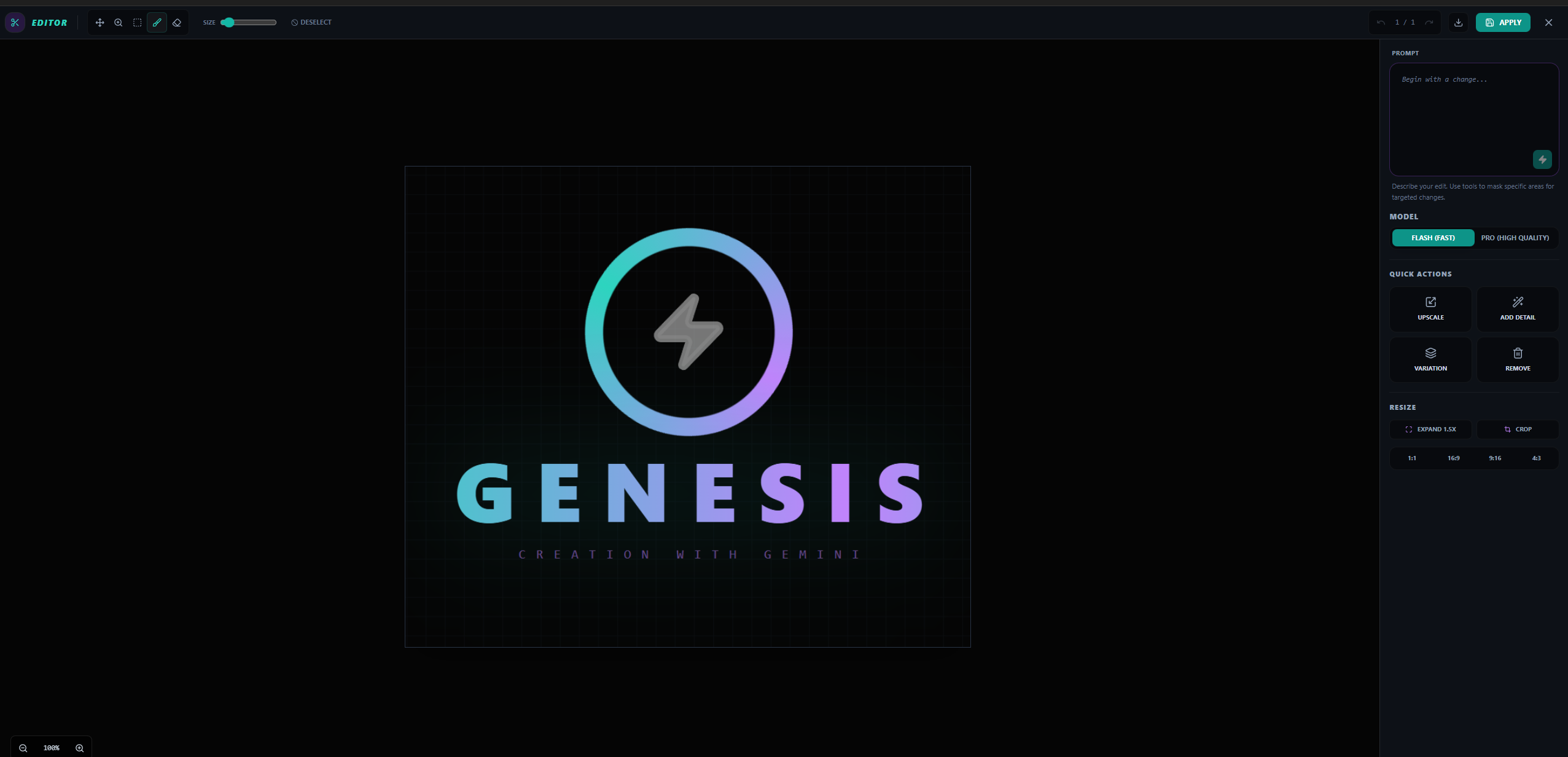
Editor Advanced post-processing canvas. Nano Banana + Pro inpainting (remove/replace), outpainting (extend/resize), and quick actions for high-fidelity upscaling (increase resolution up to 4K), variations, adding realism and detail, as well as chat-based changes of any kind. Features paintbrush and marquee selection masking for precision editing. Acts as a passthrough until edits are applied, then injects the new version downstream.
Splitter & Router Intelligent efficiency tools. Splitter uses Gemini 3 to intelligently slice scripts or multi-prompts into scenes and grid images into individual assets, pairing them and spawning the next node. Router is a passthrough for stream management. Consolidates multiple image/text signals from complex trees into a single output stream to fight the spaghettification.
Data Flow & Intelligent Automation
Cascading Context & Control Genesis is built for efficiency. It uses a smart inheritance system where prompts and references flow downstream from wherever you’d like to begin. Context is injected automatically into every connected generation node so you never need to copy-paste prompts or reconnect images to every node — the graph handles consistency automatically, ensuring scalable production. Lock in branding and character consistency one time and go.
Automation & Efficiency Image Genesis and Identity Lock utilize preset grid generation options to ideate quickly and save on input tokens downstream (1 image reference instead of multiple). Splitter automates tedious tasks, instantly slicing grids, storyboards, scripts or multi-prompts into individual assets without manual cropping or copy-pasting. The canvas-level Create button allows for full workflow automation, with selective execution — pre-run individual nodes and use the Lock feature to freeze them to allow for rapid iteration on downstream details without reprocessing upstream assets, saving time and compute while maintaining the completed assets and inputs in your workflow.
How I built it & Challenges I ran into
Having recently tried my first vibe-coding project (a low-fi music visualizer), I casually asked Gemini Pro (Canvas mode) if it could make a node-based tool for Gemini API, thinking surely it could not. I was wrong! As we began to build together, I quickly realized that the project was too ambitious for Canvas alone. It repeatedly erased changes we'd made and rewrote the app several times. I now know that it is meant more for rapid prototyping than software development. So, I took the Canvas code over the Google AI Studio. Things were better for a time and then I had the same problems. So, I took the Google AI Studio code to Vertex AI Studio. We were off to the races! ... But the cost was too high and some old problems were cropping up. I tried to work through some things in Visual Studio but realized my lack of coding experience was showing and things weren't working out. Fourth time's a charm! I took the code back into Google AI Studio, this time instructing it to read the code but completely overhaul the architecture to make it more efficient. This was the approach that was necessary and, after weeks of guidance and editing and testing, now we have Genesis!
Accomplishments that I'm proud of
Just making a program ... ANY program ... is an accomplishment I never thought I'd claim. But making THIS program ... it is impossible to express how proud I am of what I've made.
What I learned
The last month and a half was a crash course in AI-assisted coding, software architecture, and programmatic engineering, getting under the hood of creative technology. I went from a generative AI software power user to a generative AI software designer in 6 weeks. I had never used React, Tailwind, CSS, Visual Studio, Google AI Studio, Vertex AI Studio, or Gemini API / APK. I now have an understanding of architecture and UI design.
What's next for Genesis
So that others can fully use Genesis, I will set up a log-in system. This will enable users to input their own Google API key, save and share workflows for ease of collaboration and repeatability. I will be looking for some power users to stress test it to its limits and report bugs before releasing it to the public. I would also like to add an audio-generation node and video studio to arrange clips.
Built With
- css
- gemini-2.5-flash-image
- gemini-3-flash-preview
- gemini-3-pro-image-preview
- google-ai-studio
- html5
- imagen-4.0-generate-001
- lucide-react
- react
- react-19
- react-markdown
- tailwind
- typescript
- veo-3.1-fast-generate-preview
- veo-3.1-generate-preview
- veo3.1
- vertext-ai-studio
- window.aistudio


Log in or sign up for Devpost to join the conversation.