-
-
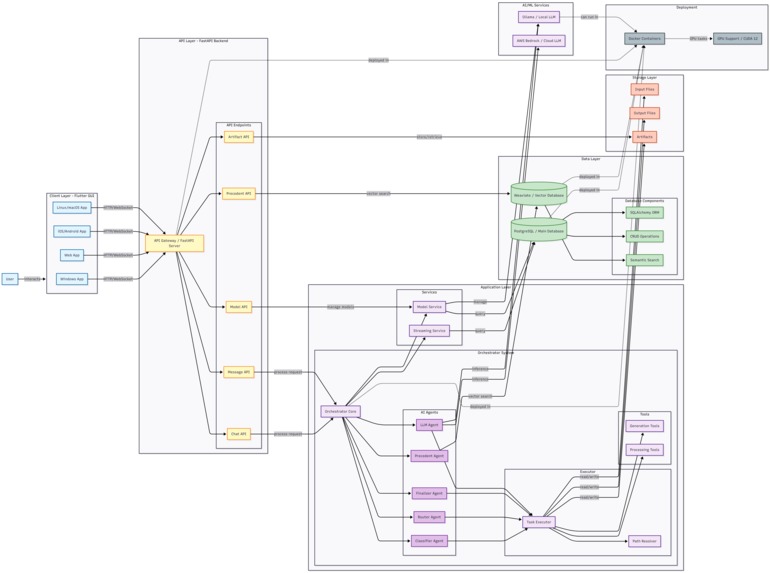
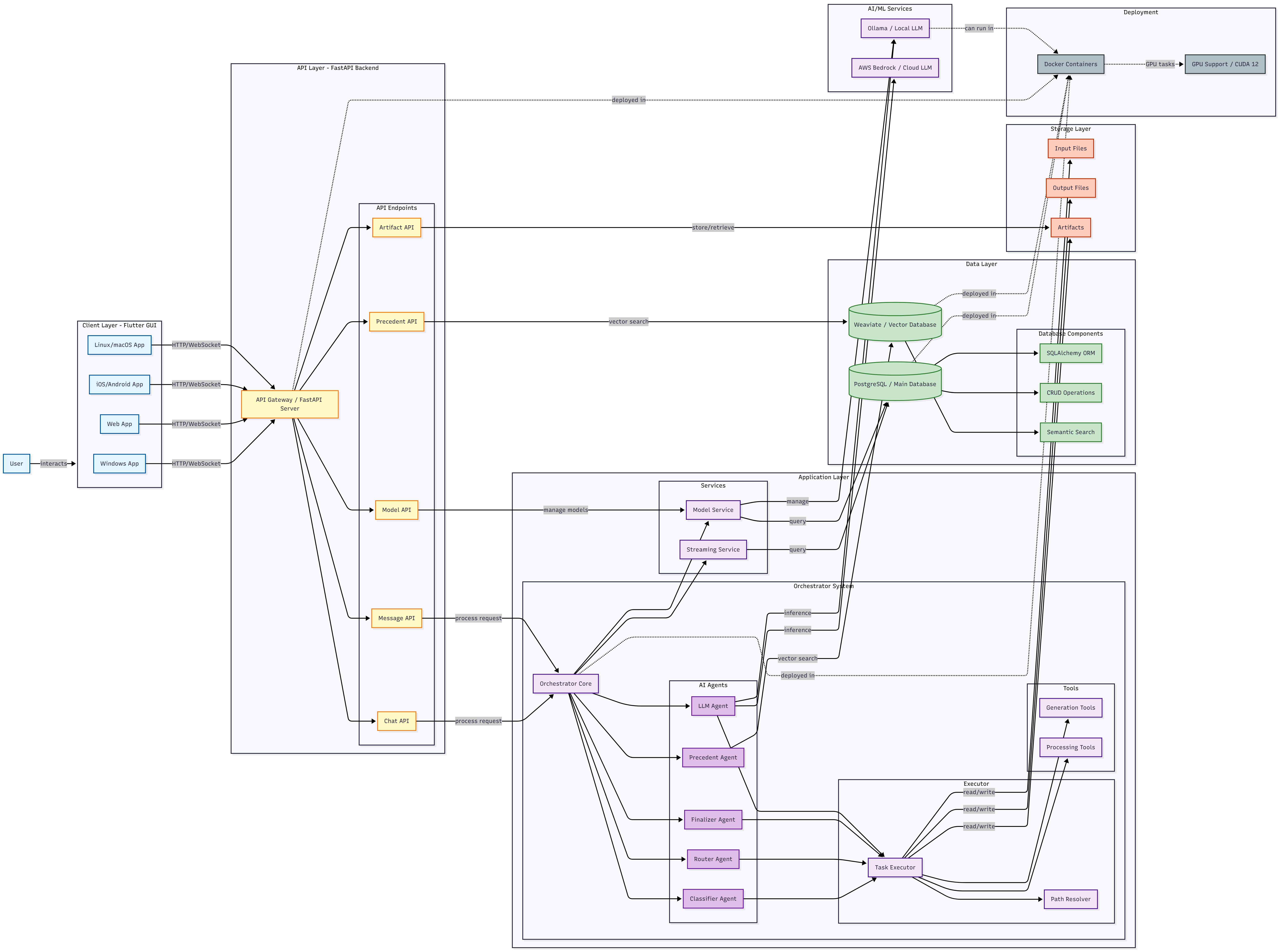
Architecture Diagram
What Inspired Us
The inspiration for Genesis came from realizing how fragmented and energy-intensive modern AI workflows have become. Every tool, model, and prompt often runs in isolation — repeating the same reasoning and consuming unnecessary computation. Using AI is inevitable for the mass majority now, we wanted to create something that could unify these processes into one intelligent, efficient system. Genesis was born from the belief that innovation and sustainability can coexist — that we can make AI not only smarter and faster, but also more energy-conscious for a better future.
What is Genesis
Genesis is an all-in-one, agentic chat workspace that plans and executes multi-step AI workflows (translate images, denoise audio, text to speech, etc.) through a token-efficient, energy-aware orchestration layer. Instead of forcing a single giant model to do everything, Genesis routes each task to the most suitable specialized OpenSource tool, reuses intermediate results, and avoids redundant reasoning—delivering faster results with fewer tokens and lower compute.
How We Built Genesis
Architecture Overview: Multi-Agent Orchestration with LangGraph
Genesis is built as a multi-agent orchestration system that dynamically routes user inputs through specialized agents using the LangGraph framework. The architecture is designed for flexibility, scalability, and efficient task execution across different AI tools.
graph TD
    User[User Input] --> Precedent[Precedent Agent]
    Precedent --> Classifier[Classifier Agent]
    Classifier --> PathGen[Path Generator]
    PathGen --> Router[Router Agent]
    Router --> Executor[Execution Engine]
    Executor --> Finalizer[Finalizer Agent]

    Precedent -.-> VectorDB[(Vector DB)]
    Finalizer -.-> VectorDB
    Executor -.-> Tools[OCR/Translate/Denoise/...]
Agent Roles
- Precedent Agent: Searches the vector database for similar past workflows to reuse previous reasoning and reduce redundant computation.
- Classifier: Analyzes input types (image, audio, PDF, etc.) and user objectives to determine the correct processing flow.
- Path Generator: Uses a depth-first search algorithm to discover all valid tool combinations and transformation paths.
- Router: Selects the optimal execution path based on precedents, context, and efficiency scoring.
- Executor: Executes tools in isolated processes with real-time progress streaming.
- Finalizer: Formats and stores successful workflows back into the vector database as new precedents.
Technology Stack Evolution
Phase 1 (Original):
- Frontend: Next.js + React + TypeScript
- Vector DB: TiDB Cloud (hosted)
- Streaming: Basic WebSocket implementation
Phase 2 (Current):
- Frontend: Flutter + Dart (cross-platform native apps)
- Vector DB: Weaviate (self-hosted Docker container)
- Streaming: Multi-provider normalization layer
Phase 3 (Ongoing):
- Enhanced real-time visualization with animated path propagation
- Execution panel showing live AI reasoning and tool outputs
- Resizable panels with persistent layout preferences
Efficiency Insight
By caching successful workflows and reusing reasoning paths, Genesis avoids redundant model invocations. This reduces token usage, speeds up response time, and minimizes overall energy consumption —
making the system both high-performing and environmentally efficient.
Challenges We Faced
1. Multi-Provider Format Chaos — Every Provider Had a Different Structure
Each LLM provider returned data in different formats. Some sent plain strings, others nested lists or complex JSON objects, and each stored reasoning content in a different location.
Key inconsistencies we had to resolve:
- Different content types (string vs list vs nested object)
- Reasoning fields located in various places (
additional_kwargs,content[].thought, etc.) - Conflicting metadata structures for usage, stop reasons, and model info
- Inconsistent streaming granularity (token-by-token, block-buffered, or part-by-part)
- Divergent structured-output formats (
function_call,tool_use, custom JSON) - Distinct error formats and response nesting
To solve this, we built a universal normalization layer — a translation pipeline that detects the provider automatically and converts all responses into a unified internal schema (content, reasoning, metadata).
This removed provider-specific parsing logic from more than fifteen frontend components, cut hundreds of redundant lines of code, and made adding a new provider a 50-line task instead of a major refactor.
2. Frontend–Backend API Contract Mismatches
Maintaining data consistency between our Python FastAPI backend and Flutter frontend became a serious pain point. Differences in serialization, type handling, and message structure caused silent deserialization failures and visual glitches.
Typical issues:
- Python
dictvs DartMap<String, dynamic>type mismatches - Nullable fields handled inconsistently between platforms
- Backend events shaped like
{"data": ..., "metadata": ...}while the frontend expected flat objects - Complex Pydantic models producing deeply nested JSON the UI couldn’t parse
- Time formatting differences (ISO 8601 strings vs Dart DateTime objects)
- WebSocket message types (
"messages","updates","on_chain_start") undocumented and inconsistent
To fix this, we established a strict API contract with:
- Shared type definitions and documented example payloads
- Backend serialization helpers that guarantee predictable JSON output
- Frontend deserialization helpers with explicit null-safety defaults
- Integration tests verifying the frontend can parse real backend responses without errors
This contract eliminated recurring breakages and made cross-language development predictable and maintainable.
3. Execution Workflow Isolation with Conflicting Dependencies
Different tools required incompatible Python dependencies — for example, OCR demanded GPU-accelerated Torch, while denoising relied on Librosa and SoundFile. Running them all in one environment caused version conflicts, crashes, and resource exhaustion.
We needed a way to isolate each tool while keeping data flowing smoothly between them (e.g., OCR → Translate → Inpaint).
Our solution:
- Implemented process-level isolation, where each tool runs in its own lightweight Python virtual environment
- Used file-based state management to pass intermediate results between tools safely (JSON metadata, NumPy arrays, images)
- Designed a standardized serialization protocol so outputs from one tool automatically become inputs for the next
- Optimized performance — faster than containerized pipelines and resilient to crashes
Benefits achieved:
- Dependency and environment isolation without Docker overhead
- Fault-tolerant execution — one tool crash no longer affects others
- Persistent, human-readable state for debugging and re-runs
- Stable performance and complete cross-tool compatibility
Built With
- amazon-web-services
- bedrock
- docker
- flutter
- postgresql
- python
- weaviate

Log in or sign up for Devpost to join the conversation.