-
-
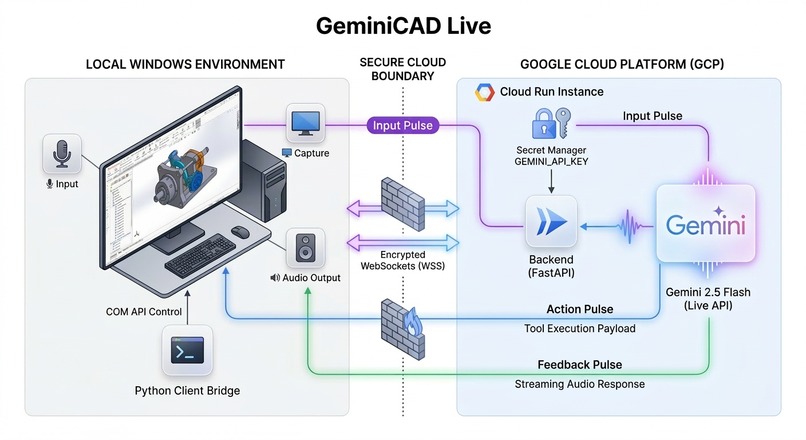
Architecture Diagram
-

Thumbnail

📽️ Project Overview
GeminiCAD Live is a hands-free, AI-powered mechanical engineering assistant designed to bridge the gap between natural language intent and complex CAD execution. Built for the Google Gemini Live Agent Challenge (UI Navigator Track), it allows designers to control 3DEXPERIENCE SOLIDWORKS through voice and visual context.
Instead of navigating deep ribbon menus or complex property managers, a user can simply say, "Extrude this sketch by 25mm," or "Draw a circle for a bolt hole on the top face," while Gemini follows along via a real-time screen stream.
⚙️ How It Works
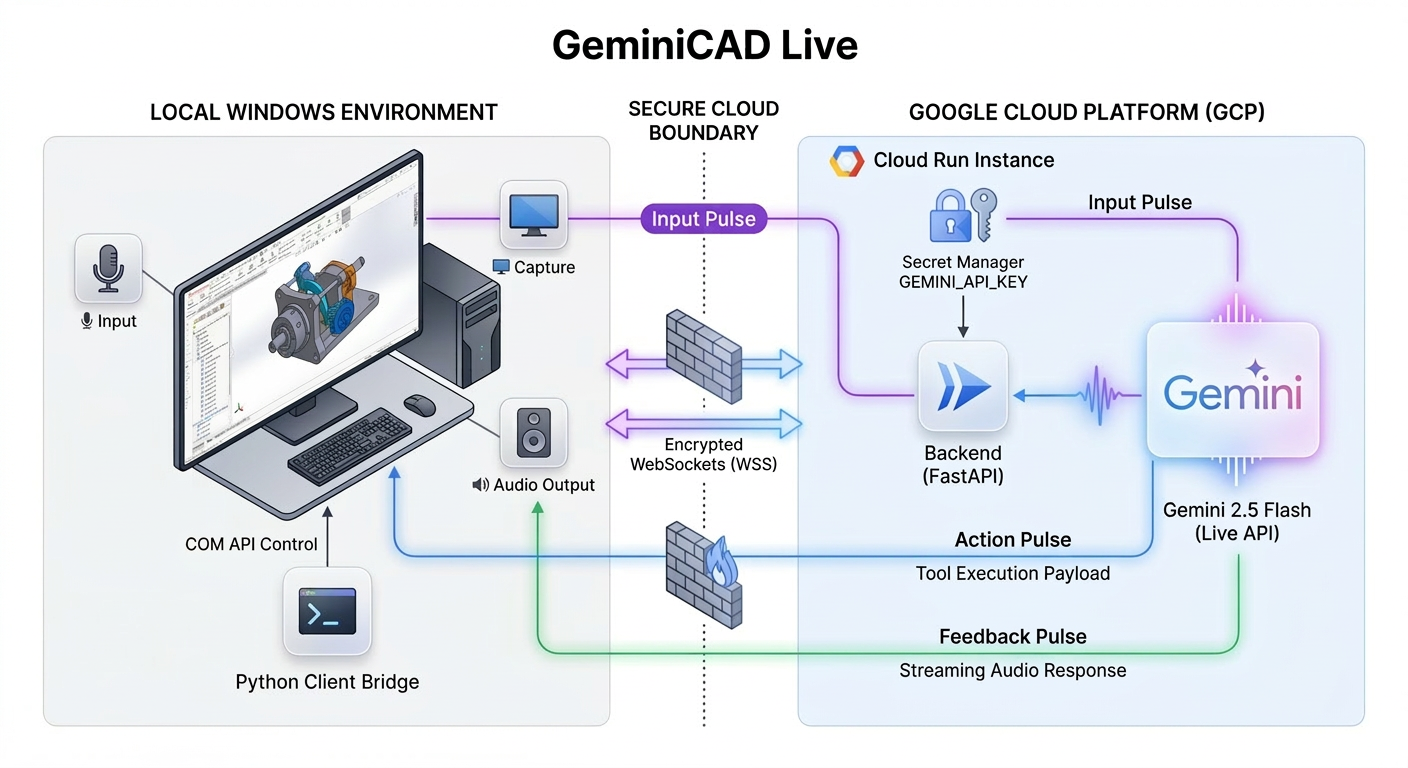
The system utilizes a split-architecture to satisfy both the low-latency requirements of the Gemini Live API and the local hardware constraints of SolidWorks.
1. The Cloud Hub (Google Cloud Run)
The "brain" of the agent is containerized and deployed to Google Cloud Run.
- It maintains a bidirectional WebSocket session with the Gemini 2.5 Flash model (
native-audiopreview). - It serves as an orchestration layer that processes streaming audio/video and decides when to trigger specific engineering tools.
- Security: Injected secrets via Google Secret Manager ensure the Gemini API key never touches the source code or build artifacts.
2. The Local Bridge (Windows Client)
Since SolidWorks runs natively on Windows, a lightweight Python client acts as the agent's "eyes" and "ears":
- Vision: Captures the SolidWorks window at ~1 FPS and streams frames to the backend.
- Audio: Handles full-duplex PCM audio (Microphone → Cloud → Gemini → Speaker) for natural, interruptible conversation.
- Actuation: When the backend agent triggers a tool (e.g.,
create_new_part), the client receives the command and executes it locally via the SolidWorks COM API.
🛠️ Leveraging the Agent Development Kit (ADK) Patterns
GeminiCAD Live follows the core architectural principles of the Google Agent Development Kit (ADK) for Python to create a robust, tool-capable agent.
- Tool Definition & Orchestration: We defined a specialized
SOLIDWORKS_TOOLSmanifestation. Each tool (likedraw_shapeorapply_feature) is registered with a precise JSON schema, allowing Gemini to pass structured arguments (e.g., radius, plane name, depth) derived from natural language. - System Instruction Design: The agent is configured with ADK-style modular system instructions that prioritize immediate action. This ensures the agent fires the "Actuator" tools first before narrating its actions, reducing system latency.
- Multimodal State Management: The ADK-inspired backend manages the synchronization between the user's intent (Audio), the software's state (Vision), and the agent's response (Tool Call). We implemented a "Turn Locking" mechanism to prevent audio feedback loops while a tool is physically executing on the local machine.
💡 Innovation & Accessibility
By moving the UI interaction to a voice/vision agent, GeminiCAD Live addresses two major pain points:
- Complexity: Software like SolidWorks has thousands of commands. GeminiCAD abstracts this behind natural engineering language.
- Accessibility: Engineers with motor impairments or those who find mouse-intensive work physically taxing can now drive a 3D design session using only their voice.
Technical Stack Summary
- Model: Gemini 2.5 Flash (Native Audio Preview)
- Backend: Python / FastAPI / Docker
- Cloud: Google Cloud Run / Artifact Registry / Secret Manager
- Local: Python / SolidWorks COM API / WebSockets
Challenges we ran into
Initially Gemini Live would voice everything it was about to do which made the CAD design process too lengthy. Adjusting the system prompt to tell the AI to call the tool first then to voice just the tool that was used made the system quick and responsive.
Accomplishments that I'm proud of
- How easy it is to use Google Antigravity to manage projects.
- Being able to utilize automated testing to quickly locate and fix bugs. link
- Using Gemini 3.1 to generate the instructions for Nano Banana 2 to generate an amazing Architecture Diagram.
- Using Gemini 3.1 to generate the instructions for Veo 3.1 to generate the intro video.
What I learned
Gemini 3.1 taught me how to setup Google Cloud Run.
What's next for GeminiCAD Live
- Expand Tool Integration: Integrating additional tool calls will allow the agent to orchestrate more advanced 3D models within SolidWorks.
- Enhance Visual Grounding: Implementing the feature to parse 2D object diagrams with dimensions and automatically translate them into 3D printable models would be an excellent way to further leverage Gemini's visual reasoning capabilities.
- Refine Error Handling: While the agent logic utilizes "Turn Locking" to manage latency and audio feedback, explicitly detailing how the Local Bridge gracefully handles SolidWorks COM API errors or hallucinations during tool actuation would further strengthen the technical architecture.
Built With
- antigravity
- clipchamp
- docker
- fastapi
- gemini
- python
- screenpal
- websockets


Log in or sign up for Devpost to join the conversation.