-
-
Example!

Inspiration
We were inspired by apps like Be My Eyes, which connect visually impaired users with volunteers for real-time visual assistance. While incredibly powerful, these solutions depend on human availability and internet reliability. With advances in multimodal AI, we asked: What if the assistant could be automated? That vision became KnightVision, a voice-activated AI that interprets your surroundings and speaks them back, helping users move safely and confidently in real-time.
What it does
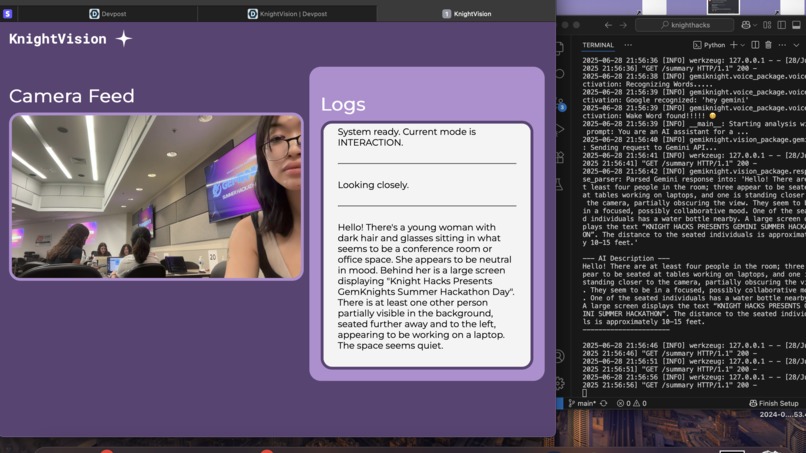
KnightVision is a real-time AI-powered vision assistant that:
- Captures live camera input.
- Analyzes visual scenes using Google Gemini Vision API.
- Responds to voice commands using predetermined speech commands.
- Displays the live video feed and summary history via a Flask-based web GUI.
- Speaks out intelligent scene summaries via TTS (text-to-speech).
- Switches between two smart modes:
- Interaction Mode – identifies and describes nearby people or objects.
- Pathfinding Mode – scans the environment for a navigable path.
- FreeForm Mode - lets you ask a question/query to Gemini about what it sees.
It’s designed to assist users with visual impairments, and allow them around-the-clock increased spatial awareness and autonomy.
How we built it
- Python for the entire backend pipeline.
- Flask to create a local GUI showing camera feed and AI-generated summaries.
- Google Gemini API for powerful image-to-text interpretation.
- Voice recognition module for wake-word detection and command parsing.
- Text-to-Speech (TTS) for hands-free audio feedback.
- Multithreading to run the GUI alongside real-time analysis and voice input.
- Custom logging and summarization system for web-based visualization.
Challenges we ran into
- Handling concurrent threading between Flask and the main application without crashing.
- Avoiding port conflicts during development on macOS (AirPlay was stealing port 5000).
- Integrating Gemini API image analysis efficiently with our camera module and ensuring that latency remained low.
- Handling integration between front-end and back-end processes
Accomplishments that we're proud of
- Seamlessly integrated voice activation, camera input, AI scene analysis, and text-to-speech into one real-time feedback loop.
- Built a working mode-switching system to adapt behavior based on user intent.
- Designed a clean, scrollable summary dashboard to replay recent AI observations.
- Implemented a modular, scalable architecture that can be extended with new prompts or sensors.
What we learned
- How to effectively use multimodal AI APIs like Gemini for visual reasoning.
- The importance of real-time performance tuning when combining I/O-heavy operations (like camera + voice + AI).
- Best practices in designing thread-safe Flask apps.
What's next for KnightVision?
If we were to continue further development into the project:
- Deploying on Raspberry Pi + camera module to create a fully mobile assistant.
- Enabling mobile compatibility by adapting the web app for iOS and Android, allowing deployment as a native app that leverages the phone’s built-in microphone and camera for real-time interaction and convenience.


Log in or sign up for Devpost to join the conversation.